
Greetings MoteMancers!
The Artifice Update is live, and this time your personal workshop is getting some much-needed attention.
The Alchemist's Journal is here, and the Blueprints system has gotten an overhaul - with functional previews, live rotation/mirroring, and a new paintable selection mode. Additionally the new Pinnables and Spell Wheel allow you to keep your recipes, plans, and favorite spells close at hand.
A lot of these features have been sitting on the player request pile for a long time. It feels good to finally put them in your hands.
Pacing has also gotten a significant pass. Elemental logistics are significantly cheaper, and a few choice Research tree tweaks now allow you to use your Elemental tools sooner.
MoteMancer already gives you plenty to think about while building a factory. Finding the right button shouldn't be one of the puzzles. Existing saves are fully compatible with Artifice, so keep tending your current world or start a new one to try the revised progression. Entirely up to you.
Let's talk shop!
The Alchemist's Journal
This feature has been brewing for more than a year. MoteMancer has a lot of unusual rules, and a tooltip can only do so much when you're trying to explain the nuances of modular Lava Generators.
The Journal gives those lessons a home you can return to. As you progress, you'll collect explanations of the systems you're working with, from the relationships between Motes, Salt, and Aether to power networks, research, and Entropy. Many of these lessons include working demonstrations using the same Structures you're placing in the world. You can watch the items move, see where the power comes from, and have a permanent reference for the wide variety of Elemental gameplay in MoteMancer.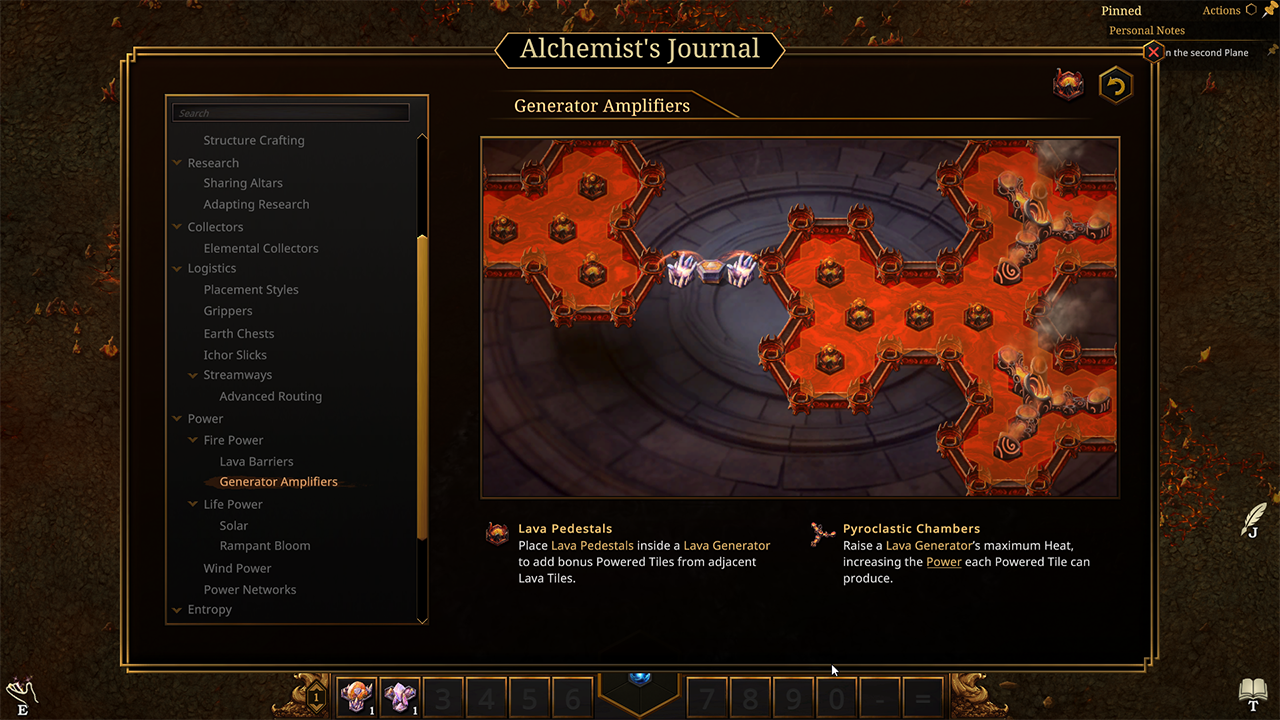
The Journal is searchable, has followable links between related lessons, and in-line hover tips for more information. My hope is that you can go back to your own factory with your own creative thoughts brewing.
There is also a Personal Notes section for your own discoveries, reminders, or whatever unique experiment you're planning next. Those notes stay with your account between worlds, so you can bring your own reference along wherever you go.
Blueprints Come to Life
One of the fun side effects of building the Journal was realizing that the same tools could animate fully functional Blueprints. The Blueprints menu can now show a working preview of your layout, with items moving through the design.
The preview captures inventories when the blueprint is made and re-creates them in the preview, so you can see how it moves without building the whole thing first. You can rotate and mirror it, and remove Structures and restore them while you tinker. You can also add Mana Flares to any existing Blueprint for chaining purposes and either save the result as a new variant or replace the existing entry.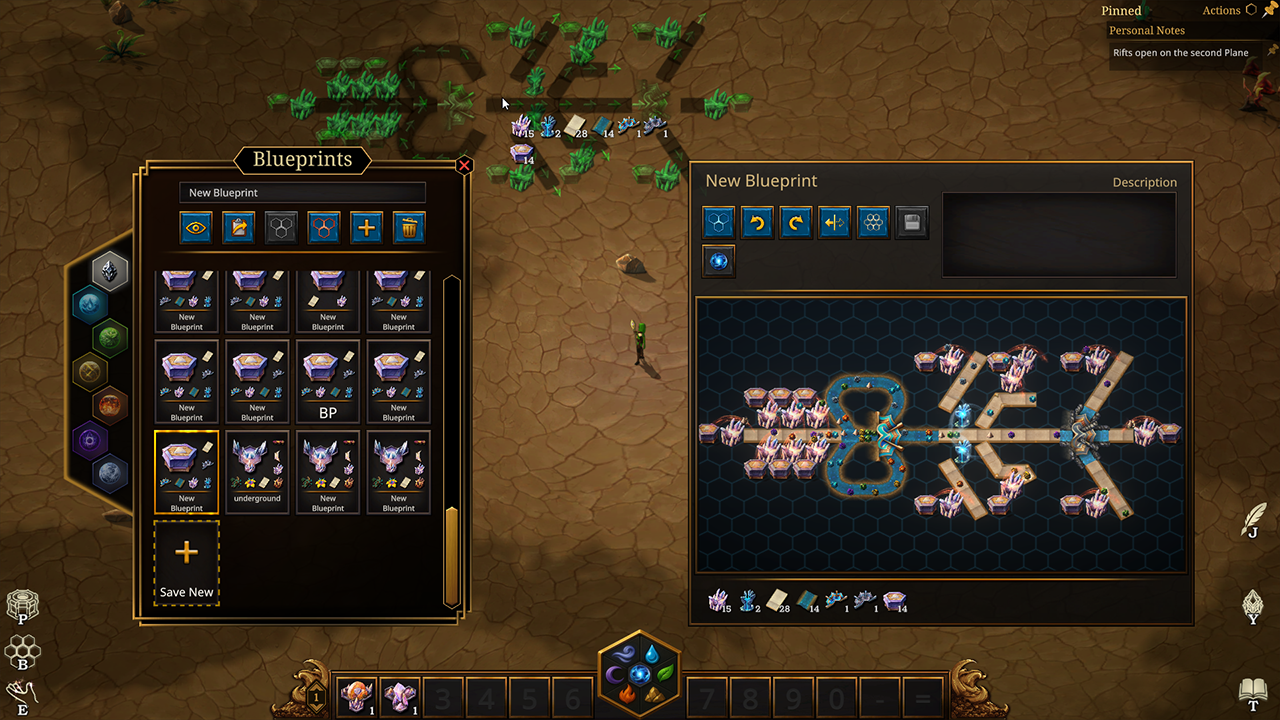
The rest of the menu has had a substantial pass too. Blueprints can have descriptions, your last-used blueprint can be recalled without hunting through the menu again, and saved designs can be assigned to your action bars. If you have a little collector setup you build everywhere, it can live right next to the individual Structures you use to make it.
And yes, sharing blueprints still invokes MoteMancer's unique runic language. Some things were already correct.
A Place for Your Plans
One of my very first playtesters asked for recipe pinning before MoteMancer even had art. There are a lot of ingredients to remember, especially when you're working towards research on another Plane or preparing a new production line. That request has finally escaped the nice-to-have pile.
Recipes, upcoming research, and Personal Notes can all be pinned to a movable panel on your HUD. Reorder them, collapse the parts you aren't using, and keep the current project in view while you work.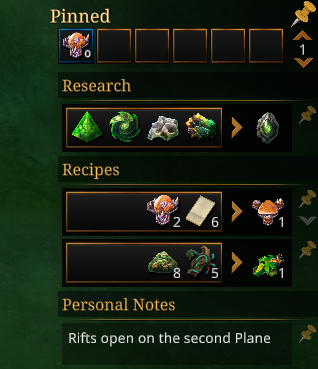
That same panel has room for 36 additional (bindable too!) action slots. These are particularly useful for things you always want on the same button, like Levitate or your favorite Streamway. Their hotkeys still work while the buttons are hidden, so you don't have to fill your screen to make use of them.
There is also a new seventh action bar, unlocked through research, that keeps a separate setup for each elemental Plane. Your Fire tools can be waiting when you arrive in Fire, without replacing the bars you already use everywhere else.
Spells, Shortcuts, and Search
There is a new Spell Wheel! Bound to Tab by default. The existing spell menu has a lot of useful information, but quickly swapping spells could get a little clunky. So why not have both?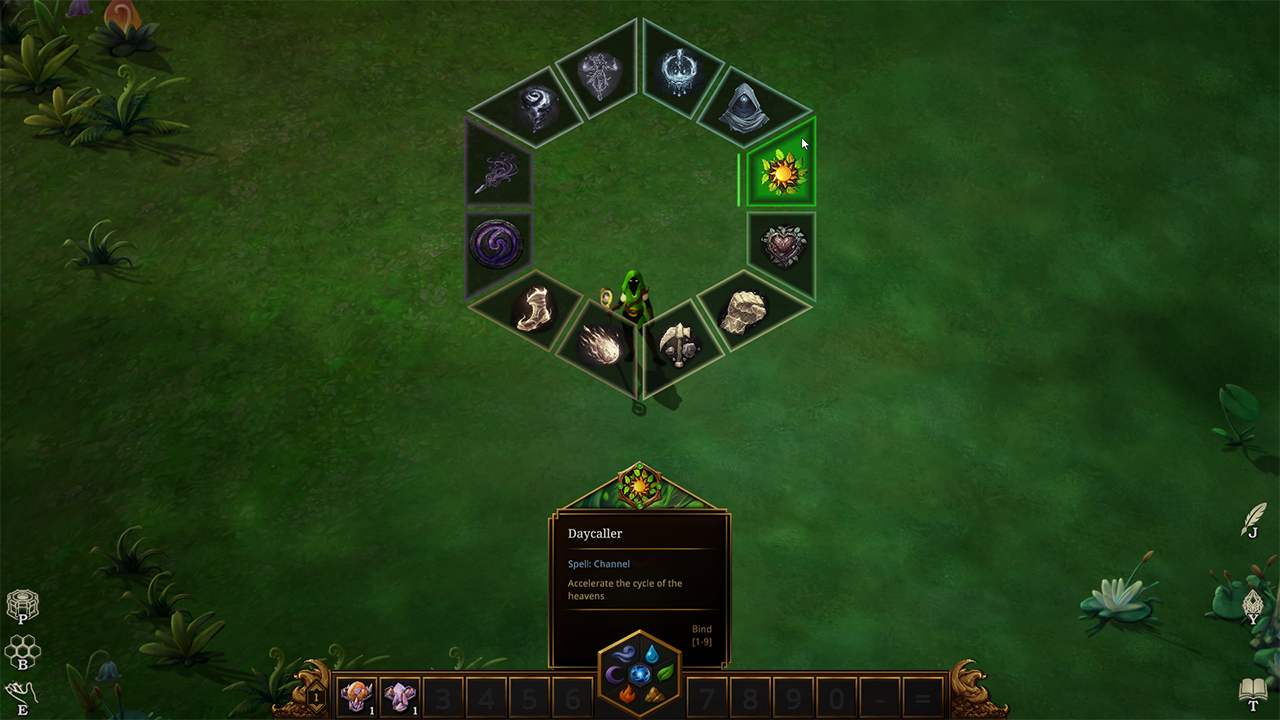
And for everyone who has asked for more flexible keybindings: you can now bind Ctrl, Shift, or Alt combinations, including combinations with side mouse buttons. Set things up the way your hands expect.
Search functionality has also been added to crafting, research, and the Journal. Additionally Research nodes now show the prerequisites between you and the thing you're aiming for more clearly.
Going With the Flow
Streamways have received a significant update both in the world and in their controls. The ordinary, Torrential, and Verdant families have completed intersection art, including their banks, underground covers, and transitions. I'm very happy with how these are looking in a busy base.
More importantly, Deltas now let you choose which lanes are allowed through each connection. You can split the two lanes into different routes, with a live flow preview in the window to help show what you've asked for. Two lanes are a lot more interesting when you can deliberately send them to different places.
Underground exits and Delta outputs can also be rotated now! Opening up some new shapes for your logistics puzzles.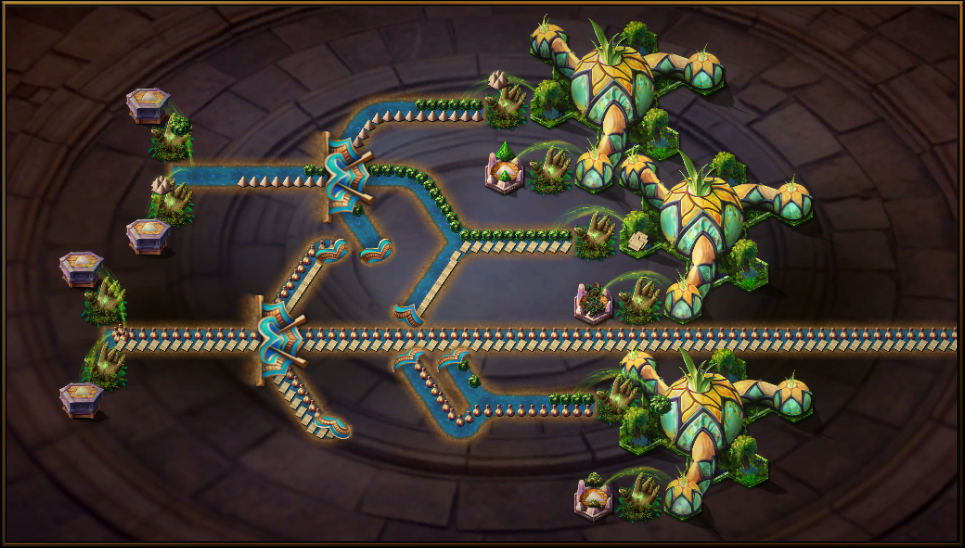
For laying out the routes themselves, Point-to-Point building joins Locked and Freeform placement. Click a starting point, preview the line to your next point, and click to build it. Keep clicking to extend the route. It uses automatic underground crossings where they fit, and leaves blueprints for pieces you can't reach or don't yet have the materials for.
This works for paths, Mana Roots, and Ichor Slicks as well as the usual transport lines. Long routes are much nicer to put down this way, and watching them zip into place is pretty satisfying. One other quality of life upgrade - holding Shift will allow you to replace an entire chain at once, so upgrading in place is nice and clean.
Earlier Elemental Access
Elemental logistics had been priced like a true second tier of upgrades. That made sense on paper, but it also meant that after unlocking something interesting, you could spend quite a while deciding whether it was worth the extra cost to actually use it.
I'd rather you play with your toys.
The costs of elemental logistics have been significantly reduced, and researches like Delve have moved much earlier to give Earth Chests and Grippers a stronger role while you're still establishing your factory. The elements have different ways of solving the same problems. I want you to get to those differences sooner.
Elemental Mastery now also doubles the crafting speed of Elemental Binders working on the mastered element, and Collector Array upgrades properly use their additional outputs. Those extra outputs give you more to build around than simply making the same line run faster.
Power windows have gotten a significant tooltip pass that helps better explain the mechanics of your elemental setups. Bonuses and contributions are shown more clearly, making it easier to see what your network is actually doing. Fire power has had some attention as well. Volcanic Chain now increases a Lava Generator's output based on the Heat in the other burning Generators on its network, so it's worth checking your existing Fire setups.
Victory!
Completing the Great Portal now gives your world a proper send-off, with a victory screen and run-wide statistics. The trusty book in the Library serves as a record keeper of your previous runs, so you can revisit them, compare your factories, or share the results with friends.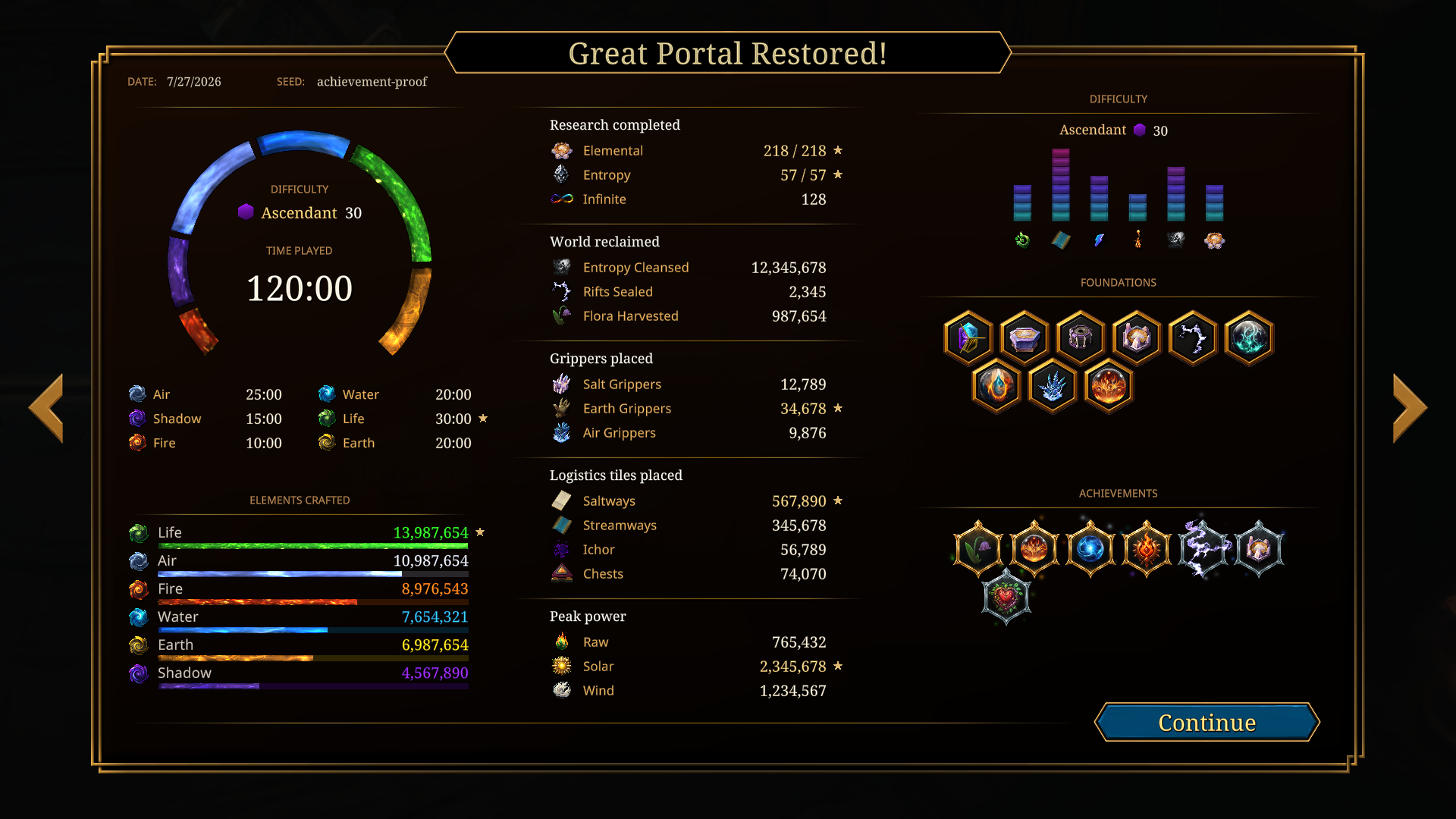
If an old run isn't already in your book, you can load an autosave from before completing the Great Portal and finish it again to add a record to the catalogue.
State of the Game and the Future
With the UI getting this much attention, in-world art is now the final major leg of the journey. Some Structures have already picked up new effects, and I'll be continuing through animations, FX, sound, and the little details that make a factory enjoyable to watch while it works. Controller support is still planned for full release as well.
Many of the longstanding player requests are now in the game, and performance is in a much better place than it was a few months ago. There is still time to squeeze out more frames and hear what you'd like to see improved. F1 reports and our Discord conversations continue to be a huge part of how these updates take shape.
Thank you to everyone who has been testing on Experimental, sending reports, and explaining the little things that get in the way. Quite a few of them turned into entire features this time.
Enjoy your new workshop. Back to the Lab!
~CyanAvatar 🌿
MoteMancer is 20% off for the Artifice Update and through Steam's Autumn Sale. If you've been waiting to try your hand at alchemical automation, come join us!
View game page
Reviews, Questions, and Other Musings
If you've been enjoying MoteMancer, leaving a Steam review is a great way to help more players find it. If you're stuck on something or have a creation to share, come visit our Discord. The MoteMancer Wiki is also there for those of you who like to get into the details.
Artifice Update Full Patch Notes
There have been a lot of changes since Attunement. Here are the new tools and the more significant adjustments, with a short catch-up on improvements from the smaller patches below.
Journal and Workspace
- New Feature: Alchemist's Journal
- Lessons, diagrams, and working demonstrations unlock as you progress.
- Search for a topic or follow links between related lessons.
- Personal Notes let you write and organize your own pages, undo edits, and pin reminders to your HUD. Your notes stay with your account between worlds.
- New Feature: Pinnables
- Recipes, upcoming research, and notes can be pinned to a movable, collapsible HUD panel.
- Recipes can be pinned directly from production windows.
- 36 optional action slots keep their hotkeys available even while hidden.
- World Structure tooltips can optionally be anchored beside the panel.
- New Feature: Spell Wheel - Select spells with a mouse gesture, using Tab by default.
- New Feature: Planar Action Bar A research-gated action bar that remembers a separate setup for each Plane.
- Flexible Keybindings
- Both binding slots now support Ctrl, Shift, or Alt combinations, including side mouse buttons. Each combination uses one modifier.
- The Controls menu points out shared bindings without requiring you to change them.
- Search and Research
- Crafting, research, and Journal search share a shortcut.
- Research hovers highlight remaining prerequisite paths. You can also reveal the full Research Tree independently of skipping tutorials.
- Fun Extra Menu Options
- Your HUD can show a local-time clock.
- Nighttime darkness can be adjusted.
- Players can be pushed by Saltways and Streamways.
Blueprints and Construction
- Blueprints
- Blueprints can show live previews with captured demonstration supplies and moving items.
- Remove and restore Structures in the preview, add Mana Flares, and save a variant or replace the original layout.
- Saved Blueprints can have descriptions and action-bar assignments. You can recall your last-used blueprint without reopening the menu.
- Capture, save, and replace controls are clearer. Compact runic exports preserve settings and preview information, and existing blueprint formats remain readable.
- Blueprint Painting gives you another way to select your layout, and ghost placement orientation is more consistent.
- New Feature: Point-to-Point Building
- Lay out supported logistics and paths between chosen points, with automatic underground crossings where they fit.
- Pieces you can't reach or don't have materials for remain as blueprints.
- Streamways
- Deltas can control lanes per connection, with animated previews and tooltips.
- Underground Streamway exits and Delta/Tributary outputs can turn. Double-wide underground exits correctly block an obstructed inside lane.
- Streamway, Torrential, and Verdant families have updated artwork, underground covers, and transitions.
- Horizontal mirroring now also works with supported held Structures and placed logistics.
- Earth Grippers can limit items per grab or pause new pickups.
- Mana Root chains can be upgraded to Verdant Streams along their existing flow.
- Wind Power Structures now smartly build at max distances while click-holding.
- Placement previews highlight matching Gripper and Collector endpoints and connected neighbors more clearly.
Research, Tuning, and Power
- Earlier Elemental Access
- Elemental logistics cost significantly less
- Delve now Tier 2 from Tier 3
- Elemental Mastery now also doubles Elemental Binder crafting speed for the matching element.
- Power Networks
- Volcanic Chain grants each burning Lava Generator 1% additional output per 10 total Heat in the other burning Lava Generators on the same network. Its own Heat does not contribute to this bonus.
- Lava Generator statistics explain their bonuses more clearly. Air and Life power windows explain network generation and local contributions, while Mana Pool statistics show connected storage capacity and power flow.
- Hovering a powered Structure highlights its local suppliers. All power networks can be shown from the power window or a rebindable hotkey.
- New Lava Generators require at least four Barriers to close a valid pool.
- Clean Hands Rework
- Normal handcrafting remains disabled, but each eligible Production Structure recipe can be handcrafted once for free on each elemental Plane after it is researched.
- The craft still takes time, and these allowances are saved with your world.
- Research Updates
- Swift Flare - doubles Mana Flare casting speed.
- Maelstrom - allows Reliquaries to destroy stored and incoming items.
- Breaking Ground - doubles Simple Collector gathering speed to allow new plane bootstrapping.
- Beacons - allows Pedestals to be used as map markers
- Collector families have their own Pulse speed upgrades.
- Collector Array research now makes use of each collector output.
- Void Towers now transfer Power between Planes.
- Rampant Bloom now grows Mana Roots beneath adjacent powered Structures instead of Production Structures alone.
- Radiant Roots extends Primordial Manawell Power range.
- Planar Reliquaries supply handcrafting and support contextual quick transfers.
- Great Portal progress and active Rift counts are easier to check from the research interfaces.
- Downpour Bastions and Incineration Spires can disable Inundate and Scour individually.
Worlds, Inventories, and Presentation
- New Feature: Victory Screen and Run History
- Completing the Great Portal brings up a victory screen with run-wide statistics.
- The Library book keeps a record of your previous runs.
- The default autosave interval is now six minutes.
- Production tooltips show the last crafted output and adjusted cycle time; inventory tooltips include more transport-rate and crafting-station information.
- Light now correctly cuts through cloud shadows.
- World effects, interaction sounds, footsteps, lighting, and animated UI feedback have received further work.
- Localization corrections continue across supported languages.
In Case You Missed the Smaller Updates
- Streamways and Saltways will smartly place undergrounds as you cross structures.
- Maps now display pedestal markers, Rifts, blueprints, and Reliquaries.
- Umbral Waygate stars can have custom colors.
- Existing saves can be opened as separate sandbox branches without changing the original save.
- In-game windows can be dragged.
- Music selection can be limited to the current Plane, adjacent Planes, or all Planes.
- Clicking the end of a Streamway or Saltway will automatically Pipette.
- Plus a slew of performance and bug fixes thanks to all of your in-game reports!
Full Recipe Change List
Water
- Streamway: 3 Elemental Water, 1 Saltway → 1 Elemental Water, 1 Saltway
- Underground Stream: 3 Streamway, 3 Underground Saltway → 6 Streamway, 1 Underground Saltway
- Streamway Delta: 3 Streamway, 3 Saltway → 6 Streamway, 3 Saltway
- Stream Weaver: 12 Elemental Water, 1 Tinker's Table → 6 Elemental Water, 1 Tinker's Table
- Tidal Collector: 6 Sand, 1 Simple Collector → 3 Sand, 1 Simple Collector
- Wave Wright: 6 Elemental Water, 9 Sand, 1 Stream Weaver → 6 Elemental Water, 3 Sand, 1 Stream Weaver
- Downpour Bastion: 30 Sand, 3 Streamway → 15 Sand, 15 Streamway
Life
- Greenhouse: 13 Elemental Life, 1 Tinker's Table → 5 Elemental Life, 1 Tinker's Table
- Verdant Collector: 5 Leaves, 1 Simple Collector → 3 Leaves, 1 Simple Collector
- Arboretum: 5 Elemental Life, 8 Leaves, 1 Greenhouse → 5 Elemental Life, 3 Leaves, 1 Greenhouse
- Rootbound Gripper: 3 Bismuth, 3 Mana Root, 3 Simple Gripper → 2 Bismuth, 2 Mana Root, 2 Simple Gripper
- Mana Bloom: 5 Elemental Life, 8 Mana Root → 5 Elemental Life, 3 Mana Root
Earth
- Stonecutter: 12 Elemental Earth, 1 Tinker's Table → 8 Elemental Earth, 1 Tinker's Table
- Vault: 4 Elemental Earth, 8 Granite, 1 Stonecutter → 4 Elemental Earth, 2 Granite, 1 Stonecutter
- Reaching Gripper: 2 Elemental Earth, 2 Simple Gripper → 2 Elemental Earth, 1 Simple Gripper
- Titan Gripper: 8 Granite, 4 Reaching Gripper → 4 Granite, 2 Reaching Gripper
- Heavy Chest: 4 Elemental Earth, 2 Simple Chest → 1 Granite, 1 Simple Chest
- Wide Chest: 2 Granite, 2 Simple Chest → 2 Elemental Earth, 1 Simple Chest
- Titanic Chest: 8 Granite, 2 Heavy Chest → 4 Granite, 2 Heavy Chest
- Expansive Chest: 8 Granite, 2 Wide Chest → 4 Granite, 2 Wide Chest
Fire
- Fire Wire: 3 Elemental Fire, 10 Aether → 1 Elemental Fire, 6 Aether
- Molten Anvil: 15 Elemental Fire, 1 Tinker's Table → 6 Elemental Fire, 1 Tinker's Table
- Ember Collector: 6 Ingot, 1 Simple Collector → 3 Ingot, 1 Simple Collector
- Cinder Forge: 10 Elemental Fire, 6 Ingot, 1 Molten Anvil → 6 Elemental Fire, 3 Ingot, 1 Molten Anvil
- Incineration Spire: 21 Ingot, 3 Fire Wire → 15 Ingot, 6 Fire Wire
Shadow
- Ichor Slick: 3 Elemental Shadow, 2 Saltway → 1 Elemental Shadow, 1 Saltway
- Tar Cauldron: 13 Elemental Shadow, 1 Tinker's Table → 7 Elemental Shadow, 1 Tinker's Table
- Shade Collector: 5 Mycelium, 1 Simple Collector → 3 Mycelium, 1 Simple Collector
- Darkgrove: 11 Elemental Shadow, 7 Mycelium, 1 Tar Cauldron → 7 Elemental Shadow, 3 Mycelium, 1 Tar Cauldron
Air
- Zephyrmill: 11 Elemental Air, 1 Tinker's Table → 7 Elemental Air, 1 Tinker's Table
- Gust Funnel: 3 Aerosyl, 3 Aether → 1 Aerosyl, 3 Aether
- Nimbus Sanctum: 3 Elemental Air, 11 Aerosyl, 1 Zephyrmill → 7 Elemental Air, 3 Aerosyl, 1 Zephyrmill
Synergy
- Magma Gripper: 3 Brimstone, 3 Simple Gripper, 1 Lava Barrier → 2 Brimstone, 2 Simple Gripper, 1 Lava Barrier
- Enchanted Gripper: 3 Quartz, 4 Whirling Gripper, 3 Streamway → 3 Quartz, 3 Whirling Gripper, 3 Streamway
- Enchanted Delta: 3 Quartz, 3 Gust Funnel, 3 Streamway Delta → 3 Quartz, 3 Gust Funnel, 1 Streamway Delta
- Verdant Stream: 3 Coralite, 3 Streamway, 3 Mana Root → 3 Coralite, 1 Streamway, 3 Mana Root
- Verdant Delta: 3 Coralite, 3 Streamway Delta, 3 Mana Root → 3 Coralite, 1 Streamway Delta, 5 Mana Root
- Primordial Manawell: 6 Coralite, 3 Mana Pool, 3 Mana Leaf → 3 Coralite, 3 Mana Pool, 3 Mana Leaf
- Void Tower: 3 Obsidian, 6 Thermal Tower, 5 Void Chest → 3 Obsidian, 3 Thermal Tower, 5 Void Chest
- Cloudspring Fountain: 3 Quartz, 7 Wind Turbine, 3 Downpour Bastion → 3 Quartz, 3 Wind Turbine, 3 Downpour Bastion
Happy Mancing!