
Hey everyone!
Some of you reported the drone spinning out of control when using Steam Deck joysticks or an external gamepad. Thank you for flagging this - your feedback helps us make the game better for everyone.
This is a quick fix. The default rate settings can be too sensitive for certain controllers. Here's how to sort it out!
How to fix it
Step 1: Open the rate settings by pressing G on your keyboard.
Steam Deck users without a keyboard:
Bind the right bumper (or any button you like) to keyboard G, or
Press Steam + X to bring up the Steam on-screen keyboard and hit G from there
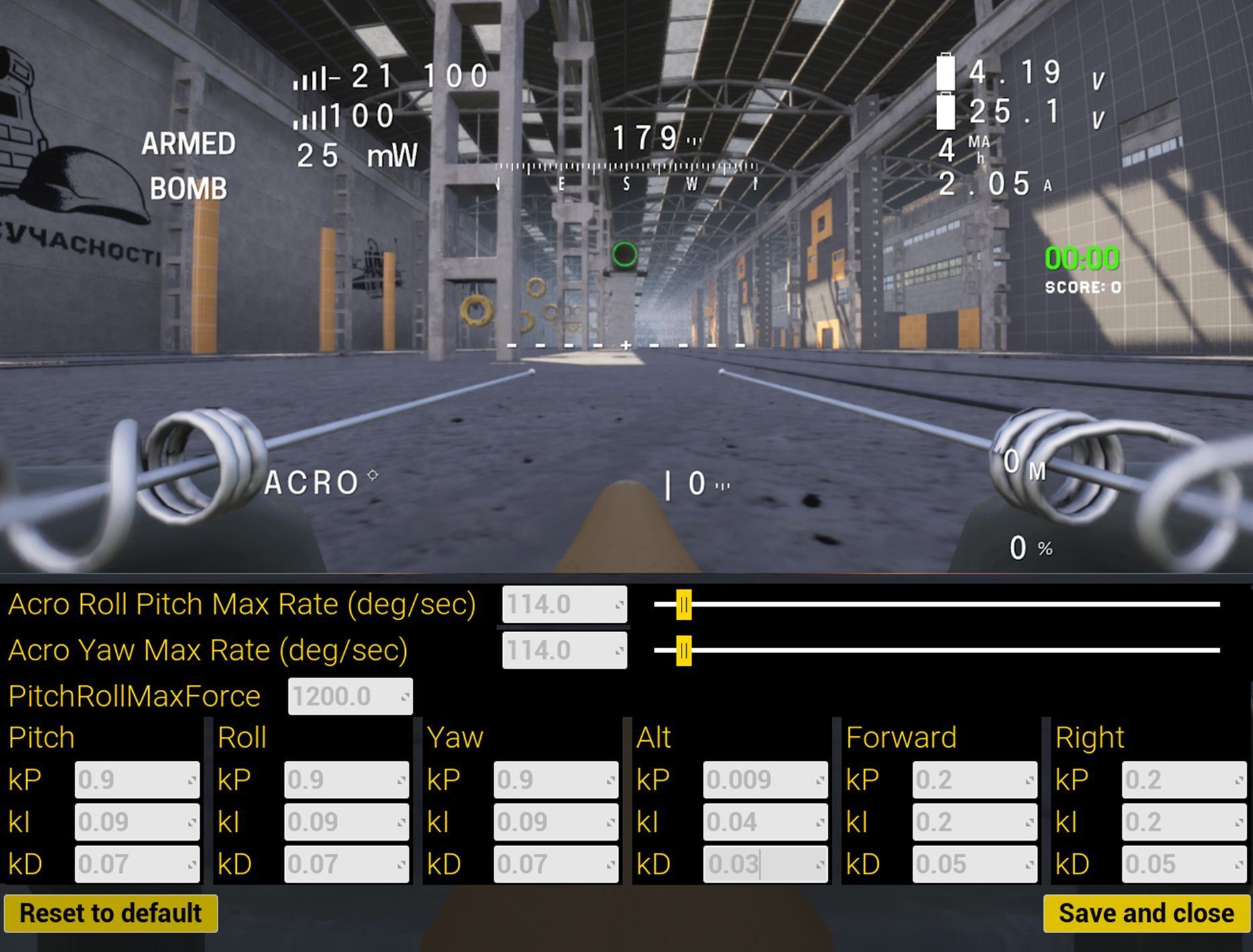
Step 2: Adjust these values:
Acro Roll Pitch Max Rate (deg/sec): 114.0
Acro Yaw Max Rate (deg/sec): 114.0
Alt: kP 0.009, kI 0.04, kD 0.03
Your drone should handle smoothly after this.
Still having issues after making these changes? Drop a comment below and we'll help you troubleshoot. We're always listening and working to improve the experience across all input methods.
Happy flying! ✈️