Source: Steam Community (opens in a new tab)
Board Editor, Rematches & Gameplay Improvements
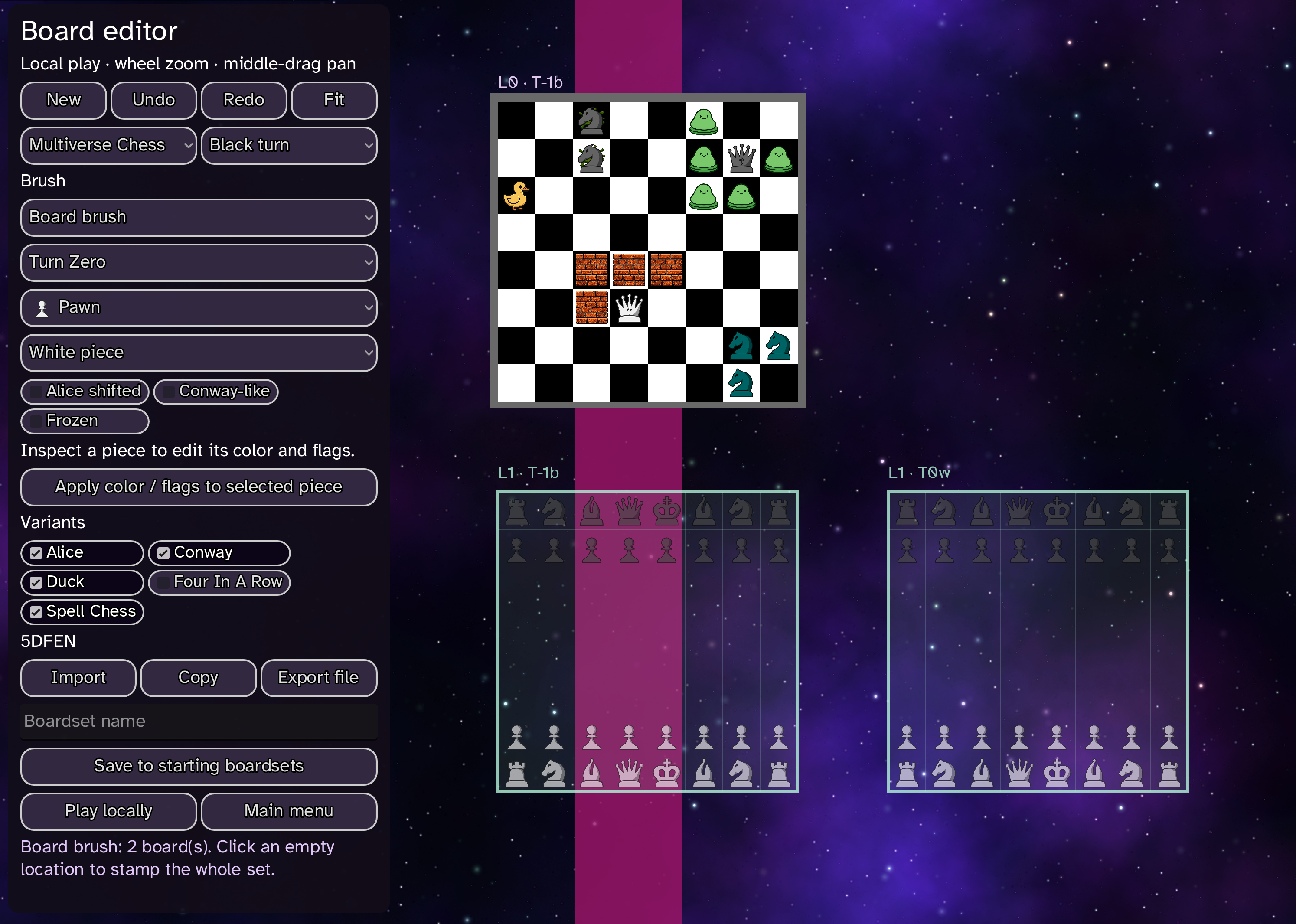
New Board Editor
- Create custom starting positions with the new Board Editor, available from the main menu.
- Place empty boards or existing boardsets, then paint, erase, and customize pieces across timelines.
- Supports special chess pieces, ducks, Conway slimes, walls, and Four In A Row pieces, plus supported Frozen, Conway-like, and Alice-shifted effects.
- Choose the game mode, starting player, and variants. Placing variant-specific pieces or effects automatically enables the required variant.
- Includes undo/redo, drag painting, camera controls, and a Fit view.
- Import starting positions, copy or export extended 5DFEN, and save layouts to your starting boardsets.
- Launch custom positions directly into local play. Editor drafts remain available when returning to the menu during the same session.
Online Rematches
- Request and accept rematches after an online game ends.
- Rematches preserve the starting position, game mode, variants, time control, swapping player colors, with fresh clocks and move history.
- Each round receives its own game-history entry. Rematches require both players to agree and are unavailable after disconnection.
Controls, Interface & Guides
- Added middle-mouse dragging to pan the board, including when the pointer is over pieces.
- Added Ctrl+Enter to submit a turn and Ctrl+Z to undo.
- Refreshed the game interface with clearer panels, improved text contrast, and more visible button states.
- Added contextual hints for moving pieces, completing variant actions, submitting turns, and waiting for opponents.
- Online turn indicators now show both the player and the playing color.
- Added an in-game Settings button, a shaded settings backdrop, and a Return to game button.
- Added a Notation toggle to show or hide editable game notation.
- The Guide is now accessible during matches, with help for special pieces, movement across time and timelines, and starting boardsets.
- Added movement tooltips for chess pieces and descriptions for starting boardsets during setup.
- Clarified local and online setup, time-control descriptions, and empty-lobby guidance.
- Removed the old external boardset-editor guide tab.
Gameplay Changes & Fixes
- Spell Chess now uses a shared cooldown for each player's spells: three successful turn submissions by that player, including the casting turn. Opponent turns do not advance the cooldown.
- Spell buttons show cooldown status, and undo restores spell uses and cooldown.
- Fixed undoing Wall spells so the wall is removed and its use restored.
- Fixed pawn double moves through pieces in the opposite Alice dimension while preserving blocking and destination rules.
- Fixed the initial Duck Chess turn indicator to correctly show Black during duck placement.
- Undo now returns the camera to the action's origin board, including Alice moves and time-travel branches.
- Fixed clocks continuing after game over and prevented further gameplay actions after a match ends.
- Fixed tooltips remaining stuck on screen after pieces or boards were copied during gameplay and undo.
- Fixed Conway, Duck, Four In A Row, and Spell Chess mod loading in exported builds.
- Fixed selected game modes not being applied when starting a game.
- Improved custom-position validation and loading errors.
- Prevented camera controls and gameplay shortcuts from interfering with text entry, settings, and the guide. Releasing a drag over interface controls now ends it correctly.
- Mythical and Reversed Royalty now start with a single White-to-move board, without the extra Turn Zero history board.
Presentation & Development
- Updated the main-menu background and Narik Chess logo, and added a Narik Gaming startup splash.
- Updated Steam store and library artwork assets.
- Updated Godot/GodotSteam build tooling and corrected export-template and Steam-library packaging paths.
- Expanded documentation and automated regression coverage for gameplay, rematches, board editing, position import/export, and mod loading.
