
Hi everyone!
We are so excited to finally get this update out. Thank you so much for your patience! This update is far and away our biggest yet and comes with several new features and a lot of fundamental improvements to the LAN Party experience.
There were a few core changes that made this update take a while, but from here on out we are expecting a much more frequent release cadence, most likely weekly. We also have several major announcements concerning new features and our official 1.0 release coming shortly!
IMPORTANT: Before I highlight some of the new features, I wanted to mention that we are working on our localization system and expect to start rolling out support for additional languages in the coming weeks. We've already finished all of the back end code/UI changes needed to support this, and we're planning to have a branch called "localization" that will have the new languages as we add them. Our plan is to do basic machine translations to start then have a professional translation service review them, but if anyone would like to help with language support it would be greatly appreciated!
Now, to highlight some of the new features:
Avatar Ragdolling
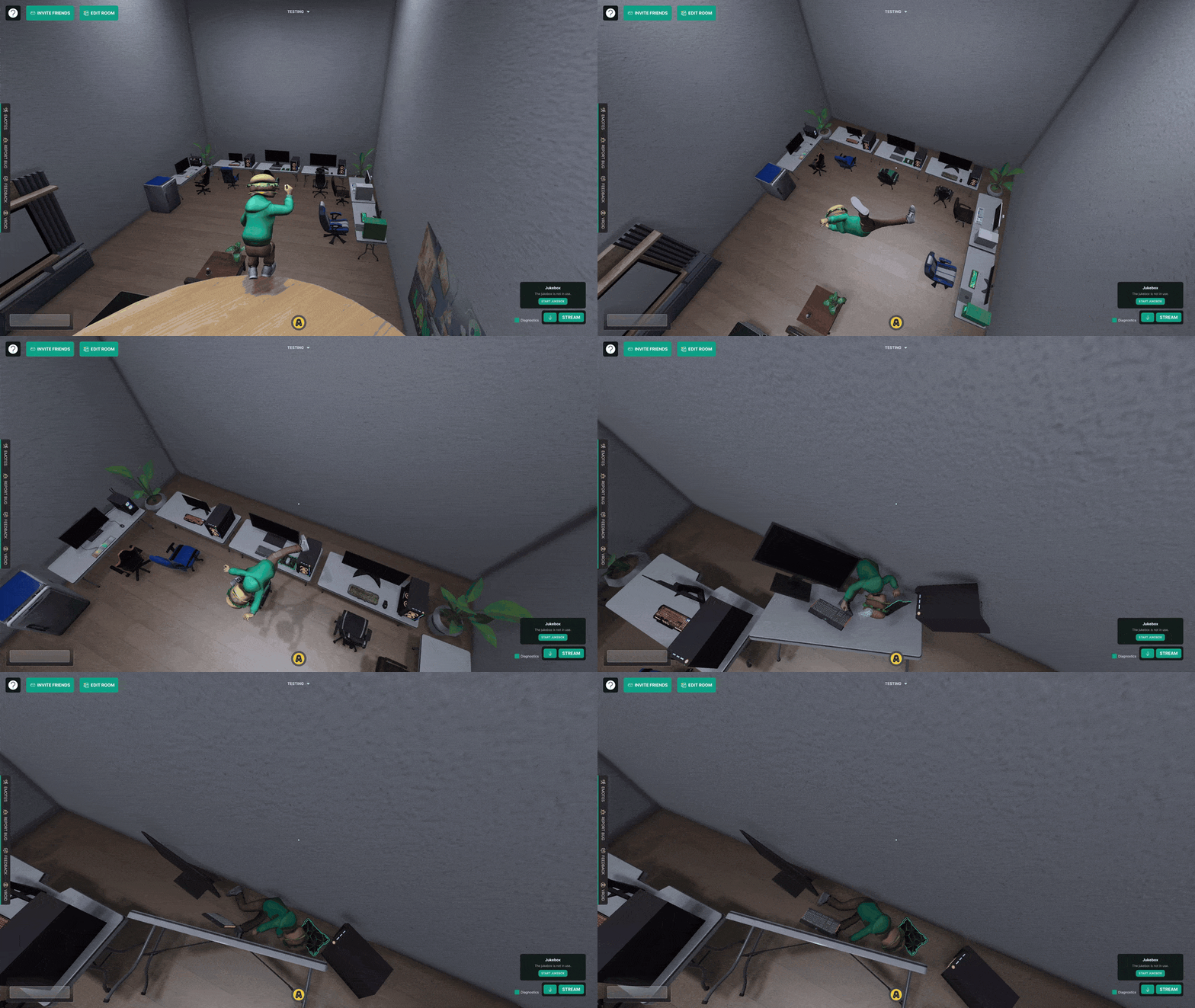
I feel like I've been working on this system for ages, so I can't begin to tell you how happy I am that this is finally hitting production. There has been a lot of fine-tuning required to get this working right, especially considering this needs to work with all avatars and assets someone could upload.
To enter ragdoll mode, simply click on the middle scroll wheel on your mouse. You can exit ragdoll mode by clicking it again or by hitting any of the movement keys.
One major fundamental change that came with this was completely uprooting our previous collider/hitbox system. Previously, all assets would be given a generic box collider by default, but players could configure assets with multiple colliders to make its hitbox more accurate. This system was inexact and tedious, and in an audit of our database we found that almost no player-made assets used custom colliders.
We decided to get rid of collider configuration in the asset importer entirely. Instead, each object will automatically have a collider added to it that matches its mesh exactly. We were able to maintain high performance by automatically simplifying the collider over a particular polygon count, saving colliders to local cache after generation, and using ultra simple colliders if the object is in motion. The new system is just as if not more performant than our previous system and leads to much more accurate interactions between assets and avatars.
Physics Objects & Throwing
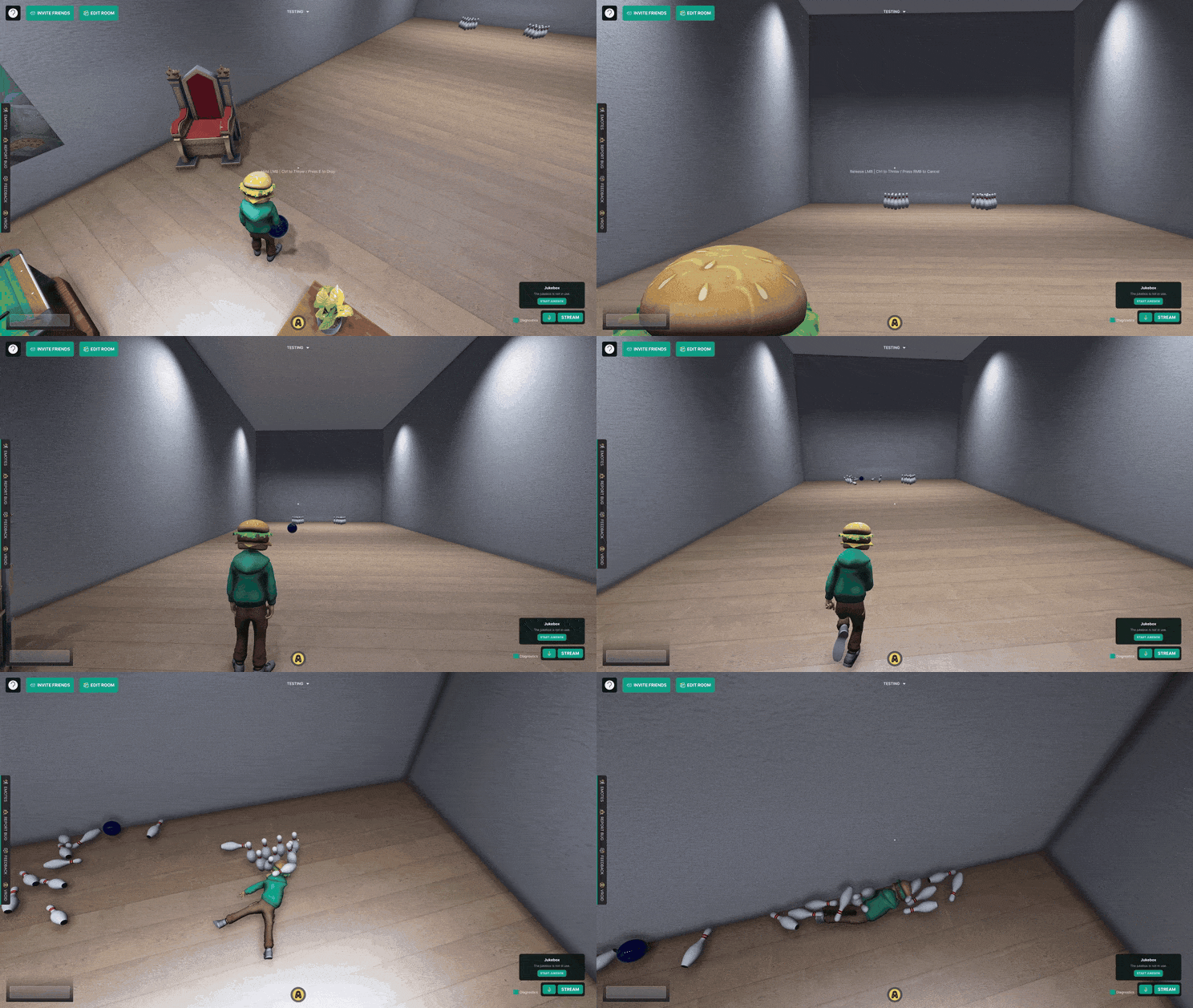
To piggyback off the last feature, we're giving you the ability to designate assets in your room as "Physics Objects". This means that the asset will respond to gravity and have collisions with avatars and other assets.
Since you will most likely want to keep the majority of assets in your room static, this is turned OFF by default. If you want to make an asset a physics object, select it in decor mode and check the "Physics based" checkbox.
You can also set various physics properties for each asset, namely its friction coefficient, bounciness, and mass. These can be set regardless of if the asset is physics based or static. These physics properties can be set for walls, ceilings, and floors as well.
In addition, any asset that has been turned into a physics object can be picked up by pressing "E". You can press "E" again to drop it, or hold and release left click to throw it. Seats and screens can be made into physics objects as well, so you can pick up and throw a chair someone is sitting in or throw a TV someone is streaming to! If other players are ragdolling, you can pick them up and throw them too!
If several physics objects have moved and you want to reset all of their positions, press "P".
Assets that have been made physics based will remain static until an avatar or other asset touches them. We did this so physics objects on the wall or ceiling wouldn't just immediately fall to the ground.
Interior Walls
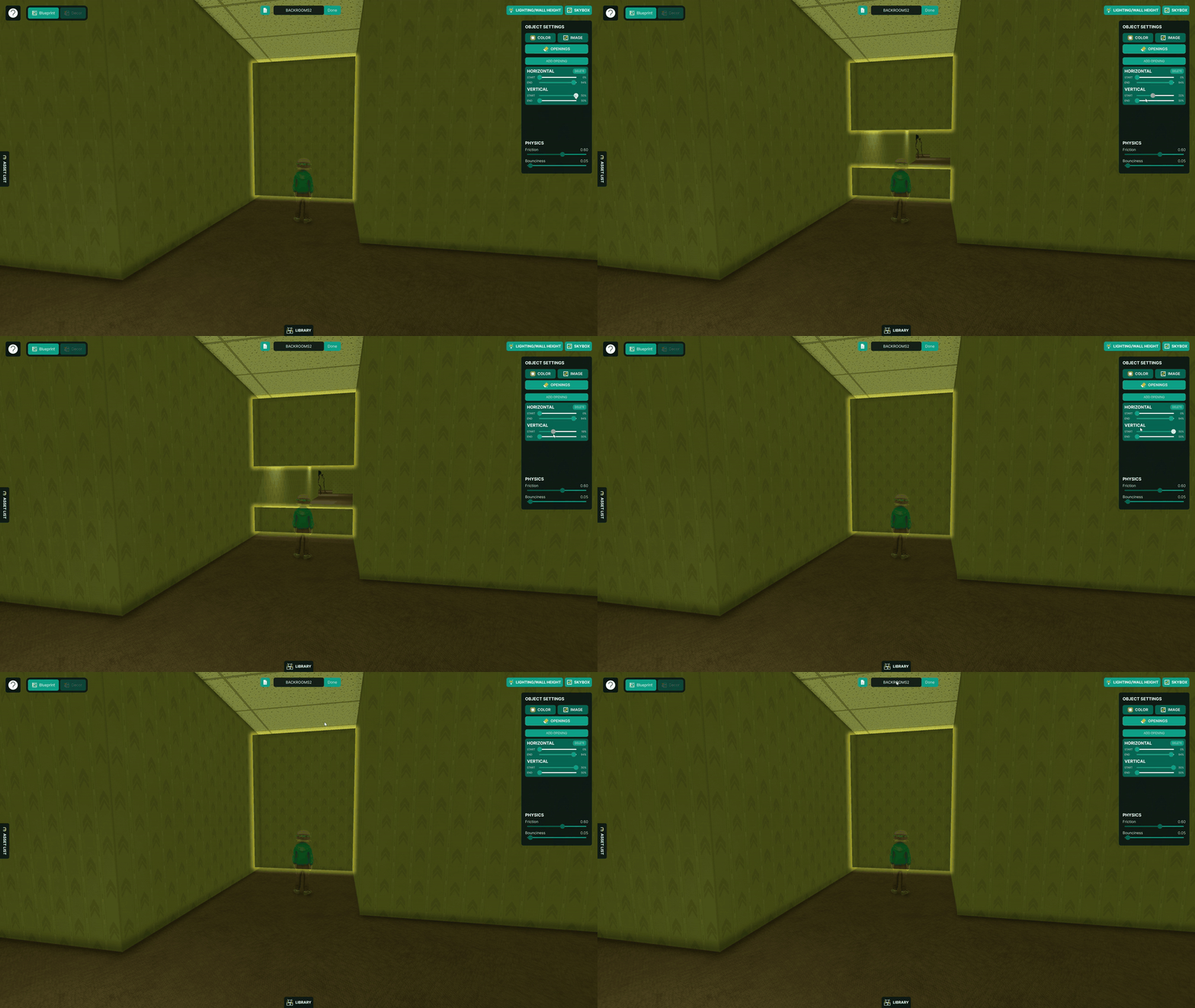
One of our most requested features has been the ability to create interior walls and multiple rooms within rooms. Its finally here!
To draw interior walls in your room, enter your room and go to blueprint mode. There is now a toggle on the bottom of the screen that toggles between drawing exterior and interior walls. Interior walls can be drawn anywhere in the room, whereas exterior walls need to complete a full loop.
Interior walls can be configured the same way as exterior walls, but each side of the wall can be configured independently. Also, you can cut into interior walls to create doorways and other openings between rooms. You can even put several different openings into the same wall.
Jukebox
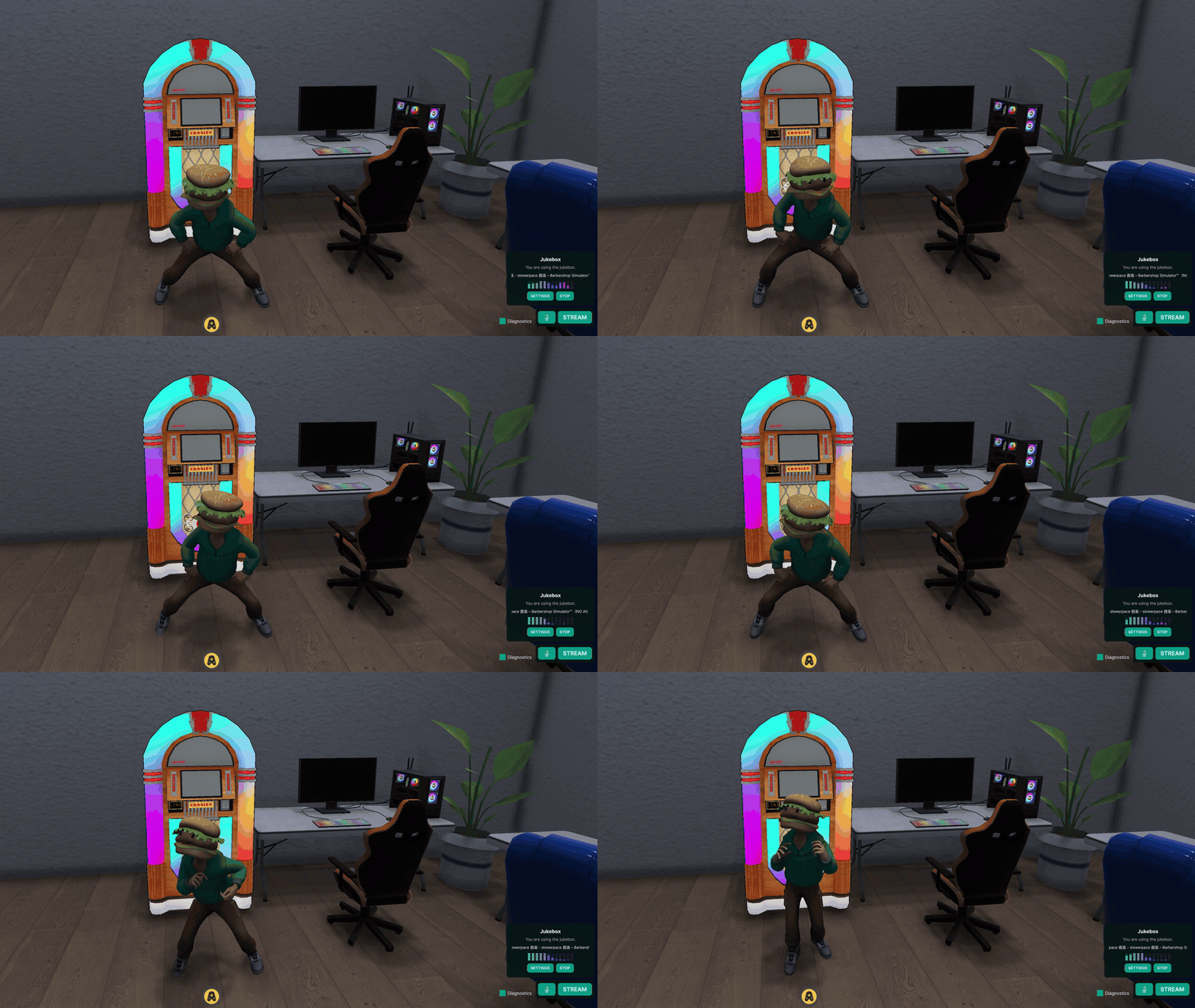
We've implemented a "Jukebox" system in the room that allows you to stream any audio from your machine or browser to everyone else in the room. This is essentially our streaming system minus the visuals but with several adjustments to preserve audio quality and consistency.
To start streaming audio to the room, just use the new Jukebox UI in the bottom right of the screen and pick an audio source to stream.
You can set the jukebox system to play flat 2D audio that plays at the same volume regardless of where you are in the room, or play 3D spatial audio that comes from invisible "Speakers" that you can place around your room in decor mode.
Note: The jukebox 3D asset in the GIF is not necessary for the jukebox system, I just put it there for fun.
Interactive Decor
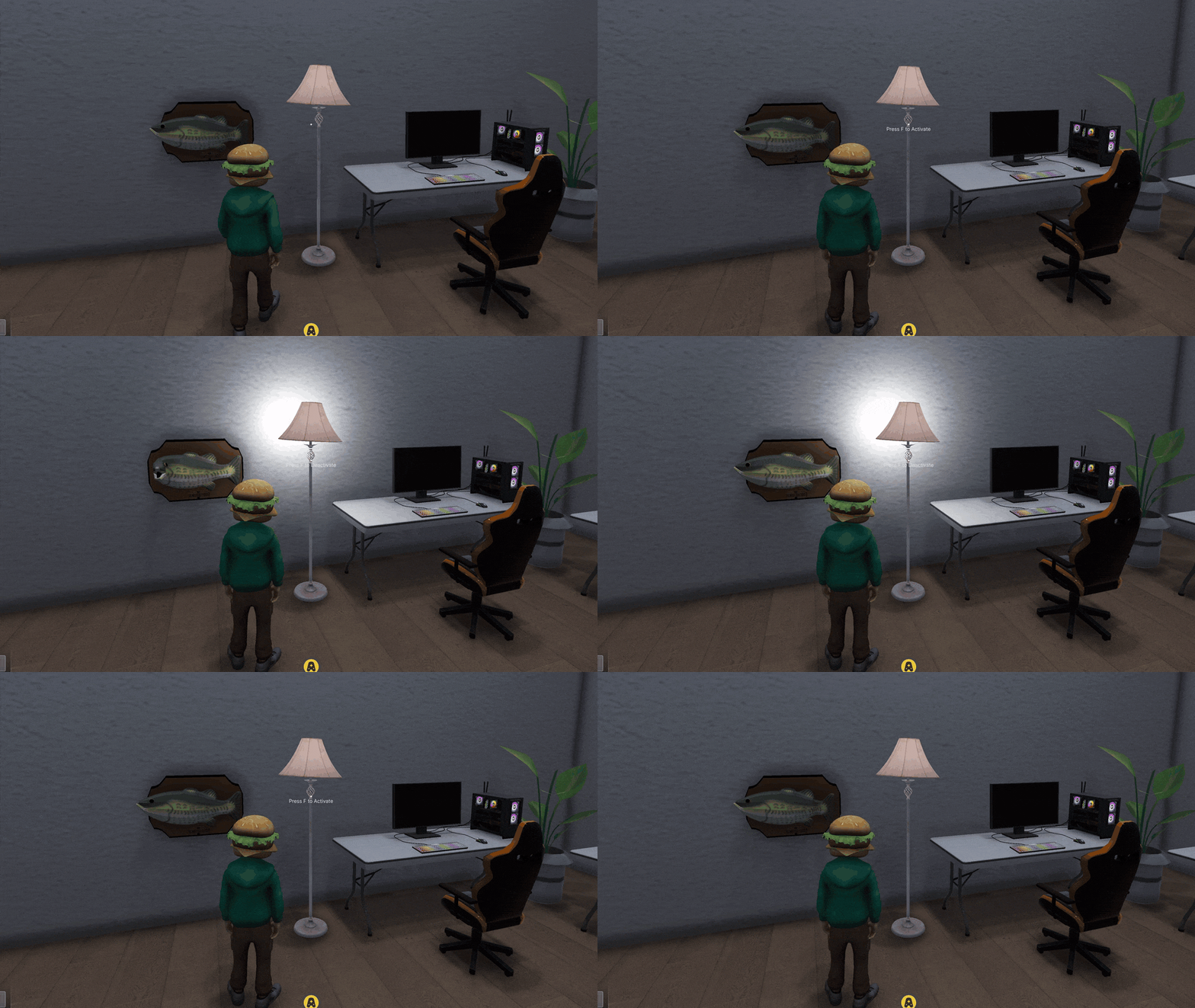
Tired of basic room decor that just sits there and does nothing? No more!
We've implemented a new system that allows you to make standard decor assets interactable. In the asset importer, you can optionally set an activation trigger for the asset: interaction and proximity. For interaction, you trigger the asset by interacting with it the same way you would a seat or a screen. For proximity, it will be triggered when an avatar gets within a specified distance from it.
If a trigger has been set, the asset will now have an "inactive" and "active" state. The inactive state is how it is by default, and its active state is what it is once its trigger condition has been met. The inactive and active states can be configured completely independently, meaning you could make the assets size, lighting, and material different in the active state than it is in the inactive state.
In addition, you can apply custom animations and upload custom sound effects to either the active state or the transitions between the two states.
For example, in the GIF, I have both a lamp that plays a clicking sound effect and enables a light source when I interact with it, and I have a Big Mouth Billy Bass that plays an animation and sings when I get close enough to it.
Custom Humanoid Animations
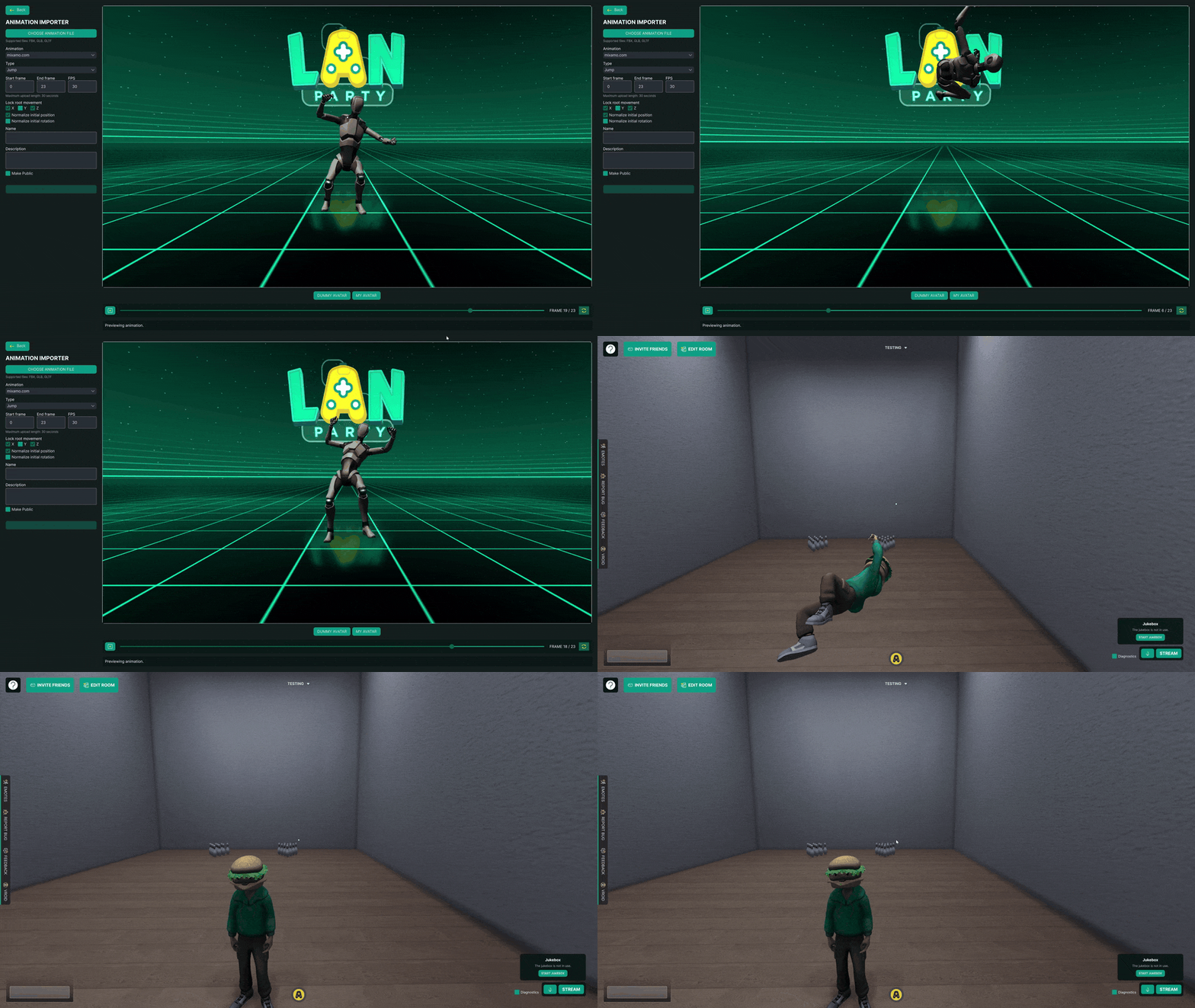
Of everything we have implemented over the last couple of years, this was the toughest nut to crack. I've been experimenting for a very long time with how to load custom humanoid animations at runtime, but one of the major limitations of Unity's Mechanim system is that most necessary operations just aren't available at runtime. There was no way to import .anim files or extract animations from FBX files and create animations at runtime compatible with humanoid rigs.
However, with our new avatar import system, we found a way around this limitation. Without going too deep in the weeds, our new system allows us to isolate and extract an animation into a runtime-readable file that can then be imported and applied to a humanoid rig in subsequent sessions.
Because of this, you can now bring in your own animations and use them on any humanoid avatar! We have a brand new Animation Importer, where you can import a model file with an embedded animation, configure the animation however you want (trim frames, speed up, lock position, etc.), and upload it! You can create animations for all action types, including movement, jumping, sitting, and emotes.
I've tested this with animations from my usual sources, so there might be some that don't translate properly. If an animation of yours doesn't import successfully, please let me know (LAN Party Discord) and I can help you out and hopefully make this system more robust.
I'm incredibly excited to see a ton of awesome animations on the marketplace!
Material Configuration & Avatar Editing
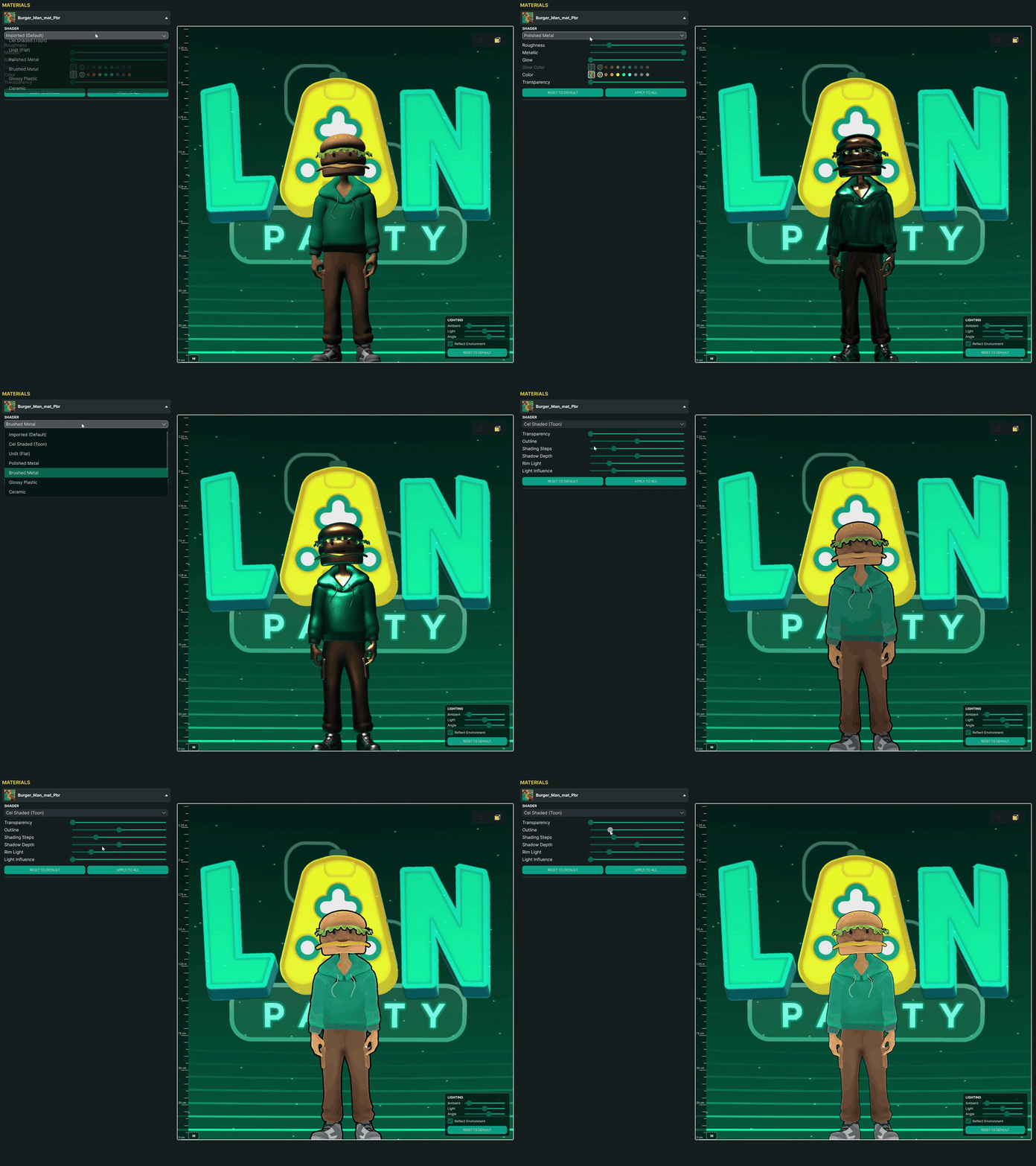
We've added the functionality for customizing the materials on any avatar or asset! You will now have a materials tab, where you can go through each material on the asset and change any of its sliders. In addition to several new presets for our default shader, we've made a brand new "Toon" slider to give materials a cell-shaded look, similar to how a lot of VRM avatars look.
In addition, you can now make personal edits to avatars, even ones you didn't upload! There is now an "Edit Avatar" button that will take you to a simplified version of the avatar importer. Here, you can change the avatar's height and materials. These changes are for you personally and don't affect the original avatar, but when you use the avatar other users will see the changes you've made.
Linux-Specific Build
We finally have a Linux build! One limitation of LAN Party with Linux+Photon or SteamOS was that streaming did not work for Linux users. However, in the new Linux build we have a new streaming protocol that allows Linux users to stream their display or even specific UI or screen segments to other users.
Note: Compatibility and streaming have primarily been tested with Wayland and SteamOS, so if you have a different setup we're very interested in hearing how things work for you.
Thank you so much for playing LAN Party! We're excited about some new features rolling out soon, so stay tuned!
-The LAN Party Team
Features:
Added physics-based decor that players can pick up, throw, catch, and push around. Decor is static by default, but can have physics enabled through Object Settings in Design mode.
Added ragdoll physics for avatars, including the ability to pick up and throw ragdolled players.
Added interior walls with configurable doorway and window openings.
Added a room jukebox with flat and spatial audio, along with placeable speaker assets.
Added interactive decor that can play animations and sound effects or change its appearance when interacted with or approached.
Added auto-rigging system for avatars.
Added custom humanoid animation importing. Players can share animations through the Marketplace and use them for movement, sitting, jumping, and emotes.
Added a native Linux build with screen-sharing support, including Wayland.
Added proximity voice chat, with an option for room owners to enforce it throughout the room.
Added spatial audio for streams, allowing sound to come from screens displaying the stream.
Added a menu for changing your stream source and stream settings without needing to restart your stream.
Full-display streams on Windows now include system audio while excluding LAN Party’s own audio.
Added material configuration for imported assets and avatars, including color, transparency, roughness, metallic effects, glow, and shader styles.
Added personal customization settings for avatars in your library without changing the original upload.
Added configurable directional lighting.
Added more granular graphics settings with individual controls for render scale, anti-aliasing, shadows, reflections, and more.
Improvements:
Reworked room networking to eliminate host migrations and improve synchronization and connection recovery.
Implemented a new asset importing system that improves asset and avatar loading times.
Improved room loading and Room Designer performance, particularly in rooms with many assets and edits.
Improved lighting, reflections, shadows, and overall rendering performance.
Significantly improved streaming source loading times.
Updated voice and text chat to use the same system as streaming, with improvements to voice playback and microphone recovery.
Overhauled the Rooms menu with live room occupancy, member status, an invitation inbox, and an avatar preview.
Overhauled the Marketplace and Library with improved asset, bundle, and room template previews.
Marketplace items now display like counts and are ordered by popularity.
Added the ability to browse more assets from the same creator and edit the names and descriptions of your uploads.
Added a “Place in Room” button to Marketplace assets.
Added interaction previews and badges for interactive Marketplace assets.
Added an asset list to Room Designer to make finding and selecting objects easier.
Improved asset collision shapes to more closely match their geometry.
Added configurable friction and bounciness for decor, floors, walls, and ceilings, along with mass settings for physics-based decor.
Placed decor can now be switched between static and physics-based behavior. Physics objects remember where they land and can be reset to their original positions.
Added duplicate, delete, and rotate buttons to the object settings panel.
Advanced placement changes now update live for other players, and wall height changes preview immediately.
Improved ESC navigation and added right-click shortcuts for opening player cards and editing room objects.
Freecam movement no longer requires holding right click. The advanced placement toggle has moved to G.
Room owners can now disable freecam for other players.
Resetting your character position now cycles through the room’s spawn points in order.
Added animated emote previews and improved custom animation previews.
Optimized generated models and added a “Generate again” option for previous Meshy tasks.
Added loading feedback when applying room templates and translucent placeholders while room assets load.
Improved support for lower resolutions, mouse-wheel scrolling in horizontal lists, and control hints.
Player nameplates are now visible at greater distances.
Reduced startup delays.
Fixes:
Fixed issues that could prevent room assets from loading when they were private, missing from your library, or had an invalid cached copy.
Fixed premium subscription status not being recognized correctly at times.
Fixed stream audio playing through the wrong output device.
Fixed voice chat issues involving interrupted microphone capture and repeated or delayed audio.
Fixed the background FPS limit not being respected when VSync was enabled.
Fixed room invitation changes not appearing immediately and revoked invitation codes still being accepted.
Fixed issues with moving and rotating wall-mounted decor, including objects snapping away from where they were grabbed.
Fixed issues with placing newly imported assets and duplicating multiple selected objects.
Fixed certain avatars deforming when switching to Ultra graphics quality.
Fixed issues with removing VRoid avatars from favorites.
Fixed several chess and poker display issues, including misplaced pieces and cards, and poker tables disappearing after deselection.
Fixed asset import forms retaining the previous model, name, description, or prompt after a successful upload.
Fixed character and camera controls responding while typing or interacting with menus.
Fixed missing ambient lighting settings in older room templates.
Fixed skybox rendering issues.