For now, only Windows can be updated.
As we wrote at the previous notification - 'Notification about later updates', this update is focused on the introduction of AvaKit SDK that makes it possible to apply various shaders to your VRM, and resolving the issues related to detecting the camera device for tracking.
This is our first fortnight update and it feels for us longer that it really is. Thanks for waiting.
Your feedbacks are really helpful to develop better AvaKit 🙇♂️

AvaKit SDK
You can apply several types of shader that AvaKit SDK is being supported to your VRM model in Unity Editor, and can export it as .avakitvrm format. This .avakitvrm-format file can be directly used in AvaKit. Please click this link for Steam Community post to check the tutorial for installation of AvaKit SDK and the way to export your .avakitvrm file.
List of supported shaders in AvaKit SDK
- UniUnlit
- MToon
- URP shader
- lilToon
- UnlitWF
- The type of supported shader will be varied.
Import '.vsfavatar' format model (for test)
It is incompletely available to import your .vsfavatar model.
However, it is an experimental feature, and whole import would not be possible for some models.
Please regard it as an intermediate step to develop the complete support of .vsfavatar model or to discover the alternatives.

Improvement of camera device detection
There have been several reports about camera detection malfunction from couple of VTuber users. By improving the algorithm related to detecting the camera device, this issue can be resolved from v1.1.4. Also, if the camera is disconnected or the accidental issue occurs at the tracking algorithm, the popup-window will be floated to notify the issue.
🛠 List of virtual cameras that cannot be detected in v.1.1.4
- Twitch Virtual Cam
- FaceRig Virtual Camera
🛠 Other notifications
It is more available to occur some unexpected crash or issues if you use MacOS device and connect lots of virtual cameras and webcams. Please note this point.
Options for tracking performance (resolution, fps)
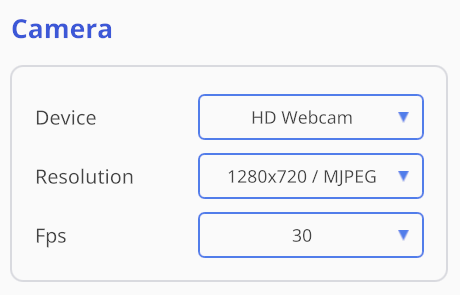
From v1,1,4, users must set the camera configuration before start tracking in AvaKit. You can choose various options related to tracking performance in the camera setting. You can implement lighter but normal-quality tracking by lowering the resolution and fps, while you can implement heavier but high-quality tracking by heightning the resolution and fps.
🚧 Cautions!
The 'resolution' in camera setting is NOT the resolution of your display or the maximum supported resolution of your camera, but the resolution of the video that is being captured by your camera. It regulates the 'size' of the video data.
Higher resolution and frame
- Better tracking performance
- Glitch or latency may occur unless the specification of CPU/GPU is enough
- Heavier CPU/GPU usage
Lower resolution and frame
- Lighter CPU/GPU usage
- Tracking available even if you are using a common, light CPU/GPU
- Relatively worse tracking performance
In addition, you can experience glitch or latency if you use 'MJPEG' format since its default frame rate is relatively high (30). - Higher fps means that the size of the data that should be computed is heavy which leads to high volume of computation. It is recommended to use 'YuY2' format if the performance is not satisfactory. Lastly, there often occurs the error when the resolution is set as 'XRGB'. If the error occurs, please try other resolution options.

- Issue related to camera device connection (socket) is urgently resolved.
- It is avilable to scroll down the decriptoin box of in-game user report.
- Rendering quality of some models is improved. (e.g. Maki)
As I said before, the next update patch will be focused on 'debugging'.
We will come back with 'better and more usable' AvaKit by resolving issues to the fullest extent.
We'll always try our best to improve AvaKit. Thank you.