
■ Update Version: v0.9.0
Hello, everyone!
We're the IfSunSets development team!
🛠️🚀 The 'Engine Version Upgrade' Is Here! 🛠️🚀
🛠️A Major System Overhaul Driven by Your Feedback
We've carried out a major system overhaul to address the issues you've repeatedly brought to our attention, including synchronization issues between hosts and guests, freezing when a guest dies, excessive load on the host, and EOS login problems.
🧩These Issues Have Also Been a Long-Standing Concern for Our Development Team.
When we first started developing the game, there were many things we simply didn't know or fully understand.
As a result, poorly designed systems began piling up one after another, gradually becoming more and more tangled over time.
Eventually, this turned into what is commonly known as 'spaghetti code.'
These were not problems that could be fundamentally resolved by simply fixing individual bugs as they appeared.
At first, we had a lot of concerns.
Since this meant changing the very foundation of the game, we were afraid that it might require rebuilding almost everything from scratch, or that it could end up creating even more problems.
The amount of work was overwhelming, as we had to dig deep into layers of code that had accumulated over the years. It was a task we had been putting off because of its sheer scale.
However, we knew it was absolutely necessary to achieve the level of quality we wanted for the game.
Our entire development team worked tirelessly, day and night, to overhaul these systems and bring about meaningful structural improvements.
And finally, we managed to untangle the complex systems that had troubled us for so long and achieve a major breakthrough.
However, because these changes involved rebuilding systems from their very foundations, various bugs and unexpected issues may still occur.
For this reason, we've decided to release this update on the 'Test Branch' first.
1. 🖥️We've Completely Overhauled the Multiplayer System, Switching from Listen Servers to Dedicated Servers!!
Previously, the game used a 'Listen Server' system, where the player who created the session (the host) was responsible for both playing the game and running the server at the same time.
As a result, the more guests joined, the greater the load on the host's PC, leading to various issues such as frame stuttering and synchronization problems between the host and guests.
With this overhaul, we've successfully replaced the existing Listen Server system with a Dedicated Server architecture.
Just like before, the server still runs on the PC of the player who creates the session. This does not mean that we, the developers, are providing separate servers to host multiplayer sessions.
However, the key difference is that the host now also joins the game as a separate client, independent of the server.
In other words, the system has been restructured so that all players, including the person who created the session, can play the game under the same client-side conditions.
This change allows us to separate the host's game client from server operations, laying the foundation for fundamental improvements to guest-side stuttering and various synchronization issues.
2. 🔐An Epic Games Account Is No Longer Required!!
We've also improved the EOS (Epic Online Services) login system, which many of you have repeatedly expressed frustration with.
While we still use EOS, you no longer need an Epic Games account.
We've updated the system so that you can now automatically log in to EOS using your Steam account.
This means you no longer need to go through the separate Epic Games login process as before, while still being able to enjoy the game with players on other platforms.
As part of this change, we've also developed a new system that automatically links existing save data previously associated with your Epic Games account to your Steam account.
3. 🚀Frame Generation Technology Is Now Available!!
You can now enable DLSS and FSR Super Sampling!
This allows you to enjoy IfSunSets at significantly higher frame rates.
(Support may vary depending on your graphics card. If your graphics card does not support these features, the corresponding options will automatically be hidden.)
✅You Don't Need to Do Anything Special for These Changes.
This was also one of our top priorities throughout the overhaul.
You can continue creating sessions just as before, joining other players' worlds as usual, and enjoying the game exactly as you always have.
The difference is that the cumbersome login process is now gone, and you can look forward to a more stable and optimized multiplayer experience.
⚠️However, So Many Things Have Changed.
Countless lines of code and systems have been modified behind the scenes.
While these changes have laid the foundation for us to build a much better game than before, they also mean that new bugs that never existed previously may now appear.
Of course, we've already fixed the initial bugs caused by these changes and conducted extensive internal testing across the entire game.
However, we cannot confidently say that we've discovered every possible issue through internal testing alone.
That's why, instead of applying this update directly to the live version of the game,
we've decided to release it to you first through the 'Test Branch.'
🙇Now, We Need Your Help More Than Ever.
This update marks an important starting point for the major optimization and stability improvements we have planned for the future.
And throughout this process, your help is more essential than ever.
The bug reports you submit during this Test Branch will be at least 10 times more valuable and impactful than ever before.
That's because they won't just help us fix individual bugs.
The issues discovered during this test will directly help us verify the stability of our newly overhauled systems and prevent countless potential problems from occurring in the future.
Even the smallest issue you discover could help prevent numerous bugs down the road.
Our development team will continue doing everything we can to test and fix issues, but your experiences and feedback from playing the game across a wide variety of hardware and environments provide invaluable insights that we simply cannot obtain through internal testing alone.
If you encounter any issues while playing on the Test Branch, we sincerely ask you to report them, no matter how minor they may seem.
🐞How to Report Bugs
In-game ESC Menu → 'Bug Report'
Official Discord
Steam Announcement Comments
Thanks to the feedback you've shared with us, we were able to make the decision to undertake such a major overhaul, and we're finally ready to show you the first results of that effort.
Now, we want to make sure these changes are fully refined and stabilized.
This Test Branch is not simply an opportunity to try out a new update early. It is an important step toward making IfSunSets a more stable, polished, and complete game in the future.
We sincerely hope you'll join us on this journey.
To everyone who continues to point out where we can improve and helps us make the game better, we are truly grateful.
Once again, we're asking for your support and feedback.
Thank you.
Sincerely,
The IfSunSets Development Team
■ Test Branch Update Notice
※ This update introduces major changes to the game's core systems, so you may encounter various bugs and unexpected issues. For this reason, this version is currently available only through the Test Branch.
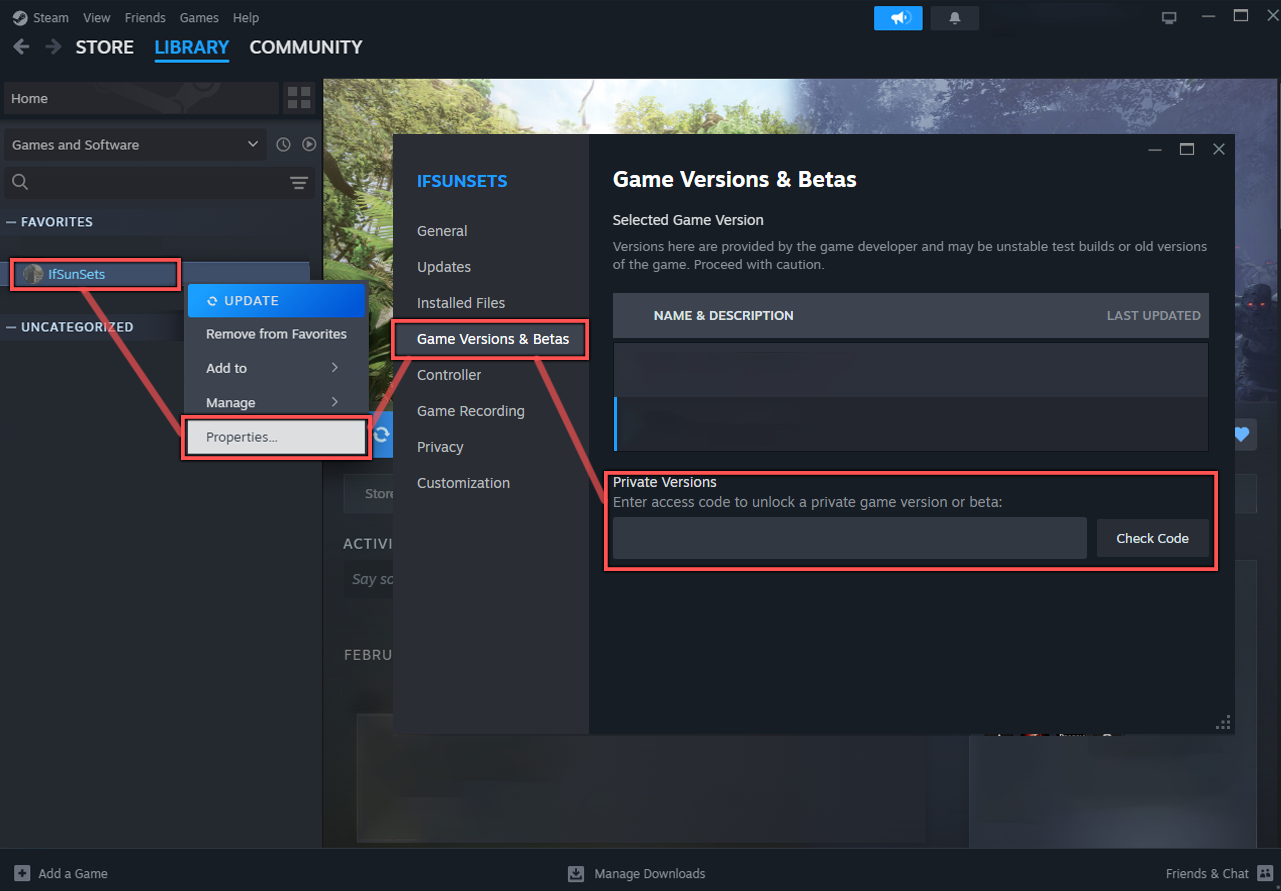
How to Access the Public Test Branch on Steam:
1. Open your Steam Library.
2. Right-click IfSunSets and select Properties.
3. Go to the Game Versions & Betas tab.
4. Enter the code provided in the announcement below under Private Versions.
5. Select the newly available publictest branch from the dropdown menu.
6. Close the window. Steam will automatically download the Test Branch update.
7. Once the download is complete, you can launch and play the latest test version.
Public Test Branch Access Code: 'openbetatest'
■ ※ Important Information
※ You Can Still Submit Bug Reports in the Test Branch!
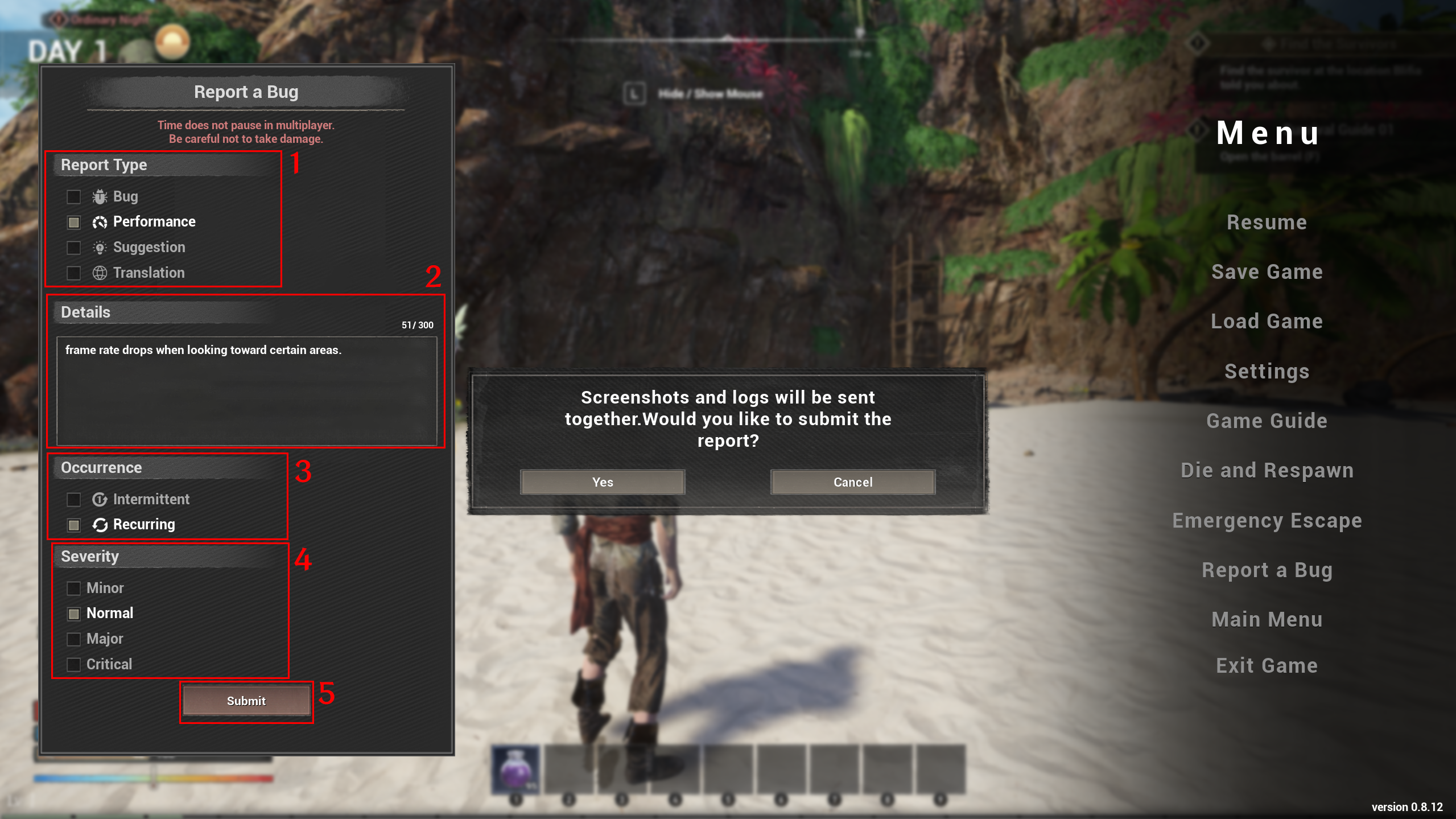
The Test Branch may be unstable due to the Unreal Engine 5.8 upgrade and changes to the EOS login system.
Therefore, if you report any bugs you encounter while playing, we can fix them quickly and ensure a smoother, more polished release for the next live update.
The bug reports we receive include a special identifier that allows us to distinguish reports submitted from the Test Branch.
Reporting bugs you encounter in the Test Branch will be a tremendous help in stabilizing the game much faster.
※ Please Make Sure to Run the Test Branch Using 'DirectX 12'.
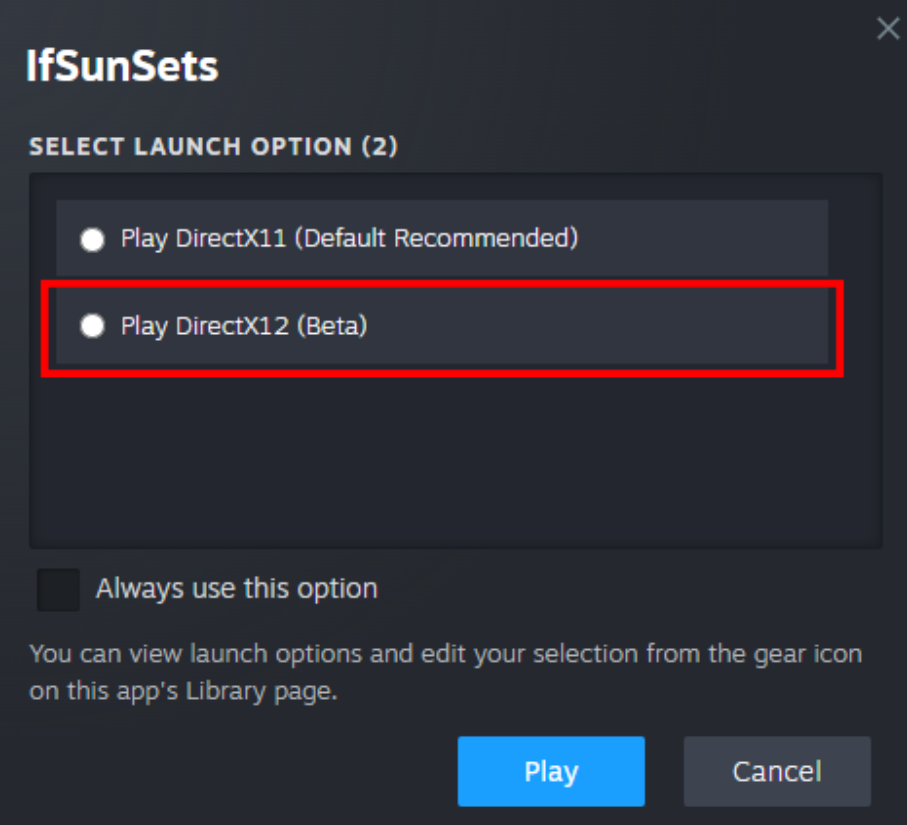
However, if you experience crashes on a low-end PC, please switch to DirectX 11 to continue playing.
With the engine upgrade, DirectX 12 now makes crash analysis and optimization much easier for our development team.
DirectX 12 is required to take advantage of the latest technologies.
※ Known Issues
Although we've switched to a Dedicated Server architecture for multiplayer, the server is still hosted on the PC of the player who originally created the session. If the session creator's PC does not meet the recommended specifications, various server-related issues may occur, such as server lag and increased loading times. We are continuously working on further improvements and optimizations to address these issues.
When server lag occurs, loading times may be longer than before, both when initially creating a server (session) and when joining one. We are also working to significantly reduce these loading times through further optimization.
There is an issue where minor enemies enter ragdoll mode in place upon death during melee combat.
There is an issue where the Phantom Limb wire behaves unnaturally under certain circumstances.
■ Detailed Overview of Major Updates
!Includes Important Information!
1. You No Longer Need to Log In to an Epic Games Account to Play Multiplayer!
With this update, we've changed the EOS (Epic Online Services) login system.
When you launch the game, your save data previously linked to your Epic Games account will automatically be transferred to your Steam account.
The system will automatically transfer your most recent save file.
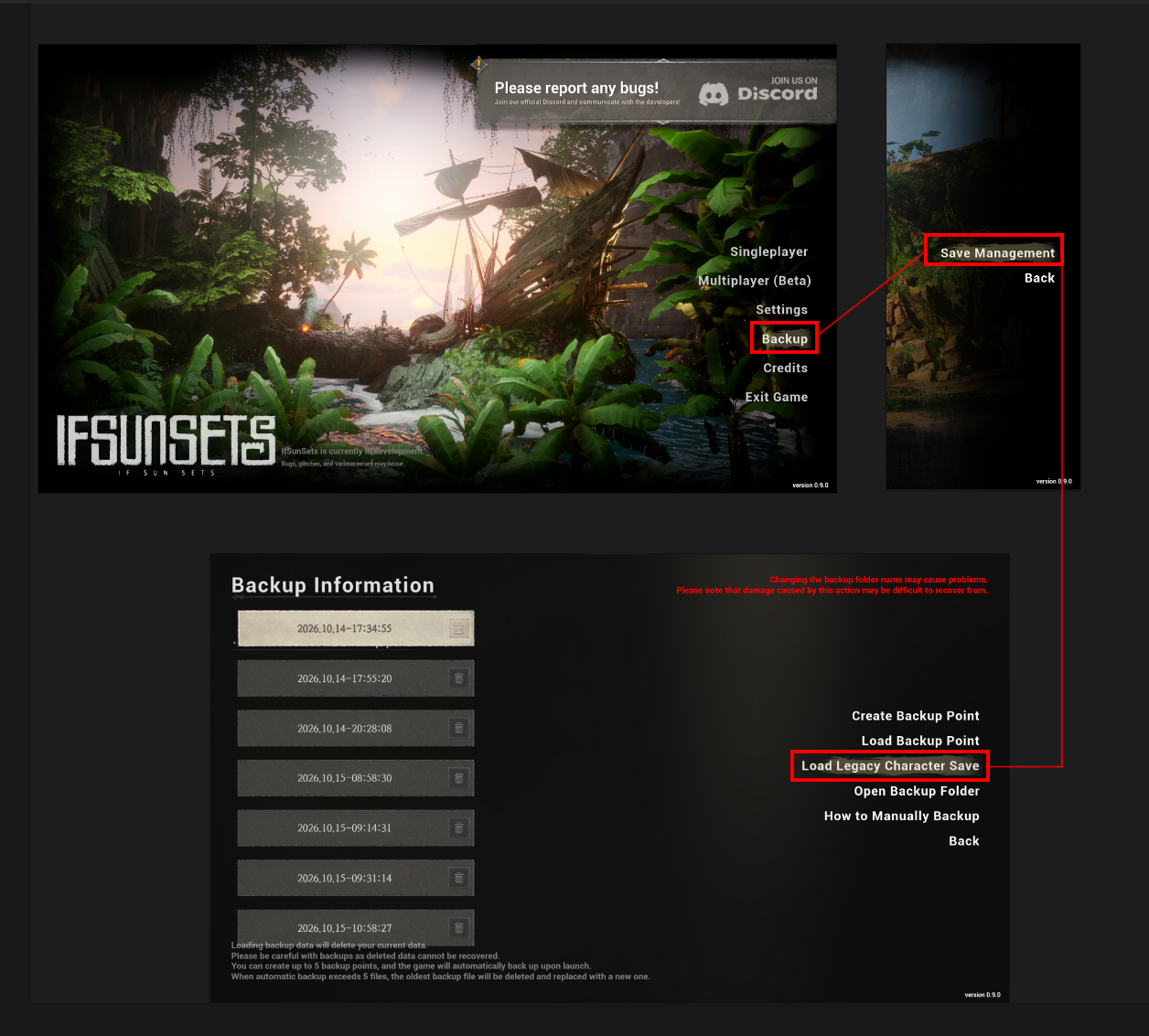
If you've used multiple Epic Games accounts, you can transfer your preferred save file by navigating to 'Backup → Save Management → Load Legacy Character Save' in the game menu.
2. The Server Architecture Has Been Changed to a Dedicated Server System!
Under the previous Listen Server system, the player who created the session acted as the 'Host,' while everyone who joined played as a 'Guest.'
In the Test Branch, we've switched to a 'Dedicated Server' system. Now, even the player who creates the session plays as a 'Guest,' just like everyone else.
[Problems with the Previous System]
The host's game also acted as the server.
As a result, when the host's frame rate dropped, the server would slow down as well, causing lag for everyone in the session.
If the host enabled Frame Generation or V-Sync, the server's processing rate could sometimes become limited to just 30 ticks per second.
[What's Changed]
When you click "Create Server," a dedicated server automatically launches in the background on the host's PC without rendering any graphics. The host then connects to that server just like any other player.
Since the server doesn't render graphics, it can run at a consistent rate regardless of the host's graphics settings or frame rate.
No additional setup, such as port forwarding, is required. You can create a session just as you always have.
When the host leaves the game, the server automatically saves the world before shutting down. World save data remains stored on the host's PC, just as before.
▎ Note: Since the host's PC now runs both the game client and the dedicated server, it may use slightly more memory and CPU resources than before. We've optimized memory usage to account for this change and will continue making further improvements.
3. Changes to the Previous Host Authority System May Cause Unexpected Issues!
※ We sincerely ask for your support and participation in testing so that we can bring these improvements to the live version as quickly as possible.
If you encounter any issues, please report them through the in-game Bug Report menu, our Discord server, or the comments section. We'll do our best to fix them as quickly as possible.
With the server now running separately and all players participating as guests, certain administrative privileges, such as party management and world settings, will remain with the player who originally created the session.
Previously, only the host or the player who placed a structure could retrieve or destroy it, which many of you found frustrating. Now, all players have equal authority to retrieve or destroy structures, even those built by other players.
The authority to manage party settings, including the role of 'Party Leader,' belongs to the player who originally created the session.
The authority to modify world settings belongs to the player who originally created the session.
4. We've Upgraded Unreal Engine from 5.3 to 5.8!
The upgrade to Unreal Engine 5.8 may not bring major noticeable changes right away.
However, this upgrade opens up incredible opportunities for much faster development and improvements in the future.
We hope you'll look forward to how IfSunSets will continue to evolve!
We've officially upgraded the game from Unreal Engine 5.3 to Unreal Engine 5.8, which brings greater stability and maturity to many of the newer technologies that were previously unstable in version 5.3.
As a result, we've already seen noticeable improvements in material optimization.
This engine upgrade also introduces numerous improvements that will allow us to focus more effectively on optimization and stability, laying a stronger foundation for the future development of IfSunSets.
5. Frame Generation Technology Has Been Added!
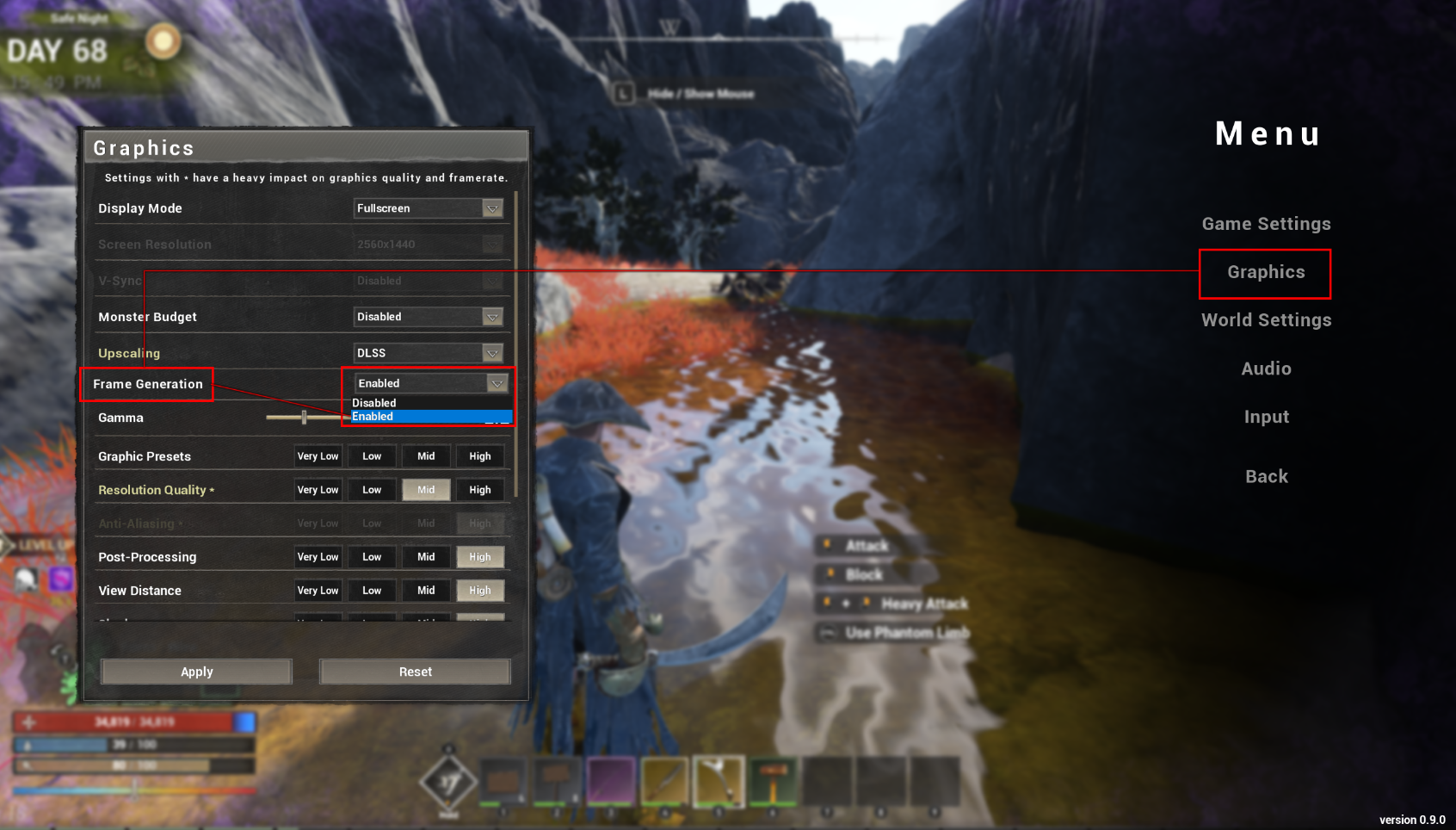
We've introduced 'Frame Generation,' a technology that uses interpolation algorithms to generate additional frames that aren't directly rendered by the game, increasing the FPS displayed on your screen.
You can now enable DLSS and FSR Super Sampling.
Support may vary depending on your graphics card. If your graphics card does not support these features, the corresponding options will automatically be hidden.
You can now experience significantly higher frame rates than before.
How to Enable Frame Generation:
■ Content & New Feature Updates
1. A Ping System Has Been Added.
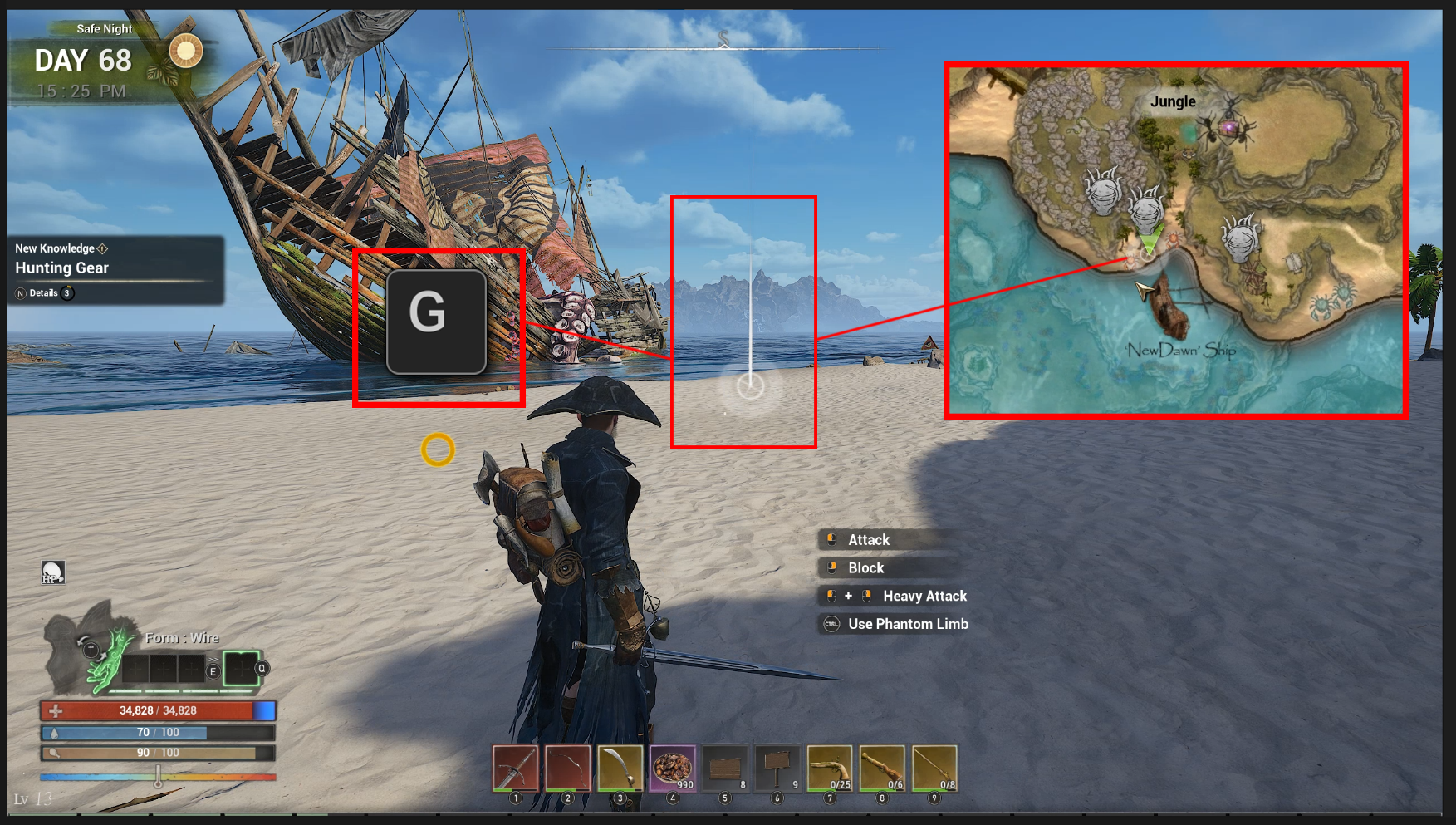

Press G / Hold the Left Trigger + Press the Bottom Face Button to use the Ping feature.
Let your friends know exactly what you're pointing at during multiplayer!
2. A Buildable Signpost Has Been Added.
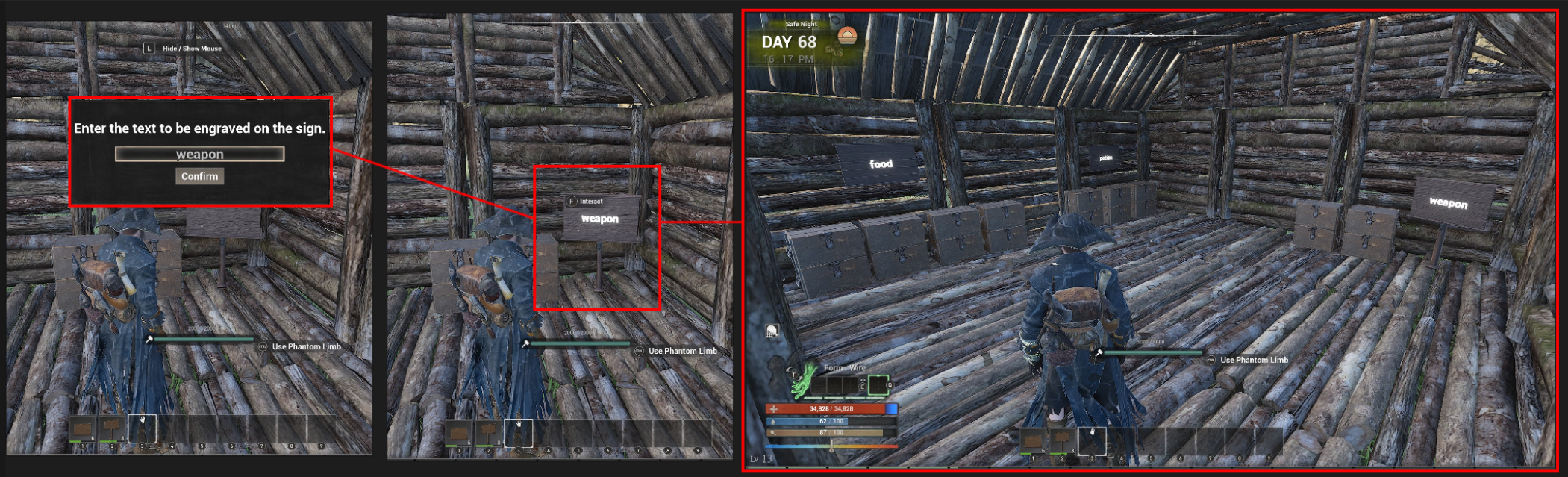
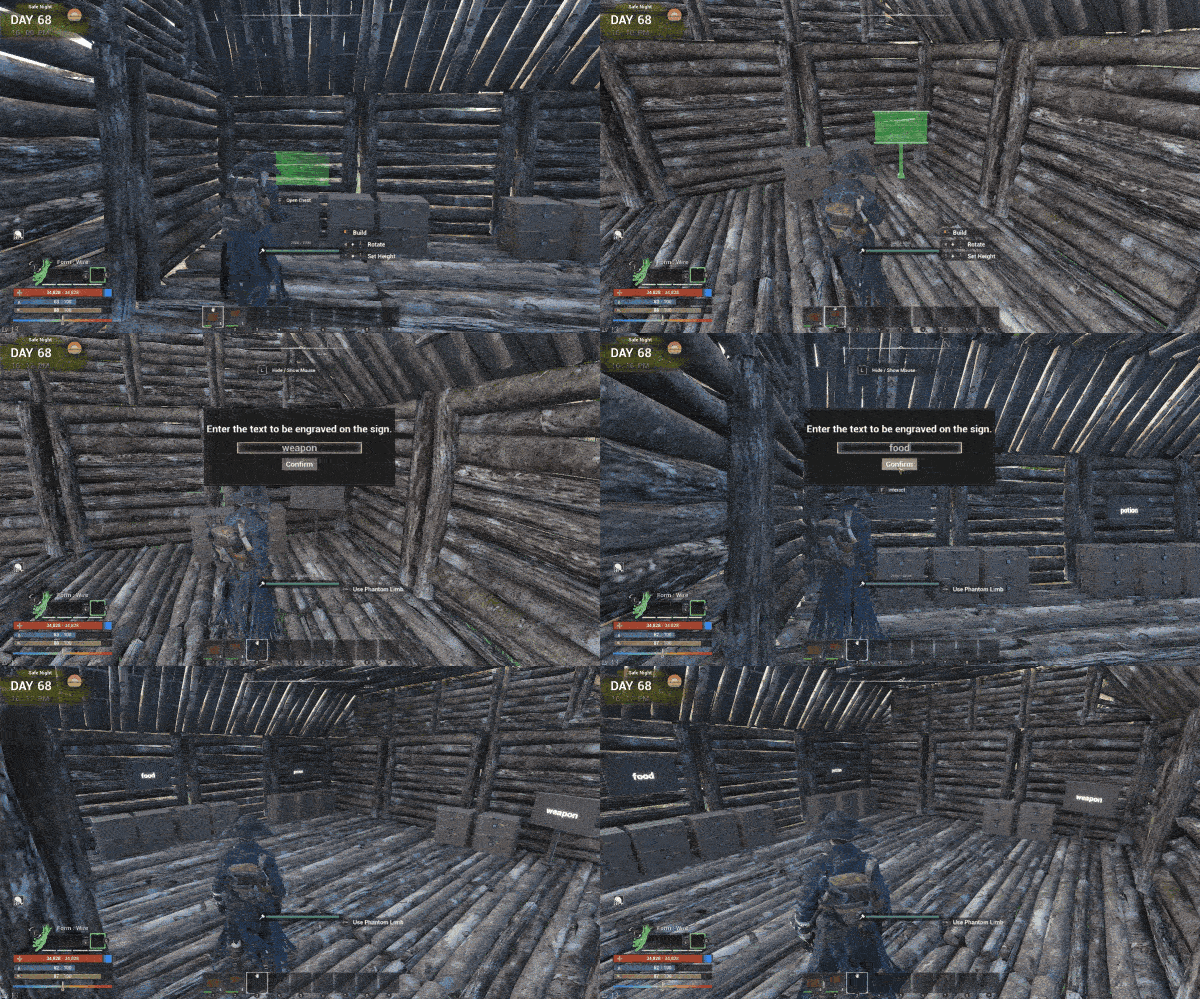
As your base grows, it becomes harder to remember things like "What's in this chest?" or "What is this room used for?", right?
Signposts solve this problem by letting players create and write their own labels!
3.New Sounds Have Been Added to Give Each Monster Race Its Own Unique Identity.
We've updated the sounds of various monsters that previously shared similar audio, giving each one distinct sounds that better reflect its unique characteristics.
This update includes the Skeletons of the Cursed Fragmented Island, Chimeras, Pirates, and Dryads of the Flower Fragmented Island.
We plan to continue updating the sounds of more races and monsters in future updates.
4. An 'Appearance Change Mirror' Has Been Added, Allowing You to Customize Your Character's Appearance Again.
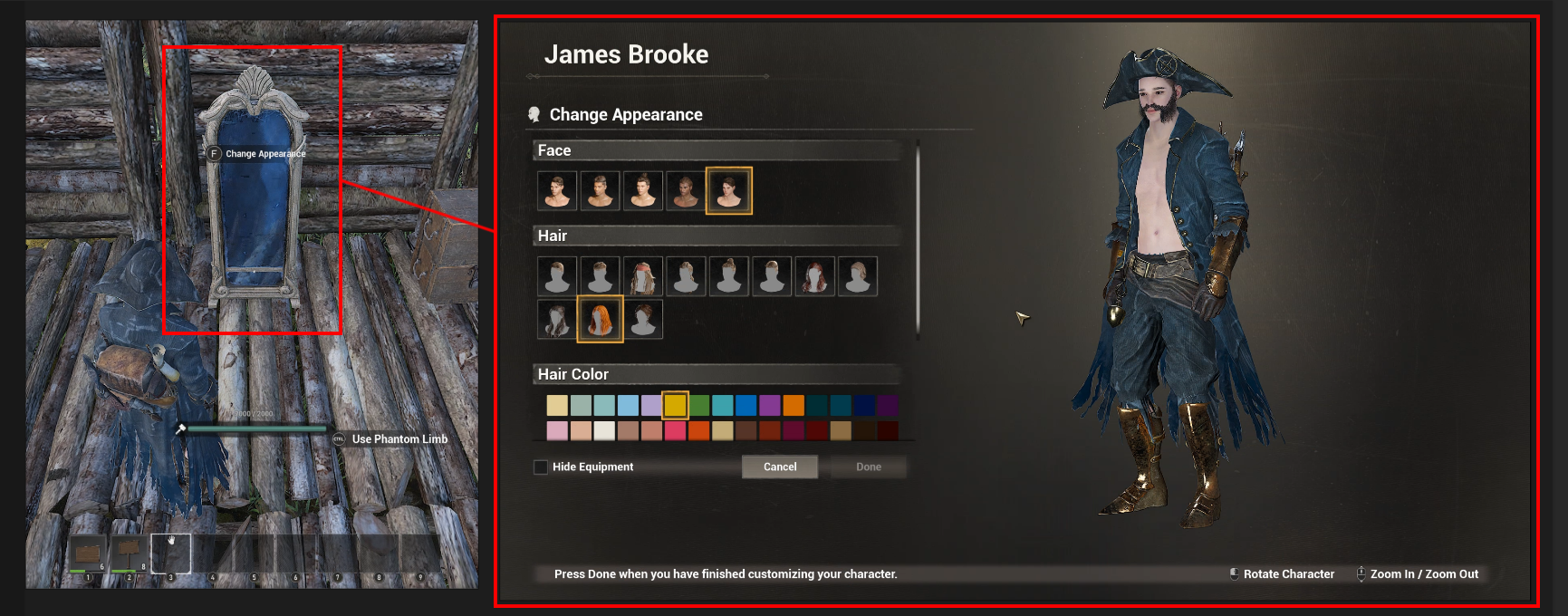
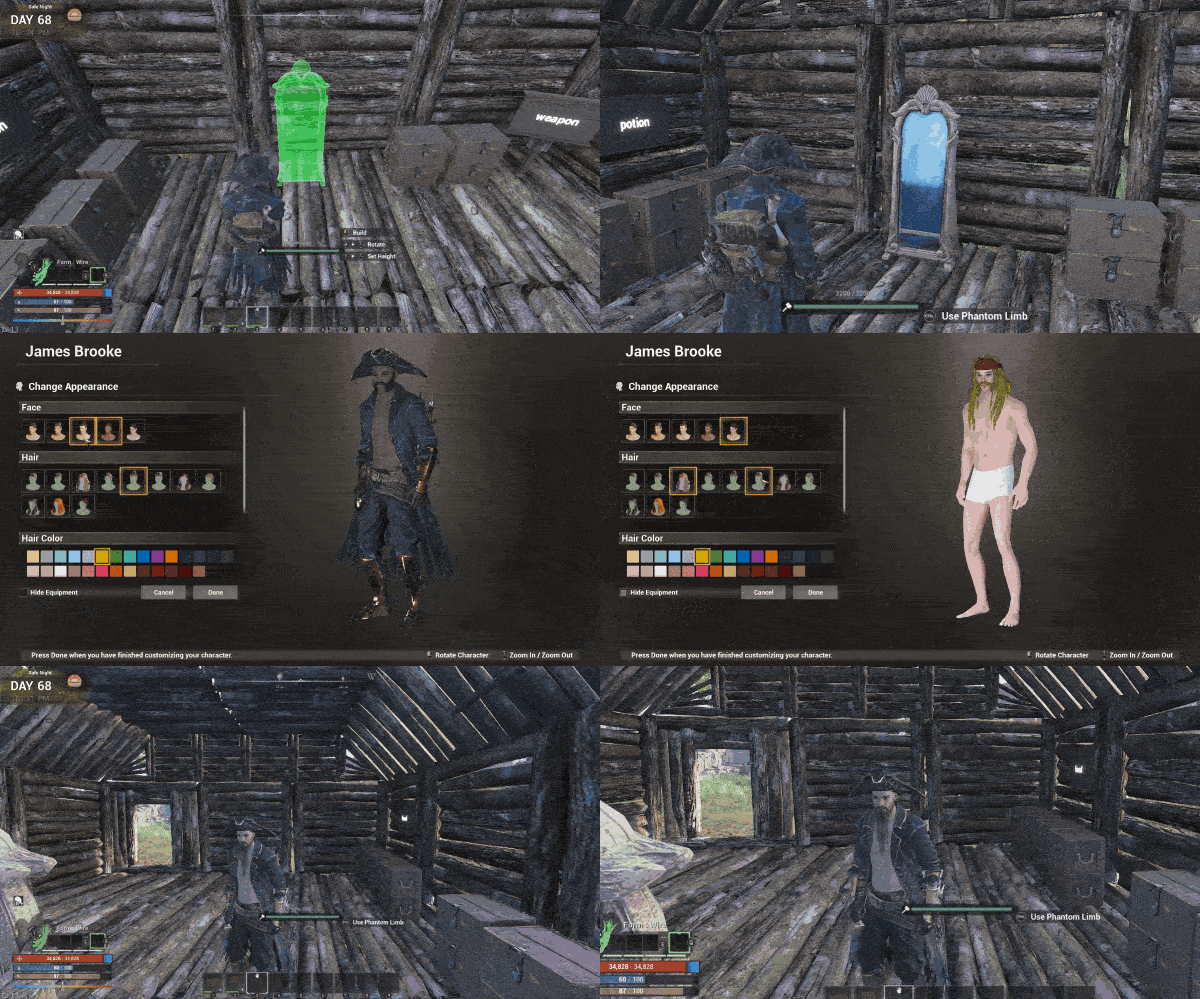
You can finally change the appearance of your hard-earned character! Now, feel free to customize your character's appearance however you like!
5. We've improved an issue where buildings would slowly appear one by one when entering a base with a large number of structures.
6. The Graphics Settings Have Been Further Improved.
Upscaling Options: You can now choose between TSR, FSR, and DLSS.
Frame Generation: Supports DLSS Frame Generation and FSR Frame Interpolation.
V-Sync: When enabled, the game synchronizes with your monitor's refresh rate.
7. Game Performance Has Been Improved.
Memory usage has been optimized.
Frame rates have been improved in bases with a large number of structures.
Joining Worlds with Many Structures: We've reduced the long freezes that previously occurred when entering these worlds.
8. Players Now Visibly Hold the Items They Catch While Fishing.
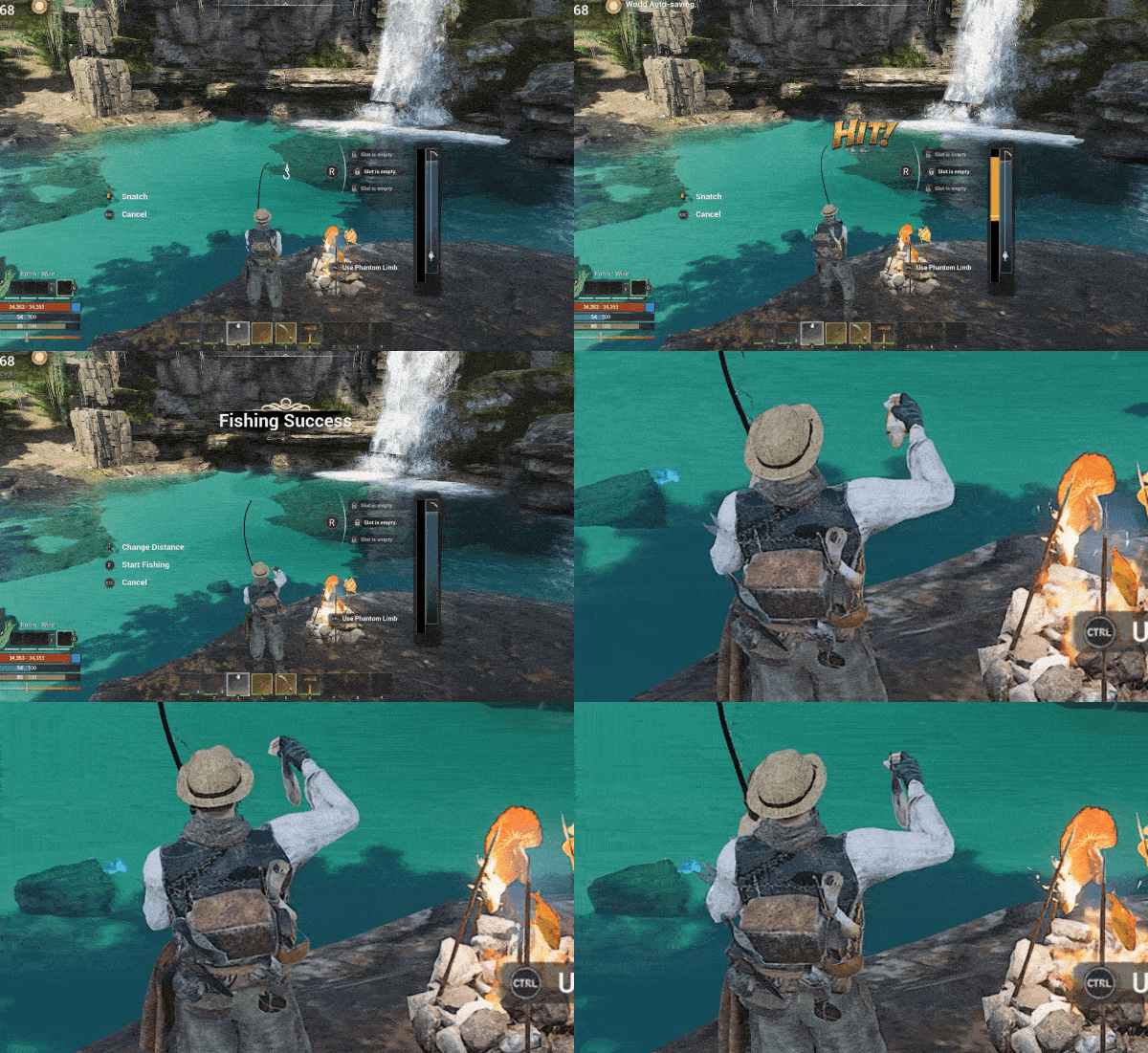
This makes the fishing experience even more immersive.
9. The Elite Soldier of the Ancient Castle Has Received a Model Update.
Previously, the Elite Soldier looked far too weak.
Not anymore.
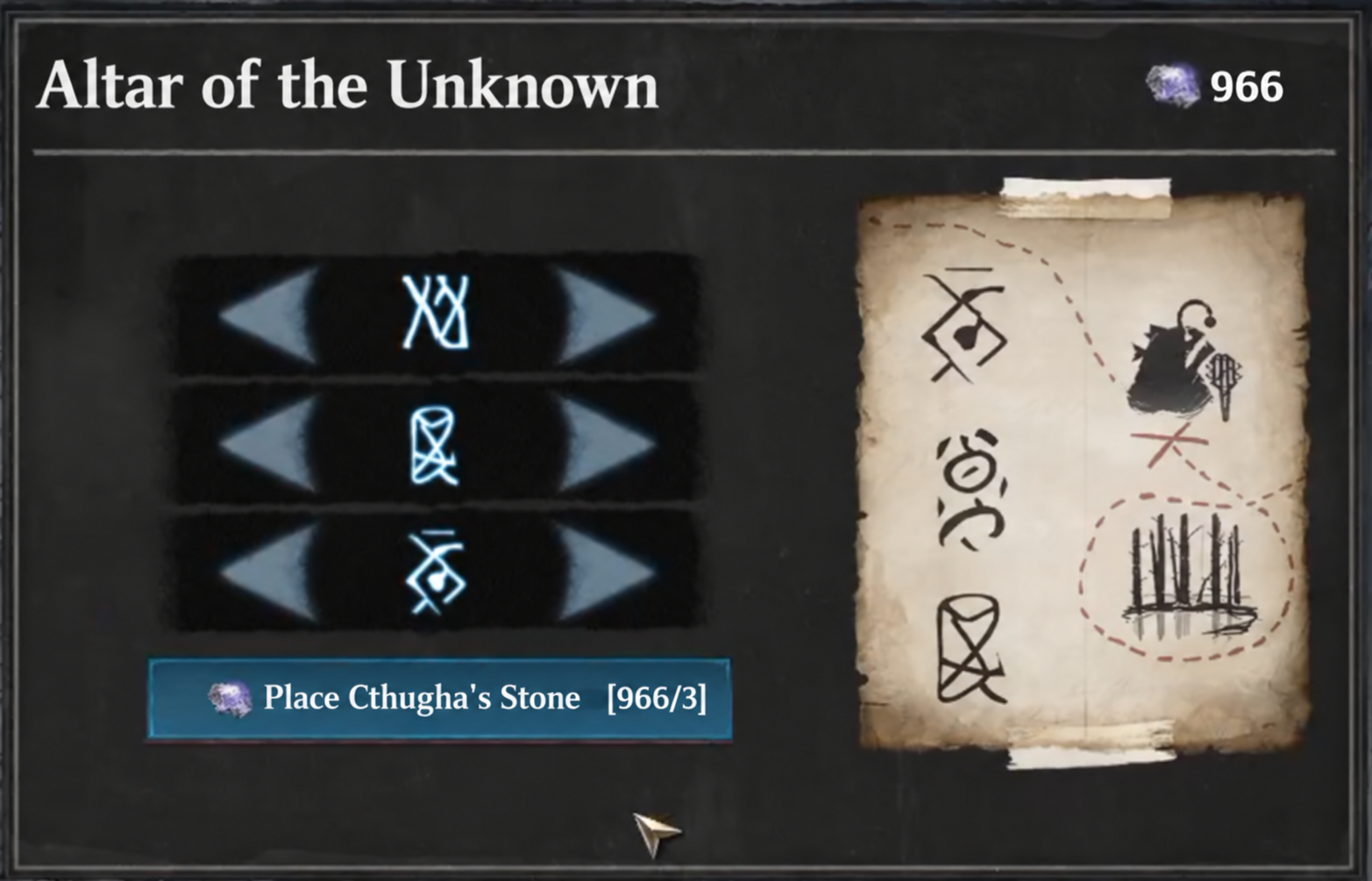
10. The puzzle-solving mechanics in front of the boss room have been changed.
[Previous Issues]
Since each slot had its own interaction area, players could accidentally interact with the wrong box.
It was difficult for players to figure out how to select the altar at the top.
Players had to repeatedly open and close their inventory to check the hints, making the process inconvenient.
To address all of these issues, the puzzle has been redesigned so that players can now solve it by clicking buttons.
■ Other Update Details
🔧 [Changes & Additions]
Fixed an issue where attaching a wire to livestock caused sparks to appear.
Removed durability from Flippers, as requiring Gillweed to repair them was unintuitive. Flippers no longer require repairs.
Added an "All" tab to every crafting station.
Added an option to confine the mouse cursor to the game window in the game settings.
🌐 [Multiplayer]
Fixed an issue where the aiming arrow appeared on the host's screen when a guest manually aimed a torpedo launcher.
🛠️ [Bug Fixes]
Reduced crashes caused by memory overload.
Optimized UI memory usage to reduce memory leaks.
Fixed an issue where the game could crash during initial loading.
Fixed an issue where item names displayed when hovering over icons in the map's Material Pin mode were obscured by the cursor.
Fixed an issue where the Bronze Ingot Ceiling appeared out of order in the construction menu.
Fixed a bug where fish appeared to be swimming above the water's surface.
Fixed an issue where the rotation function was unavailable while holding a scroll containing a saved building.
Fixed an issue where the "People of the Base" quest could not be progressed.
Fixed an issue where Shadowwing and Shadow Wraiths caused frame drops when entering the Abandoned Village Cave.
Fixed an issue where the bottom corners of wooden doorframes prevented players from passing through.
Fixed an issue where the progress bar was not displayed on Drying Stands.
Fixed an issue where the left-hand glove of the Black Sea Bracers remained visible when using Phantom Limb mode.
Fixed an issue where a warning message for the Night of the Dead appeared during a Safe Night.
Fixed an issue where the game displayed a Safe Night even though the Night of the Dead was actually occurring.
Fixed an issue where walls and traps could not be repaired, removed, or destroyed due to the hammer icon not functioning properly.
Fixed an issue where Steam achievements were not awarded after defeating bosses.
Fixed an issue where the crosshair icon disappeared after switching from Construction Mode to another mode and then returning.
Fixed abnormal behavior of flying monsters during the Night of the Dead.
Fixed an issue in the Survival skill tree where players had to unlock skills from two separate branches instead of progressing through a single branch.
Fixed incorrect descriptions for Lithium and Lithium Ingots.
Fixed an issue where the prerequisite for "Eternal Guardian" only included "Shattered Oath," while "Sentinel's Watchtower" was missing.
Fixed an issue where wires could not be used properly inside shelters.
Fixed an issue where UI selection became unresponsive while repairing wall doors, leaving players stuck in Repair Mode.
Fixed an issue where lower-tier monsters dropped excessive amounts of Mutated Marine Creature Scales compared to Krakenlings.
Fixed an issue where the host experienced frame drops when a guest died and respawned.
Fixed an issue where the screen temporarily darkened when underwater base placement effects filled the screen.
Fixed an issue where a guest's animation appeared incorrect while steering a ship.
Fixed an issue where guests could pass through monsters when entering boarding combat.
Reduced the excessive intensity of water caustics at night.
Fixed abnormal behavior of giant monsters during the Night of the Dead.
Fixed an issue where the fishing rod disappeared from the animation when attempting to fish just as the swimming animation became available.
Fixed an issue where guests riding a waterslide appeared incorrectly from the host's perspective.
Fixed an issue where certain construction wall modules were difficult to climb.
Fixed an issue where the stats provided by gems equipped on weapons were not reflected in the character's Attributes menu.
Fixed an issue where the range indicator of Cthugha's Power Device appeared and remained visible under certain conditions.
Fixed an issue where Brownbeard occasionally teleported from the guest's perspective.
Fixed an issue where movement keys still controlled the character while typing in the bug report window.
Fixed an issue where players riding together on a ship could occasionally fall off unexpectedly.
Fixed an issue where walls remained floating after the floor beneath them was destroyed, or traps placed above destroyed structures failed to collapse.
Fixed an issue where the message "Someone is already interacting with this" occasionally appeared when interacting with bundles, even when no one else was using them.
Fixed an issue where cleaning up Black Cow dung did not reward Cthugha's Stone.
Fixed an issue where docking through Ship Management after the first voyage prevented the ship from sailing again and blocked access to the Ship Management screen.
Fixed an issue where oxygen replenishment was delayed after leaving the water.
Fixed an issue where players could not access storage chests.
At POLYMORPH STUDIOS, we will never settle for where we are today.
Through continuous challenges and improvements, we will keep striving to deliver an even more polished and enjoyable gaming experience.
Thank you, as always, for your continued support.
We are continuously working on fixing crashes and errors in the game
If you experience any issues after the patch, please tell us in our discord.
Your feedback is always welcome. You can write your feedback on Steam or Discord.
Discord: https://discord.gg/Ifsunsets
Bug report form (link) [/p]
[/p]