
Announcement
Hello, this is LIFUEL.
This announcement covers the 0.6.5 update for OVIS LOOP. This minor update brings redesigned result screens for both death and successful clears, along with a revamped “[Loop Record]” screen featuring a new “Combat Stats” tab. We’ve also added a new Boss Module, “Adaptive Lens.”
We’ve also improved the death and revival animations, refined various scene transitions, polished Dr. Wolf’s Phase 2 CLASH sequence, improved combat hit feedback and HUD readability, and fixed a wide range of save, collision, and control-related bugs.
Here are the full patch notes:
New Content
Redesigned the Run Result screens for both death and successful clears, as well as the “[Loop Record]” screen. You can now view run summaries and check damage dealt and key records by weapon, skill, and module in the “Combat Stats” tab.
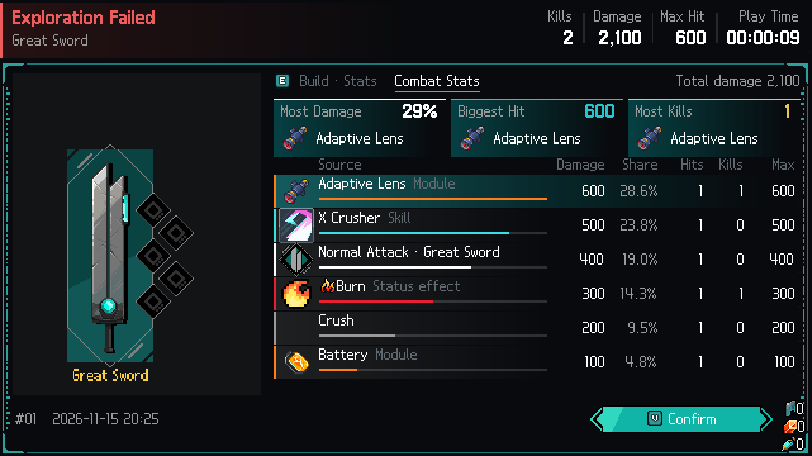
Redesigned run result screen and Combat Stats tab
Added 1 new Boss Module.
Improvements
Added new death and revival animations.
Added dedicated screen transitions for moving between rooms, using portals, starting a new game, setting out on a run, and opening result or unlock screens. The transition from closing the death result screen to returning to Corpse Hill is now smoother.
Applied a CRT monitor filter effect during Event Room dialogues.
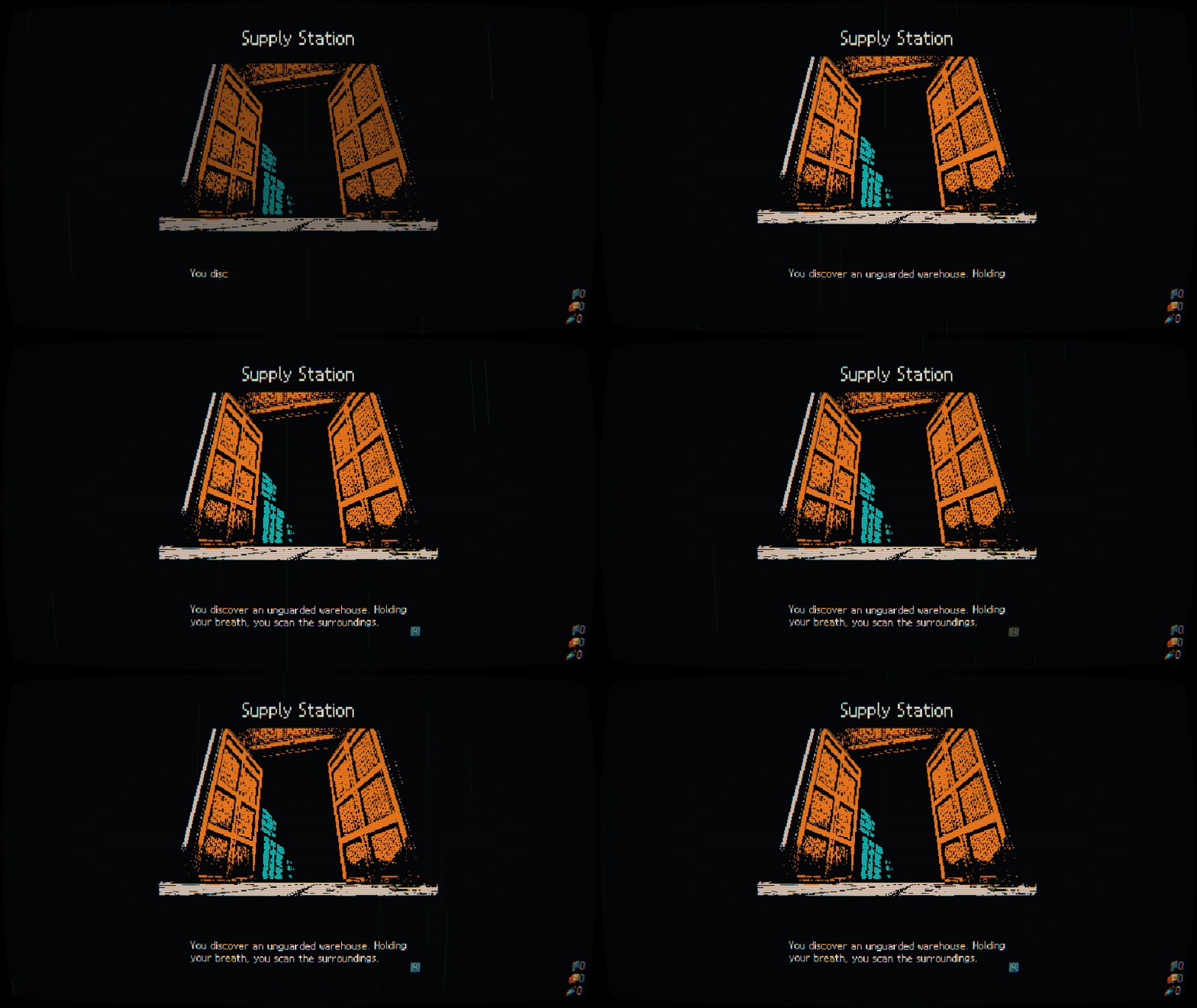
CRT monitor filter applied during Event Room dialogues
Polished Dr. Wolf’s Phase 2 CLASH sequence. After the opening roar, Dr. Wolf now immediately dashes forward to initiate the first CLASH. We’ve also improved the slow-motion effect in the purple CLASH warning zone, the slanted “CLASH” banner at the top of the screen (which prompts players to rapidly press the Attack, Dodge, Jump, or Move keys), button-mashing feedback, the win/loss animations (“BREAK!” / “Overpowered!”), and the HUD fade-in effect after the CLASH ends.
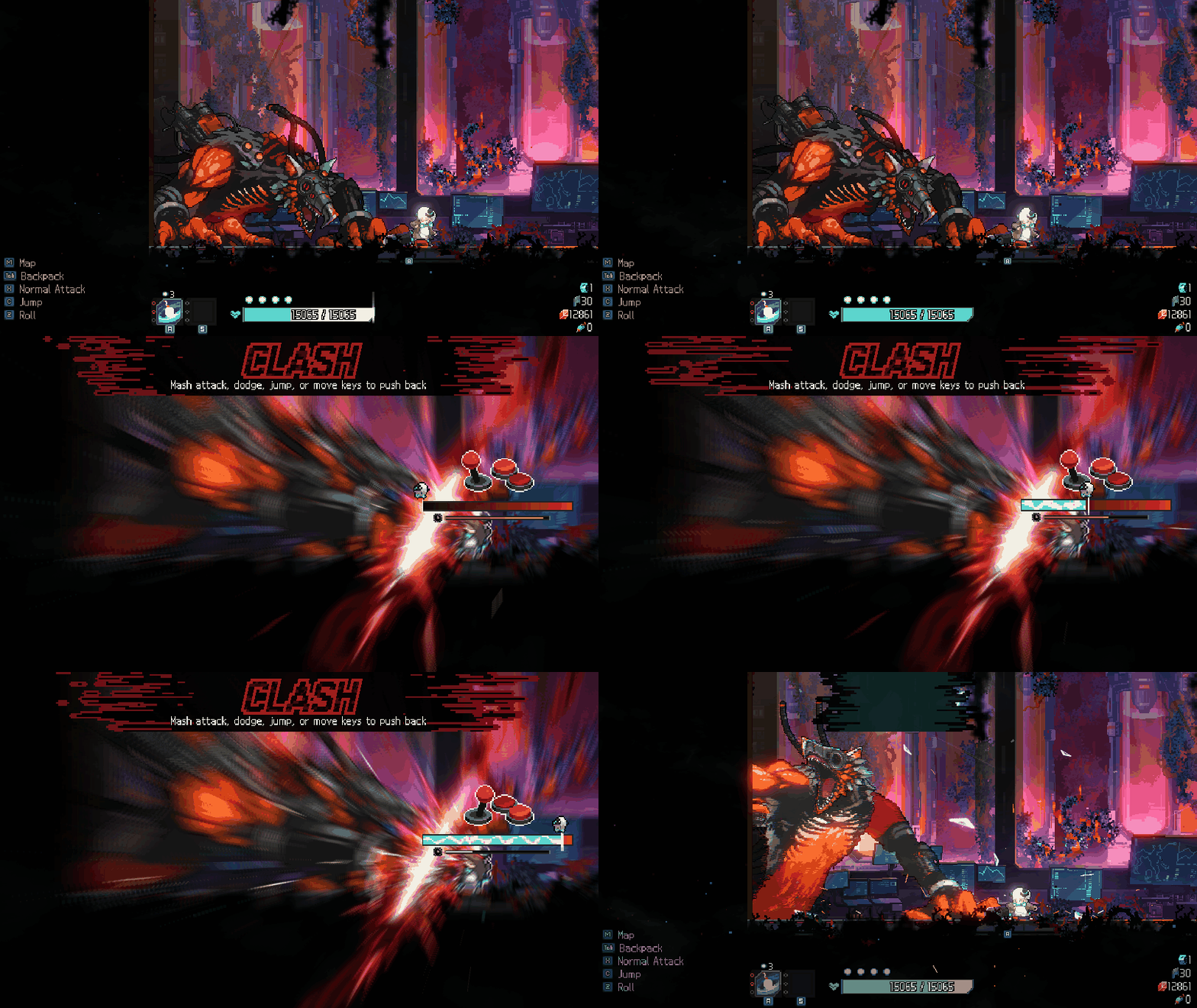
Dr. Wolf Phase 2 top CLASH banner, mash gauge, and BREAK! presentation
The number of remaining revives is now displayed as heart icons beneath the HP bar. Each heart is filled according to the amount of HP restored upon revival.
Max HP segments locked by items or events, along with their boundary markers, are now clearly displayed across the full height of the HP bar.
The module icons for “Organic Decomposer,” “Energy Spear,” “Battery,” and “Piston Engine” now display their accumulated stack count, and stacks carry over when moving between rooms.
Pressing a skill while on cooldown or short on Energy now shakes the skill slot and briefly shows a status caption (“Skill on cooldown” / “Not enough energy”) above the Energy bar. HP-spending skills no longer show “Not enough energy” when short on HP.
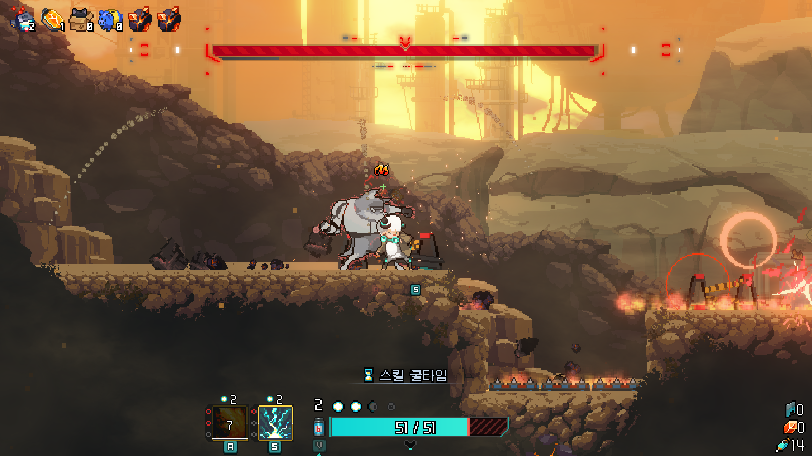
Module icon stack counters, Max HP lock boundary, and revive indicator
Image | Name | Effect | Before | After |
|---|---|---|---|---|
| Organic Decomposer | Every 10 direct hits, restores +1 HP and reduces Regain recovery by 50%. | Accumulated count not shown on icon | Shows stack count on the module icon and persists across rooms |
| Energy Spear | Every 10 Energy used, generates an Energy Spear that deals 60 damage to nearby enemies. | Accumulated count not shown on icon | Shows stack count on the module icon and persists across rooms |
| Battery | Every 10 skill uses, +200% damage for the next skill used. | Accumulated count not shown on icon | Shows stack count on the module icon and persists across rooms |
| Piston Engine | Every 5th direct hit is guaranteed to be a Crit. | Accumulated count not shown on icon | Shows stack count on the module icon and persists across rooms |
| Cat Box | After completing 4 rests, gain 3 random Normal modules. | Appeared in Stage 1 & Stage 2 boss rewards | Appears only in Stage 1 boss rewards |


When a module from your previous loop can be recovered at Corpse Hill, an exclamation mark (“!”) now appears beside the recovery pile until searched.

“!” indicator beside the module recovery pile at Corpse Hill
Trading a module with the Elephant Merchant now opens a confirmation window displaying the module given and the module received, defaulting to “No” so rapid dialogue inputs cannot trigger an accidental trade.
Stepping onto the front-right bow deck of the Raider’s Transport Ship now smoothly fades in the exterior hull cover, fading it back out when returning inside.
Dimmed zero-value rows in the stats view so modified stats stand out clearly, and staggered the opening animation of cards and stat rows on the result screen.
Added opening and closing door animations for the Base Camp entrance and exit, along with new visual effects for the Alpha Memory device. Also refined the preset lock window position, FREE label, badges, and selection highlights in the Omega Project machine.
Text now fades in and out more smoothly.
Fixed an issue where speech bubbles overlapped the faces of the Old Mouse in the shop and Gio in the Industrial Complex lobby.
Improved attack inputs pressed right before landing or immediately after jumping so they trigger as intended.
Non-elemental hits now distinguish between creatures (blood drops) and machines (sparks), while Electric and Flame hits now scale their sparks, flashes, impact sounds, and screen shake with attack strength, Critical Hits, and kills.
The Screen Shake setting now applies to all screen shake effects, including those in combat, cutscenes, environmental effects, and the UI. Setting it to 0 disables all screen shake. Stronger active shakes will no longer be interrupted by weaker ones, and controller rumble can now trigger at most once per frame.
Renamed “DDoS Blade” and the weapon modification “Auxiliary DDoS” to “Pulse Dagger” and “Auxiliary Pulse Dagger,” and added a “Pulse Dagger” keyword tooltip noting that it ignores player stat bonuses.
Icon | Name | Effect | Before | After |
|---|---|---|---|---|
| Pulse Dagger | Tiny energy blades summoned when attacking to slash enemies. They are unaffected by player stat bonuses. | Named “DDoS Blade” with no dedicated keyword tooltip | Renamed to “Pulse Dagger” and added “Pulse Dagger” keyword tooltip |
| Auxiliary Pulse Dagger | Using a skill 4 times grants the “Pulse Dagger” Booster for 4 seconds. | Named “Auxiliary DDoS” | Renamed to “Auxiliary Pulse Dagger” and linked to the “Pulse Dagger” keyword |


Balance Adjustments
Reduced the time required to use a Heal Pack from 2.0s to 1.5s.
The Boss Modules “Cat Box” and “Energy Piggy Bank” now appear only in Stage 1 boss rewards.
All Max HP percentage-based effects are now calculated using full Max HP, including segments locked by items such as Raw Manium. This applies to healing effects (such as Heal Packs and Rest rooms), revives, HP threshold conditions, and the low-HP warning. However, healing and revival are still capped at your current unlocked Max HP. This change also applies to the Omega Project upgrades “Rapid Overdrive Mode” and “Adaptive Evolution,” as well as the modules listed below.
Slightly delayed the damage timing of the Lonely Guard Captain’s shotgun attack so that it better matches the animation.
Heavy monsters and bosses that cannot be launched upward (such as the Beast of the Fields) now take a strong initial knockback when hit in midair, followed by smaller pushes until landing, matching grounded knockback feel.
Icon | Name | Effect | Before | After |
|---|---|---|---|---|
| Supernova Engine | +50% Crit chance when HP is 50% or less. | Triggered at 50% or less of reduced Max HP (excluding locked segments) | Triggers at 50% or less of full Max HP (including locked segments) |
| Surgical Gown | When HP falls to 30% or below, gain 30 Shield. Shield is consumed before HP. (Once per battle.) | Threshold and blocked gap calculated from 30% of reduced Max HP | Threshold and blocked gap calculated from 30% of full Max HP (including locked segments) |
| Bedding | Restores +10% HP when entering a rest room. | Restored 10% of reduced Max HP | Restores 10% of full Max HP including locked segments (capped at current Max HP) |
| Reboot Module | When HP reaches 0, revives you once with 40% HP. | Revived with 40% of reduced Max HP | Revives with 40% of full Max HP including locked segments (capped at current Max HP) |
| Super-Stable Module | Restores +8 HP upon battle end, and restores an additional +10 HP if HP is 30% or below. | Bonus heal triggered at 30% or below of reduced Max HP | Bonus heal triggers at 30% or below of full Max HP (including locked segments) |


Bug Fixes
Fixed an issue where Dash and Attack inputs pressed right before the end of cutscenes (such as boss/Pursuer arrivals or room entries) were ignored; buffered inputs now fire as soon as control returns.
Fixed an issue where mash inputs during Dr. Wolf’s clash could occasionally drop depending on frame rate.
Fixed a crash that occurred when a Pursuer stepped onto a jump pad.
Fixed an issue where the Scrap Collector and Lonely Guard Captain could become stuck in their hit pose after being struck in midair.
Fixed issues where the player or monsters could remain in jump, fall, or air-hit poses after landing, play landing animations before touching the ground when hit midair, or stay frozen in a hit pose after stun/hit recovery.
Fixed missing guard flash and spark effects when the Beast of the Fields blocked attacks on the ground, as well as unintended jump poses/sounds and early guard release when blocking in midair.
Fixed an issue with the Doctor’s Eye’s stage-based HP scaling. Its HP is now slightly lower starting from Stage 2.
Fixed an issue where some Manium Crystals dropped from recycling rewards could fail to be collected at low frame rates.
Fixed missing dialogue when rolling the lowest reward outcome in the “Abandoned Extraction Plant” event.
Fixed CCTV cutscene speech bubbles appearing stuck to the top-left corner of the screen.
Fixed menu highlight issues where two slots could appear selected at once or selection positions were misaligned.
Fixed an issue where pressing keyboard key 1 or tilting the right stick up could unintentionally select items on reward/shop cards, the Codex, Base Camp devices, and Title/Settings menus.
Fixed an exploit allowing modules and weapon modifications from past runs to be dismantled for currency while viewing records in the Base Camp.
Fixed the map cursor starting on a room from another floor instead of a selectable room when reopening the map.
Fixed camera bounds being lost when re-entering an already visited room, which could expose decorative tiles outside the room.
Fixed the window title bar moving off-screen when exiting fullscreen mode (Alt+Enter).
Fixed controller vibration stopping immediately or pulsing at irregular intensity when connected via Steam Input.
Fixed save slots disappearing or becoming corrupted when another program (such as antivirus software) briefly locked save files or disk space ran low. Missing or damaged slots now automatically recover from the latest save or backup on the title screen, and unrecoverable slots are marked with [!] instead of EMPTY.
Fixed saves stored in the legacy folder not appearing in the slot list when Steam Cloud was disabled.
Fixed characters passing through walls, floors, or platforms during severe frame drops, at very high move/attack speeds, or during grabs and clashes.
Fixed Attack Speed bonuses and penalties not affecting the attack interval and movement speed of summoned mechs (“Pulse Drone,” “Rapid Drone,” and “Barrier Tank”).
Fixed healing effects refilling the HP of already dead characters.
Fixed some bosses triggering death processing multiple times during their defeat sequence, decrementing the remaining monster count more than once.
Fixed an issue where healing amounts were not displayed when recovering HP through Events or Rest Rooms.
Fixed stats such as Attack Speed and Damage not returning to their exact original values after enhancements, modules, skills, or status effects ended.
Fixed lightning effects bursting out all at once when Electric stacks decreased.
Fixed remaining visual effects changing size or sprite incorrectly when other screen effects expired.
Fixed an issue where stronger time-stop or slow effects could end prematurely if a weaker slow effect expired first.
Fixed garbled English text on the Greatsword modification card referencing “Pulse Dagger.”
Other Changes
Moved the input-order rules on “Neon Roulette” into the “Swing” keyword tooltip so the card description no longer overflows.
Updated remaining DDoS references in the Attack Type tutorial to “Pulse Dagger.”
Closing Notes
Your bug reports and feedback have been a huge help as we continue refining combat feel, visual clarity, and overall stability. We will keep working hard to deliver a smoother and even more rewarding loop experience in upcoming updates.
Thank you to every player who has shared suggestions, reported issues, and continued to support OVIS LOOP!