
Hello, agents from around the world.
Following the October 12 update to the BattlEye service,
here is a workaround for issues the players may be experiencing while playing the game.
⚠ BattlEye service initialization failed. Driver Load Error (1275)
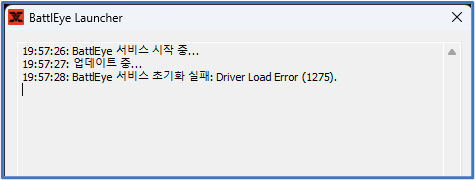
This is a known issue for Windows 11 users, and can be temporarily fixed with the workaround below.
| [Link] |
|---|
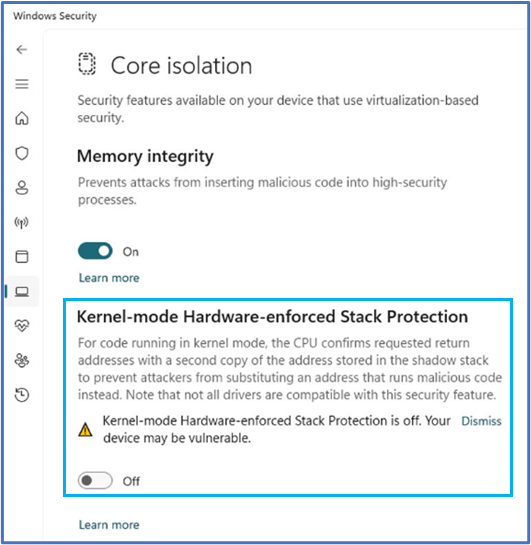
1. Windows Start menu > Enter 'Core Isolation' in the search bar > Open Windows Security window
2. 'Kernel-Mode Hardware-Enforced Stack Protection' option - Switch to OFF and reboot PC
|
⚠ After the BattleEye service was applied, the game became laggy.
Some programs influenced by the BattlEye service may affect gameplay.
If a player has banking and financial security programs such as keyboard protection, etc. running, the game may slow down, so please run the game after exiting.
⚠ After the BattleEye service is applied, crashing occurs.
Please update your BattleEye program to the latest version.
| 1. Nexon Account - Uninstall the BattleEye program from the path below (deleted when the Uninstall_BattlEye.bat file is run) - Path: C:\Nexon\VeiledExperts\VeiledExperts\Binaries\Win64\BattlEye |
| 2. Steam Account 1) Uninstall the BattleEye program from the following path (deleted when running the Uninstall_BattlEye.bat file) - Path: C:\Program Files (x86)\Steam\steamapps\common\VEILED EXPERTS\VeiledExperts\Binaries\Win64\BattlEye 2) After performing step 1), relaunch the Steam app |
Thank you.