
Hi everyone! Level design is a task as difficult as rewarding. When you’re creating an area for players to interact with, it’s got to be easy to read and navigate, but also break players’ expectations so it isn’t too predictable. It needs to be challenging, but also not too difficult so as to become frustrating. You might think that a game such as IDEA, which uses real-world footage, doesn’t involve any level design at all… but that’s not true – or not exactly! Let’s take a look at this screenshot:
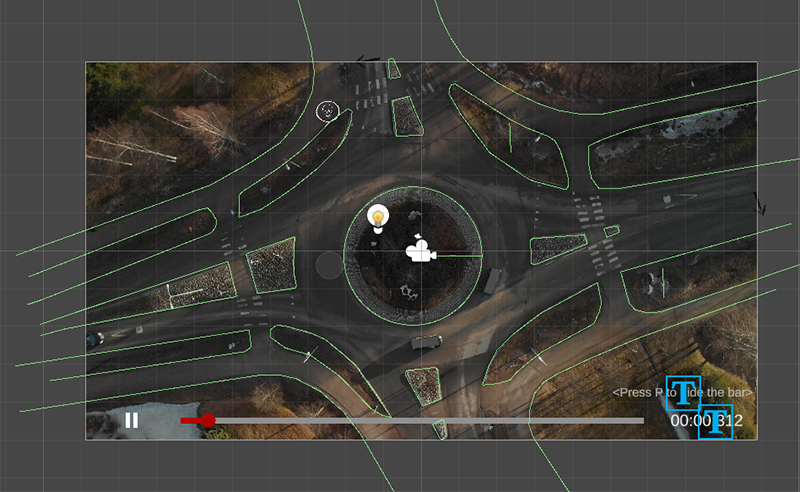
See the green lines? Those are the borders with which your lightbulb will bounce. And every single border is created and designed by hand. As far as we know, there aren’t any tools that can track videos finding their hard borders; it’s likely an AI-driven algorithm could be trained to detect borders, but we just don’t want that. This is a game, after all, even if it’s not as challenge-driven as others; and thus there has to be some degree of level design involved in our work, so every screen feels alive and different, creating opportunities for players to interact and challenges that might get you stuck and end your run. That’s the kind of care and love that an algorithm can’t provide!
The person in charge of this process is Javier Jiménez, who you might remember from our previous dev blog – he’s the developer who found a way to reproduce 4K videos without loading times. When it comes to drawing the borders of a screen, his golden rule is always to respect the natural lines of each landscape: trees, fences, walls – obstacles that are visually obvious, and that clearly say to the player that an area is blocked and they have to find another way to navigate the level.
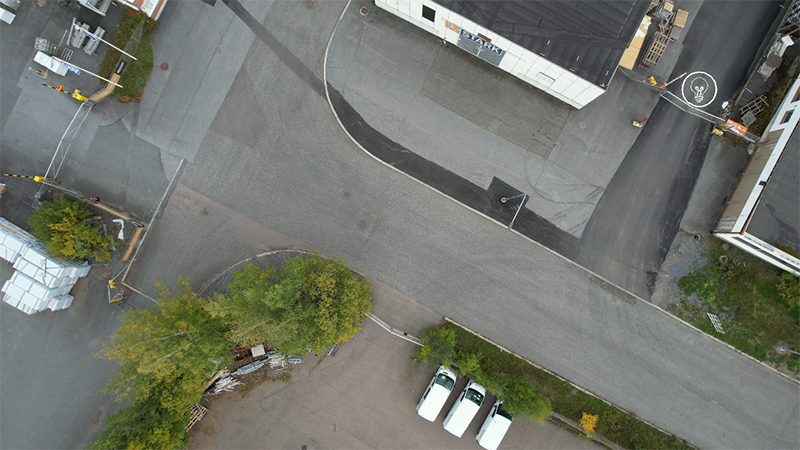
This should always create a clear path you can understand with just a glance, and help the player to make decisions very quickly so they don’t spend time trying to access an area that is blocked. But at the same time, these obstacles can be used to create surprise and replayability. Like in the screenshot above these lines: you enter a new area and you get immediately stuck in that fence, which might be a bit frustrating, but it makes you think there must be another way to enter this screen from a different angle… and thus, a brand new path for you to follow and discover.
That said, that golden rule has exceptions: we also try to break the player’s expectations so the game’s screens are not completely predictable. We do try to keep the rules consistent – for instance, generally speaking sidewalks aren’t navigable -- but there are exceptions… and here comes another challenge: finding a way to let the player know that there might be an exception in play. Check this screenshot out: as we’ve seen normally you would bounce from a sidewalk border, but you can actually get into this one. The fact that this path crosses a green area is a hint for the player – the kind of silent invitation for players to try something, just to see what happens.
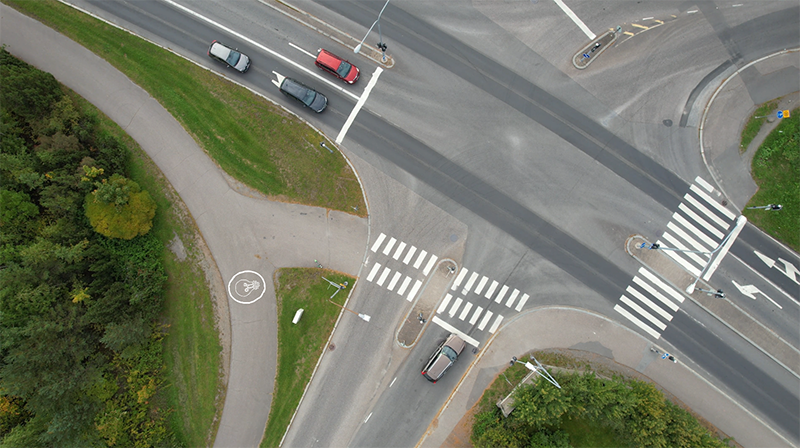
We use other ways to create surprise and unexpected situations. The lightbulb can go under some areas, almost disappearing from your sight (you’ll always have its glow to know where it is, though). There are also moving objects (like cars) that can not just alter the course of your lightbulb, but also change its speed! We do try to balance that so you can always foresee (up to some extent) where it’s going to land, but if you actually lose control of it and end in another screen, or even stuck, it’s ok too – you would have learned from it, and the next time you get to that screen you’ll be able to predict the car or use it to your advantage. Since a lot of the paths you follow are actual roads and paths, in our tests players learn to use cars very quickly.
And how does Javier do all this? He uses Edge Colliders, a Unity component that is widely used to define borders and create collisions. Using Bézier curves, arcs and straight lines you can cover pretty much any shape you can think of, including circular shapes (like roundabouts) or complex polygonal shapes like buildings. Moving obstacles, like cars, are less refined – if a car hits you at full speed you’re not going to notice if its collision box is a box or has small bumps, so bothering to design a complex box would be completely overkill.
As you can see, even if it seemed unlikely, there is some level design involved in IDEA. And, again – it’s all done by hand, because even if we could use an algorithm to define and detect borders in all the video footage we’ve got, we wouldn’t use it!
That’s all for today! See you next week in our dev diary, when we’ll start introducing you to some of the key people who are working in IDEA. Remember that you can help us a lot wishlisting and following the game, as well as spreading the word on social media. Have a nice rest of the week, and stay safe!