
This update has the same version for both the official release and the beta
This time we're only adding a test for the dock background liquid glass. Both the official and beta channels are fine, but you'll need to add the configuration file manually because this feature isn't finished yet. There might be a lot of bugs, so it's just for trying out. Turning on liquid glass will increase GPU usage since it keeps taking screenshots in the background. If you're gaming, it's recommended to turn it off.

Changelog
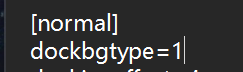
Added dock background liquid glass configuration. You need to manually add dockbgtype=1 under [normal] in config.ini. After restarting, the dock background liquid glass effect can be enabled.
Brand new compilation method, program instruction set changed to AVX.
Completely new dock icon rendering method, high-quality icon rendering removed. In this version, rendering is always high-quality, fully GPU-accelerated, fixing all previous versions' icon residue and other rendering issues.
Fixed the previous issue where leaving the dock from the left side without icon magnification enabled caused text labels and icon selection effects to be misaligned.
Optimized minimized window animation shadow rendering, using D3D11HLSL to render shadows, improving performance and reducing video memory usage.
Fixed the previous version's dock icon scaling and global scaling configuration reading error.
Fixed the previous version's dock icon loss issue.
Adapted to WeChat Mini Programs. Each mini program can display an independent icon and can also be added to the dock with WeChat Mini Program binding.
Fixed the previous version's issue where adding a general icon would cause the window to freeze after clicking add.
Fixed the issue in the previous version where front scheduling on multiple screens could cause the program to freeze.
Fixed the front scheduling issue where continuously switching windows could cause a certain window to disappear from the window list.
Fixed the high CPU usage problem caused by recycling bin detection due to a large number of disk partitions on some systems.
Fixed the incorrect icon sorting order issue when saving in MyFinder.
Fixed activation issues for some program tray icon menus.
Optimized the Launchpad icon rendering, separating text and icons to save GPU usage.
Optimized the Launchpad drag-and-swap icon order feature.
The temperature detection program has been identified as a virus by Windows Security Center due to a vulnerability in the Winring0 driver, and is currently searching for a new temperature detection method
supplement
win11 24H2 system does not show WiFi, you need to turn on the geolocation of the system
If you have some problems with the game stuttering or unable to enter the game, you can go to the game icon in the dock - right-click menu - options - no longer show this program to minimize the animation, and then in the preferences - window animation, window display and hide animations all add the exclusions of the game, and finally restart mydockfinder
All the function buttons in Dock and Finder have corresponding functions in the middle button of the basic mouse wheel, dock icons, window previews, stage scheduling window lists, myfinder buttons, scrolling up and down and clicking on the scroll wheel
After turning on the multi-screen display dock at the same time, you can't drag the icon, because you are afraid that the icon configuration will be out of order
Version 2.0 takes a while, and I want to make a super stable version before version 2.0, because as soon as there are new features, there will be new bugs, and all new features will be released when there are almost no bug fixes.
Known issues
Dock icon masks cannot follow global color changes after advanced editing
Occasionally, the dock does not activate the window, and it is currently being investigated
Additional instructions
myfinder volume menu added the function of switching sound effects spatial sound effects,At present, this function is not due to the fact that there is no example on the network, even if it is AI,So every time this function is run, the sound will be stuck when it is displayed for the first time,The reason is that the background will switch all the spatial sound effects once to detect whether which sound effects are installed
If the Win10 system to open this feature after the crash you can open the program installation directory config.ini file, search for "dockicoImmersion=1", delete this line of text to save and restart the computer can be!
Win10 2004 before some systems may have a crash after opening the dock icon reflection, and even the task manager can not end the process, you can open the config.ini file in the program installation directory, search for "enable_iconreflection=1", delete this line of text and save it after restarting the computer
Once the Trash is deleted, it can be re-added in the Add System icon
The window display animation is not perfect at present, if there are many problems, you can close or add exclusions to individual programs, it is known that the window will occasionally disappear after the window animation is displayed, and the window needs to be reactivated to display, the UWP program animation will be displayed twice, and some program windows may be clicked invalid after display, such as Task Manager and Notepad
After MyFinder hides the window with its own menu bar, if the program that hides the menu is displayed abnormally or unstable, please unhide the window menu bar