
CROWZ OPEN BETA TEST will start soon!
To all the Crows who have waited so patiently, please check the information about the OPEN BETA TEST schedule and the Pre-download.
⭐️ OPEN BETA TEST information
- We will be applying updates and fixes based on the valuable feedback from all the Crows, and the OPEN BETA TEST will commence to better showcase CROWZ!
This OPEN BETA TEST is open to any Crows who want to join CROWZ without any complicated steps!
▶️ OPEN BETA TEST schedule
- February 20, 2022 15:00 21, 2022, 03:00 ~ TBA
※ More details regarding the OPEN BETA TEST will be announced through a separate notice.
▶️ Pre-download schedule
- Download period: February 11, 2022 ~
※ The game will start if you press 'Play', but will not be playable.
※ If you start the game after the pre-download, you can check the count down until the OPEN BETA TEST start.
※ The update button may appear continuously during the Pre-download period. This can happen when editing/adding data to prepare for the test.
※ It will not be possible to access the game even if the update is completed before the OPEN BETA TEST starts. We recommend that you proceed with the download on the starting day of the OPEN BETA TEST.
※ We will notify you in a separate notice when the download for the final update to participate in the test is available.
How to launch (download) the game
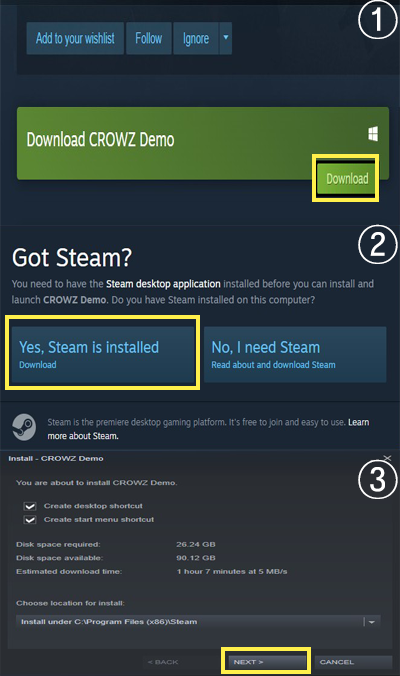
STEP1. Go to CROWZ store page
STEP2. Click the [Download] button at the bottom of the page → [Choose to install Steam] → Install → Launch
※ The game can only be downloaded if the Steam client is installed, so please check if the Steam client is installed first!