
New Template - ACT - Jump of sky
A new template DLC made by the official will be available soon, expected around the end of March.
The template is GameCreator's official platform jumping game template - Jump of sky
It is a platform jumping game template without any self-contained combat system. Future official platform jumping templates will be based on this template.
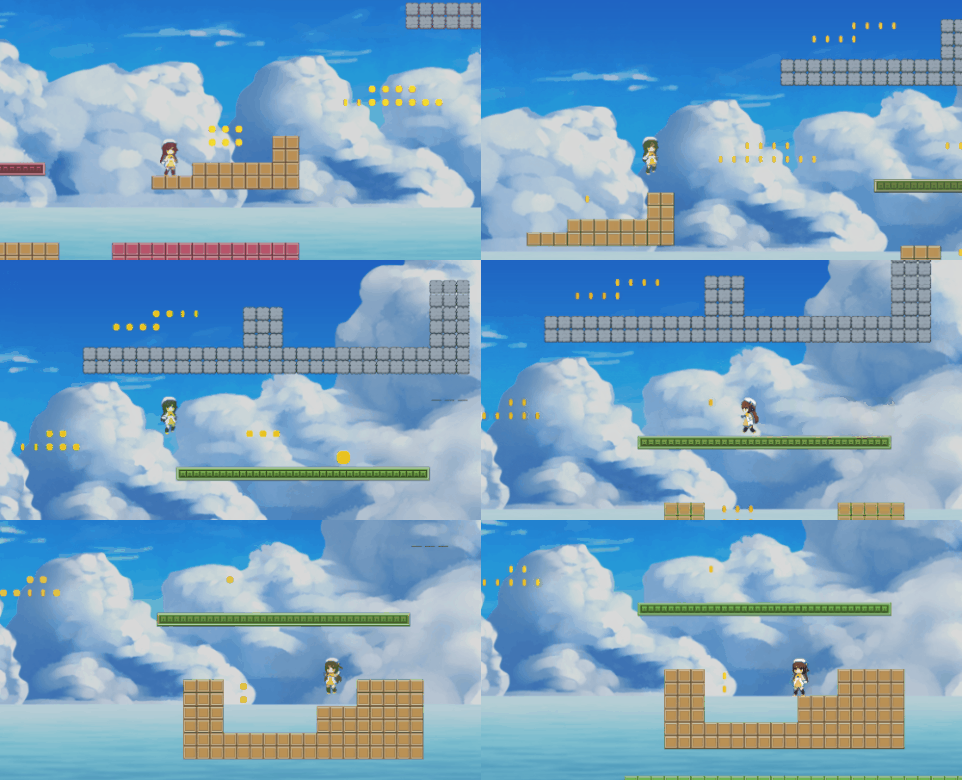
Getting Started Difficulty: ★★★
Entry-level authors can create a complete game flow using pre-defined function blocks + drawing maps.
Advanced makers can expand by changing module parameters, adding events, modifying scripts, etc.
Engine-Module-Custom Helper
Custom Helpers
New features.
● Frame-by-frame helper: Support different frames to store different helper data, the game can get the helper data of the current frame according to the current frame of the avatar.
● Shape support: rectangle, circle, triangle, polygon, line, oval, none
● Helper list: Show all helpers, each helper can be set off display and locked individually (and the whole helper list can be hidden).
● Custom Editor Support: Add custom helper configuration in Menu - Custom Editor, you can configure which shapes of helpers are displayed in the current editor. For example, if the template only supports rectangular helpers, you can turn off the other shapes so that only rectangular helpers can be used in the production.
Note: This function needs to be called by code, and eventually the template will be used or not. For example, the current version of "Jump of sky" already supports frame-by-frame rectangular helpers, which can be used to change the collision size in real time by setting the helpers data in different frames.
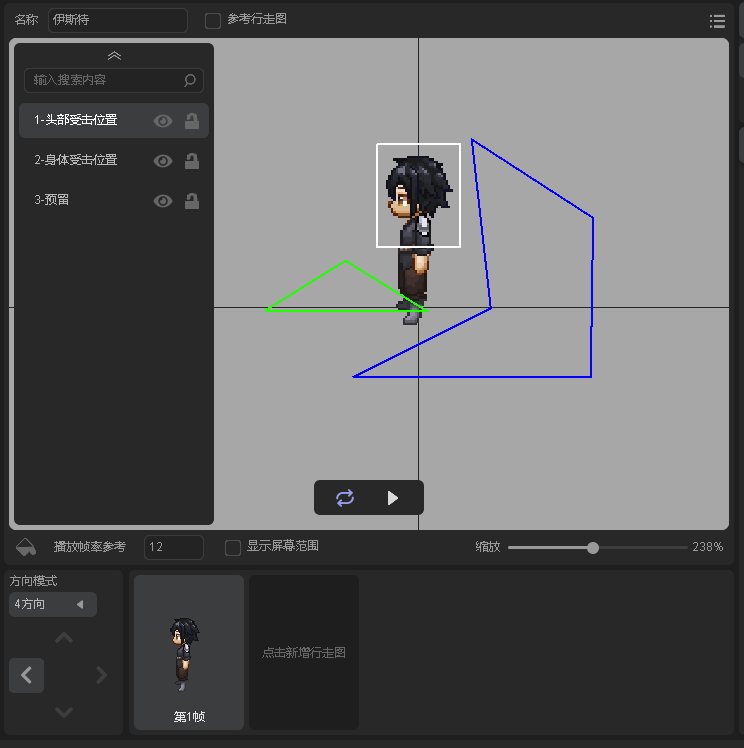
Operation method.
1-Turn on the display helpers in the database - avatar editor (or shortcut H to enable and disable)
2-select the helper for operation (polygons can be moved to the corresponding line double-click to add a point)
Engine-Module-Scene object preset repository
Scene object preset repository
Allows to save the scene object as a preset, the object created by the preset is the same as the previously set effect, the preset will save all the data of the scene object, including the event command.
For example, if you have made a scene object with a treasure chest of 100 coins, after saving it as a preset, you can simply drag and drop the treasure chest of 100 coins from the preset warehouse to create it in the future.
It has been applied to the "Jump of sky" template, which makes the production threshold further reduced, just drag out the preset function blocks to use, no need to configure any parameters or add events.
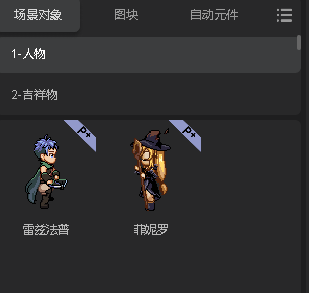
Operation mode.
1-edit the existing scene object prototype or add a new one, prototype settings-configuration items-display mode, modify to data preset
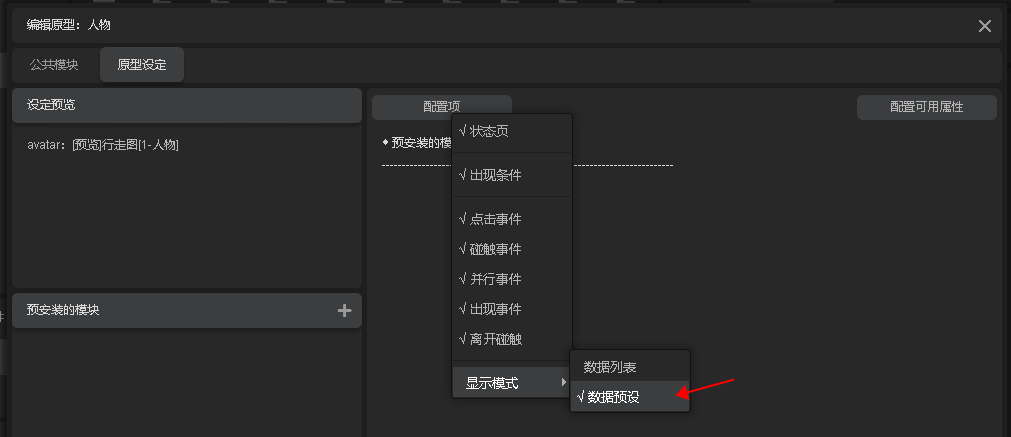
2- Save the scene object on the scene as a preset with a right click
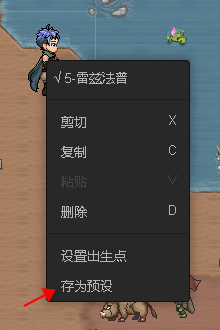
3- You can drag and drop to adjust the position of the data in the preset list or delete it.
engine-module-resource-encryption
Resource encryption
Image resource encryption is supported when publishing the game. When checked, image resources will be encrypted to protect the material in the project.
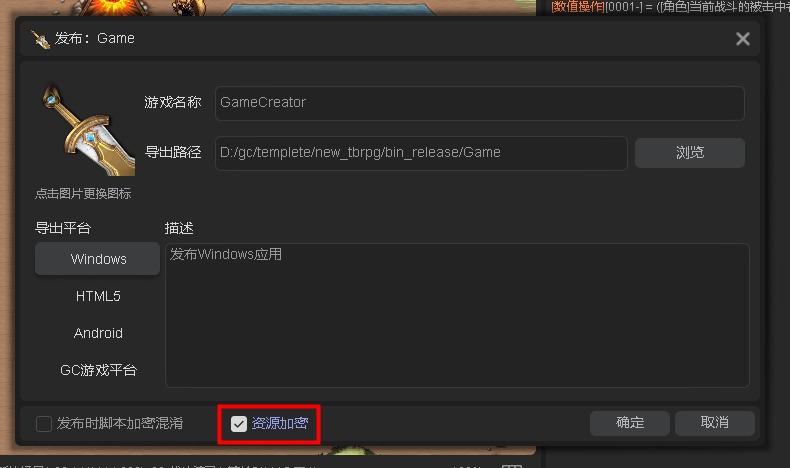
Engine - New Features
● Android package supports full-screen mode, i.e. no information bar for power, signal, etc. (default full-screen mode, if you need to cancel it, you can call the script os.fullscreen = false;)
● Add custom component: 59-SelectedSenceData: Used to select the coordinates in a scene, support only the coordinates of the current scene and variable mode.
● Tiling function is added to the bitmap component of the interface
● The auxiliary panel of the scene object has been added with a switch that can hide the orientation controller.
Engine-Tweak and Optimize
● Added protection for export path when packing for Android to avoid accidental file deletion.
● Android packing is optimized once and supports offline mode (you can also try to pack after disconnecting if you encounter packing failure)
● Auto landscape in Android mode has been changed to true landscape mode, so that it will also adapt to the input method landscape.
● The system will automatically hide the avatar property panel when the avatar is not displayed by modifying the editor (for example, if the walking map is hidden in the editor preview of the object module).
● Custom behavior commands are not listed if the name is empty
Engine - Bug fix
.
● Fix a bug that caused an error after uninstalling the scene in some cases (caused by calling ClientScene.setViewPort even after uninstalling).
● Fix the problem that the existence of module variables of the current module in the custom module causes an error (reference mode - value).
● Repair the problem that two modules in the custom module refer to each other's module variables, resulting in error reporting (reference mode - value).
● Fix the problem that accessing SceneObjectEntity.prototype.setSwitch through script is useless.
● Fix the issue that when the option setting is cancelled, another one sets the default option. The focus of the default option will be wrong.
● Fix the problem that the picture component in the interface can't modify the nine-box grid by using string pictures
● Fix the bug that the picture layer of the current map may be cleared in some cases after reading the file
● Fix the problem that the script SinglePlayerGame.getSceneObjectSwitch gets the wrong object switch.
● Fix the problem that the map name is displayed incorrectly when the word "copy" exists in the archive.
● Repair the problem of error when using unassigned game values in numeric variable operation.
Engine-API
● The editor preview is upgraded (such as the editor preview code of the scene object module), and some APIs are provided, and the variable name editor can access the editor interface (the editor interface will be opened gradually).
● UIBitmap added isTile property: whether to tile or not
● AvatarRefObj is changed to Helper (AvatarRefObj is kept for the old project without error, but API is no longer provided)
● Avatar's refObjs changed to Helper type
● Avatar added helperType: auxiliary body mode 0-uniform mode 1-frame-by-frame mode
● Added SelectedSenceData, the return value type of the coordinates of the custom component 59-selected scene.
● ClientSceneObject added lockDrag, lockDelete, lockKeyMove
Template-RPG - Feather of cyan
● Optimize the operation of the virtual joystick on the mobile side, it should take effect immediately when pressed
● New command: Timer, support countdown and positive count
● Game value: Get the current countdown
● Template update archive time limit, so that the archive is not triggered again in the archive
Template - TBRPG - Sword of dream
● Synchronized the update of "Feather of cyan"
● Added our status icons in battle - show detailed descriptions when hovering the mouse
● Added more of our characters to the battle screen by default, making it easier to set more than 4 characters
● Fixed the bug that the upgrade event could not be triggered when increasing or decreasing character attributes, changing experience and increasing level.
● Added upgrade events to character settings
● Added HP consuming skill (can consume both HP and SP)
● Battler in the battle interface will no longer be added to the background in battle, instead, the container battlerRoot will be replaced, so that the character display will not be affected due to modifying the background.
● Fix the issue that CustomCommand3.ts is missing by default in vscode compilation
● Fix the bug that the end of action event is not thrown at the end of battle (EVENT_ONCE_ACTION_COMPLETE)
● Fix the bug that the phrase of the game value - role - the way to get the role is not described correctly at certain values
● Fix the bug that the database - role - initial carry setting still carries skills and equipment when it is unchecked.
● Fix the bug that changing experience value in "Increase or decrease character's attributes" may report an error when the character is full level.
● Repair the problem that skills may still have effects when passive attributes, passive status, special ability, status change and event settings are unchecked.
● Repair the problem that equipment may still function even if the passive status and event settings are not checked.
● Repair the problem that the status may still function even if event setting and special ability are not checked.
● Fix the problem that the team may still function even if the event setting and carry item setting are unchecked.
Template - AVG - Eyes of star
● Fixed the issue that when the archive interface is displayed with a jogging event related to the current interface component in the event, the archive interface is displayed incorrectly when opened again immediately after reading the archive interface.