
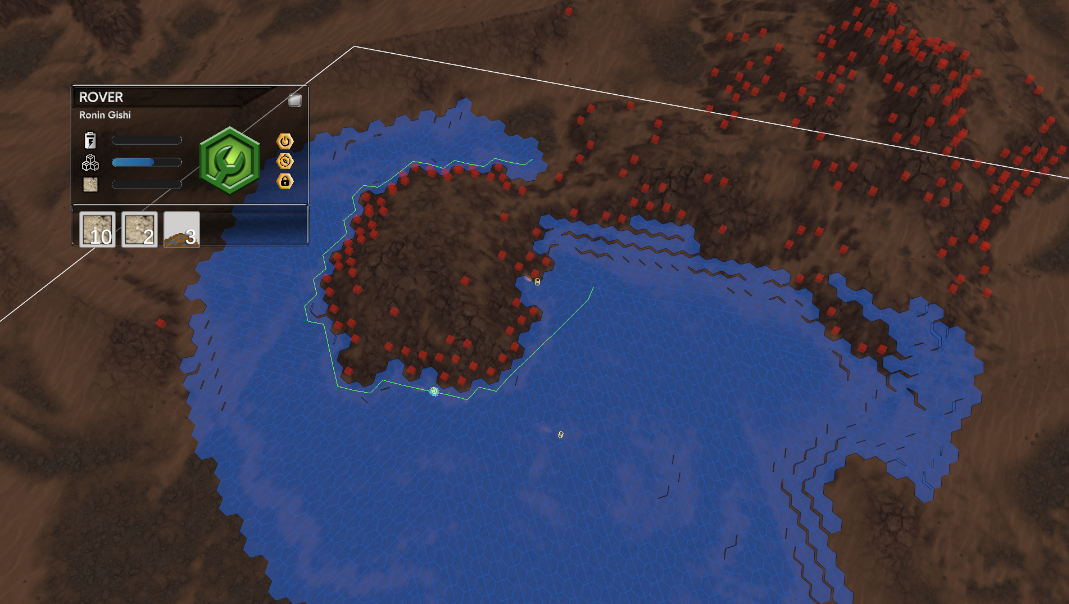
Huge step up for the pathfinding - development view
Huge week of productivity here for the team, so much to update you with this week. The highlight of the week is a shift to a new pathfinding tech - A* Pathfinding Pro by Aron Granburg. The screenshot above is a development only view with the Unity Gizmos turned on showing a rover doing a long path around a hill that would be found in West Ladon Valles around 23 S, 29W in the Margaritifer Sinus quadrangle (MC-19). What attracted us to integrated A* Pathfinding is that it is happy to create grids dynamically across terrain tiles and is not hung up on the boundary between terrain tiles. We are looking forward to deeply leveraging this into a number of new features and behaviors.
Enhancements:
- All new pathfinding tech is in place, a lot of benefits - many bugs fixed, better rover behaviors, and even about 1000 lines of code have been pruned from the code
- Rovers now path find across terrain grid tiles
- No more crazy pile-ups trying to smash into the center of a storage unit
- Use of raycasting to mark filled the hexagonal grids accurate to the physical shape of the SimObject
- New navigational icons in the main game view as we transition to our new UI style (will happen over the next few updates)
- The log window is now able to be resized and dragged around
- Double-tap the spacebar now takes your camera up to the camera limit above the terrain
- Left-Control B - pops the camera into a “Bird’s Eye” view looking straight down
- Left-Control W - pops the camera over to the selected SimObject
- Added more options to the settings screen
- Only your own rovers show up on as indicator icons - no more confusion with your neighbors’ rovers
- Your slice of heaven right there on Mars! Review your plot’s boundaries with Left-Control-O and tap O to toggle on and off
- After unloading a full load rovers now wander off and do a bit of discovery and then tuck into a new round of mining
- In-game feedback widget where you can take a screenshot of the game and add some words to let us know about a bug, or something confusing or even something you like!
Bugs Fixed:
- Fixed a bug with large stacks of stackables being added to another stack of stackables and the loss of the remainder of the stack when the new stack would reach its stack limit
- WTF!OMG! Now the game has a separate state machine to keep track of when you are playing the game, vs typing in the chat input line vs typing in a menu, so, so much better - many bugs and confusion have been eliminated! This also included the intelligent interpretation of the ESC key to close windows that are being displayed or to abandon a line of text being typed or to stop dropping an item (or a stack of items) or to de-select a SimObject
- The highlighting of the currently selected SimObject and the currently hovered over Sim Object has been cleansed up and works consistently now
- Moving of buildings placed is back! Now select an object and tap X to move it to a new location. We might need some game mechanics around this in the future.
- The crafting system now fully respects the volume limit of factories and does not enjoy the benefits of cheating with negative volumes
- Mini state icons are back! They were shy, now you can turn them on or off again with the tap of the i key
Behind the Scenes:
- A ton of work is in progress on the server side of things (as always)!
- The linking of factories is now server persistent
- The state of a SimObject is also now server persistent
- All of our data-driven game data has a new tool processing it into our DB from use of google sheets
- New developer-only command to advance the world time on a development server so we can test time dependent features (many) more rigorously
Cheers,
-Erik