
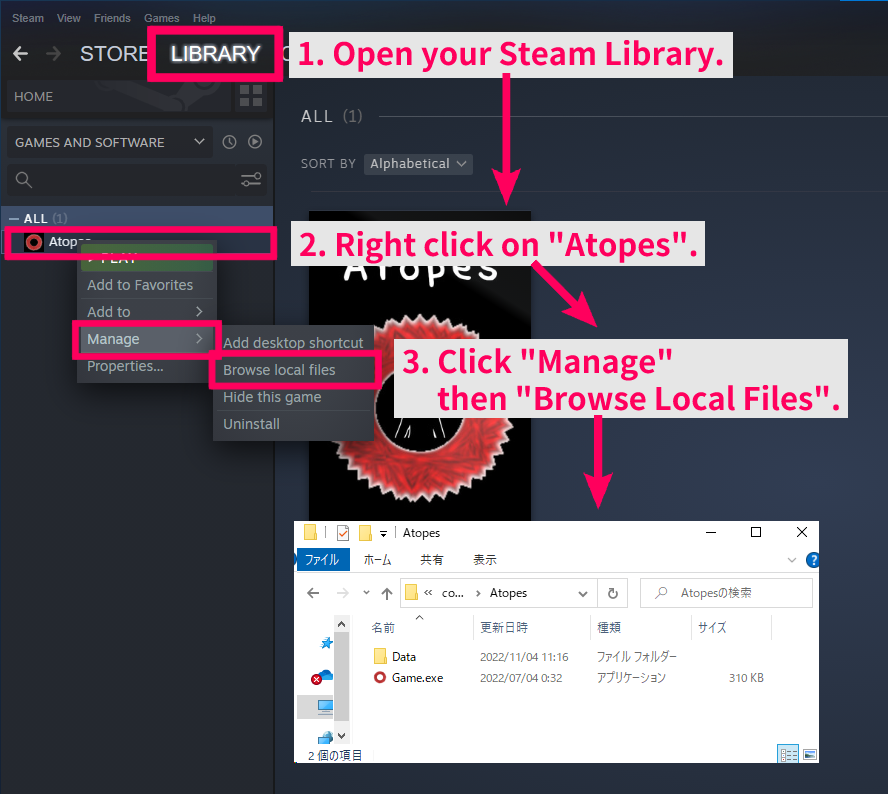
How to view the local files.
Open the Steam app.
1. Open your Steam Library.
2. Right click on "Atopes".
3. Click "Manage" then "Browse Local Files".
Local Files are now opened.
Developer announcements, patch notes and gaming coverage from across the GaugeDB catalogue.
Source: Steam Community (opens in a new tab)
How to view the local files.
Open the Steam app.
1. Open your Steam Library.
2. Right click on "Atopes".
3. Click "Manage" then "Browse Local Files".
Local Files are now opened.
Steam update times within 24 hours of this post. Matching dates do not confirm which build it describes.
Build 9914684 · public branch
Steam updated · First observed