
- Maintenance Schedule -
Nov 27 (Thu) 06:00 ~ 09:00 UTC
※ Maintenance time may be shortened or extended depending on the progress. Any changes will be announced separately.
- Patch Notes -
[Contents Added]
■ New Battle Pass Open
The “Christmas Spy Operation” Battle Pass has begun and will be available until the maintenance on February 5, 2026.
※ As the Battle Pass duration has been extended from 8 weeks to 10 weeks, weekly missions have been adjusted from a 5-week cycle to a 6-week cycle.
With the end of the previous Battle Pass, “Moonlight Thieves”, its key rewards can now be purchased from Shop > Special.

■ Recruitment Reward Item Update
The Master and Weapon Set lineup for Rare (Normal Recruitment) and Legendary (Advanced Recruitment) has been updated.
※ For both Rare (Normal) and Legendary (Advanced) weapon rewards, the previous method of obtaining basic parts + mod parts separately has been changed to a full-set acquisition format, granting all components at once.
※ Effective from the Nov 27, 2025 maintenance until the start of the Feb 26, 2026 maintenance.
New Pickup rewards can also be obtained with Gold Master Coins through Shop > Exchange.

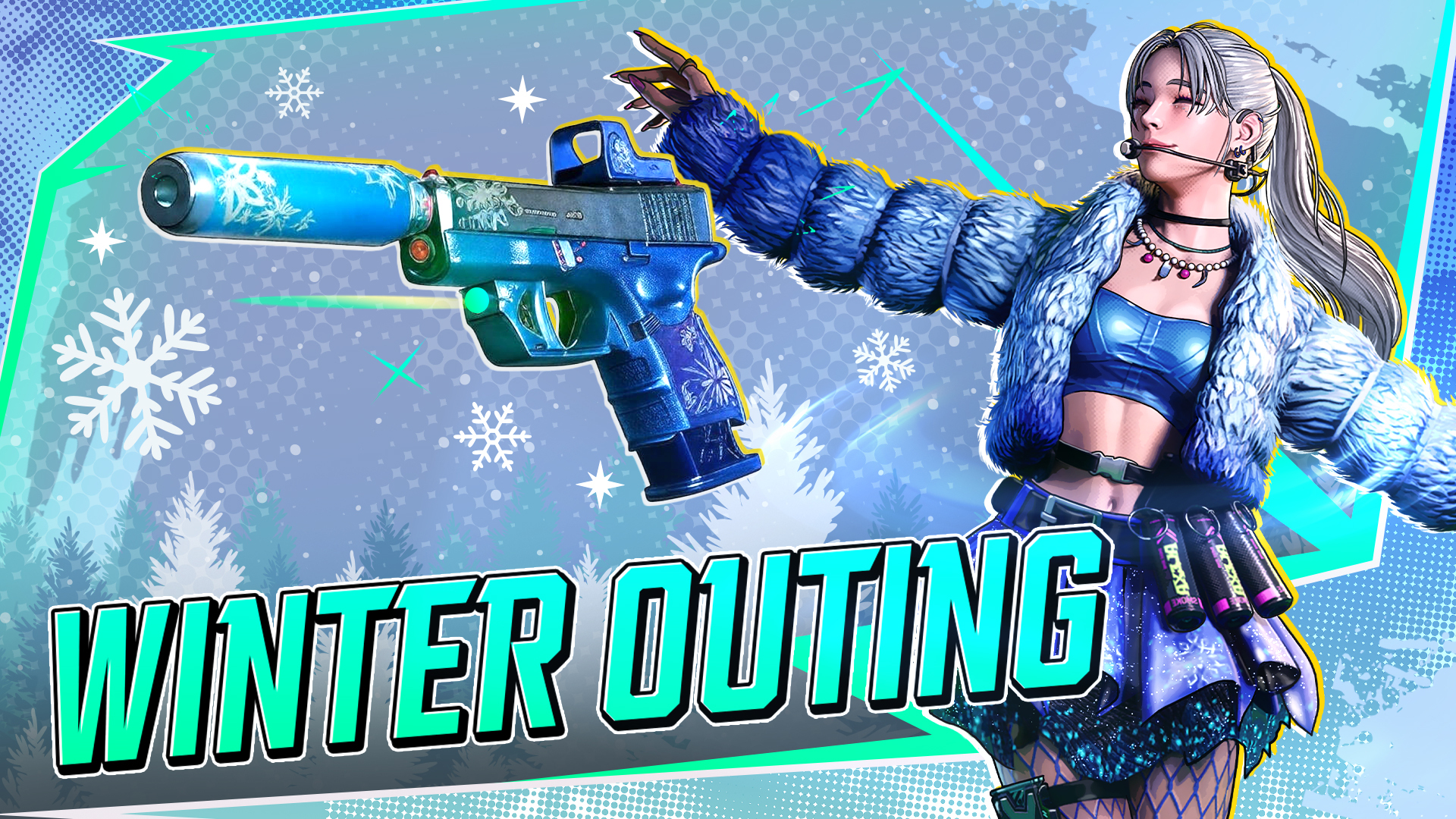
Advanced Recruitment | Normal Recruitment | |||
|---|---|---|---|---|
Added | Removed | Added | Removed | |
Master | [Ms. Twin] Indigo Maid | [Hardworker Crush] Leeds Day's Set | [Kaira] Winter Blue | [Mr. Hollowpoint] Mad Clown |
[Ms. Twin] Violet Maid | [Hardworker Zero] Leeds Day's Set | |||
[Hardworker Grasper] Leeds Day's Set | ||||
Weapon | [Walther PPK] Indigo Maid | [Walther PPQ] Vintage Factory Set | [Glock 26] Winter Blue | [Walther PPK] Clown Purple |
[Walther PPK] Violet Maid | [Kimber 1911 Rapid] Jade Dragon Set | |||
[CZ 2075 RAMI] Red Thread Skull set | ||||
Accessory | [Charm] Maid Bow Tie | |||
[Charm] Maid Heel Bow | ||||
Sticker | [Sticker] Twin's Nameplate | |||
[Sticker] Maid M.A.I.D.! |
■ New Social Feature Added
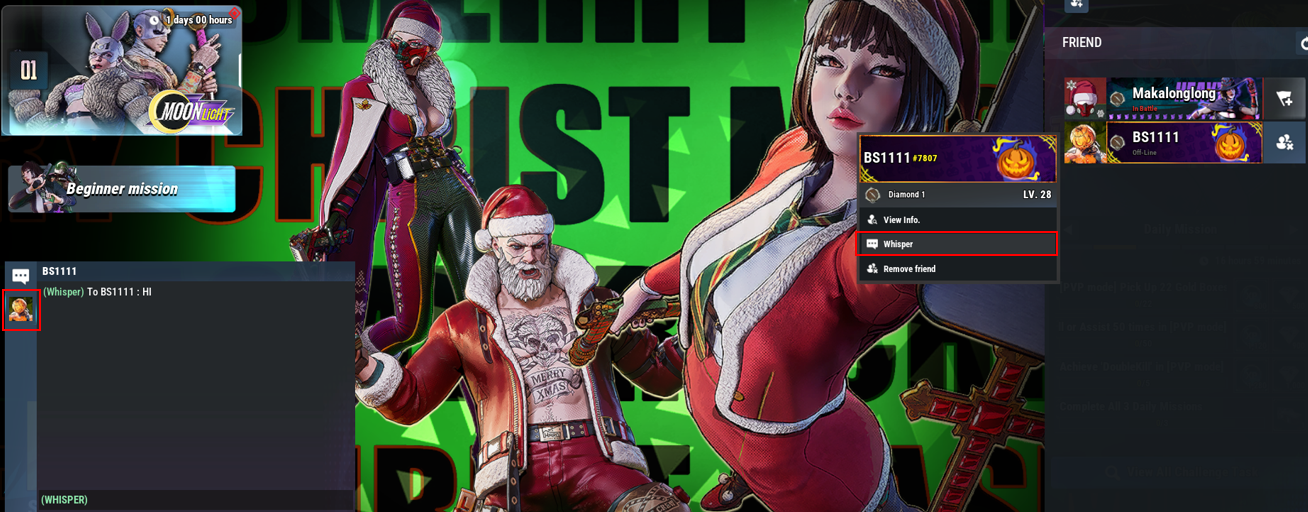
Friend Chat (Whisper) Feature Added
Messages can now be sent between users who are friends.
By clicking Social > Friends > Whisper, you can open the chat window on the right to talk with your friend.
Clicking a friend’s emblem on the left side of the chat window will switch the conversation to another friend.
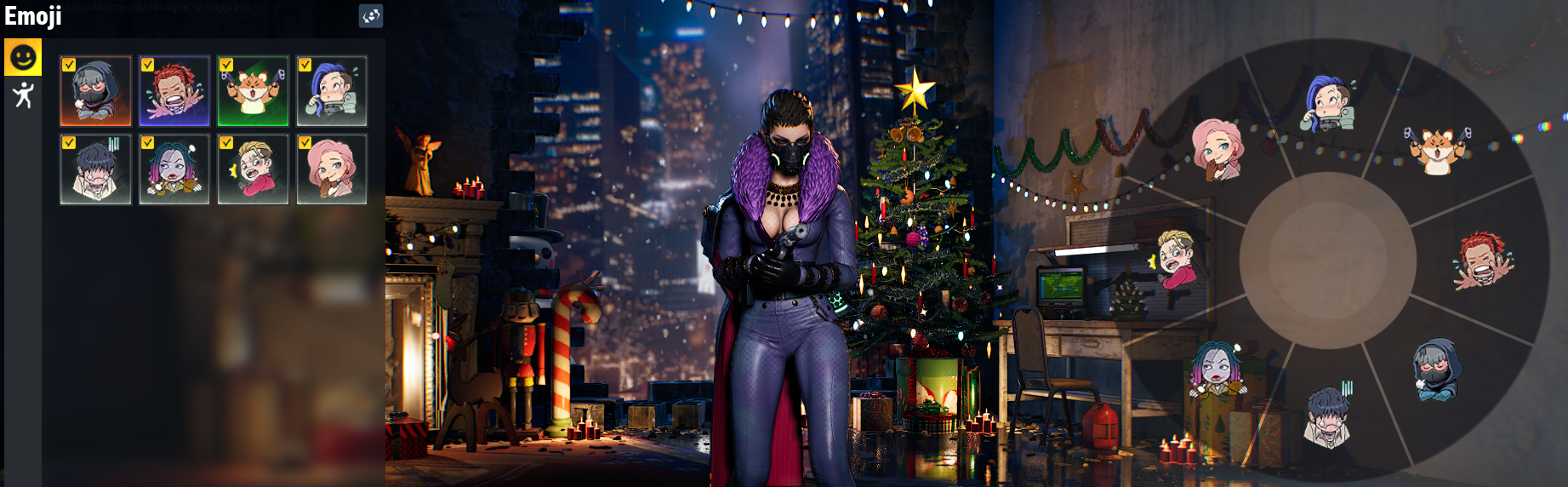
Added Emote Wheel Function
Added an emote configuration feature under Master > Emote menu.
During battle, hold the ‘C’ key and move the mouse in the desired direction to select and use an emoji.
The Ping Wheel function has been changed to activate by clicking the middle mouse button.
※ Since both Ping (Mouse Wheel Button) and Emote (C) may overlap in key bindings, please check your key settings in ESC > Settings > Controls.
[Balance Adjustment]
■ Shooting mechanics have been changed so that firing in third-person view automatically switches to first-person view.
When using Action Skills, the camera will automatically switch to third-person view.
When using dual pistols, the view will remain in third-person.
You can disable automatic view switching through the settings:
※ Settings > Options > Controls > Third-Person Shooting
■ Karia: When using “Rainbow Syndrom” (SpaceBar), characters inside the smoke now take 4 damage per tick every 0.7 seconds for 8 seconds.
■ Micron: When using “Piercing Shot” (SpaceBar), the aiming movement speed for arrow firing has been adjusted from 0.5 → 0.7.
■ Third-person shooting accuracy increased (approximately 2× improvement).
■ First-person moving aim-shot: Accuracy while moving increased (2×).
■ Increased movement speed while aiming in first-person view (×3)
■ Headshot damage multiplier changed from 1.4× → 1.2× relative to body shots.
■ Armor damage reduction values adjusted:
Armor Type | Changed | Previous |
|---|---|---|
Damage Reduction Rate | ||
Soft | 0.3 | 0.2 |
Medium | 0.5 | 0.35 |
Hard | 0.7 | 0.5 |
Multy | 0.4 | 0.35 |
[Content Fixes & Improvements]
■ Main Screen Overhaul
Applied seasonal and event-themed UI to the main screen.
Improved the Social UI, allowing players to view and add friends directly from the main screen without switching pages.
Adjusted the layout of major menu icons.
If Beginner Missions are not completed, a banner will now appear on the main screen.
The Party Invite button has been moved to the upper-right corner, and the visual indicator for invited party members has been changed from character portraits to emblems.
■ Beginner Mission Steps Simplified
Steps 1–7 have been merged and simplified into 2 steps.
Step 8 (Level 5 Reach Mission) has been adjusted to an easier difficulty and changed to the Master’s “First Mission”
■ Improved item acquisition information and methods
For unowned items that have an available acquisition source, the source information and shortcut button will now be activated.
For purchasable items, required currency amounts can now be checked, and items can be purchased immediately.
■ Tier rewards for Season 1 have been standardized to match the rewards of each tier’s highest rank.
Tier (Ex) | Stage | Changed | Previous |
|---|---|---|---|
Silver | I | Advanced Recruitment Ticket x16 Normal Recruitment Ticket x24 Gold Master Coin x248 | Advanced Recruitment Ticket x16 Normal Recruitment Ticket x24 Gold Master Coin x248 |
II | Advanced Recruitment Ticket x15 Normal Recruitment Ticket x23 Gold Master Coin x236 | ||
III | Advanced Recruitment Ticket x14 Normal Recruitment Ticket x21 Gold Master Coin x224 | ||
IV | Advanced Recruitment Ticket x13 Normal Recruitment Ticket x20 Gold Master Coin x212 | ||
V | dvanced Recruitment Ticket x12 Normal Recruitment Ticket x18 Gold Master Coin x200 |
■ Improved visual comfort by adjusting the flashbang effect: after the initial flash, the screen now darkens to maintain limited visibility while reducing eye strain.
■ Reduced screen shake when taking headshot damage to alleviate discomfort during hit reactions.
[Optimization]
■ Optimized the processing of various visual effects, including explosions, skills, and weapon effects.
■ Improved data handling and resource streaming during major in-game loading sections.
[Bug Fixes]
■ Fixed an issue where the lower-body muscle activation of the Twin character remained active after death.
[Other]
■ Controller Support (Alpha)
We have begun the first phase of controller support. Some usability issues and bugs have been identified, and additional improvements are in progress.
Supported devices: XBOX, PLAYSTATION (requires Steam Input gamepad layout)
Supported display mode: Fullscreen
Key layout check/edit: Options > Settings > Controls
※ Existing users may need to select “Reset Controls” in Options > Settings to use it normally.
※ Please share improvement feedback on the official Discord; we will actively apply updates.
■ Compensation due to maintenance
Reward: Booster Ticket × 200, Normal Recruit Ticket x3
Claim method: Sent via in-game mail after maintenance
Thank you.
BLACK STIGMA Team