
What's happening
There's a new beta of Learn Japanese RPG with katakana, mouse controls and a batch of fixes. It's opt-in. You only get it if you pick the unity_beta2 branch. If you do nothing, your game stays as it is.
How to opt in
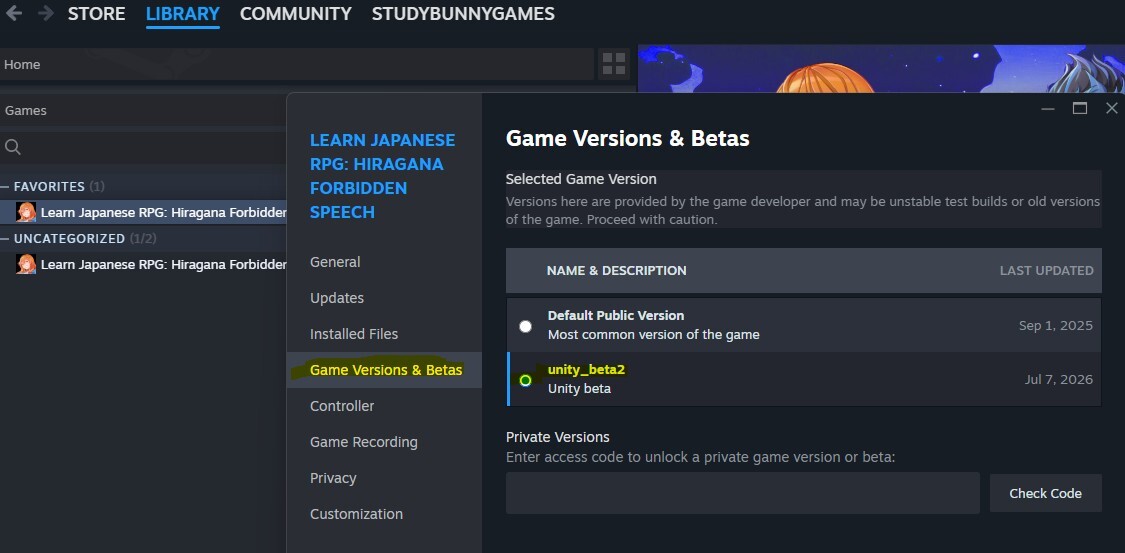
1. In your Steam Library, right-click Learn Japanese RPG and choose Properties
2. Select the Game Versions & Betas tab
3. Under Selected Game Version, choose unity_beta2
4. Steam downloads the update. If it doesn't start, restart Steam
How to leave the beta
You can leave the beta anytime and everything but your katakana data will be retained. Follow the same steps as above, but choose the default version under Selected Game Version.
How do I know I'm on the beta?
The version number in the bottom left corner of the title screen will be 2026-09-23 or later.
Your saves
Your saves carry over to the beta, so you can continue where you left off.
What's new
Katakana
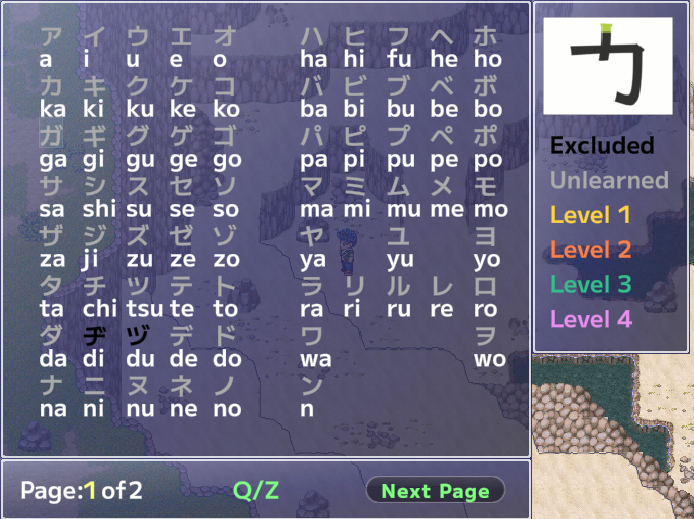
Katakana is now taught in battle. It comes after all the words and hiragana, so on an existing save you'll see it once you've learned all of those.
Mouse controls
- Click on the map to walk there. Click a person or object to walk up and talk to it
- Hovering the mouse moves the menu cursor, and the mouse wheel scrolls lists
- Right-click works as Cancel
- In battle, click a multiple-choice answer to pick it
- New clickable buttons for menu and battle actions, including a "Replay Audio" button beside the game screen
- A new pixel-art glove cursor that hides while you play with keyboard or controller
Found a bug?
It's a beta, so please tell us about anything that seems wrong:
Discord: https://discord.gg/tAhtJN7g
You can also post in the Steam discussions or in the comments on this post.
Happy learning!
Lun