
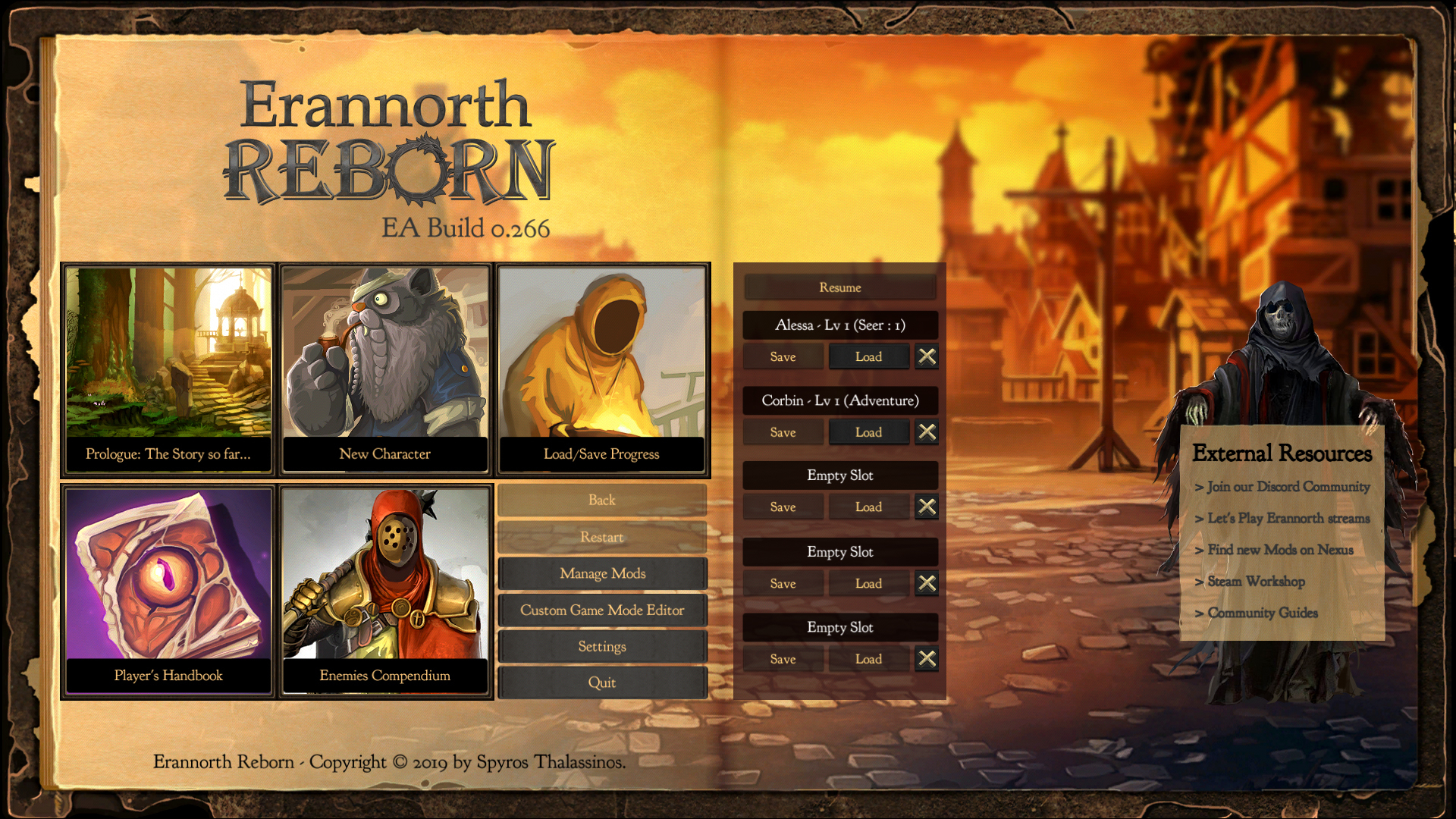
Hi folks! This build adds 5x Save / Load slots in the game. If you always wanted to play with multiple characters and switch between them when you feel bored or need a break from them, now you can. Otherwise you can use, not use, or abuse this system as you see fit.
The second addition of today's build makes graphic overhaul mods a peace of cake. Just put the graphics in the proper folder named after the Card or Enemy and you are done! Upload in Workshop and enjoy. No matter what I do to these enemies or cards, your graphic overhaul mod will always be fully compatible and work as a charm ;)
For those of you who have unlocked everything, and want to try something new, take a look in my Multiclass Mod in Steam Workshop, as it also allows you to play Class/Class combinations. Like for example a Shadow/Necromancer or a Witch/Spelldancer removing the need to do separate class mashup mods for that. I recommend it only to those who have unlocked everything, for the simple reason that the mod will force unlock every race & class in the game and that would be overwhelming for a new player.
https://steamcommunity.com/sharedfiles/filedetails/?id=1866929392
I hope you'll enjoy these changes! Let me know if you encounter any issues or bugs. ;)
Multiple Save/Load Slots
- There are now 5 new Save Slots in Addition to the Resume Slot. (If you need more, there are also Modder's shell commands to Save/Load progress)
- Clicking the Former Continue button (Now: Save/Load Progress) will toggle on/off the Save/Load Manager
- You can (manually) Save your Game Mode Progress any time Enemies aren't present. Click Save in the corresponding slot.
- You can Load your Game Mode Progress only when a Character isn't active (if one is Active: first you need to end the run using the 'Restart' button). Click Load in a corresponding slot.
- You can use the x button to delete a save. There is no confirmation so make sure you really want to delete the save ;)
- You can also just overwrite save over the same slots
- For testing purposes the Game mode currently don't impose any restrictions i.e you can save spam Ironman. But this will change once I am certain that the system works well.
Easier Card or Enemy Artwork override Mods
- You can now override vanilla artworks of Cards or Enemies just by providing .png files with the same name. (No need to override or provide a DB entries). Any Artwork found matching a Card's or an Enemy's Name in the CustomArtworks/Actions or CustomArtworks/Enemies folders will be used automatically. For example to replace Lanna's Artwork: put a Lanna.png in the CustomArtworks/Enemies folder of your mod. To replace Feral Anger card: put a Feral Anger.png in the CustomArtworks/Actions folder of your mod. That's it.
- (UserArtwork is now a deprecated property but will still work nevertheless.)
Modder Shell Additions
- You can manually Save the Game Progress using the Modder's Shell only when a character is active using: SaveProgress [Savename]
- ie. SaveProgress Jonathan
- You can manually Load a Game Progress using the Modder's Shell only in Main Menu with no character active using: LoadProgress [Savename]
- ie. LoadProgress Jonathan
- If you end up having too many you can find these saves and delete them manually in C:\Users[Your Username]\AppData\LocalLow\Spyridon Thalassinos\Erannorth Reborn as they'll too sync with Steam Cloud
EA Build 0266.2 - Hotfix
- Added a Close button under the Save/Load Manager
- In some cases Audio would start out muted, till the user clicked on the settings menu
- In some cases Artwork overrides (with the new method), wouldn't display everywhere properly like in Echoing Actions or in Summons.