
Hi All.
In the previous few posts we've looked at the various stats that define a character's profile. Now it's time to look at the Inventory.

(Click to download)
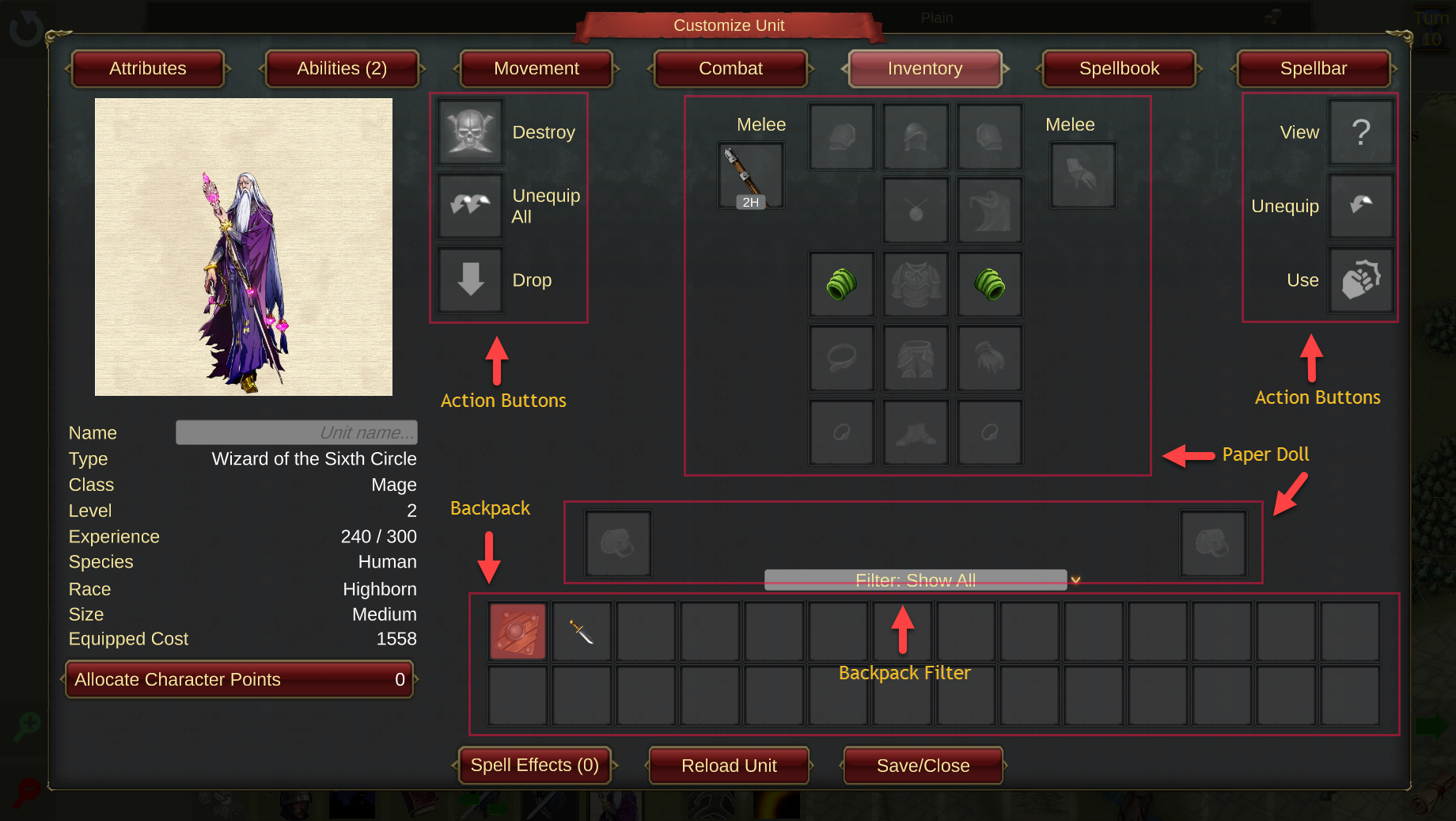
The Inventory page is made up of 3 sections.
Paper Doll - a graphical representation of the unit where items are 'equipped'. Any item that is equipped will usually affect one or more stats on the Attributes, Abilities, Movement or Combat pages.
Backpack - where the unit keeps all 'unequipped' items. There is no limit to the number of items in a unit's backpack and they are always displayed in item value order, highest value first. There is also a Filter field placed just above the Backpack where you can narrow down the items displayed. This is most useful if you have a lot of items in the Backpack.
Action Buttons - actions that can be performed within the Inventory.
Items are equipped from the Backpack to the Paper Doll by dragging and dropping. Whenever an item is dragged from the Backpack, the available slots that it can be dropped in are highlighted in green. Items can be swapped by dropping one on top of another on the Paper Doll. In the picture below the Dagger is being dragged and you can see the right and left hand Melee weapon slots are highlighted. You can also see that several of the Action Buttons are highlighted - these are explained below.


(Click to download)
If the Dagger is dropped on the slot holding the Staff, they will swap places. Also you can see that the Staff is denoted as a 2-handed weapon (with the 2H icon). If the Dagger is dropped on the empty hand slot it will automatically send the Staff into the Backpack as the unit does not have enough hands for the 2 items to be equipped at the same time.
Looking now at the Backpack of this Mage, there is an item in the first slot that is highlighted in red. This indicates that this item is not usable by this unit. To reveal more information about an item you can hover over it to reveal a Tooltip or Right Click the item to get full details as shown in this screenshot. You can also get full details on an item by dragging and dropping it on the View action button.


(Click to download)
At the top right of the picture you can see that this item is only usable by the Cleric or Warrior classes and thus it is not usable by the Mage.
The following screenshot shows an inventory for an Archer.


(Click to download)
Compared to the Mage that we saw above, you can see that there are additional slots visible on the Paper Doll. First there is a Quiver slot (second row down) where the Archer will keep Ammunition and then there are left and right hand Ranged slots where the Archer will equip their ranged attack weapon. Archers can have Ranged and Melee weapons equipped at the same time. When distant from an enemy only Ranged attacks can be performed but when adjacent to an enemy the Archer can choose to attack with either its Ranged weapon(s) or its Melee weapons(s).
As mentioned above, items can only be equipped in appropriate slots as determined by the Item Type of the item. The Item Type of each slot is as follows:


(Click to download)
Example items:
Melee - sword, mace, polearm, dagger...
Ranged - bow, crossbow, sling...
Shoulder - pauldron, epaulette, rerebrace...
Head - helm, hat, cap, coif...
Quiver - arrows, bolts, slingshot...
Necklace - necklace, amulet, chain...
Cloak - cloak, cape, shawl...
Bracer - bracer, vembrace, couter...
Torso - breastplate, chainmail, mantle...
Belt - belt, girdle, sash...
Legs - trousers, pantaloons, cuisses, grieves...
Gloves - gloves, mitts, gauntlets...
Ring - ring, band, circlet...
Feet - boots, shoes, sabatons...
Miscellaneous - orb, statue, bowl...
Looking now at the Action Buttons, there can be up to 6 displayed depending on where in the game the unit profile is being displayed. The buttons are:
Destroy - removes the item from the game forever and cannot be undone!
Unequip All - dragging an item here from the Paper Doll will move all items that are currently equipped into the Backpack.
Drop - only available in a Battle. The item will be placed in a Loot chest on the battlefield where it can be picked up by another unit.
View - the same as right-clicking an item, will give a detailed description of the item.
Unequip - dragging an item here will move that item to the Backpack.
Use - only available during a Battle or Army Management. Using an item will trigger its effects and destroy the item. During a battle Item Types that can be used are Consumables, Potions, Scrolls and Tomes. During Army Management only Scrolls and Tomes can be used.
Cheers!
Ian & Jann