I was hard at work this past week between exams and Quixer. I got some juicy stuff for you!
A few were asking for more and more keys to bind hotkeys on. With different keyboard layouts and exotics keys, I had to go with what made the most sense.
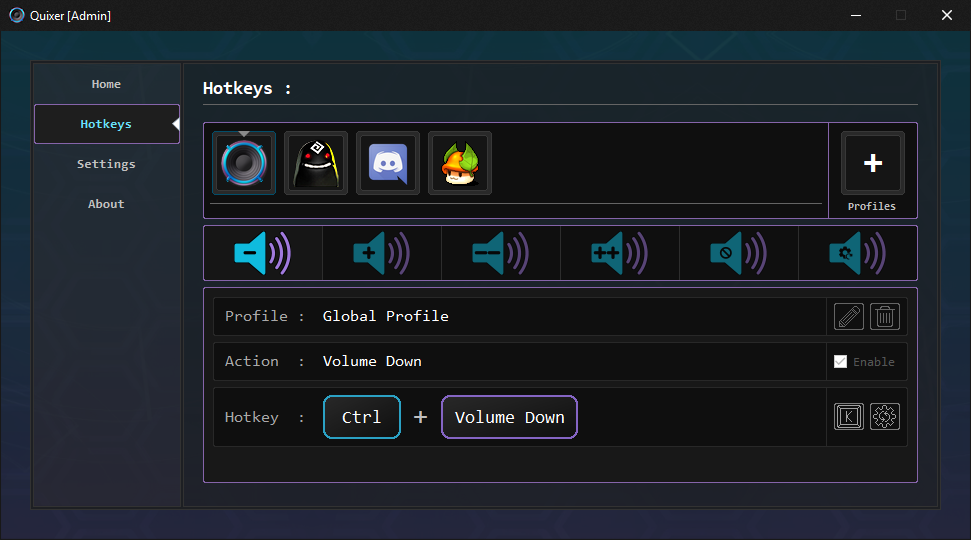
And so! I got rid of the keyboard layout and redesigned the keybinding from scratch. You can now simply press the keys you want to assign as a hotkey and some mysterious magic will happen right before your eyes.
Next we have profiles! This feature had me re-design the way configurations were handled so you will unfortunately have to rebind your hotkeys. (Sorry!)
I will try to make this simple... You have the default profile which is Global Profile. This profile is the equivalent of how Quixer used to be. Meaning the focused window will be the one having its volume adjusted.
You can add more profiles that will target exes of your choice. Upon assigning hotkeys to those profiles, you will be able to manage their audio without the need to be focused on those apps.
I'm sure it will make more sense when you try it!
And finally, as you can probably see, Quixer got a nice design overhaul all around. Don't underestimate designing... it takes a lot of time.
Even though I tested the new features a bunch, there might still be a few bugs hiding around. If you encounter one make sure you report it.
Feedback is always welcomed so keep it coming.
That's it for now though. Profiles have opened a door to more features in the future so we will see what happens next!