Build 68:
This patch adds new content but is primarily focused on improving controls the user experience. Desktop mode has had a significant overhaul and has received a new casual play tool: Auto fasten. Auto fasten will come to VR play in later patches. There are also many bug fixes, too many to document in the patch notes. More changes to both desktop mode and VR mode are coming soon.
Content:
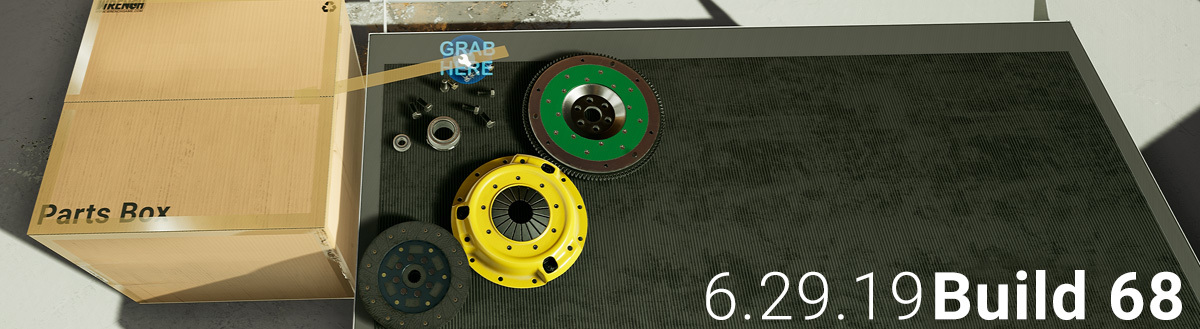
Added clutch kit (flywheel, pressure plate, clutch disc, pilot bearing, flywheel bolts, pressure plate bolts, throwout bearing) and updated temporary transmission art to support clutch install. The game will attempt to auto install the clutch parts onto cars when loaded in the new patch. If the player’s cars are disassembled on load, the clutch parts will not be auto install but can be installed by using the “Install New Parts” button in the car details app.
Catalog and parts purchases overhaul:
- The catalog has been redesigned for better usability in both desktop and VR play. Parts are broken into categories, thumbnails are more legible, and the layout has been tweaked. Parts are also searchable by name. VR users can open a virtual keyboard to type in part names.
- The new catalog uses a shopping cart and checkout screen format. Money is now visible but still not implemented in this temporary version of the career mode. Purchased parts are packed into boxes and delivered into the shop. Boxes are opened by pulling the tape off starting at the “grab here” node.
- Broken replacement bolts are now delivered by a package instead of the bolts spawner. The bolt and parts spawner have been removed from the game.
Parts scanner removal:
The parts scanner has been removed from the game and replaced new inputs that don’t require physically holding a tool. In VR trigger is now used to inspect a part. In desktop mode the E key inspects or players can inspect from the right click context menu.
Miscellaneous:
- More parts are now paintable including the timing belt and the parts delivery boxes.
- Added a roadmap app and updated the new game introduction tutorial
- The lift is now controlled through a grab handle in the world. The lift app has been left on the tablet and still functions. We may remove the lift app in the future.
- Car details app now has a part name type in filter
- Notifications have been added to the tablet UI.
- Reduced the frequency of race event “money shift”
- Added purchase sets to many more parts
- Minor assembly rule tweaks
Desktop mode:
- Controls have been overhauled. E is now used for inspection and is no longer a second input for pickup/interact.
- Hovering the mouse over parts in desktop mode now gives some basic information on the hud.
- The tablet interface has been converted to a 2d menu system opened and closed with the tab key.
- Right clicking opens a context menu for easy access to all the major functions for that part. Hotkeys are also available for all actions in the context menu
- The flashlight has been converted to a headlamp and is cycled on and off with the 3 key. Repeat pressing of the 3 key will change headlight brightness. Auto Fasten:
- A new auto fasten feature has been added to facilitate more casual play. In career mode 2.0 the auto fasten will be balanced to reward players who do not use it.
- Auto fasten is accessed through the right click context menu, or directly with the R key. Bolts removed using auto fasten enter the players “pocket”. The auto fasten tool can only install bolts that are in the players pocket. Players can manually access the contents of their pockets with the Z key (this is the same functionality as the small part pickup found in the last patch). Pocket controls: z: Store/Unstore part hold z + MWheel: Cycle stored parts hold z + MClick: Store target
VR mode:
- Controls have been tweaked for VR mode. Vive users can no longer switch locomotion modes on the controller and now must do that from an option in the settings app. Oculus users can use either the thumbstick click or settings app to change locomotion modes.
- Magnet grab has been moved. Oculus users operate magnet grab with the B button and Vive users access magnet grab with the right controller up button.
- Vive and WMR users: A bug causing double inputs when using the right controller up button has been fixed. This was previously causing locomotion modes to switch. Magnet grab is now bound to that input and the double input but has been resolved so magnet grab will not be triggered when holding a wrench and attempting to change fasten direction.
- Trigger when not holding anything is now the inspect functionality. Inspection operate the same as earlier version and rely on the inspect app.
- Added a watch function for viewing tablet notifications in VR. Raise your left hand as is you are looking at a watch and a mini tablet will appear. Pressing the home button on your watch will summon the tablet.