SPOUT and NDI
ColoryVR is now sending the "Live Cam" Spectator screen to Spout
Spout enables you to send video between windows applications without screencapturing. it works directly on the GPU. Many Video applications support Spout, for example OBS or Resolume.
Get Spout here: https://leadedge.github.io/
There is also a SPOUT->NDI application on their website. this works perfectly. with this, you can stream the output over the local network to other computers running any NDI enables application likve OBS or similar. (NDI Tools optional available here: https://ndi.tv/tools/)
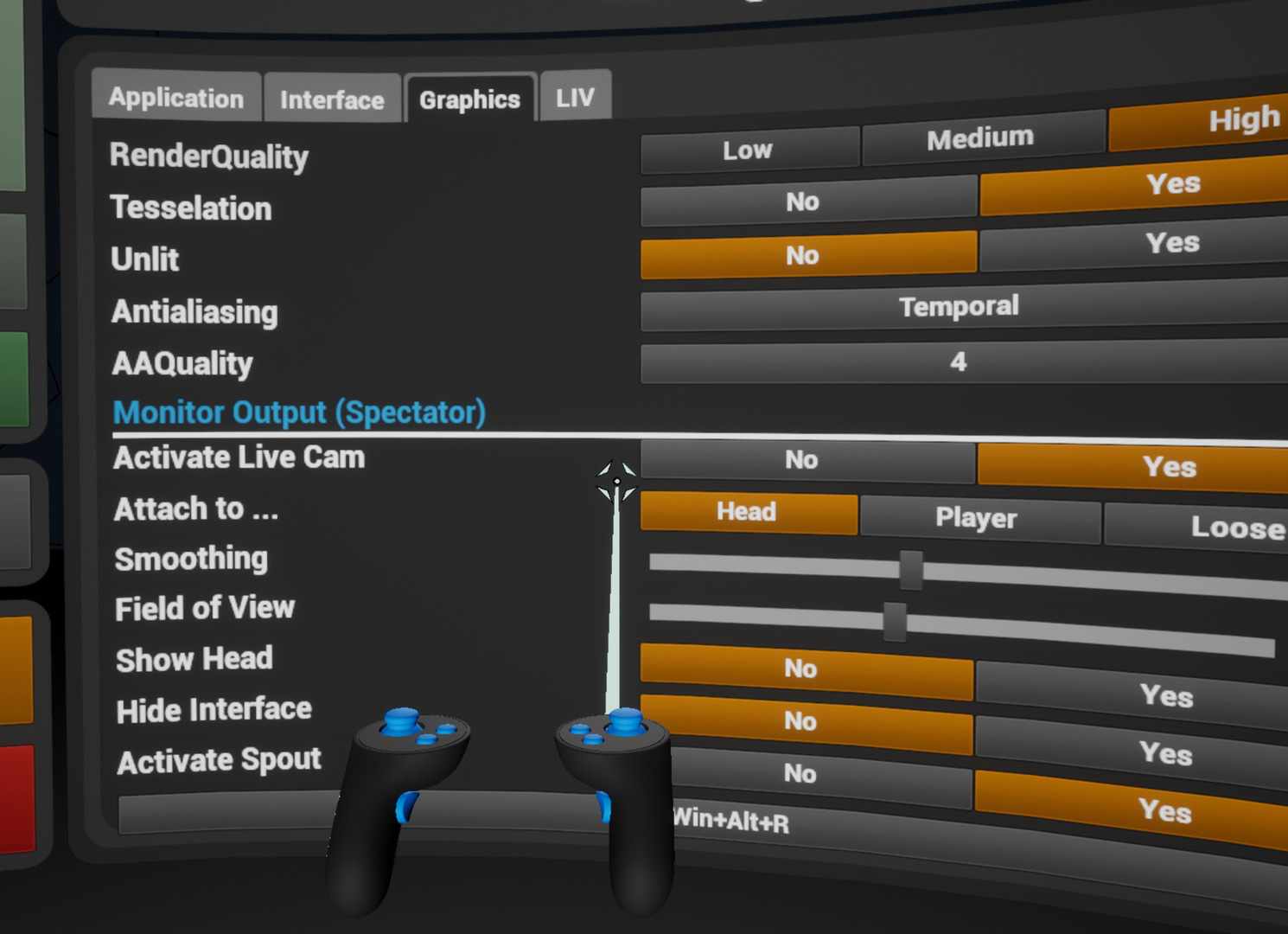
Go to ColoryVR Settings, tab "graphics" and activate "live cam".
After that you can activate the option "Spout"
ColoryVR will send on a Sput channel named "ColoryVR_Spectator".
On Oculus, you have a resolution nailed at 3296x1776 (Native Oculus Res).
On other headset, we output 1920x1080 for better performance.
Please report your experiences on discord.
Small changes in ColoryVR
- Maximum PlayerSize is increased from 20 to 75
- Selection Material was opaque and is now additive.
- Youtube-Brush: Added Parameters for Crop and Chromakey to Material Designer.
- Added a "Home" Button to the World-Panel. this will teleport you to the zero position in your image.
Activate Spout here: