
Pipe System Improvements
Pipes are an incredibly useful way to move water, steam, magic crystals, and all kinds of goods around your town without using up population capacity. But, there were several aspects about them that needed improvements. The new version is meant to be more user-friendly but also more customizable.
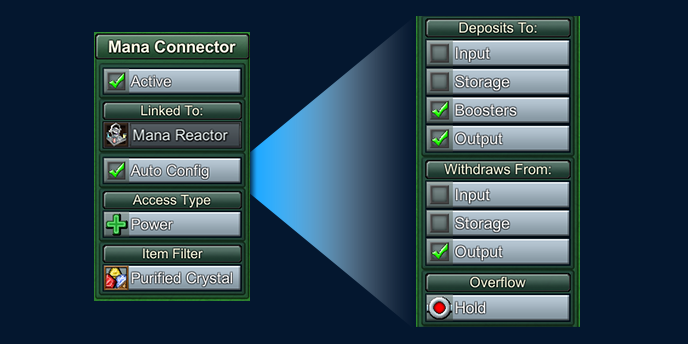
- Added new 'AutoConfig' flag on pipe connectors. This setting will allow connectors to update its ability to Input, Output, or Boost based on the type of building it's connected to and whether there are pipes flowing into or out of the connector. In most cases players can just leave this on and use the default behavior.
- AutoConfig will also automatically set the Overflow flag to Hold if it's targeting a building that consumes depleted crystals and outputs charged crystals (or vice versa) to prevent unwanted items in downstream pipes.
- AutoConfig can be turned off, which will allow the player to very specifically control pipe connector behavior, and it won't automatically get changed if the building or connected pipes change.
- Pipe Connector behavior settings that can be independently changed are: Deposit to Input / Output / Storage / Boost, and Withdraw from Input / Output / Storage. This allows players to chain together buildings in new ways (like filling up one building's output slot directly from a pipe inlet).
- Removed ‘Default’ option for connector overflow behavior. The proper setting (Bypass or Hold) is now detected and applied based on previous 'Default' logic.
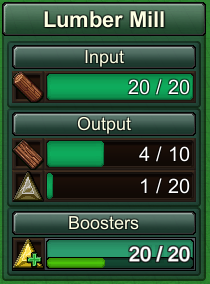
- Buildings now have dedicated inventory slots for Steam Booster and Mana Booster inputs and outputs. This makes the booster behavior more obvious and allows for buffering of boost ingredients.
Only items supplied using the ‘Deposit to Booster’ setting on connectors will fill these slots, and only items in these slots will be consumed to power the Booster (not recipe inputs).
- Resolved bugs that occurred when placing pipe connectors independently
- Pipe connectors can only face one direction. It was too limiting to force them to connect to the buildings on either side. Instead, they only link with the building they are facing (- This will break In+Out connectors that had directly connected buildings via a 1x1 pipe but otherwise should be backwards compatible with all previous layouts)
- Can choose pipe connector input type when placing individually, cycle through options with TAB. When placed individually, they AutoConfig setting will not be enabled as it is assumed the player specifically wants Input or Output as a fixed setting.
- Added new filters for “Charged or Depleted Mana Crystal” as well as all elemental crystal types
- Pipe connectors that transfer between overworld and underground layers can transfer items regardless of Input/Output settings.
- Stopped depleted crystals from leaving through other Input connectors
- Fixed clipping on pipe connector icons
- Using Pipette tool on a connector will copy its connection settings
- Internal pipe flows are displayed while a connector is selected
- Steam Power Plant no longer automatically creates an underground steam connector at its origin
- Changed icon on boost-targeting mana connectors to match the standard Booster icon
- The 2D icons on the underground layer indicating available pipe connections are now circular and tinted green if there is a matching booster or input slot on the building.
- The status panel of Pipe Connectors will display what building they are linked to
- Access Type icons are more consistent with the icons that appear on pipe icons
- Pipe Connectors will be automatically configured with the ‘Nothing’ item filter (preventing all output) if they are created or modified while attached to a building that has ambiguous output, and that would go through that connector (to prevent unwanted items in pipes). For example, a Kitchen making both Apple and Berry juice will default to a 'Nothing' filter on the connector when drawing pipe outlets.
Misc Improvements
- Performance improvement due to optimizing player inventory UI
- Performance improvement from optimizing rail cars
- Can reposition the status/inventory panel (top-right) and activity panel (bottom-right) by dragging on the header
- Added logic to prevent player from dragging menu panels off-screen
- Pipe Connectors and Grabbers will automatically assign an initial item filter if the linked building has exactly one output. If more than one output, will still be flagged as ‘Nothing’ filter which requires the player to choose a filter. This should prevent unwanted outputs when a recipe is changed or added.
- ‘Storage’ data overlay only shows buildings that supply to shared inventory (e.g. Barns, but not Rail Stations)
- Square highlight no longer appears on grid view if nothing highlighted
Balance Changes
- Fish Oil now requires 5 work units instead of 10
- Increased maximum allowed houses for all base levels 5 and higher
- Ether production is now enhanced by the Magic town specialty
- Infinite research for Production Speed now requires Industry Research Points instead of General Research Points
- Ward is now buildable as soon as the player has Enchanters, to provide another way to earn Purple Coins at this stage of the game. Previously it required Magic Jewelry research
- Books are now included as part of Knowledge specialty
Bug Fixes
- Fixed bug: Campaign Map 7 was requiring Writing Supplies for Mana Reactor research. New and legacy maps will have this setting reverted to new (correct) defaults
- Fixed bug: visual artifacts on some menu buttons
- Fixed bug: hitbox on Medicine Hut was too large
- Fixed bug: costs for research would be invisible if loaded a map where research was complete, then loaded a map where research was not complete
- Fixed bug: in campaign 4, books were not sellable at schools
- Fixed bug: in some legacy campaign 2 maps, Intermediate Logistics was not available, so the player could not build the required conveyor belts
- Fixed bug: Potato Bread recipe was not benefiting from Production town specialty
- Fixed bug: Game was failing to load assigned Purple Coin Boosters
- Fixed missing icons for Knowledge Tome satisfaction category filters
- Fixed bug: Incorrect tooltip for Knowledge specialty (it doubles Tome production, but it no longer doubles Research Point gain)