
It's been a rough week between learning how to setup a Linux server from scratch and how Steam's server list registration works, but things are... mostly working now. Currently I've switched the dedicated server I'm hosting from the new California Linux server back to the Tokyo Windows server while I work out some Linux specific bugs, but the Tokyo server is registering fine with the Steam servers, and can now be connected via the in-game server list.
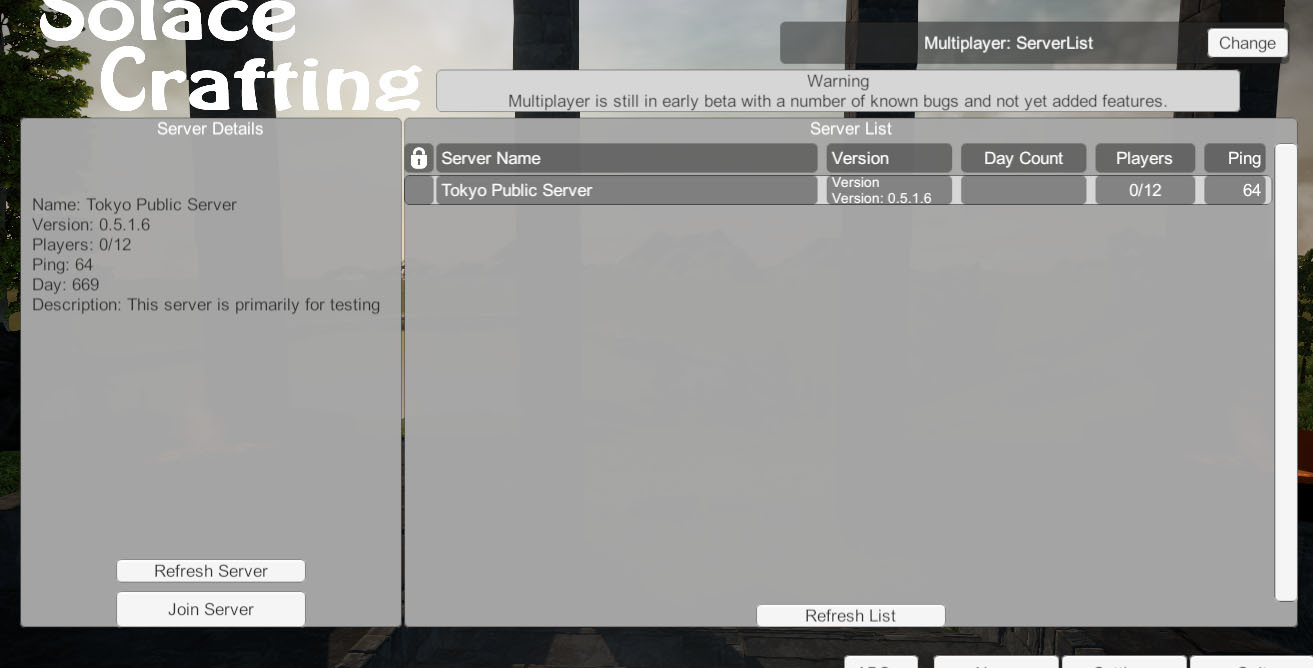
This also means anyone else that starts up a server with thier ports properly opened should now show up on the server list as well! I have changed the default ports used to 27015 and 27016, which are pretty common here on Steam it seems. I will make both of those changeable in the server config file.
Once I can clear up the Linux bugs I will move the world that has been up for the past week back onto the California server, and finally get back into fixing bugs.
The worst part of it all, the main reason setting up the server list functionality took me so long was due to an error in the documentation I was following. One variable used in the Steamworks SDK has to match another variable in the Steamworks Dashboard, but the documentation I was trusting in said the SDK should be left blank. Luckily I don't think I've lost any hair from the frustration, but I certainly lost a few days of development time.
When I consider something important I don't give up on it lightly. Probably the main reason I'm still here, and I'm not going anywhere, as Solace Crafting has a lot left to become. On that note, May sales were the best they've been since Early Access first launched, so I hope that the coming weeks of multiplayer fixes and improvements help to create more momentum as it's really hard to get noticed on this big ball of ours!
Thank you again to everyone patiently awaiting multiplayer improvements, and to everyone posting bugs and screenshots in our Discord server, and sorry this feature has taken so long!
v 0.5.1.6 2019.05.29
- Steam managed server list functionality added
- Server config file added (see stickied post in discussion boards)
You may need to restart Steam for the update to begin.
To opt into Beta you only need to go to your Steam Library, right-click on Solace Crafting, select Properties, click on the Beta tab, and opt-in to the beta. This beta version is only available to Windows 64-bit users.
Interested in supporting development of Solace Crafting?
Please consider becoming a patron via Patreon!