
The settings dialog has been completely reborn! And that annoying issue during transcription? Completely solved!
✨ New Features and Major Improvements
Settings Dialog, Complete Renewal! 🎨
"Settings won't open..." "Settings disappeared after pressing Apply..." - These nightmares are completely over.
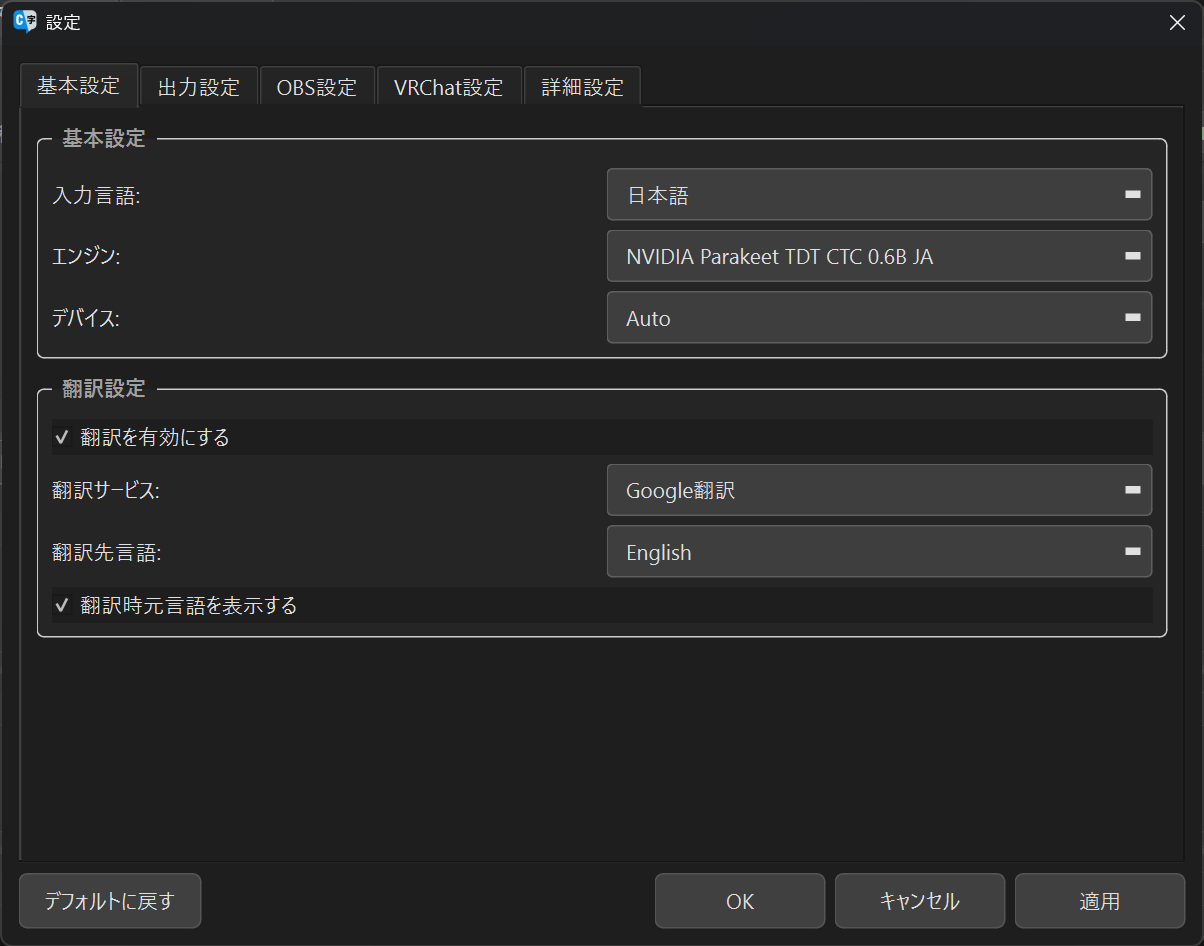
Before: Settings crash when opened... too scary to touch
Now: Beautiful, smooth-running settings screen!
How? Rebuilt completely from scratch
Logical tab reorganization
Basic Settings → Output Settings → OBS Settings → VRChat Settings → Advanced Settings
Everything is intuitive!
"The settings screen is so heavy..."
Not anymore.
Lightning-fast startup with Lazy Loading technology
Smart system that loads only the tabs you use
Settings Lock During Transcription, Completely Implemented! 🔒
"Voice recognition stopped after changing settings..." - This tragedy will never happen again.
Before: Touch source settings during transcription... voice recognition dies
Now: Settings changes completely blocked during transcription!
What gets blocked?
Preferences menu
Source settings button
Add/Remove buttons
Everything grayed out!
"Why can't I change settings?"
Kind explanation via tooltip
"Settings cannot be changed during transcription"
Instantly available after stopping!
VAD Parameters Guide, Now Available! 📖
"What's VAD? How should I configure it?" We've got answers.
New guide button added
Appears in Advanced Settings tab
One-click documentation display
Detailed explanation of parameter meanings
Optimal values clearly explained!
🐛 Bug Fixes and Improvements
Eliminated Numerous Settings Dialog Bugs!
Did you notice? All of these have been fixed:
Apply button showing "widget.button_ok"
Complete Japanese/English support
All translation keys organized
Perfect multi-language support!
OBS Settings tab going blank
Layout system fixed
Content displays correctly
Smooth scrolling too!
Auto engine appearing twice
Duplicate check implemented
Engine list optimized
Clean selection list!
Error with Reset to Defaults button
ConfigLoader issue resolved
Settings reset works reliably
Peace of mind to return to initial state!
WhisperS2T Model Loading Issue, Completely Solved! 🔧
"WhisperS2T won't start..." - This tragedy is finally over.
Before: Select WhisperS2T engine → Model load error → Can't use it...
Now: All model sizes work reliably!
What was the problem?
Mismatch between BaseEngine and WhisperS2T model management
BaseEngine: Expects files in models/ directory
WhisperS2T: Auto-managed internally (no files needed)
How was it fixed?
Implemented WhisperS2T-specific model verification logic
Skip model cache check
Fully delegate to internal auto-management!
WhisperS2T, Perfect GPU Support Too! ⚡
"It's slow even with GPU..." - Also solved.
GPU optimization
Proper device settings propagation
CUDA works reliably
Large-v3 model blazing fast!
Background Transparency 0% Issue Fixed!
"I want it transparent..." - Now possible.
Full transparent background enabled
0% setting properly applied
Completely blends into stream
Pro streamer quality finish!
Canary Engine Loading Issue, Completely Resolved! 🦅
"Canary model won't start..." - This pain is gone forever.
Before: Select Canary engine → Error occurs and load fails → Can't use it...
Now: Canary engine starts smoothly!
What was the problem?
Bug in model memory management
Fixed internal processing bug
Small fix, big improvement!
"I want to use NVIDIA's latest model..."
That worry is now history.
4 language support (EN/DE/FR/ES)
Perfect for international streaming!
Model Initialization Messages, Fully Multilingual! 🌐
"Why are messages in Japanese when I'm in English mode..." - This inconsistency is completely gone.
Before: Loading model... "モデルをロード中..." Huh? Japanese? But I'm in English mode!
Now: Everything displays in beautifully unified language!
What changed?
Model initialization dialog messages are fully multilingual
"Checking dependencies..." (in English mode)
"依存関係をチェック中..." (in Japanese mode)
Over 60 messages translated!
"Settings are in English but logs are in Japanese..."
No more such mismatches.
All engines unified
WhisperS2T, Voxtral, Canary, ReazonSpeech, and Parakeet!
📝 Other Fixes
Removed deprecated WhisperS2T models (Small, Large) for cleaner UI
Suppressed unnecessary NVIDIA engine warning messages for cleaner output
Help buttons now integrated with documentation viewer
Button order unified to Japanese style (OK | Apply | Cancel)
Remove button also disabled during transcription
Various tooltip improvements
Added logging for easier troubleshooting
🎉 Summary
v2.0.9.5 is a revolution in "stability" and "usability"!
Settings screen no longer scary
Safe even during transcription
Everything intuitive
LiveCap becomes even more fun!
Remember: Settings are your friend. No more fear! Enjoy your transcription life! 🚀