
Here is the complete English translation while preserving the original formatting:
How to Upload a Mod:
First download the mod from the Steam Workshop (https://steamcommunity.com/sharedfiles/filedetails/?id=3487957265)
The mod is located in your Steam installation directory at: "~:\SteamLibrary\steamapps\workshop\content\3085890"
In the game installation directory "~/LandOfIdyllicBeauty_Data/SteamWorkshopContent", create a new "Setting" folder. (If the SteamWorkshopContent folder or "Setting" folder doesn't exist, please create them manually).
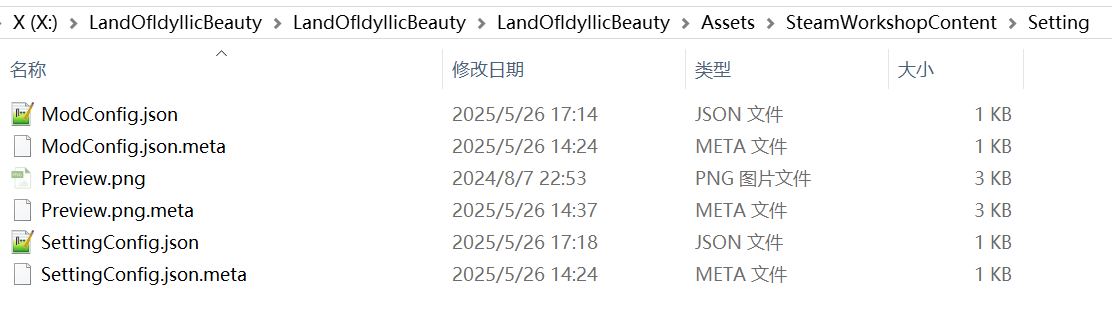
Then copy the files from the language mod you just downloaded into the Setting folder, as shown in the image above.
Modify the configuration data in the ModConfig.json file to change the name, description, etc. of the language pack you want to upload (even if you don't modify it, you can manually change it in the Steam Workshop after successful upload).
Do not modify the line: "ModType": "setting"
Example reference:
{
"ModType": "setting",
"ModName": "your mod name",
"ModTitle": "your mod title",
"ModDescription": "your mod des",
"content_folder": "Setting",
"visibility": "Public",
"preview": "Preview.png",
"PublishedFileId": {
"m_PublishedFileId": 0
}
}
ModConfig is the configuration json.
SettingConfig is the json section for modifying values.
Here's an example for modifying player movement speed and drop rates:
{
"PlayerMovementSpeedMultiplier": "2",
"DropItemRate": "2"
}
*Please pay attention to the format and usage of commas and quotation marks.
The "PlayerMovementSpeedMultiplier" entry represents the player movement speed multiplier, where 2 means 200%.
The "DropItemRate" entry represents the drop quantity multiplier, where 2 means double drops.
Another example:
{
"GlobalMoneyGainMultiplier": "1",
"AdditionalDailyRefreshVillagersInTavern": "4",
"DishesAlwaysCraftedatMaxQuality": "1",
"TownExpansionGoldReductionMultiplier": "0.5",
"NoBaitConsumption": "1"
}
Players can freely combine the entries they want to modify. Please note that the last entry should not end with a comma.
Here are all the term explanations:
// ==================== Villager Management Module ====================
AdditionalSatisfactionIncrease
/// Additional satisfaction bonus when recruiting villagers (fixed value)
/// Data type: int | Default value: 0 | Example: 20
VillagerWorkEfficiencyMultiplier
/// Percentage increase in villager work efficiency
/// Data type: int | Default value: 0 | Example: 15
VillagerRecruitmentFeeReductionMultiplier
/// Recruitment fee reduction coefficient (multiplicative calculation)
/// Data type: float | Default value: 1.0 | Example: 0.5 (50%)
VillagerFoodConsumptionReductionMultiplier
/// Villager food consumption reduction coefficient (multiplicative calculation)
/// Data type: float | Default value: 1.0 | Example: 0.5 (50%)
AdditionalDailyRefreshVillagersInTavern
/// Daily refresh villager count bonus in tavern (fixed value)
/// Data type: int | Default value: 0 | Example: 2 (2 extra people)
HigherChanceforVillagerswithBetterStatsinTavern
/// Probability increment for high - quality villagers (original probability + this value)
/// Data type: float | Default value: 0 | Example: 2
NegativeTraitsRemovedfromTavernVillagers
/// Whether to block negative traits for tavern villagers (boolean switch)
/// Data type: int | Default value: 0 | Example: 1 (on)
// ==================== Agriculture System Module ====================
SeedGrowthCycleMultiplier
/// Plant growth cycle adjustment coefficient
/// Data type: float | Default value: 1.0 | Example: 0.7 (70%)
CropQuantityMultiplier
/// Crop harvest quantity multiplier coefficient
/// Data type: float | Default value: 1.0 | Example: 2 (2x)
WateringExemption
/// Whether to exempt from watering requirements (boolean switch)
/// Data type: int | Default value: 0 | Example: 1 (on)
// ==================== Construction System Module ====================
FarmExpansionGoldReductionMultiplier
/// Farm expansion gold consumption reduction coefficient
/// Data type: float | Default value: 1.0 | Example: 0.8 (80%)
FurniturePlacementCostDiscountMultiplier
/// Furniture placement gold consumption discount coefficient
/// Data type: float | Default value: 1.0 | Example: 0.9 (90%)
WorkbenchCraftingMaterialReductionMultiplier
/// Workbench crafting material consumption reduction coefficient
/// Data type: float | Default value: 1.0 | Example: 0.7 (70%)
BuildingConstructionMaterialDiscountMultiplier_BusinessStreet
/// Commercial street building material consumption discount coefficient (area - specific)
/// Data type: float | Default value: 1.0 | Example: 0.8 (80%)
CommercialStreetExpansionGoldReductionMultiplier
/// Commercial street expansion gold consumption reduction coefficient
/// Data type: float | Default value: 1.0 | Example: 0.75 (75%)
BuildingConstructionMaterialDiscountMultiplier_Town
/// Town building material consumption discount coefficient (area - specific)
/// Data type: float | Default value: 1.0 | Example: 0.9 (90%)
TownExpansionGoldReductionMultiplier
/// Town expansion gold consumption reduction coefficient
/// Data type: float | Default value: 1.0 | Example: 0.6 (60%)
BuildingConstructionMaterialDiscountMultiplier_BackMountain
/// Back mountain building material consumption discount coefficient (area - specific)
/// Data type: float | Default value: 1.0 | Example: 0.8 (80%)
BackMountainExpansionGoldReductionMultiplier
/// Back mountain expansion gold consumption reduction coefficient
/// Data type: float | Default value: 1.0 | Example: 0.5 (50%)
// ==================== Fishing System Module ====================
FishingWaitTimeReductionMultiplier
/// Fishing wait time reduction coefficient
/// Data type: float | Default value: 1.0 | Example: 0.6 (60%)
FishQualityMax
/// Whether to force maximum quality fish catch (boolean switch)
/// Data type: int | Default value: 0 | Example: 1 (on)
NoBaitConsumption
/// Whether to exempt from bait consumption (boolean switch)
/// Data type: int | Default value: 0 | Example: 1 (on)
BiteRateIncreaseMultiplier
/// Fishing bite rate coefficient (additive calculation)
/// Data type: float | Default value: 1.0 | Example: 1.3 (130%)
// ==================== Economic System Module ====================
ShopSalesMultiplier
/// Shop sales adjustment coefficient
/// Data type: float | Default value: 1.0 | Example: 1.2 (120%)
MaterialConsumptionReduction
/// Supply chain material consumption reduction coefficient
/// Data type: float | Default value: 1.0 | Example: 0.8 (80%)
// ==================== Production System Module ====================
DishesAlwaysCraftedatMaxQuality
/// Whether to force crafting of maximum quality dishes (boolean switch)
/// Data type: int | Default value: 0 | Example: 1 (on)
// ==================== Special System Module ====================
ScratchCardWinRateIncrease
/// Scratch card winning rate bonus (fixed value)
/// Data type: int | Default value: 0 | Example: 5 (exclude 5 floating numbers)
// ==================== Global Parameters Module ====================
BuildConstructionValueMultiplier
/// Construction progress acceleration coefficient
/// Data type: float | Default value: 1.0 | Example: 2.5 (250%)
*Another very important note: the preview image of the uploaded file "preview": "Preview.png" should not exceed 1MB, preferably kept below 900KB. Exceeding this size will cause the mod upload to fail, but a preview image is mandatory for successful upload. You can freely choose a small image for testing.
After all preparations are complete, launch the game and click "Upload Mod" at the lower-left corner of the initial screen to upload the mod.