
How to Upload a Language Pack Mod:
First, download the Language Pack Mod from the Steam Workshop.
The Mod's directory is located in the Steam installation directory => ~:\SteamLibrary\steamapps\workshop\content\3085890.
In the game installation directory ~/LandOfIdyllicBeauty_Data/SteamWorkshopContent, create a new folder named Language.
(If the SteamWorkshopContent folder or "Language" folder does not exist, create them manually.)
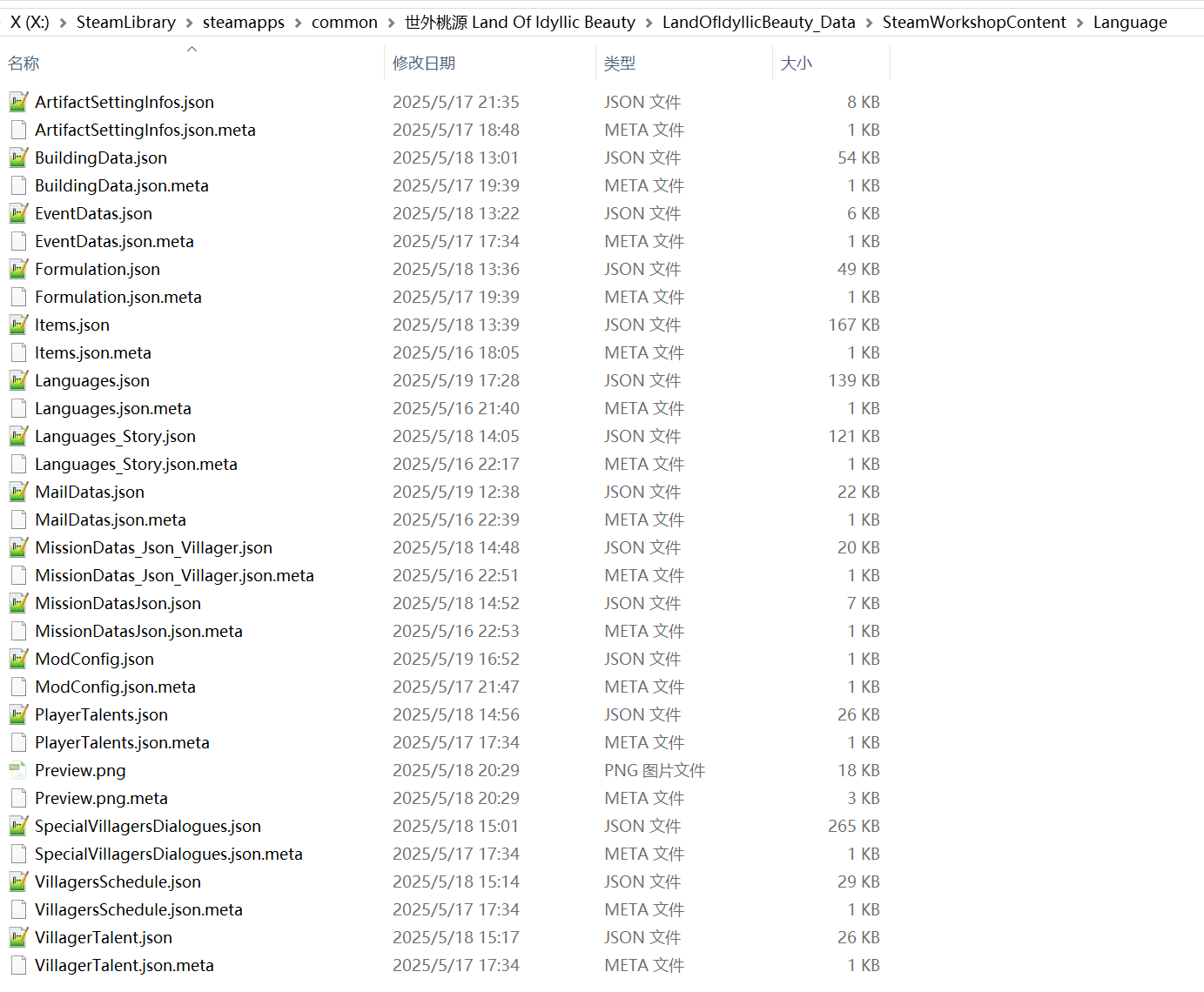
Copy the files from the Language Mod you just downloaded into the Language folder, as shown in the image above.
Modify the configuration data in the ModConfig.json file to change the name, description, etc., of the language pack to be uploaded.
(You can also manually modify these on the Steam Workshop after successful upload, even if you don’t modify them now.)
Note: Do not modify the line ModType": "language".
Edit the text entries in the corresponding JSON file to create your own Language Pack Mod.
Important Note: The preview image file preview": "Preview.png" must not exceed 1MB in size, preferably under 900KB. Exceeding this size will cause the Mod upload to fail.
Once all preparations are complete, launch the game and click Upload Mod in the lower-left corner of the initial screen to upload the Mod.