
On the community forums, copy-paste, and hotkeys were requested by xburcali. They're here now, plus undo-redo to go back on changes, and more!
A New Edit Menu!
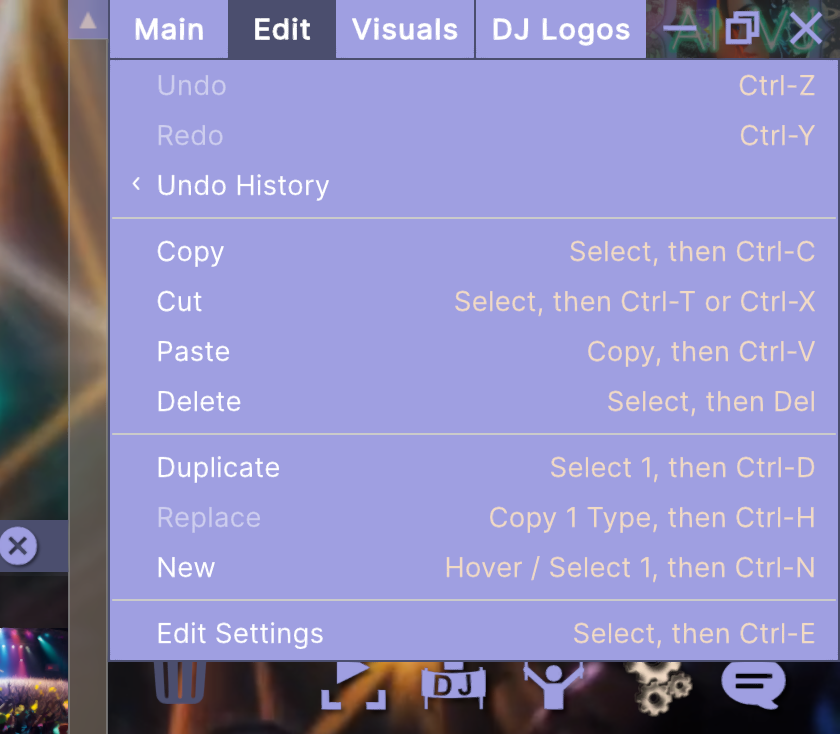
We now have a fully loaded Edit menu for moving visuals, banks and other things around!
You can undo and redo with Ctrl-Z & Y, and in the Edit menu there's a Undo History list as well, to make larger jumps in your edit history.
Then there's copy, cut, and paste, as well as replace, duplicate and new. Hotkeys are listed in the Edit menu for easy reference.
Other things such as saving, and opening saves can now also be accessed via hotkeys!
This should bring us even closer to our aim of having the best User Interface in the VJ world!
New Input System
To manage all of these shortcuts while keeping things neat, we've swapped in a new input system. This should make it easier in the future to add support for key customization, and even midi controllers! Though that will be a later update.
Millisecond precise video switches!
We've revisited the video playback logic, and optimized it to make video transitions even faster and more precisely timed.
And Several Smaller Fixes
- Increased the size of the mouse cursor a little. Good for those wild nights...
- Dragging and dropping near the bottom of a near empty deck works now
- Things like single decks drag-dropped to the right of the last set now are pasted more intuitively, creating a new set. Preveiously they were just added to the last deck. Same for banks in decks
If you reported other bugs, we're keeping a list and working through them! Please keep reports coming!
Join us on Discord!
Feature requests & bug reports are welcome. Either here or on our discord!