Q: The game crashes upon launching?
A: 1. Try disabling antivirus and other security software before launching the game. 2. Attempt to reinstall Steam and the game as well.
Q: Encountered issues like operational freezes and screen freezes during the game?
A: Press ESC to return to the main menu, then re-entering the game can resolve most problems (your current game progress will be saved, even during battles). We are actively working on fixing known issues and will release patches progressively.
Q: I used to be able to run the game without any issues, but sometimes I encountered a black screen upon launching.
A: Close the game and Steam, navigate to this directory [%userprofile%\AppData\LocalLow\91Act], delete everything except the "save" folder, then restart the game.
Q: Steam Deck is unable to run/launch the game properly or experience lag and blurriness?
A: Although we have tested the compatibility of the Steam Deck, the official compatibility review by Steam is still ongoing. Until it is approved, you will need to manually set up Proton in order to play the game properly. Here are the specific steps for setting it up:
1. Open your Steam Deck's Library and select BlazBlue: Entropy Effect.
2. Click on the cogwheel icon on the right side to open the menu, then click Properties.
3. Navigate to the Compatibility tab.
4. Check the box labeled Force the use of a specific Steam Play compatibility tool.
5. Select Proton 8.0-3 from the dropdown menu.
6. Relaunch the game and enjoy!
Q: The game experiences input lag and unresponsive keystrokes in certain usage scenarios?
A: 1. Check if the wireless controller or keyboard has sufficient battery power. 2. It is not recommended to use Bluetooth input devices.
Q: My PS controller is recognized as an Xbox controller?
A: Please try disabling Steam Input in the game's controller settings.
Q: Only gray screen after launching the game?
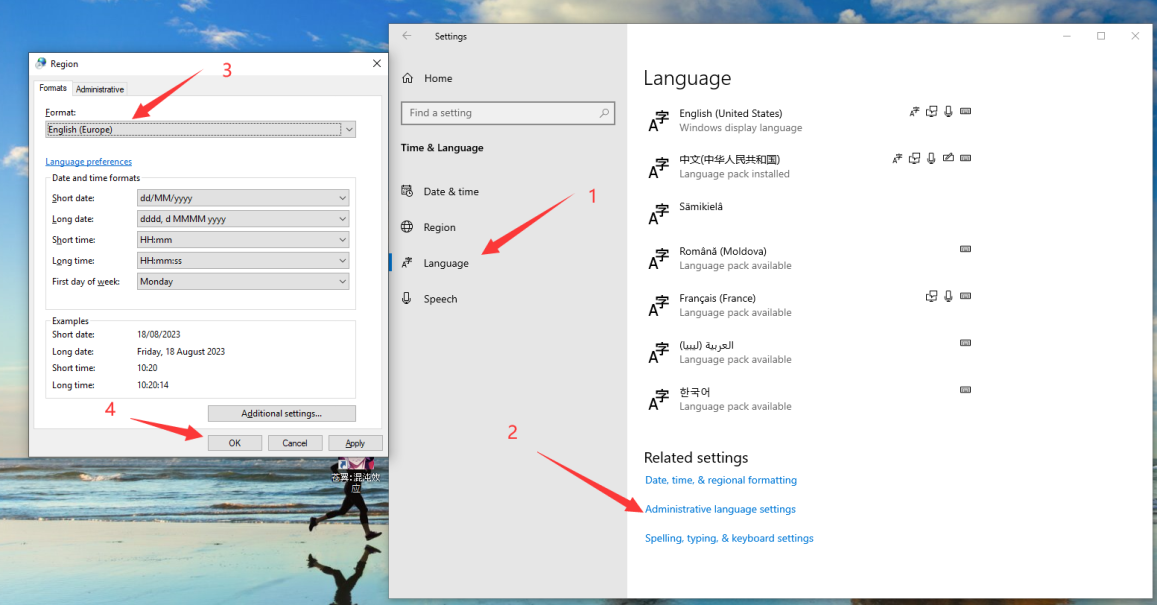
A: We are currently preparing an update to fix the gray screen issue that occurs on specific language operating systems, such as Turkish. A temporary solution is to change your system's Regional Format to English. You don't need to switch the entire operating system to English. If you have encountered the gray screen issue and your system language is not Turkish, please let us know the language you are using.