Need a helping hand to get started in Walton City? We've put together answers to some frequently asked questions, and explained some troubleshooting to common issues.
General Questions
Where can I buy the game?
- You can purchase Into the Dead: Our Darkest Days here on Steam.
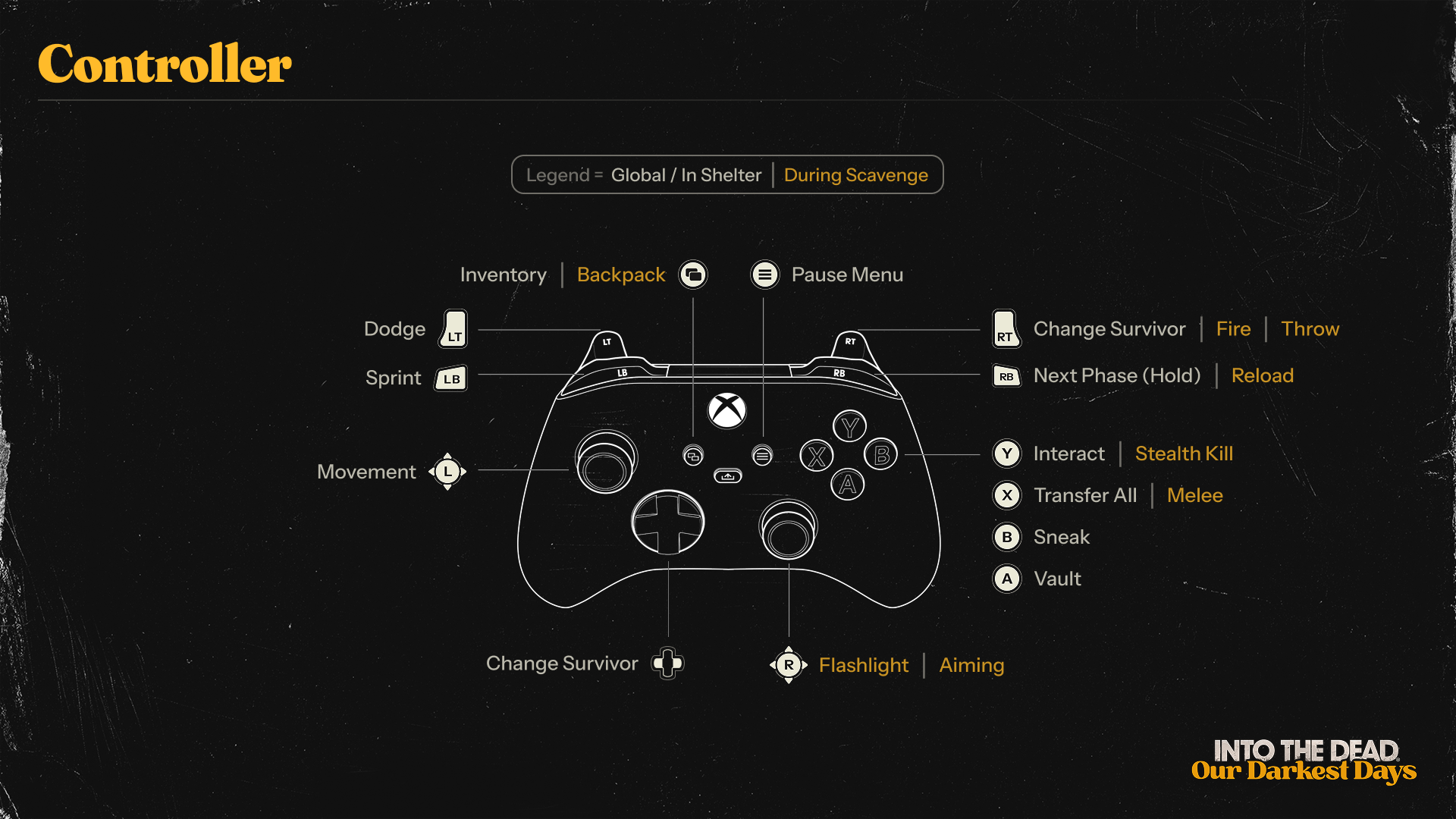
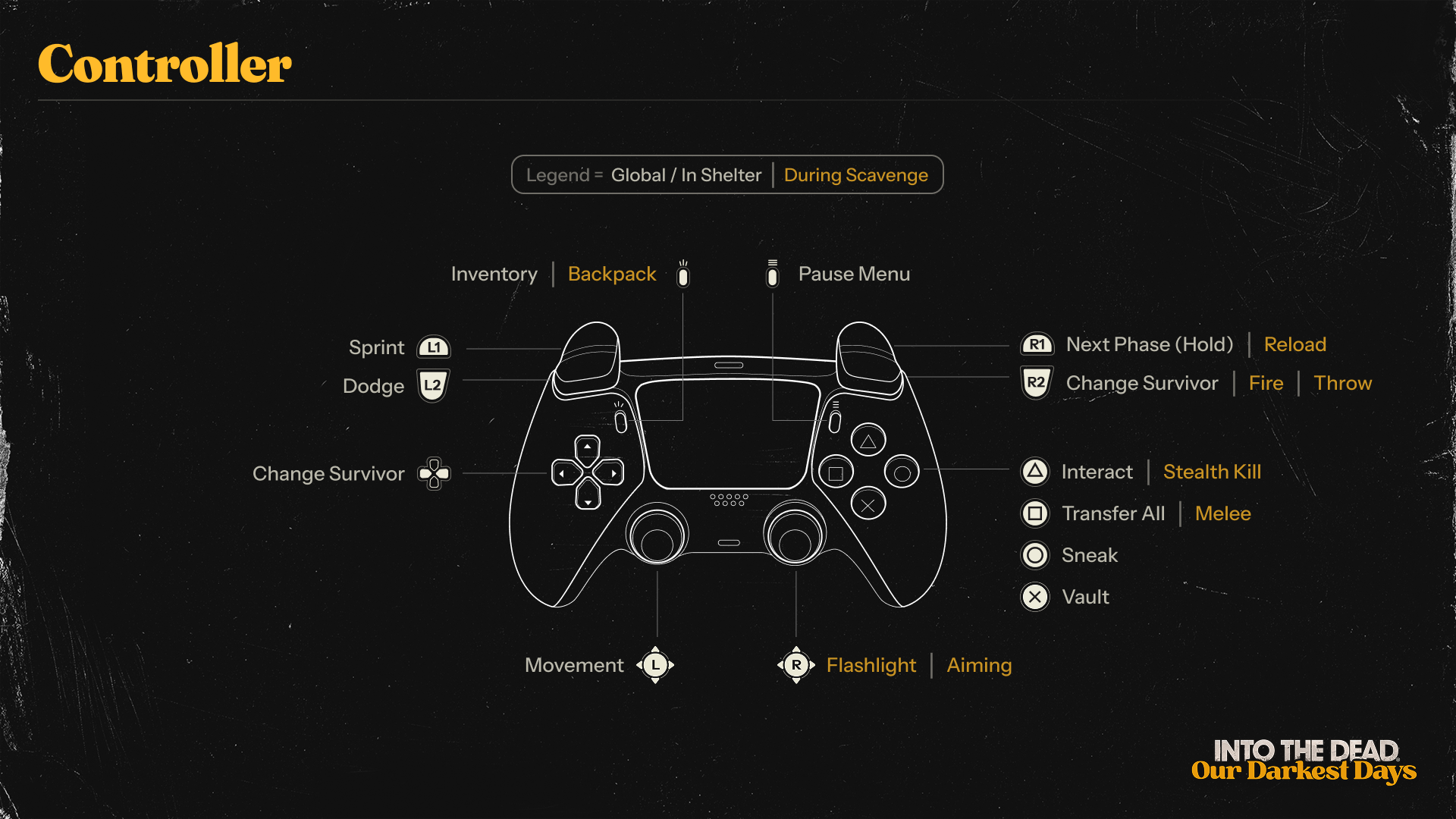
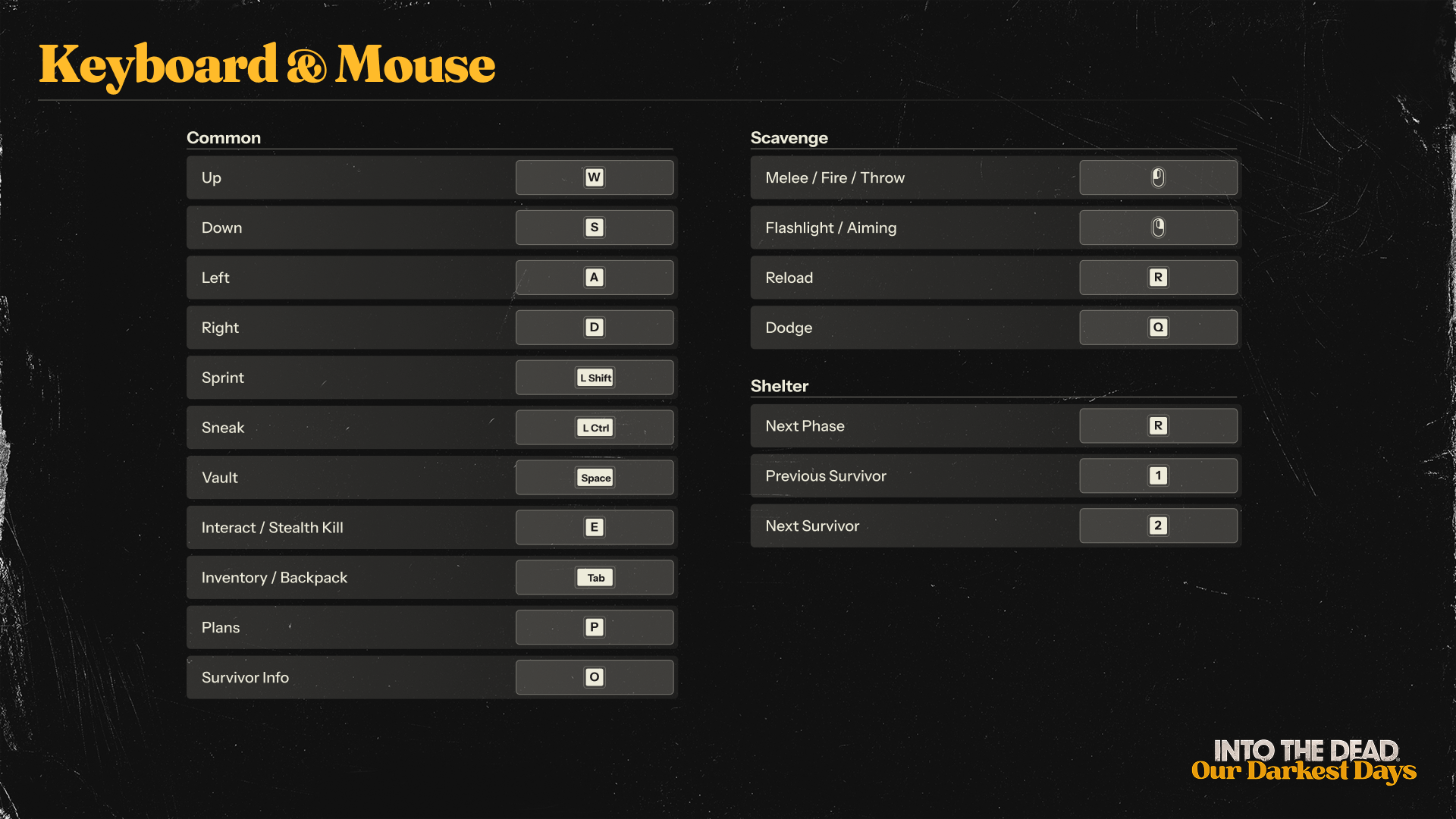
How do I control the game?
- Below are instructions for using an Xbox controller (XBOX), a PlayStation controller (PS), or keyboard and mouse controls. Other controllers may also function.
- We recommend using a controller.
- Detailed control schemes are available in-game or at the bottom of this page.
Gameplay Questions
How do I assign survivors to tasks?
To progress in the game, you need to assign your survivors to different tasks like scavenging, resting, or rebuilding barricades.
Approach a shelter station with a survivor by moving using:
- Left joystick on the controller
- WASD on the keyboard
Once you are at a station, press:
- Y (XBOX) or Triangle (PS) on the controller
- E on the keyboard to interact
Add tasks to a survivor’s queue with:
- A (XBOX) or X (PS) on the controller
- E on the keyboard
Remove the last queued task on the shelter station screen by pressing:
- X (XBOX) or Square (PS) on the controller
- R on the keyboard
Go back with:
- B (XBOX) or Circle (PS) on the controller
- Right mouse click to withdraw from the screen
If your survivor is now doing an interaction animation at the station, they have been successfully assigned.
You can change to another survivor by using:
- The Directional Pad on the controller
- The number 1 and 2 keys on the keyboard
Once you have assigned all survivors, you need to end the current phase to progress the game.
To do this, hold:
- RB (XBOX) or R1 (PS) on the controller
- R on the keyboard until the phase circle in the lower right corner of the screen is filled
Then the phase will end, and your survivors will be set into action.
How do I send survivors to go scavenging in the city?
Survivors can be sent scavenging by using the map station in their current shelter.
Move a survivor to the map using:
- The left joystick on the controller
- WASD on the keyboard
Then use:
- Y (XBOX) or Triangle (PS) on the controller
- E on the keyboard to interact with the map
Choose a location by:
- Navigating to it with the left joystick then pressing A (XBOX) or X (PS) on the controller
- Left mouse clicking on it and then pressing E
Choose items in the shelter inventory for your survivor to take with them.
Once you have moved the items you want into your survivor’s backpack, press:
- Y (XBOX) or Triangle (PS) on the controller
- R to go scavenging
Once you end the current phase, your survivor will head out into Walton City.
Tip: It’s always good to make sure you have plenty of weapons and lockpicks in your survivor’s backpack when they go scavenging!
How do my survivors escape the city?
The goal of Into the Dead: Our Darkest Days is to escape Walton City with as many survivors alive as possible.
Your survivors do this by completing one of a number of possible Escape Plans.
First:
- Survivors need to discover a Plan Lead. Survivors can find these hidden around the city in different locations. A Lead will also unlock after a set amount of phases if your survivors have yet to find any.
Once they get their first Lead:
- Press the Inventory button on the controller or P on keyboard to view the Inventory menu
- Change to the Plans menu. This will show you where to look for more Leads.
Once your survivors have collected enough Leads, you’ll be alerted that an Escape Plan is available:
- Visit the Plans menu again to pin the Escape Plan.
- Now your survivors need to follow the objectives listed in the top left of the game screen to progress through the Plan.
- Be careful - if your survivors die or they fail to complete an objective, they won’t be able to complete the Plan and escape.
Tip: Make sure to investigate each location you scavenge thoroughly to make sure you don’t miss any Leads.
How do I heal my survivors?
In the shelter, your survivors can use a Healing Kit from the shelter inventory to instantly restore health. Sleeping will also restore a small amount of health.
If your survivor is suffering a physical state such as ‘Bruised Ribs’ or ‘Sprained Wrist’, they’ll need to use an item like a Bandage or a Splint to recover. If they have a psychological state such as ‘Nightmares’, they’ll need to use a shelter station like the Communal Area to recover. Usually it will require a few phases to pass before the survivor is fully healed from their state.
Check the state’s description in the Survivor menu to see what it requires. To do this:
- Open the Inventory and change to the Survivor menu.
How do my survivors use the flashlight?
All of your survivors already have a flashlight - they don’t need to craft or equip it.
To use it, aim using:
- The right joystick on the controller
- Hold the right mouse button while moving the mouse
How do my survivors use a firearm?
Once you have a firearm, your survivor needs to equip it in the Inventory screen. Then they can aim using the same controls as the flashlight.
Load the gun with:
- RB (XBOX) or R1 (PS) on controller
- R on keyboard
Fire with:
- RT (XBOX) or R2 (PS) on controller
- Left mouse click on the mouse
Keep an eye on your survivor’s ammo in the lower left of the game screen and don’t forget to reload!
Tip: Your survivor needs the right kind of ammo to fire their gun e.g. a pistol uses pistol ammo only.
How do my survivors throw distractions?
Your survivor can throw things like glass bottles to distract zombies.
Equip the item in your survivor’s inventory.
Aim with:
- The right joystick on the controller
- Or hold the right mouse button and move the mouse
Then press:
- RT (XBOX) or R2 (PS) or left mouse click to throw
Tip: Your survivor cannot have throwable items and a firearm equipped at the same time.
When my survivors move into a new shelter, what happens to the location's loot?
Some locations can be cleared of zombies and be turned into new shelters. When survivors move in, all the loot in that location will automatically be added to the shelter's inventory.
What about shelter upgrades?
Any station that is upgradable will move with your survivors (e.g. Weapons Bench). Stations that are not upgradable are specific only to certain locations (e.g. Garden). Those won't move with your survivors.
What are the circles on the ground in scavenging locations for?
Gray circles indicate cover, where your survivor can hide.
To use them, press:
- Up on the joystick or W on the keyboard to take cover
- Down on the joystick or S on the keyboard to move out of the cover spot
Some cover spots will hide you from zombies approaching in either direction, while others will only hide you from zombies approaching in one direction.
Cover also doesn't work if a zombie is chasing your survivor or is already aware of their presence.
Tip: Your survivor can throw distraction items like bottles or aim their gun from cover.
Why do my survivors keep alerting zombies?
Stealth is key to surviving Walton City.
Make sure to toggle sneaking with:
- B (XBOX) or Circle (PS) on controller
- Left Ctrl on keyboard when moving around in the city
If your survivor makes a loud noise, like attacking a zombie, running, or firing a gun, it will alert zombies around them.
Zombies that are dormant in the background or foreground might move to the middle ground (where they can hurt your survivor) when awoken, even if they’re off-screen.
Certain actions cannot be done silently, like opening rolling garage doors.
Tip:
- Some zombies will let out a primal scream when alerted, which will call other zombies to them.
- Make sure to quickly kill zombies that are winding up for a primal scream before they can complete it!
Why aren’t my survivors responding?
If your survivor isn’t responding to controls or you’re missing button prompts, try the following:
- Launch the game using DirectX11.
- Check if all survivors are assigned to shelter stations properly. (If they’re not doing an interaction animation (and are just standing idle in front of the station) then they are not assigned to it.)
- Restart the game to refresh inputs.
How do I report a bug?
The best way to report a bug is to use the in-game bug reporting system. Please include as much detail as you can to help our development team squash that bug! You can also report bugs by emailing [email protected] or joining our Discord and using the Bug Report channel.