

1. Humanity God’s Fantasy
- New Count D dungeon, .
▶ Entry Method
- Complete the Mission [Striking the Set] in the episode [After the party is over] with character Level 95 or higher to unlock the dungeon.
▶ Humanity God’s Fantasy
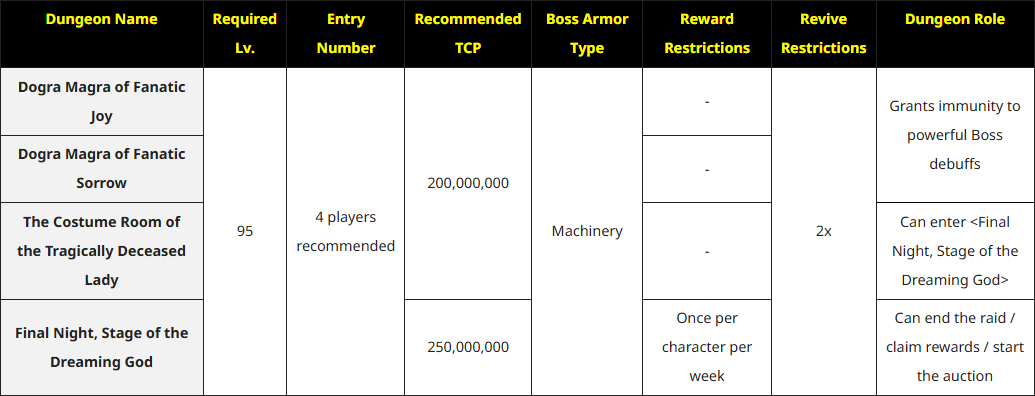
- Similar to , each dungeon in has its specific role.
- BONUS REWARD in the dungeon is the same as and shares the dungeon counts.
▶ Additional Notes on
- Added the achievement in the Sector tab.
- Added in the Growth and Farming Guide.
- UNION Watch Weekly Mission: Added 4 dungeons to ‘Clear [Legion Commander/Advance Party/Spectators]’ mission.
2. New Gear
- New Full-Body Costume and Modules.
▶ Full-Body Costume Crafting
- The new Full-Body Costumes can be crafted via the Matter Mixer in Fantasy World: Dream Theater <>.

▶ Full-Body Costume Details
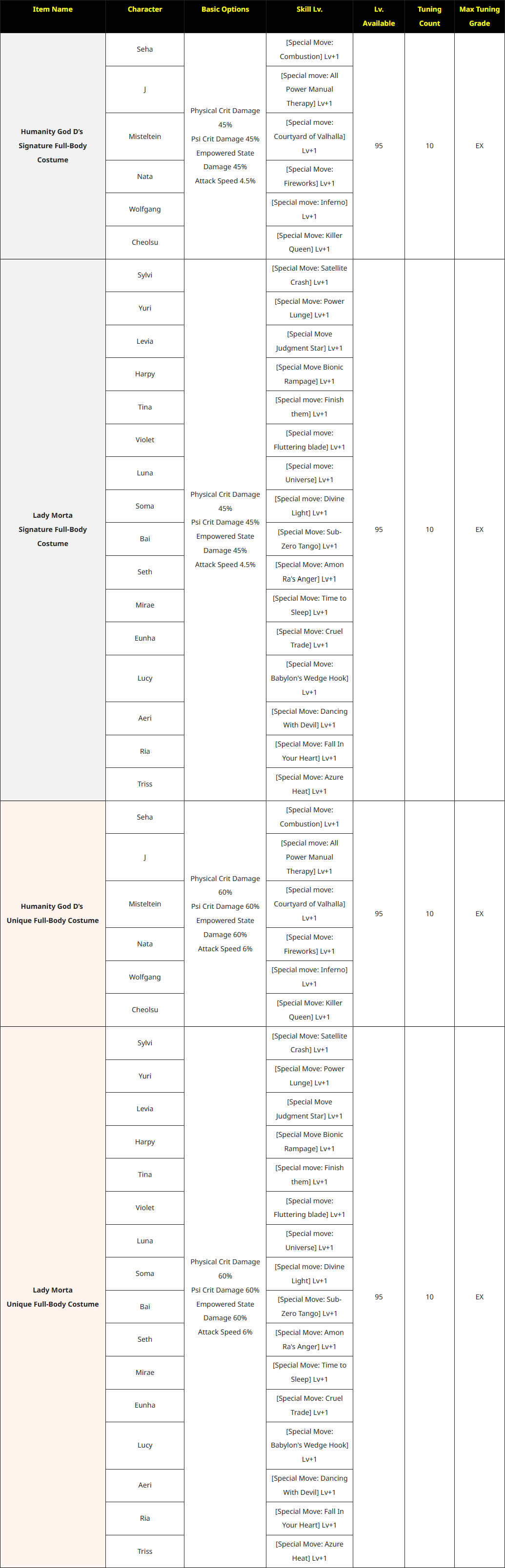
- Humanity God D’s Unique & Lady Morta’s Unique Full-Body Costume can be stored to the Account Bank and are tradable on the Black Market.
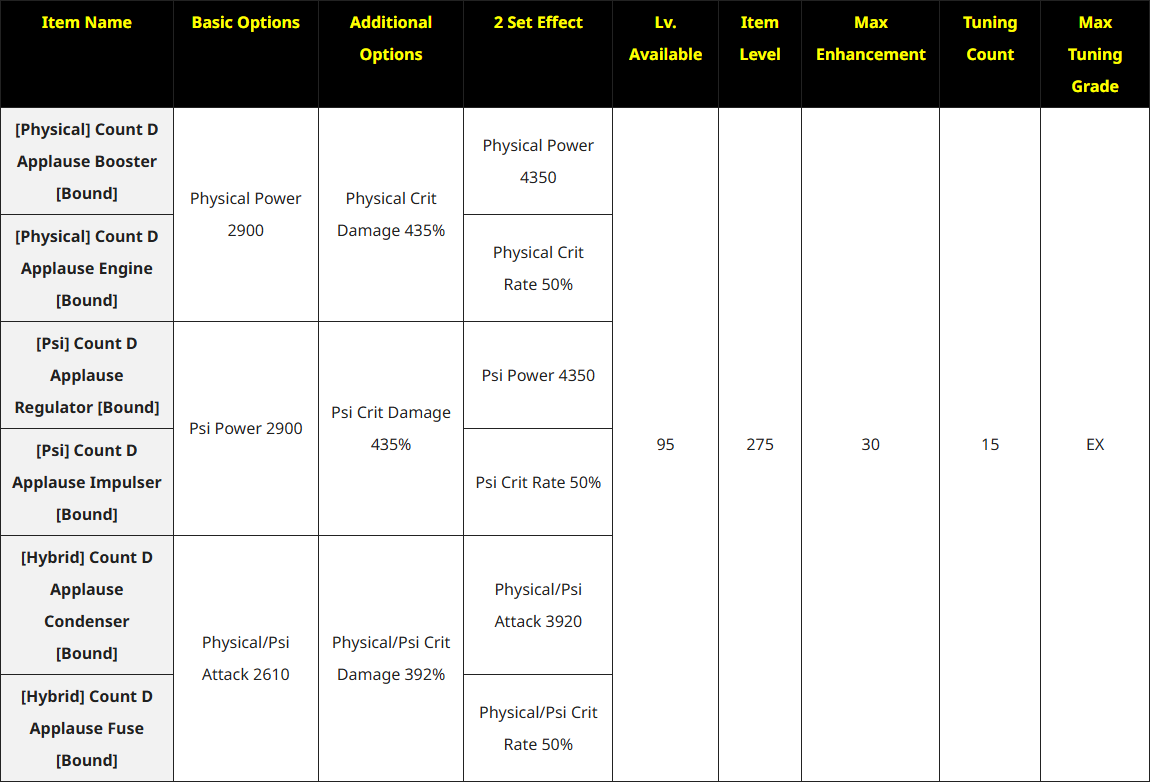
▶ New Modules
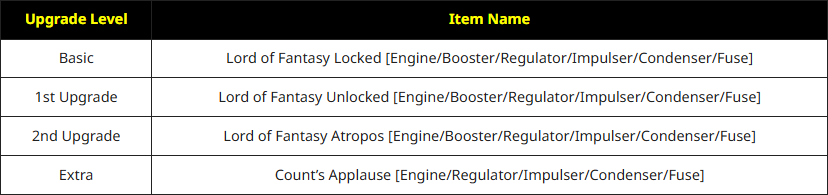
- Added a crafting method that allows Epic Modules to be upgraded into Extra [Bound] Modules.
- The new Extra Module [Bound] can be upgraded as follows: Locked → Infinity → Atropos → Extra [Bound]
▶ New Module Details
▶ Additional notes related to the new gear
- Added a new changing method for the new module.
- Added the new gear to the Enhancement Transfer group.
- Added the new gear to the Salvage Gear group.
System
1. Auction System
- Introduced a new auction system.
▶ Auction Start
- After clearing a dungeon where the auction system is available, the auction window will appear immediately.
▶ Auction Distribution Count
- Dungeons with the auction feature will now have an ‘Auction Distribution Count.’ You can receive distribution credits based on this count.
- After clearing the dungeon, the Auction Distribution Count will be deducted regardless of whether you participate in the auction.
- Even if all Auction Distribution Counts are used up, you can still enter the dungeon and participate in the auction.
- However, once all Auction Distribution Counts have been used, you will no longer be able to receive auction proceeds. *If no party members possess any Auction Distribution Count, the auction will not appear.
- The more party members that have Auction Distribution Counts, the higher the chance for high value items to appear in the auction.
▶ Auction Distribution Count UI
- Added an UI which allows you to view the Auction Distribution Count.
- Squad Info Window
- Raid Theme Select Window
- Raid Status Board
▶ Distribution Credits
- Except for the player who wins the auctioned item, the auction proceeds will be distributed among other party members who possess an Auction Distribution Count.
- Members without any remaining counts will not receive any proceeds.
- The proceeds are evenly distributed after deducting a 10% service fee from the winning bid amount.
▶ Auction Progress
| Auction Icon |
|---|
 |
- When the auction begins, the Auction Progress window will appear. It can also be opened manually by clicking the auction icon at the top right of the screen.
- You can hover over the auction icon to view auction details.
- The auction alternates between “Auction Pending” and “Start Auction” phases.
- While an auction is in progress, you cannot enter dungeons where the auction system is applied. *You may still enter other dungeons not subject to the auction system.
- Waiting for the First Auction
- You can’t check the auction items during the first auction pending time, and all items will be revealed once the auction pending ends.
- When the waiting time ends and the items are revealed, a highlight effect will appear if a high-value item is included.
- Start Auction
- During the auction, the item currently being auctioned will display “In Progress” and can be bid on.
- Bids can only be placed before the remaining time reaches 0 seconds. The remaining time will be reset when you bid on the loot.
- Loot items have a minimum bid price, and bids lower than this amount cannot be placed.
- Clicking [Immediate Bidding] will place an immediate bid at the minimum bid price.
- Credits used for bidding is immediately deducted from your inventory and converted into [Auction Credits], which will be held until the auction ends. It will not be returned to your inventory before the loot auction ends.
- When another player places a higher bid, your previously used Credits will be automatically refunded as [Auction Credits].
- When placing a high-value bid, [Auction Credits] will be used first. If the amount is insufficient, additional Credits will be deducted from your inventory. *Bids exceeding 200 billion Gold cannot be placed.
- Waiting for Auction
- When the auction ends, the auctioned loot will display as [Ended].
- While in the “Auction Pending” state, you cannot place manual or instant bids.
- The next item to be auctioned will display as [Waiting].
- Auction Conclusion
- An auction result pop-up appears when the auction ends.
- Not sold, Won, Won by Another
- An auction result pop-up appears when the auction ends.
- Loot Auction Result Window
- The Loot Auction Result window displays the auctioned loot, distribution amount, winning bid, and refund amount.
- You can check and claim the winning loot, distribution amount, winning bid, and refund amount only through the Loot Auction Result window.
- Auction results are saved separately for each character, and rewards cannot be claimed by other characters.
- Clicking [Receive All] allows you to collect all listed loot, distribution, and refund amounts at once. However, if your inventory is full or the Credits limit is reached, the [Receive All] action will be removed.
- From the time the auction takes place, records of claimed loot and distribution amounts will be retained for 30 days.
▶ Additional Notes related to the Auction system
- A broadcast message will appear when you successfully win a high-value item in an auction.
- A new Auction category and tab have been added to the guide.
- The following loot items may appear during auctions:
| Item Name |
|---|
| Smiling Mask | Lady Morta Illustration Ticket |
| Splendid Tuning Components | Humanity God D Illustration Ticket Selectable Box |
| Omega Equalizer | Humanity God D Illustration Ticket Full-set Box |
| Gear Booster Fortifier | Humanity God D Accessory Full Set Box |
| Real Colored Driver | Humanity God D’s Rare Full-Body Costume |
| Real Platinum Driver | Dogra Magra’s Atropos Scissors Box |
| Slot Type Modification Tool | Glutton King Beelzebub's Phase Wing |
| Legendary Dimensional Material Box | Ocean King's Chakram Phase Wings |
| PNA Growth Activator | Machine King Doomsday Clock Phase Wings |
| Lady Morta Silk Hat | Beast King's Dragon Fear Phase Wings |
| Morta of Grief Waist Ribbon | [Physical] Count D Applause Booster |
| Lady Morta Eye | [Physical] Count D Applause Engine |
| Count D Silk Scarf | [Psi] Count D Applause Regulator |
| Humanity God D’s Stage Mask | [Psi] Count D Applause Impulser |
| Humanity God D Unique Full Body Selectable Box | [Hybrid] Count D Applause Condenser |
| Humanity God D Illustration Ticket | [Hybrid] Count D Applause Fuse |
2. Additional Black Market Improvement
▶ New Sorting Filter
- Added a new Sorting Filter
- When “Sort by Item Name” is selected, results will be organized by item name series. *If sorting by item name is not selected, items will be sorted in their original order.
3. Costume EX Tuning
▶ New Costume EX Tuning
- C Grade excluded from Tuning option in Humanity God D & Lady Morta Full-Body Costume.
- EX Grade will appear as a Tuning option in Humanity God D & Lady Morta Full-Body Costume.
▶ New Costume Tuning Items
- Added 4 new tuning items.
- Used for tuning lv.95 + costumes.
| Item Name |
|---|
| EX Guaranteed D Component : Costume | Special D Component: Costume |
| Splendid Fabric Treatment | Splendid Fabric Relaxer |

[START]
1. Count D Hard Mode Open Celebration Reward
- Event Period: After maintenance on October 15, 2025 - Before maintenance on October 29, 2025 UTC
2. Golden Harvest - Harvest and Hunt!
- Event Period: After maintenance on October 15, 2025 - Before maintenance on November 26, 2025 UTC
3. Golden Harvest Event Dungeon (Daily Accumulative Login)
- Event Period: After maintenance on October 15, 2025 - Before maintenance on November 26, 2025 UTC
4. Golden Harvest UNION Pass
- Event Period: After maintenance on October 15, 2025 - Before maintenance on November 26, 2025 UTC
5. Count D’s Applause Module – First Drop Acquire Double Drop Event! (Rate Up!)
- Event Period: After maintenance on October 15, 2025 - Before the first acquisition of the first Count D’s Applause Module
[END]
- 2025 Costume Rental Shop
- Summer Finale Character Sticker Collection Event
- New Investigation Group Celebration Dungeon Clear Event
- Memorial Attendance
- October Closers Weekend


[START]
1. [Autumn-Glow] Package
- Sales Period: After maintenance on October 15, 2025 – Before maintenance on October 29, 2025 UTC
2. New Costume Components - Updated!
- Sales Period: After maintenance on October 15, 2025 – Always on Sale
3. Vultures Secret Shop (New Condition Added)
- Count D Full-body Condition Period: October 15, 2025 after maintenance - End
[END]
- Summer Finale Chain Discount
- D's Fantasy [Special Product]
- [Special Product]
- [Memorial] Package

[START]
1. Autumn-Glow Costume Transmitter
- Sales Period: After maintenance on October 15, 2025 - Before maintenance on November 12, 2025 UTC
2. Panda Friends (New Costume & Available for all Characters!)
- Sale Period: After maintenance on October 15, 2025 - Before maintenance on November 26, 2025 UTC
- Sale Method: Character Washing Machine (Available for all Characters) ★ Multiple Chance during Sale Period ★
[END]
- Sunny Day Adventure

Other Updates
▶ Newsletter Coupon #106
- Subscribe to the Closers Newsletter and get a special coupon! Check [Link] to know how to subscribe Newsletter.
- Coupon Valid Period: October 29, 2025 at 7:00 AM UTC
- 106th Coupon Components:
| Newsletter Fireworks Coupon |
|---|
| x1 Firework Festival Experience Box |
▶ The ‘Dungeon Special Key’ description has been changed in the Count D dungeon.
▶ Certain patterns in the dungeon have been changed to undodgeable.
▶ Removed certain text from the Raid Status Board window in the Raid Entry System.
▶ Tuning count limit has been adjusted in Signature / Unique Costumes.
Bug Fix
▶ Fixed the [Special] skill animation of the costumes in [Dimensional Mode].
▶ Fixed an error where the [Semi Exceed transcendent] stacks were removed in certain attack states when Violet casted [Rose Cutter].
▶ Fixed an issue in Violet’s [Mastery - Master] effect in [Exceed Pulse] failed to apply [Semi Exceed transcendent] stacks when [Semi Exceed] was triggered by repeatedly using Dash Jump basic attacks.
▶ Fixed an issue where, under certain conditions, [Seth's Territory Declaration!] attack in [EX Horus's Attack] skill would end before reaching the maximum number of attack hits.
▶ Fixed an issue where some weapon costumes did not appear when Triss performed the [Sit] motion.
▶ Fixed the missing [Invincible] effect tips in Seha’s [Rank 2 Special Move: Sword Meteor].
▶ Fixed an issue where the “Shortcut” function for certain missions in the Growth Guide did not work properly.
▶ The [A Midnight Ball in the Skyscraper] dungeon in Unified Entry System is now listed under the ‘Memorial’ category.
If you encounter any bugs or issues, please send an email to: [email protected] or through Customer Support web inquiry by clicking the banner below.
