
Hello, this is the development team.
Thank you for playing our Early Access version.
If you have disabled the Steam overlay setting,
you will not be able to purchase any items in the Shop.
If you are unable to purchase items in the shop,
please change the Steam overlay setting to effective by referring to the following instructions.
①Change the overlay settings for the entire Steam
・Launch the Steam client application.
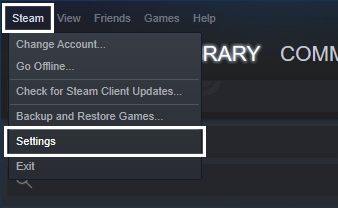
・Select "Steam" -> "Settings" from the top menu bar.
・In the "Settings" menu, select "In-Game".
・Check the "Enable the Steam Overlay while in-game" checkbox.
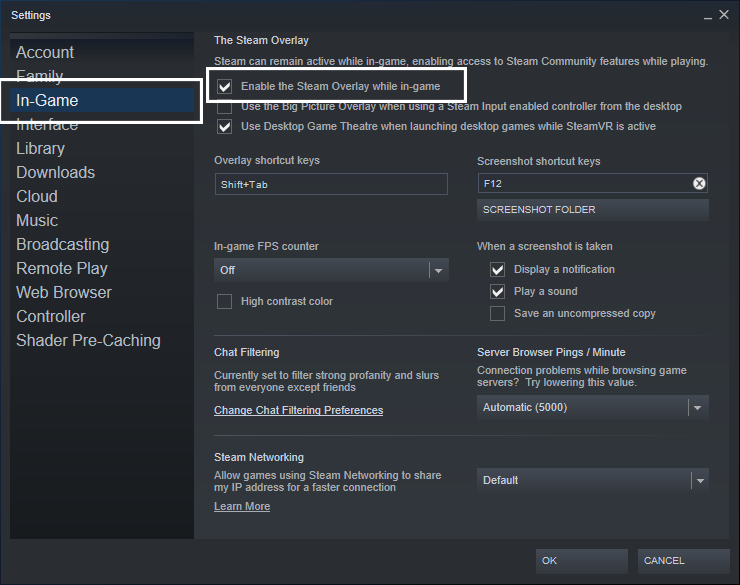
・Press "OK" at the bottom of the menu to save the settings.
②Change overlay settings for each game
・Launch the Steam client application.
・Select the "Library" tab in the main window.
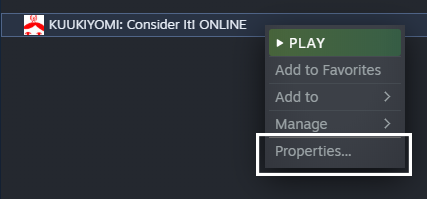
・Right-click on the game from the list on the left and select "Properties".
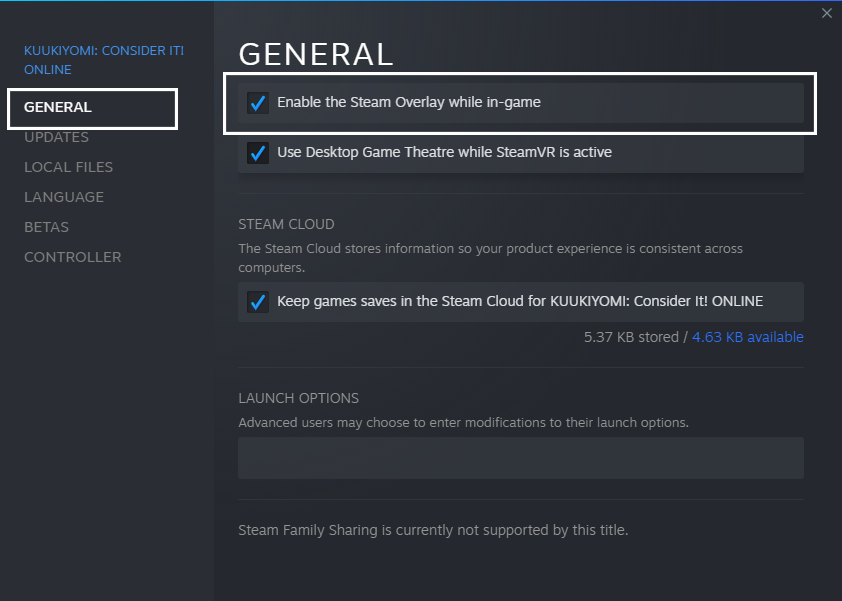
・Select the "General" tab and check the "Enable the Steam Overlay while in-game" checkbox.
We have released this title as an early access version in order to build it up together with you, with your support, opinions and messages.
We hope you will continue to support us in our ongoing development.
Thank you very much for your support.