This update brings more control over exports: custom file name order, folder structures, multi-axis auto rotation and more.
Roadmap and news
Documentation and tutorials
Changes
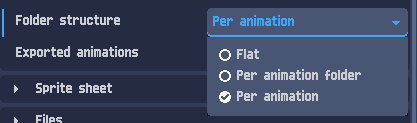
Animation folder structure : choose to export all animations in the same folder, a folder per animation folder or a folder per animation.
 |
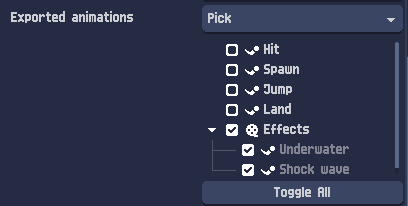
Improved exported animations picker : pick whole animation folders or single animations from a tree.
 |
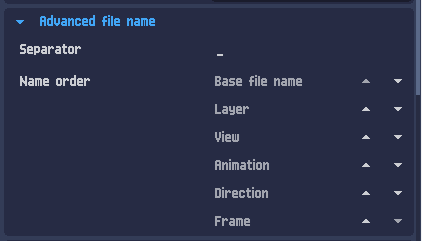
Advanced file name : reorder the parts composing the exported file names.
 |
| Separated layers can now be exported in different folders. |
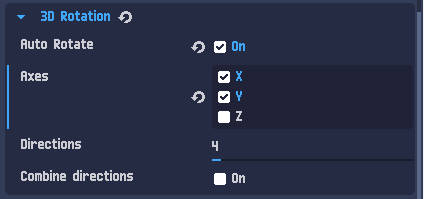
Auto rotation : pick up to 3 axes. With several axes, all direction combinations are exported and the axis names appear in the file names.
 |
| GIF export improvement (especially when a palette is set in the layer). |
| Added a setting for using the vertex color in 3D materials. |
Bug fixes
| Issue | Reference |
| Right clicking on an unselected track now unselects the others. | Link |
| Fixed Z ordering with an auto increment of 0, and set it to 1 by default. | Link |
| Added an input to define mesh 2D triangles Z sort. | Link |
| Resamplers are now updated when bones deform a 2D mesh. | (Not Reported) |
| Fixed objects selection synchronization between the Z order tree and the scene tree. | (Not Reported) |
| Fixed infinite frame computation when exporting a project with a specific IK setup. | Link |
| Fixed tip bones resetting their length when reopening a project. | Link |
| Export auto rotation is now allowed even if the layer camera is added to animation tracks. | (Not Reported) |
| Fixed an issue with the offset added in the animation tracks. | (Not Reported) |
| Fixed export with sublayers. | Link |
| Prevented mesh shapes from being triangulated, allowing for more extreme deformations. | Link |
| Prevent missing objects in project files. | Link |
If you encounter any bugs or have feature suggestions, feel free to share them in the
community forum.
Thank you!