
In the month of February, our focus has been on designing Nordic-themed tools and educational posters, the Dole horse, interior design for the stable, implementing dynamic music and terrain-dependent hoof sound effects, developing AI for horse pathing, and laying the groundwork for an inventory system.
Tools & Anatomy
By Maja - CEO, Concept Artist
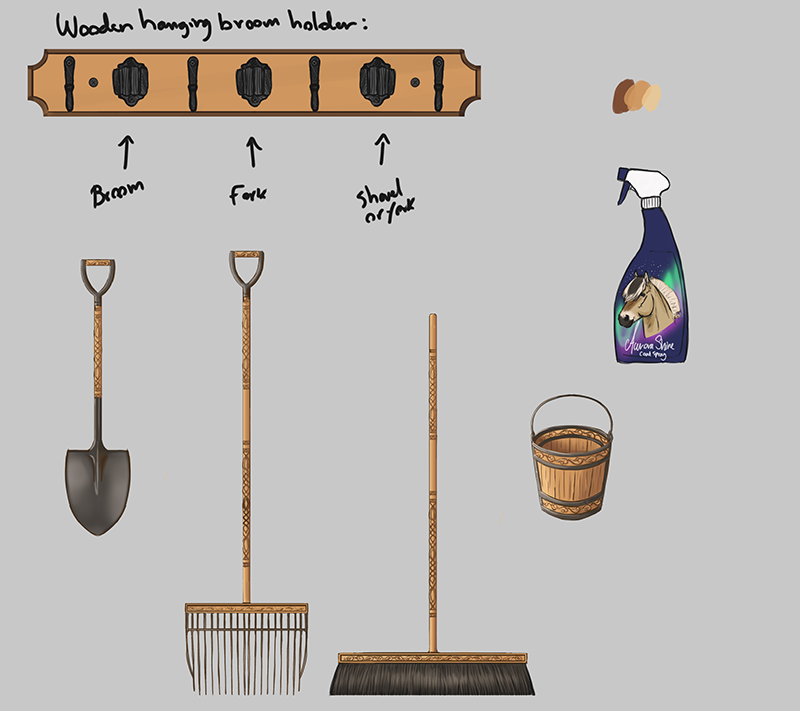
Hi, it’s Maja here! For the art part of February, I’ve been drawing concept art for a few assets and tools like a spray bottle, fork, bucket, broom, and shovel. I decided to make them out of wood and metal. Which gives them a very Nordic and historic appearance. I wanted them to have a wood carving design which makes them look quite unique compared to standard plastic barn tools. For the spray bottle, I wanted to use the fjord as the model, since it’s kind of the icon of Astride. And I wanted it to seem like it’s designed for horses in cold countries. So I went with Aurora Shine so that when someone uses this spray the horse will shine just as beautiful as the Nordic lights. I will make the bottle art rendered and nice for the game since this is just a sketch.
In most stables I’ve been in, there has always been an anatomy chart of a horse somewhere in the stable. This poster showcases the horse’s skeleton and muscles with names for each part. It’s very educational to look at. It often comes with advice for when the horses get hurt and what to do, and it also tells you to call the vet. We horse people always want the best for our horses, so this can be very helpful.
It will be something educational to look at. I of course had to put the iconic Fjord in once again, however, these posters are almost always made from a Warmblood horse. Which is cool, but I really wanted the Fjord to be showcased in Astride. To draw a Fjord is not an issue for me, it went pretty fast. But when it came to the skeleton part I had to do tons of research to get it to fit the Fjord as much as possible. And there is a huge difference between a Fjord and a Warmblood. The skull itself was very different. It’s so large compared to the body and it’s very wide. I already knew that the Fjord can have quite large heads. Often they can use like 135 in blankets and cob-sized leg protectors and such, but the head sometimes is the size full. The Fjord is also a small draft breed, so that’s that.
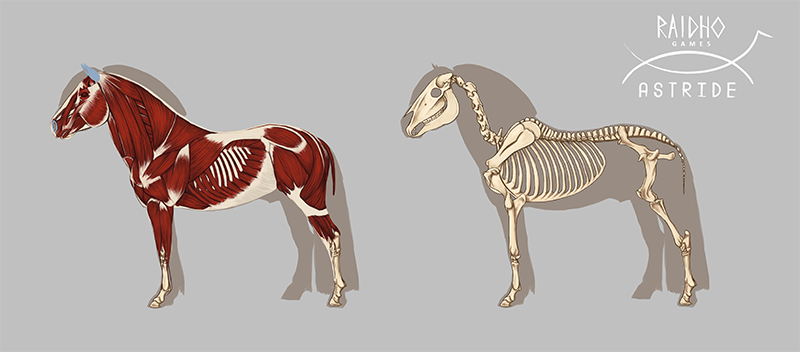
I had a Livestream in our Discord channel for the supporters on Patreon and Kickstarter. It was very nice and people seemed to enjoy it. But I was too scared to speak and I did not know how to play music during a stream. So I will look into that next time. Anyway, when the muscle horsie is complete, I want to add lines and names for each muscle and bone part when I make it into a complete poster.
Horses & Game Design
By Mathilde - Community Manager, 3D-artist
I know that February is a shorter month, but it flew by fast! This month, I have had a lot of things to work on. The biggest task has definitely been the Norwegian Dole horse model. While working on the Dole horse, I’ve also been back and forth between working on tasks inside the Unity Engine as well as writing a lot in our Game Design Document.
When it comes to the Game Design Document, it is very important to have specific details around the gameplay and game functionality so that our programmers can get a picture of how the result will be. I’ve been writing about how the horse AI should work, and how horses should behave in different situations that are based on the real-life reactions of horses. Thankfully, I already have a lot of experience with horse behavior, so I could translate this into a language (mostly if-statements) that the programmers can use. Since we want the horses to feel like real, individual, horses, it is really important that the AI reflects this.
The Show Jumping has also had a major information dump in our GDD. Mainly about how the jumping should work in different settings, such as training and doing lessons at home, competitions with NPCs/other players, and how a course designer should work for players to design courses at home and share them. And of course one of the most important factors - is the tutorial/introduction where players will learn about how to set up a horse perfectly to the jump (speed, striding, angle), the rules for competitions, and more. This is still a work in progress, but it’s starting to shape up.
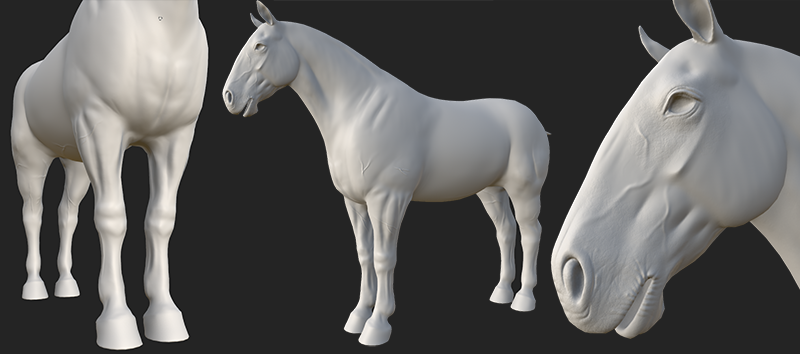
Back to the Dole horse, it is finally reaching the finish line. While it doesn’t have feathers (yet), it is coming along. For the feathers on the legs, this is a much bigger task to figure out as the hair cards will need to be placed in a certain way for it to look good. Not only that, we will also need different types of feathers since the feathers on an Icelandic vs Dole are different. There will be at least two or three types of feathers depending on the horse’s breed and heritage. But more on that later down the road! With the Dole, I‘ve used the same approach as the other breeds. It has its own high poly model which is baked on top of the low poly model, making it visually different from the other breeds.
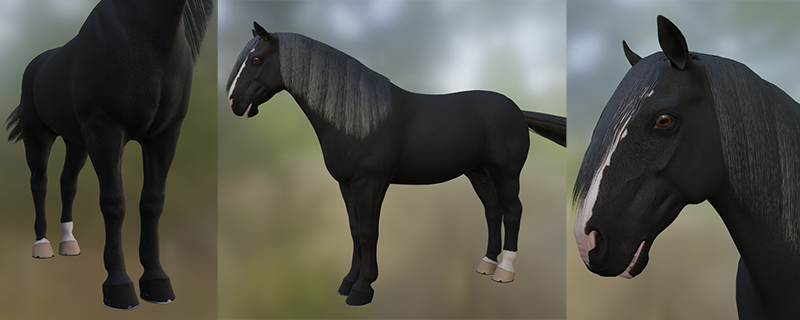
As a last addition to my devlog, I can reveal the next horse that I will be working on. The Alter Real will be my next priority and I am looking forward to creating a baroque breed this time.
Making Rooms
By Tirna - Project Manager, 3D-artist
Last month, I was working on the main structure of the stable. February mainly focused on making the interior, which includes different rooms such as the stable office, tack room, and feed room.
Since the stable was bought by a well-established horse breeder, we aimed for it to be in better shape than just "some stable." While we understand that many people like the opportunity to develop and customize the stable themselves, we view that as a significant risk in terms of game development for now. Therefore, we aim to create a stable with high standards from the beginning! However, this doesn't mean that we have completely excluded some sort of customization. But please keep in mind that if we include it, it may be restricted since we want to focus on other aspects that are more related to gameplay.
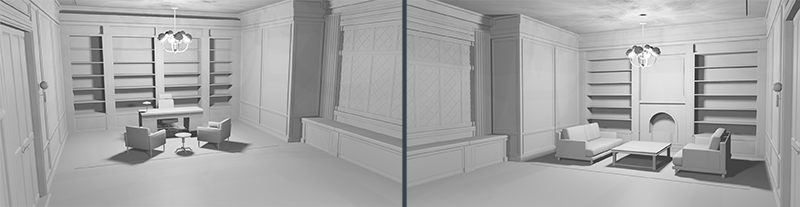
The stable office has a classic look with vintage elements. We wanted the office to be high-end! You might spend time here with NPCs like staff or clients, and if you play online, it can be a cool hangout with friends. Therefore, we decided to add a cozy lounge area in front of the fireplace and a large window that will hopefully offer a nice view.
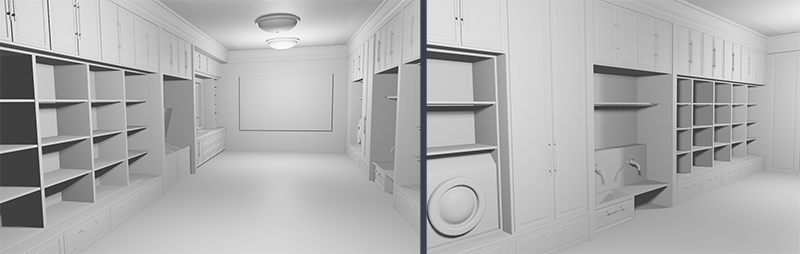
In the feed room, the player can find the horses' food. Each stall has its own shelves. This room is inspired by both a laundry room and a kitchen to elevate the style of the stable. Usually, stables aren't this luxurious, but we thought, why not make it look like a dream place when it doesn’t cost us anything more or less to make it exclusive?
Last but not least, we have the tack room. It has a similar style to the feed room to maintain a cohesive style for the entire stable. As before, each stall (or here, each horse) has its own designated place where you can find their tack. The shelves and bench at the back will be decorated with relevant items.
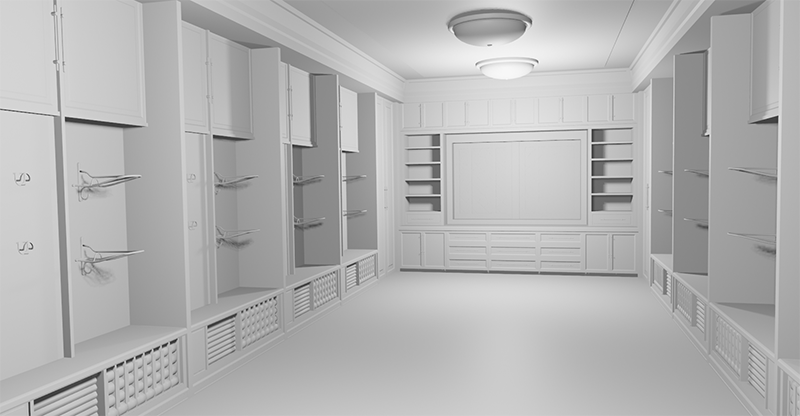
I can't wait to texture all of this and see how it all works together in Astride. So far, I've only started small-scale texturing a few models and have been working on a setup where the walls can be seamlessly put side by side without showing any seams.
Sound & Music
By Marius - Animator
Last month, I meant to make the music change depending on if you were in the main menu, making a horse or running around in the game. This turned out to be more complicated than I envisioned as personally I have not worked with the menu system at all, and Ouroboros was working on an overhaul of the fundamental UI system; which meant that anything I could get from the menu system would be changed in the future. This led to the problem of how could I make a script that needs to know if you are in the menu without access to the UI system? The solution turned out to be scenes.
For those not in the know: scenes are as the name suggests a container for everything that you would need to be loaded in in that scene. For example: The world you play in would be one of the major scenes containing everything from terrain, buildings, horses and sound emitters. While the horse creator is a smaller scene that loads in when needed. You can think of it as an instance in MMOs often used for specific self contained areas, like inside houses or PvP maps.
Back to the music: The solution was to look for active scenes in the game! The main playing area and horse creator would be easy with this approach as they are self contained scenes that are only active when in use, the main menu was a head scratcher though. For when you are in the main menu there is only one scene active, which is a scene containing just scripts, UI and sound management. The problem is that this scene is always active, so I can’t use it as a reference and rather make the script ignore the scene altogether. So after some brainstorming I came up with making the script play the main menu music when no scenes are active, excluding the management scene.
Please excuse the background noises as I didn’t realize the mic was on.
As I got the hooves to make sound last month, my next step (chuckle) was to make it dependent on the terrain surface. This meant that I needed to detect that there is a surface beneath the hoof stomp object before anything else. I did this by firing a raycast downwards from the stomp object and seeing if it hits anything tagged as terrain, the raycast itself will get information about the first object it hits so I can easily know if I am directly on the terrain object, on a rock or a floor of any kind.
After making the script detect if it is on terrain or not the next step was to get the information on what surface you where standing in the terrain. This meant that I needed to know what texture was currently under the hoof stomp object. First and foremost I set the default sound effect to stone, this is because at least for now about everything you can ride on that is not terrain are stones. This means that if it does not detect the terrain it will default to the sound of walking on stone.
During this I requested from our sound designer to get access to the other hoof sounds, which I got with a warning that the other sound effects were not properly started on yet so they would not sound good. Which was okay for I just needed them to test the sound change system so the sound design was not a concern at the time.
Next I did was to extract the x/y coordinate position of the hooves position on the terrain. Which is hard for me to explain, but the raycast the hoof object sends, gets information on where on the terrain object it hits in coordinates that can be cross referenced with the coordinates of the texture map of that terrain tile. Now you know where the hoof is placed on the texture map and can find what pixel you stand on, and can then get what type of texture brush is used on that pixel. You do get every layer of brushes used on that pixel and to what degree though so I simplified it to only pass on the brush with the highest number and thrush the most prevalent brush on that pixel. Then I had to set up a script that translates this number into different sound identifying names or numbers in this case. For example: you stepped on a spot that is gravel transitioning to grass, you get 0.245 of gravel texture and 0.755 grass texture. It will then send the grass texture ID number as it is the highest, to the script that translates it into the sound ID number for grass and changes the surface sound parameter to correspond with that sound ID number.
A problem I noticed is that sometimes the hoof clips slightly though the surface object, if it is a rock or the actual terrain. This makes it possible that the raycast gets started below the surface and tries to find the first thing downwards, which leads to it either finding the terrain surface while you are on a rock or if you are on the terrain it will find nothing; and if it finds nothing it will play the default sound, which is the stone sound. So to fix that I had to lift the origin point for the raycast a few centimeters upwards.
After making the hoof sound play and change based on surface texture it was time to break it. In other words there were some things in the setup that led to performance issues and had to be reworked. The main offender of this was that a new object spawned every time a hoof struck the ground. I did talk a little about this last devlog also and had put a limit on how many were active at a time. Otherwise all the functionalities that made up the hoof sound system were across several scripts with their own dedicated function that got referenced into a main script. This is not a good coding practice and would need to be restructured. So the first thing I did was place the sound emitters (and particle systems) on the hooves instead of the object that I spawned earlier. To spare details and a lot of back and forth I restructured the scripts from six into two, the main manager script now had all functionality scripts and the last script was unchanged as it is a library and translates the textureID to soundID. The library script is just referenced and not placed in any object but the main manager script got fused with the code that originally spawned the objects that held the sound emitters, I just reused the functionality to change and play sounds instead.
At this point I needed a break from coding and started some interaction animations with the horse. As of now I started with stuff you do from the horseback like petting, stroking and scratching the base of the neck. Other interactions will need some more advanced functionality that I need to research before making.
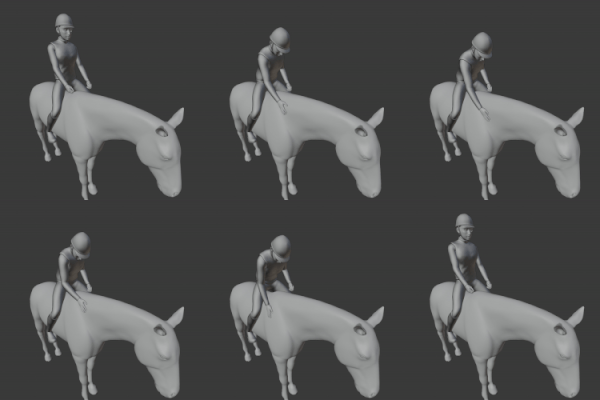
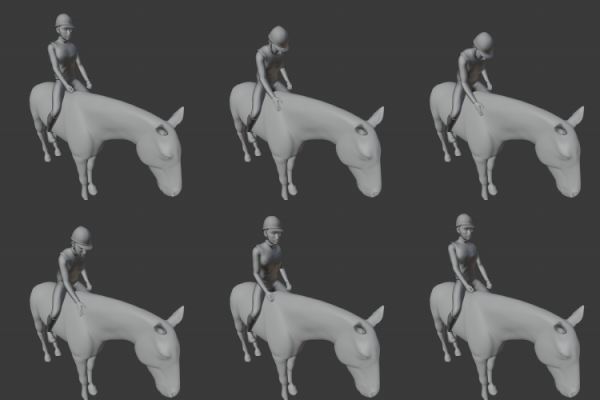
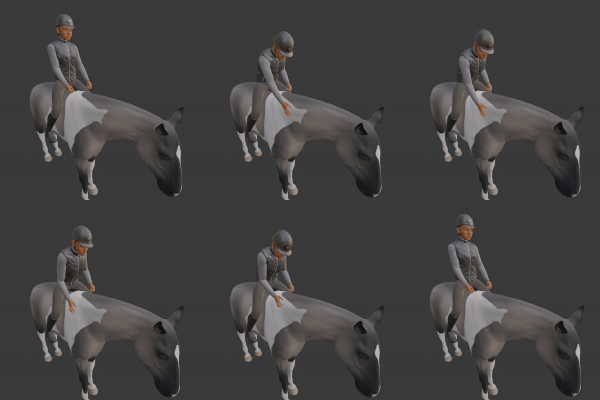
In the last week while preparing to export I started to look into updating the human rig a little to remove clipping through clothing and maybe even make it possible to use the masculine model.
I did this by designating segments of the body and making blend shapes that shrink the designated body segments. The part that shrinks should be everything completely covered by clothing, like the torso and hips when you have for example T-shirt and shorts equipped.
To make the masculine character usable will take a little more work though and may need to affect the animations themselves, but the body segment shrinking goes a long way to fix the issues it currently has.
Horse Pathing
By Green Horse - Programmer
February has been a month of focused AI development. Inspired by Red Dead Redemption 2’s cinematic mode, where the horse automatically follows a path, I’ve been exploring ways to enable that type of feature in Astride. It’s extremely simple for now, but it will become more advanced over time. The goal is for the horses to act and behave like real-life horses. The technical terms for how I want horses to behave are “Flocking” and “Boids”.
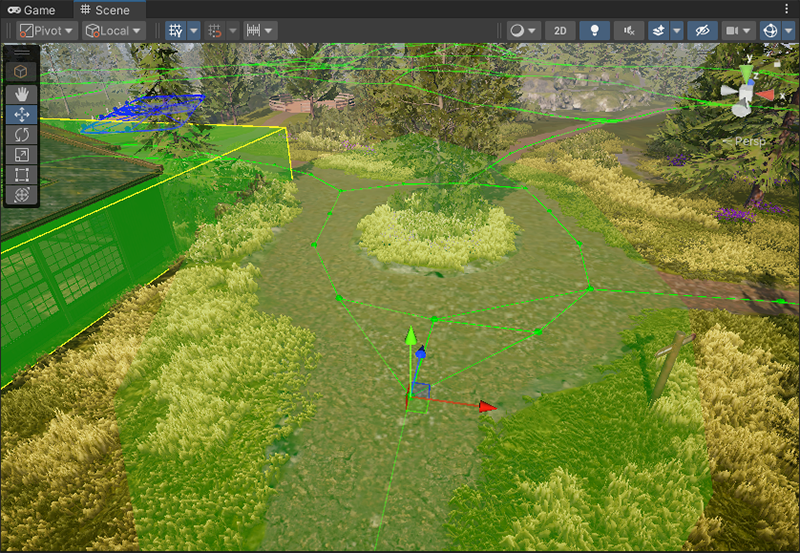
To make horses follow roads, we need to provide the AI with information on where the roads are. I’ve implemented this as a simple node graph system where path nodes connect to nearby path nodes to form a traversable graph. With the help of bezier curve math used in the dressage gamemode, we can create smooth curves between the points and have the horse move along the curve. It’s experiencing some issues with overshooting at high velocities, but that’s a problem to solve later.
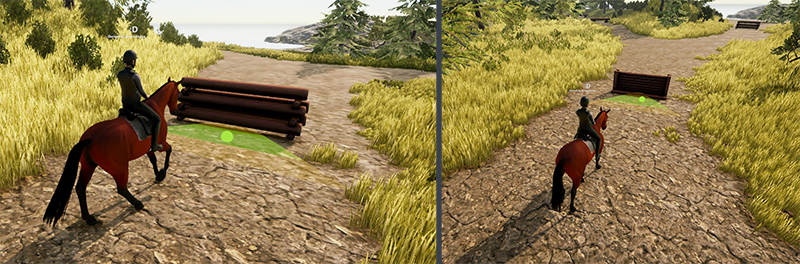
Some other features have also been worked on. The striding indicator has been toned down and made more intuitive. Instead of showing each striding point as a dotted line in front of the horse, we only show the points inside the striding plane as spheres and make them green when they’re inside the green jumping zone. This will make it much easier to see if your striding is aligned at a distance.
Inventory System
By Ouroboros - Programmer
My focus for February has been to work on an inventory system. This first iteration is a simple implementation that allows the player to put certain items into the inventory, and spawn items from the inventory into the world. The inventory is saved between sessions, so now it will be much easier to keep track of all the eldhest figures. With that said, the inventory system won’t be ready for release for a while yet. Some features still need to be implemented, and some issues need to be ironed out.
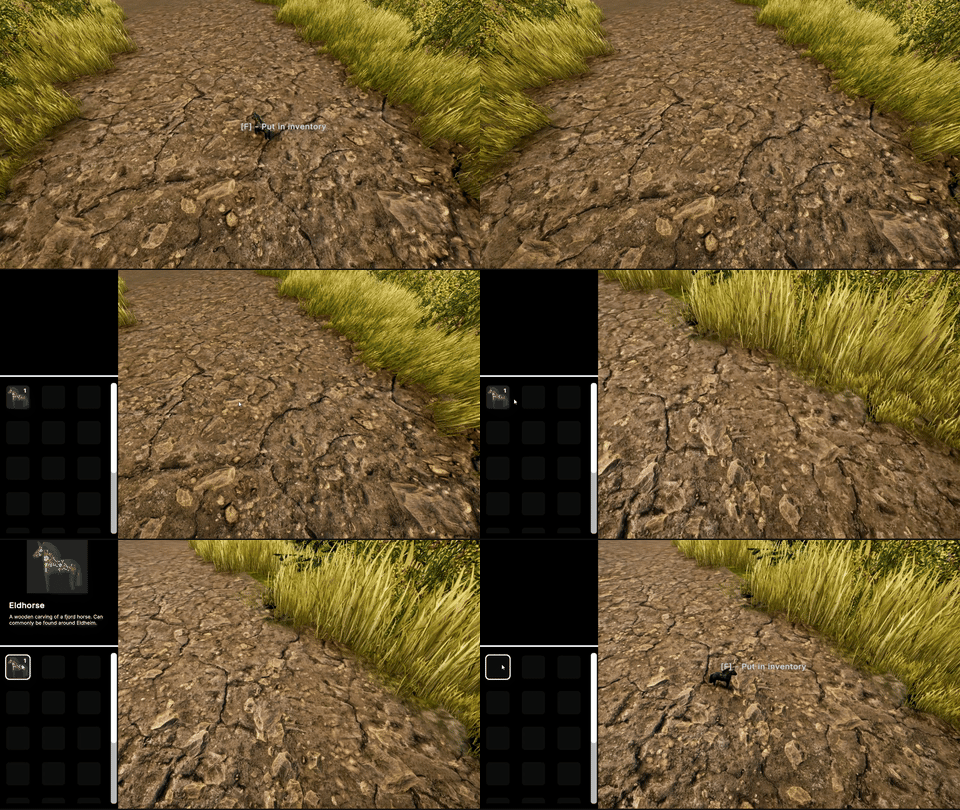
For a small change of pace, I have spent the last week of February working on a system for dialogues and texts in general. This will provide a good foundation when starting work on quests and tutorials. I have also worked a little more on the new UI by adding gamepad support and fixed some bugs.
Please be aware that the content featured in these devlogs represents an ongoing work in progress and may be subject to further changes. We are committed to continuously developing and refining our game. To stay informed about the latest updates and connect with the rest of the Astride community, we invite you to join our dedicated Discord server community here! For additional information about Astride, please visit our official website.