
If the Steam overlay is not enabled, you may experience difficulties when trying to make a purchase in the game; therefore, please refer to the following steps on how to set it up.
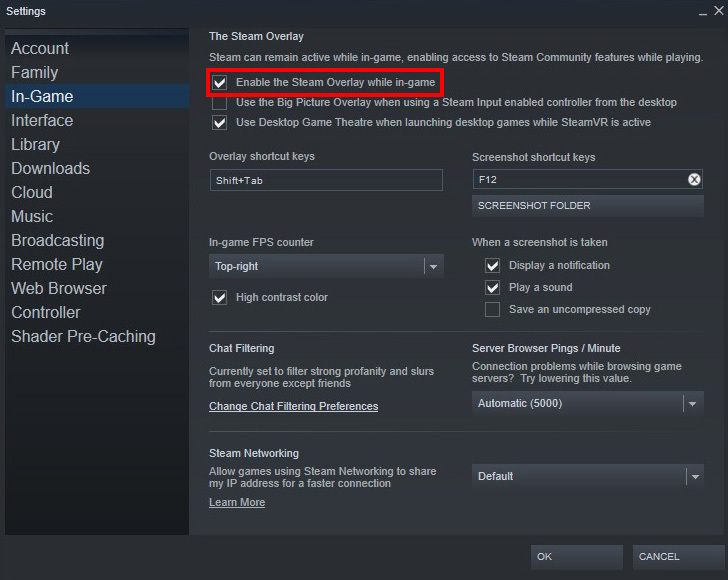
■ How to activate Steam Overlay:
1. Log in after launching Steam Client
2. Click the ‘Steam’ button in the upper left corner > click ‘Settings’
3. In the left menu, select ‘In-Game’ > check the box for 'Enable the Steam Overlay while in-game'
4. Launch the game
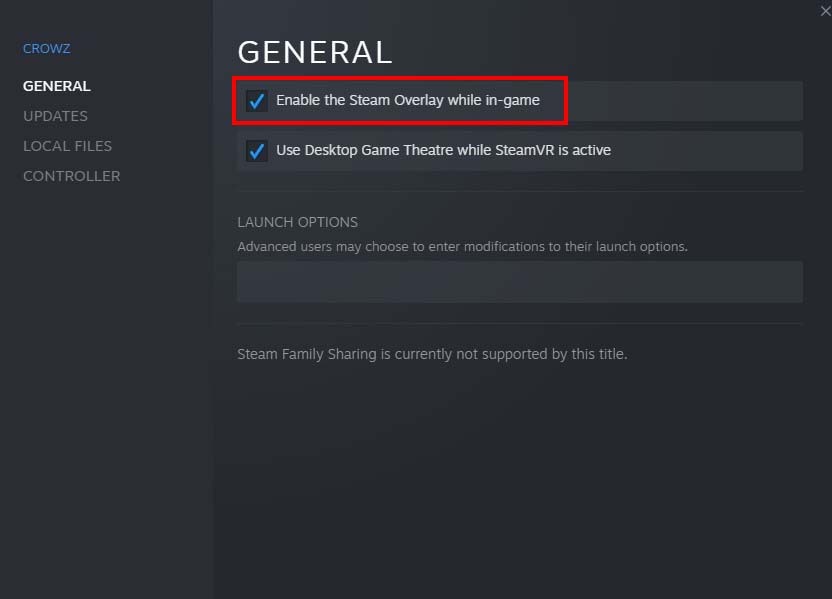
■ How to activate CROWZ Overlay:
1. Open Steam Client Library
2. Right click on 'CROWZ' > click 'Properties'
3. In the left menu, select 'General' > check the box for 'Enable the Steam Overlay while in-game'
In addition, please note that some programs running in the background may interfere with the operation of Steam Overlay. If the issue with payment persists even after completing the above steps, please try closing the programs mentioned below or take further measures.
■ Programs that may interfere with Steam Overlay
1. ATI Tray Tools
2. EVGA Precision
3. Fraps
4. Kaspersky AV or Internet Security - Kaspersky
- For users with 7.0 version, please disable options to be able to directly control the program after enabling compatibility mode in the program options for using protection schemes.
5. RivaTuner
- Disable RivaTunerStatisticsServer.exe to use the in-game overlay.
6. sView 3D Image viewer - S3D service
7. The Shield Deluxe Anti-virus
8. Tiny Personal Firewall
9. Ventrilo
10. Windows Blinds
11. X-Fire
12. Zone Alarm
Thank you.