
Today's dev blog will be a little more technical and deserve the name dev blog a bit better than the previous.
In an interview with Fightful, the legendary Mat Dickie can be quoted as saying that "we all know, for a fact, how difficult it is [to make a wrestling game]". From the several years of experience working on CPW, we can assure you it is. One of the main reasons for this is animation. There are several aspects about animation in a wrestling game that take very much to get right. In this dev blog, we'll cover a few of those things and what CPW's take is on them.
The Sheer Amount of Animation Clips
This is the first real issue when dealing with wrestling games. The number of required animation takes is immense, because there are so many possible actions, moves, taunts, etc. Many of the basic actions you would expect from a wrestling game are implemented in CPW, but far from all, and most importantly, there aren't too many different moves yet to choose from. Still, we count as many as 194 different animation clips at the time of writing.
While large companies can have most of the handiwork done using motion capture (which still requires a lot of postprocessing and isn't as simple as it may read here), in CPW, all animations are modeled by hand keyframe by keyframe, which is probably true for most indie wrestling games. In addition to that, many animations have scripts attached that help with issues described later in this post.
Dynamic Transitions
In many games, there's that character that the player controls and they have a set of actions at their disposal where most of the time, it's pretty clear what action can follow another. In wrestling games, this is a little more tricky. You may be swinging for a big punch but your opponent flinches in a swift kick and interrupts you. You may be climbing up to the top rope when somebody smashes you in the back. The move you're going to execute? Well, it may be countered, somebody may interrupt it from outside, but maybe also you're just out of gas to lift the opponent and botch the whole thing. Any of these things can happen at any point during an animation. From a developer perspective, there is no real telling what happens next, and that makes it pretty difficult.
Needless to say, the animation system has to be as flexible as possible. You can't draw up something like a state machine that defines possible transitions and implement that. Any animation may have to transition into any other at any point in time and the developer never saw that coming.
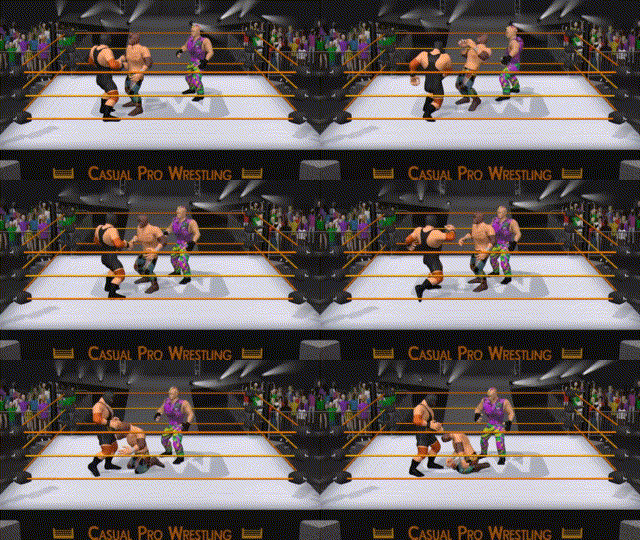
CPW does work with a state machine to determine what a wrestler can do right now, but the animation system is completely decoupled from that, allowing transitions at any time. Here's a tiny demonstration of a poor guy being pingponged:
Ragdoll Transitions
What you also see in that short clip is what we've been talking about in the first dev blog, wrestlers in CPW ragdoll when they lose composure. That doesn't make animation any easier: at any point, a wrestler may ragdoll and the transition should look fluent. Whatever movement and rotation the body was going at during the animation should plausibly be passed to the physics system so there are as little hickups, slowdowns, boost, teleports or similar. CPW tracks the movement of every part of the ragdoll individually during animation to make this as flexible as possible, nothing is hardcoded here.
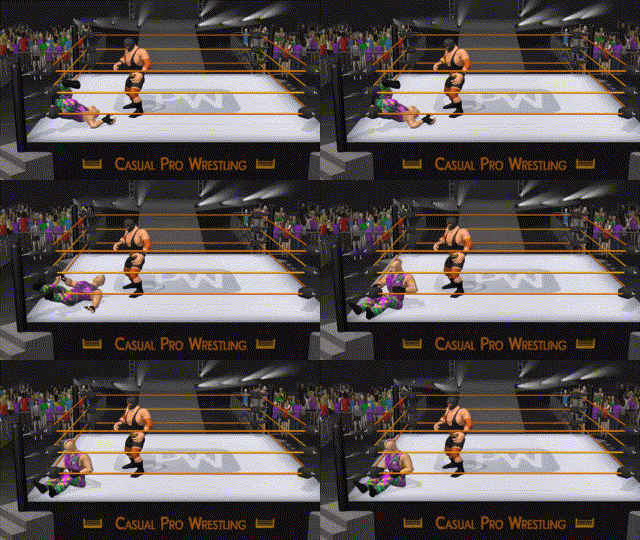
Then there's also the reverse direction. Ragdolling wrestlers will, at some point, go back to being animated from wherever and in whatever position they've been laying around. The back-transition from ragdolls to animations is tough to get right at all times. Here's somebody sitting up from an unfortunate pose:
Animation Frame Sampling
In CPW, it is as you would picture it, one animation for certain actions. As an example, let us take climbing up the ring apron from outside: there is one animation for it. So far, so good.
Not every apron is the same. In fact, the ring is generated procedurally in CPW (a necessity for ring customization) and may have different heights than the animation anticipates. Furthermore, not every wrestler is the same, and smaller wrestlers may need to start climbing closer to the ring apron for the animation to look plausible. There is no way to premake an animation for every possible scenario, and still, for one and the same apron climbing animation, we want the wrestler to begin and end up on the correct spot.
CPW employs a technique we call animation frame sampling to get this to work: before climbing, the game internally "plays" the animation to the end and looks where the wrestler would end up with no adjustments. It compares that to where the wrestler should end up, and then adds the difference as motion that is gradually applied while the animation is playing. An example is shown here:
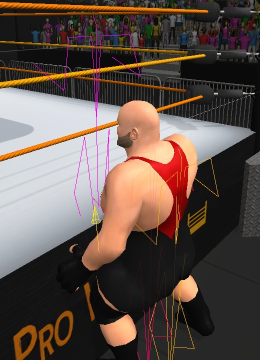
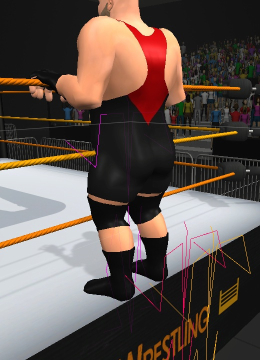
In the first picture, the sampled skeleton at the end of the climbing animation is visualized in magenta. It's obviously sunken into the apron too much, so we'll have to adjust the animation by the yellow arrow. In the second picture, we see that it worked pretty well!
Inverse Kinematics
Let's stick with standing on the apron. We want the wrestler's hands to be on the ropes as we see in the second picture. Again, there's exactly one animation of a wrestler standing on the apron, and it must be adjusted for wrestlers of different heights, arm lengths, hand sizes, and so on.
CPW uses Inverse Kinematics, a very common technique in games that helps place endpoints of a skeleton - e.g., the hands - where they should be, or make sure the feet are on the ground when standing on slopes.
Synchronized Animations
Finally, there's one problem where all of the above come into play: synchronizing animations between two or multiple participants. CPW has a separate animation clip for the instigator and the victim of a wrestling move. During actual gameplay, however, the wrestlers may be at different starting positons, may have different sizes, may or may not be ragdolling and may need to take into account the sorroundings. Still, you want the hands on the opponent's shoulders while grappling, or when doing a chokeslam, the hand of a larger wrestler shouldn't end up in the opponent's mouth just because they're smaller.
CPW has a separate animation clip for the instigator and the victim of a wrestling move, and uses all of the techniques described earler to make sure things are in sync on one hand, but very flexible on the other. This is done by adding extra scripting that orchestrate the animation, positioning etc. during a move. Let's have a look at an Irish Whip, which looks simple enough, but has quite some synchronization going on internally:
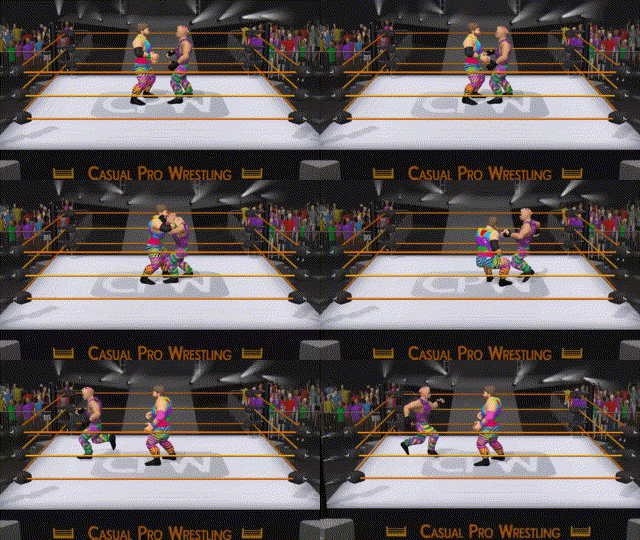
To round it up, animation is the most important aspect of a wrestling game, because wrestling is all about motion of human bodies. While this is true for many games, wrestling games need to synchronize animations between multiple characters and the environment at the same time, which is but one aspect that makes their development a real challenge. For CPW, we have our ways to tackle this challenge and try to make a fun gameplay experience out of it.
For those who have been following, thank you for reading and stay tuned for the next update!