
Hello, survivors!
Whether it’s riddling zombies with bullets, exploding them or setting them on fire - everything’s more fun with a friend!
In this post, we’ll go step-by-step over how to play Hordecore! Prologue with a friend online, using the power of Steam Remote Play.
Step 1. Install and launch HordeCore! Prologue
Seems pretty self explanatory! Please note - only the host needs to have the game installed.
Step 2. From the Main Menu, open up the Steam Overlay and invite your friend!
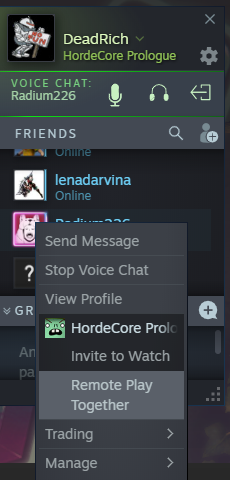
After you’ve loaded the game, press Shift + TAB to open up Steam Overlay.
After that, open up your Friends menu, select the friend that you want to play with - and then, after right-clicking on their profile, press “Remote Play Together!
!!!!! IMPORTANT !!!!! Currently, Remote Play only works correctly if the player joining the game uses a controller. We apologize for the inconvenience and are working on fixing this issue.
Step 3. Set up the joining player’s profile.
After the second player joins the session, you’ll see their Steam Remote Play profile.
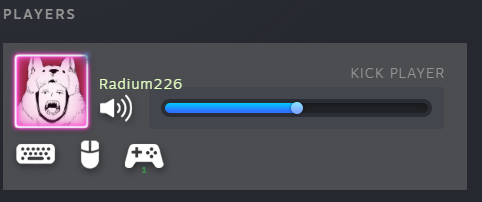
Disable their keyboard and mouse support. That way, we’ll exclude any possible interference between the host and the joining player.
Step 4. Start up the game and enjoy!
You’re all set!
All you have to do now is simply start up the game by pressing either “New Game” or “Continue”. In-game, the joining player should press the START / OPTIONS button to enter the game. After joining, pick out a character and get on with killing zombies!
Thank you for your time! We hope you enjoy your time out there in the Wasteland, alone or with a friend!
For any other questions or support, please contact us at [email protected]