
Hello troops,
What's Tricky About Optimization?
This is a smaller update (no traditional "content") than normal but hopefully a welcome one. Since the Maginot Line update (which most everyone seems to be enjoying!), I've received some really fantastic feedback from players. It warms my heart to see so many players enjoying my WW2 game. One consistent theme from some of the comments is occasional lag experienced by some users. While I think an argument could be made that some amount of "sub-par" performance is expected for a battle-simulator type game (lots of AI bots tends to do that), I always want to try and make the game perform as best as it can to enable as many players to enjoy what it has to offer.
The tricky thing about optimization is that the first 60-70% of optimizing is relatively easy. The more efficient and optimized you wish to make it beyond that begins to require an exceptional amount of work and trickery. Think about automobiles - many cars can routinely get 25-35 MPG, but to push beyond that margin starts to become very tricky. You begin to work at the edges of your knowledge, your design & engineering limitations, your tool limits, and a shrinking time-spent vs. performance-gained margin. Let's talk about some of my limits with Brass Brigade and how I'm addressing them.
The Unity Engine & Monobehaviour
Brass Brigade is built on Unity Engine 2018.1.9f2. Unity Engine is an absolutely fantastic game engine, known for its high accessibility, user-friendliness, and C# backend. Many fantastic games have been built on the Unity Engine such as Ravenfield (an inspiration for Brass Brigade), Tannenberg, Verdun, Escape from Tarkov, and more. Despite these fantastic games, some players associate Unity with poor performance or sub-par gaming experiences. While I disagree with such a black-and-white association, one thing that is true is that some of Unity's fundamental programming libraries derive from a class called "Monobehaviour". This is a class that provides engine level programming functionalities to Unity developers. The name Monobehaviour does imply though that it is not "thread-safe" - in other words, it cannot be multithreaded. This core coding library that backs much of Unity cannot be multithreaded. To clarify, data can be extracted away from the Unity level libraries and multithreaded elsewhere, but this limits multi-threaded work to extremely low-level computation, which would not often benefit from multithreading.
Some users, especially those with Ryzen CPUs, have noted low CPU consumption. This is a by-product of Unity executing on a single thread. In my experience, I've noticed similar patterns with other Unity games on other CPUs that have multiple cores. As a general take-away, CPUs with higher clock speeds & stronger single-core performance should perform better than other multi-cores with slower per-core speeds - at least, that's my experience with Brass Brigade. Newer versions of Unity are introducing new technologies that are much more friendly to multi-threading; these are still in early development & forwards compatibility with old projects is unlikely in my estimation.
What's been Optimized?
The good news is that Unity does offer some fantastic tools to profile your game and figure out where CPU time is being spent. In the case of Brass Brigade, more CPU time was being spent in the Camera Rendering and Physics engine than anything else.
Physics Engine Related Optimizations
- Optimized bot character controller code to not rely on physics engine for translating characters. This significantly reduces physics overhead for bot movement.
- Particle effects have had their total number of sub-particle emitters reduced. Most debris that gets kicked up by bullet impacts & explosions will no longer collide with the environment to reduce stress on the physic engine.
- Bot AI has been refactored to spread out the timing of when they raycast a target (checks if they can physically see a target) across all bots. This has the added benefit of allowing an individual bot to raycast more frequently than before while retaining a net reduction in raycasts per frame. This has helped to reduce the frequency of friendly fire drastically as bots can detect a friendly in front of them much quicker.
Camera Rendering Optimizations
- Particle effects no longer have randomized rotations over time; this allows them to be culled when off-screen. Previously, particles were being rendered by the camera system, even when off screen.
- Ambient Occlusion sample count was drastically reduced.
- Disabled reflection mapping in the rendering pipeline as it wasn't really contributing to the overall visual presentation.
- Reduced terrain grass render resolution slightly.
- Particle effects no longer cast shadows.
- Modified shadow cascade profiles to allow for much crisper shadows closer to the earlier releases of the game with virtually no change in performance (increased visual fidelity for no cost effectively).
Test Metrics
Test System
- i7 7700k @ 4.2GHz
- 16GB DDR4/3000MHz GSKILL Trident Z RGB
- GTX 1080 Ti @ 1920x1080@60Hz
- Game running off 2TB 7200RPM SATA300 HDD
- Windows 10
Game Settings
- Anzio Day 2
- 64 Bots, default map settings
- Default CPU time settings
- Low Settings = Out of the Box Settings with no grass, no ragdolls, no bullet impact effects
- High Settings = Out of the Box Settings, 0x ragdoll corpse multiplier
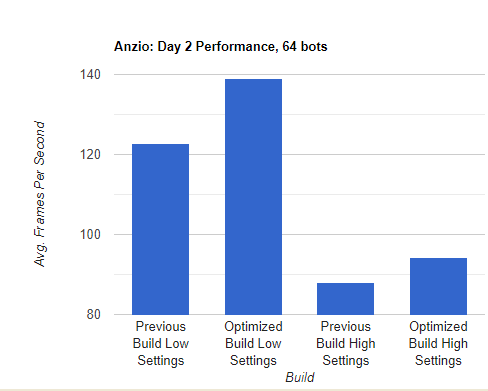
Here, the previous Maginot Line Update build was compared against this new optimized build. I played 3 minutes on the map with each configuration, doing my best to run the same path. With the "Low Settings", I saw a 13% increase in performance on average, going from an average of 122.808 FPS to 138.942 FPS. With the "High Settings", I saw an increase from 87.923 FPS to 94.253 FPS, or an increase of 7.2%. Across 3 different test systems (ranging from 4th gen i7s & GTX1060m to the aforementioned test system), similar increases were observed.
Not too bad - plus, I believe the overall gameplay experience has increased in part due to more responsive enemy AI, less friendly fire incidents, and sharper shadows. These results were captured using Fraps benchmark tool.
The Future - And More Optimization Tips
On my test rig, exceptional performance (120FPS+ on average) was experienced by reducing the graphical fidelity. By turning off the grass, shell casings, bullet impacts, and ragdolls, you trade some visual candy back for CPU time. You can use that to fill up your scene with more bots, or just enjoy the extra frames.
Most Costly Settings (Higher = More Costly, Lower = Less Costly)
- Graphics & Audio > Render Shell Casings For Bots
- Graphics & Audio > Use Ragdolls
- Graphics & Audio > Bullet Impact Particles
- Graphics & Audio > Terrain Detail Draw Distance
- Graphics & Audio > Terrain Detail Density
- Gameplay > Ragdoll Corpses (Set to 0x for best performance if using ragdolls, if this is turned up high, it can FAR outweigh anything else in cost and make the game unstable.)
There were a few other optimization tools I was testing (such as a mesh-combiner toolset) which did not yield the results I was initially hoping for, but due to their complexity, I have not exhausted their use entirely yet. They may still provide more performance as I learn them. Until next time, I'm hoping to bring you a map or 2 in the future. I'm always curious to know about your performance - feel free to visit the Brass Brigade Discord and drop me a line. As always, if you're enjoying the game, please leave a Steam Review!
Until Next Time,
Henry Kucab
Addendum (9/30/2020) - Small update pushed that fixes missing global lighting on Operation Battleaxe.