
Hello and welcome to this new devblog dedicated to the jump and all that implies in the game.
The jump is an essential mechanic in the game. It needs to be responsive and satisfying while keeping the original intent we had for the game. We don’t want a rigid jump, but we don’t want that the platformer part prevails over the puzzle part either.
Platformer aspect :
Even though Palallel is a platformer, it’s first and foremost a puzzle game. It’s not necessary nor desirable to add common mechanics from 2D platformers. Every new mechanic that we add has an impact on the game balance. To explain it more clearly, here is an example :
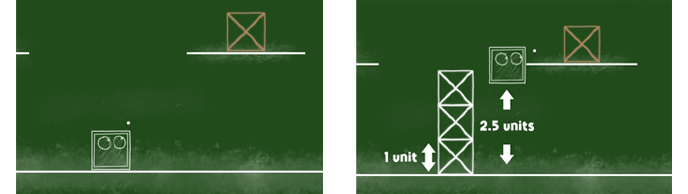
In this situation, the player wants to jump to get to the platform with the box (left picture). Our actual parameters allow the character to jump approximately 2.5 units (right picture). This jump height parameter has been fixed so we can build adjusted levels upon it. Adding a new movement mechanic like a double jump or a wall jump will break this balance and force us to adapt many levels.
The current level design is designed in a way that the character can’t reach this platform alone. To get the box, he will need the help of the second player. All movement parameters (character speed, jump height, acceleration, ...) have been set at the beginning of the level creation. It guarantees the scale of all objects in the level and that the puzzles are solved the way we intended. A badly calibrated level may hurt the satisfaction players can feel by beating a level. That’s why it’s mandatory to consider all of these parameters early in the level creation process.
We have chosen to not give other movement mechanics to focus the game on puzzle-solving and make the platformer side easy and restrictive at all.
The importance of a polished jump mechanic :
A good platform game is like I’ve said above, a game where the jump is responsive and satisfying. However, the most important part is that the jump should not be frustrating and especially not a constraint to the player’s progression. The jump needs to be simple and easy to apprehend and use.
Allow me a little digression to talk about the quality assurance and testing field. Everyone expects a game to work correctly and without bugs (even though some games like Cyberpunk 2077 tend to make players more distrustful over the quality of games that comes out). We often say that the job of tester in the videogame industry is unrewarding and that it’s only visible when it’s not done correctly.
This is also true in our case for the jump. If we made our job, the jump would be invisible to the players. On the contrary, if the player ever feels like the jump is a burden when moving the character, we have more work to do. The next chapters will present to you some actions we have taken to ensure the jump feels right.
Flexible jump :
This chapter will introduce you to a very common concept that will greatly facilitate the movements of the players. When you will wander around the levels, you will often cross little platforms like the ones you see on these pictures below :
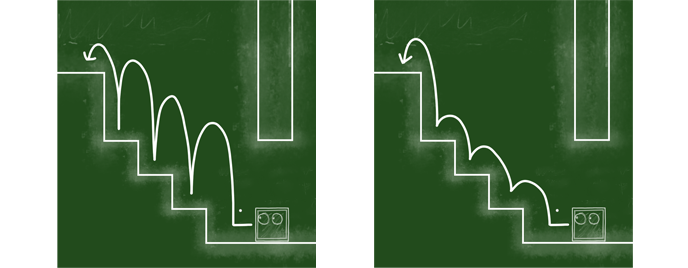
On the left picture, you can see how the game would react without this mechanic. The jump has a fixed height (2.5 units) and the character goes 2.5 units height each time the player jumps. This makes the movements feel long and tedious.
The right picture is an example where the variable jump is applied. The more the player has the jump button pressed, the higher the character will go. On the contrary, if the player decides to release the button early, he will fall off much quicker. It’s really easy then to alternate between small and big jumps to get to the platform you want to reach.
Palallel has a lot of obstacles related to the jump so this is the option we chose. We just have to set a minimal and maximal jump height and base the level design on that.
Coyote time :
I will now present to you two mechanics that are widely spread in game design. Those are used to prevent the frustration that players can feel when traveling in a 2D environment.
The first of those two concepts is called 'Coyote time' (related to the character “Wile E. Coyote” from Looney Tunes). It’s a technique that allows characters to jump from one platform to another without touching the ground. Let me explain with an example :
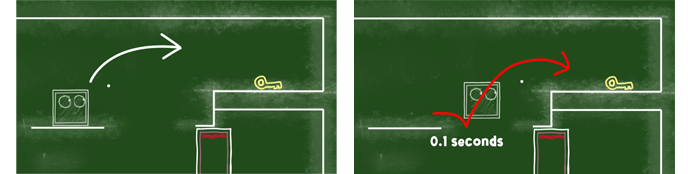
On the left picture, we have the base situation. The player wants to jump to the golden key. Let’s take a case where the player moved to the right and fell from the platform because he pressed the jump button too late. He could have missed the timing from 0.05s only and yet, the game would still consider he is no longer “grounded” at the moment his character leaves the platform. This is a very common and frustrating experience because the player thinks he jumped on time.
On the next picture on the right, we now apply the coyote time effect. We allow the player to be considered “grounded” for a very short amount of time each time he leaves a platform and is in the air. In this example, the player goes to the right and presses the jump button 0.1s after leaving the platform. The game will allow him to jump because he is still in the timing where he is considered “grounded”. The red line is the estimated trajectory of the character with the effect on.
This concept is used in a very large amount of platform games and if you found this interesting, I suggest you pay close attention to some of the games you play because it’s quite likely that these games have toggled this mechanic. This subject as well as many others are brilliantly explained in an interview of Sébastien Bénard (game designer & lead on Dead Cells from Motion Twin) from Gamespot :
https://www.youtube.com/watch?v=LtBNffzWhf4
I strongly suggest you to take a look at this video if you’re interested in game design.
Input memory :
The other concept I wanted to mention is quite similar to the previous one. I don’t know the term used for this concept so I call it ‘Input memory’. The purpose of this mechanic is still to avoid a maximum of frustration.
Here is the example situation :
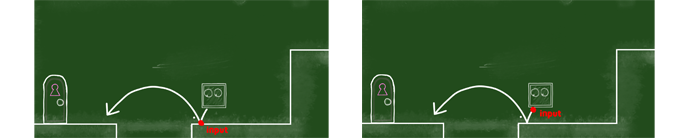
The player jumped from the higher platform on the top right corner of the picture to land below. Like in the previous examples I gave you, the left picture represents what happens when the concept isn’t applied, and on the right what happens when it is applied. The input memory principle is to keep in memory that the player has pressed the jump button when he is in the air. Same as the coyote time, we only keep it for a very short amount of time like 0.05s to 0.15s.
On the left picture, the player presses the jump button only when he touches the ground (the red dot). If he presses the button 0.05s too late (while the character is still in the air), the jump won’t trigger and the will fall in the center.
With the concept applied the player can press the jump key up until 0.1s before the character touches the ground. If he does so, the jump will trigger once he landed on the ground. On the right picture, the player pressed the jump button on the red dot and he will be able to jump on the next platform once he touches the ground.
There are many techniques and methods like those I’ve presented, but it’s time to end this very long devblog. Thank you for reading this devblog and I hope you found something interesting there. If you wish that we talk about something in particular, don’t hesitate to give us some ideas in the comments or on our discord (https://discord.gg/fXNgBnvRTd).
Have a nice Sunday,
-- CorentinPB