Welcome back to the second issue of our Scribble It! Developers Blog. This time we explain our usage of Signed Distance Fields as a method to make our UI razor sharp on almost any resolution.
Scribble It! is a 2-dimensional game. As such it is predestined to also run on machines with low-end hardware. Maybe someday even on a smartphone.
Machines that have very old GPUs or even rely on onboard GPUs most often have a rather small texture memory. Yet modern games require the loading of a lot of big textures to make them visually appealing. To cope for that often times the player can reduce the texture quality in a settings menu - but that obviously makes the game look worse.
Using low resolution textures on 3D models to get a smooth gameplay might be a worthy tradeoff. But blurry 2D elements in the User Interface would seriously disturb the entire gameplay of Scribble It!. After all the game basically consists of only texts and UI elements.
We therefore needed a way to make the UI and text elements very sharp but without loading those big textures. Storing many high definition textures for all the different elements would mean high hardware requirements which is not somethin we wanted. There had to be a way to create sharp UI elements without using big textures.
We found the answer in a technique presented in a 2007 Valve Corporation paper by Chris Green called „Improved Alpha-Tested Magnification for Vector Textures and Special Effects“.
The presented usage of Distance Fields allows you to create sharp images on many screen resolutions. These Distance Fields make it possible to use small textures even for the highest resolutions. This way texture memory usage is being minimized and the game still looks good. Looking towards a possible mobile release for Scribble It! this was just what we needed.
This technique implicates that the resulting representation is „limited in terms of topology of features which can be represented“. Or to put it in other words: The approach is not feasible for really detailled and complex artwork. For Scribble It!'s rather simplistic approach to UI design this was not an issue.
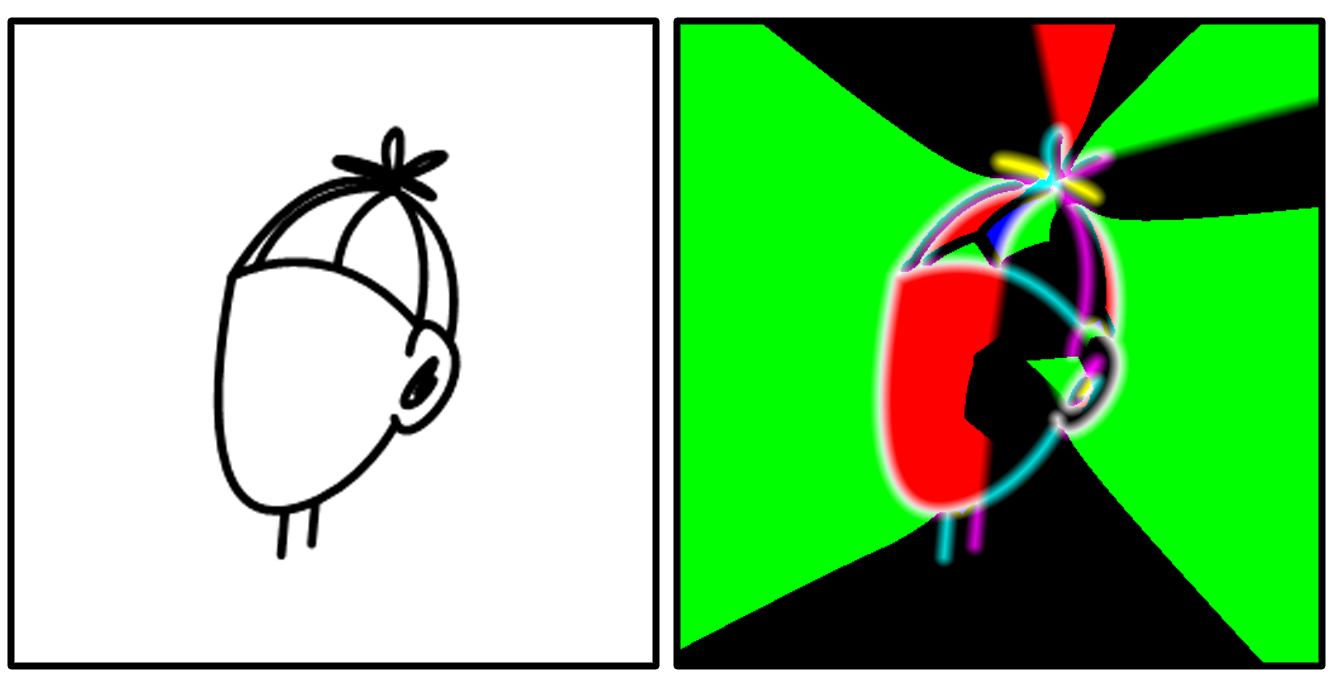
We generated the Distance Fields by using Chlumsky's Multi-channel signed distance field (MSDF) generator. Below you can see an avatar in the form of paths and the resulting MSDF texture.
Afterwards we created a shader to render the final texture from the MSDF. In this step the main challenge was to get smooth edges for every resolution. After testing out several different approaches to tackling this problem we found a solution that worked for us. We made the amount of smoothness that is applied to each pixel depended on the ratio of texture size and actual size of the render target.
The following material function is what we used to achieve that goal.
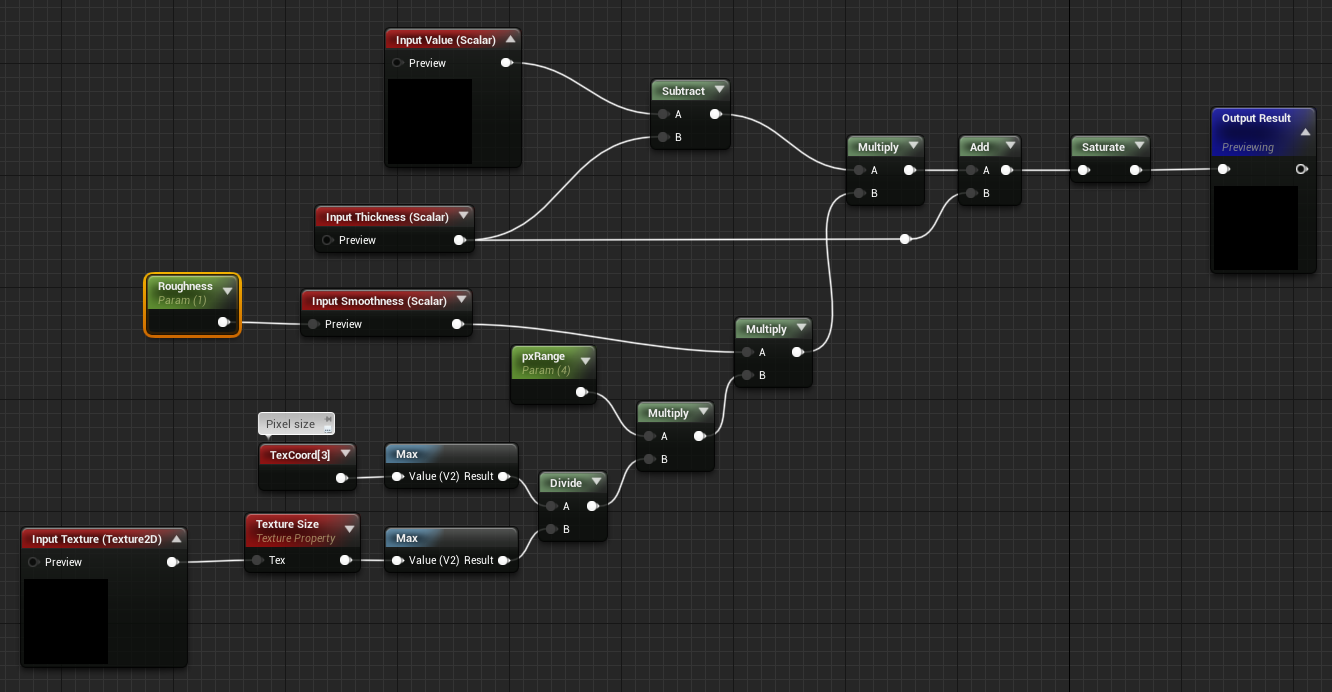
When generating a MSDF we can set a value for pxRange which represents the amount of surrounding pixels that will be included in the computation of the current output pixel. Specifically the pxRange determines how much the thickness parameter influences the final render.
Another parameter called roughness is responsible for how smooth the edges will be and can be changed in the MSDF material. This allows for a relatively comfortable adjustment of the different textures so they look good depending on their size and the type of artwork that they contain.
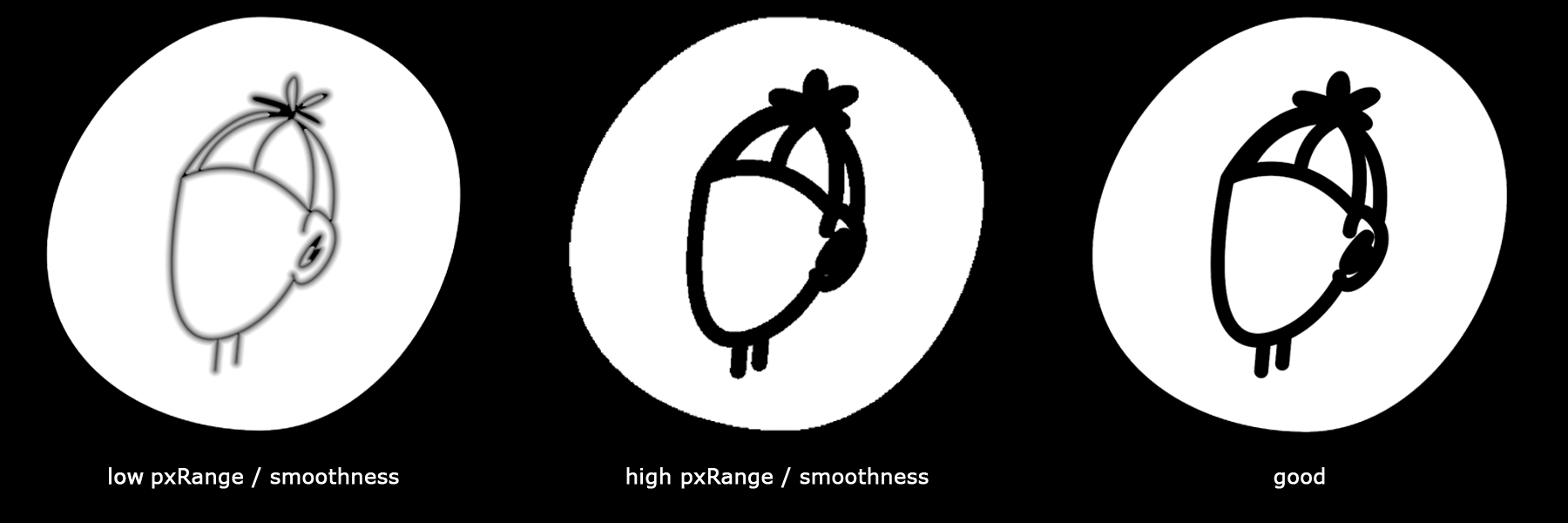
Below are some examples of what happens if the roughness or pxRange values are not correctly set. To make the different artifacts more visible we increased the thickness of the depicted avatar a bit.
Overall we are pleased with the way we were able to use MSDFs to create sharp UI elements and texts. We had to make some adjustments to existing algorithms in our material and ultimately we are happy with the result. We hope you gained some insight into topic from todays issue of our DevBlog!
Marcel & Sören
Be sure to follow us on Twitter!