
Hello Gamecrafters!
In this week’s dev blog we’re going to talk a bit more about our ongoing UX improvement as well as some changes to the way we plan on releasing updates going forward.
UX Improvements - Step 2
With Gamecraft’s latest update we introduced ‘Step 1’ of our UX overhaul which mainly focused on the idea of “Modes” for building. You can read more about those changes, and everything else in that huge update here: https://store.steampowered.com/newshub/app/1078000/view/2397551743439682802
Step 2 focuses on Config Mode, with some big changes to wiring and tweaking.
Wire Widget States & Persistence
The first and arguably biggest improvement we’re making here is to allow countless widgets to be open at once, while also letting you minimise unwanted widgets!
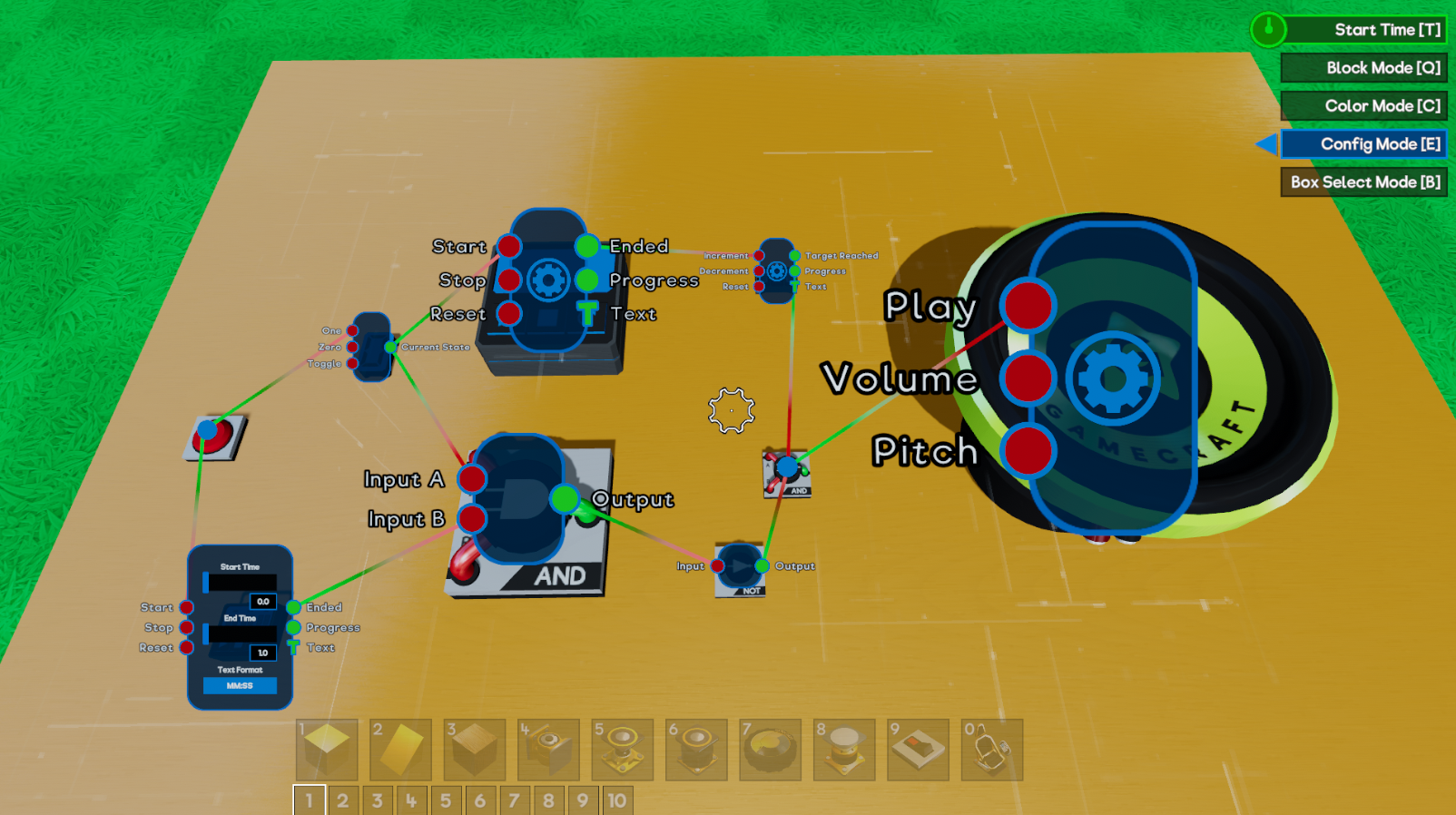
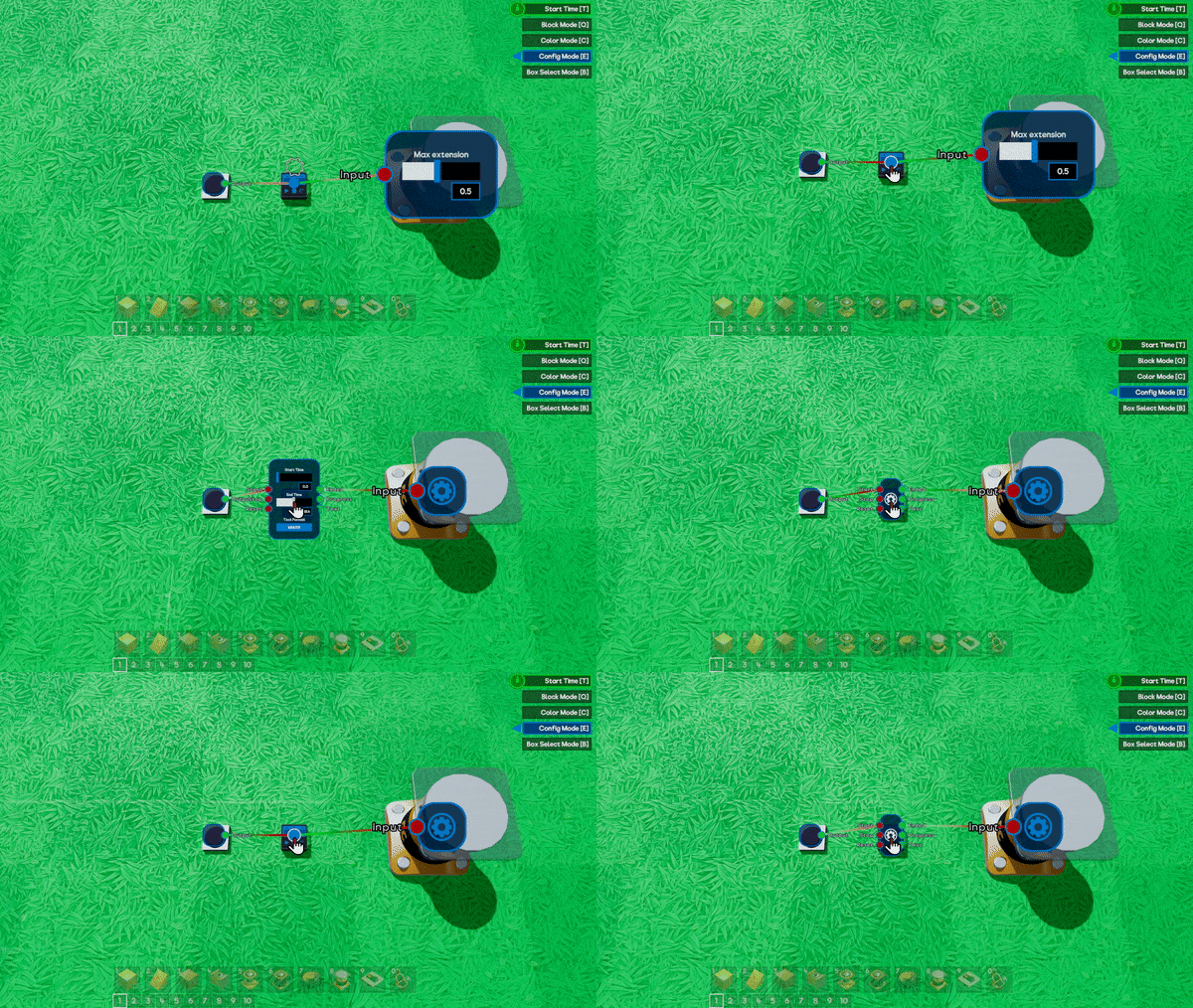
Clicking LMB over a blue dot will still open the widget, and any directly connected to it, as you’re used to. Clicking RMB will now minimise expanded widgets or fully close them, leaving them in the smaller dot state.
Other Changes
A few more additions and changes are coming too.
- With RMB now closing widgets, clicking RMB on a port will no longer delete any wires that stem from it. DEL will be used instead. Deleting single wires will instead be handled by hovering over the wires themselves and clicking RMB, giving you finer control.
- Switching back to Block Mode from any other mode will no longer be possible by pressing the current mode button again. For example, you can enter config mode with ‘E’ but pressing ‘E’ again will not return you to Block mode.
- The size of widgets will now scale with the size of the part, making it much easier to interact with.
- Parts that have no ports will open directly into the expanded widget. This felt like an unnecessary extra step on parts like the Movement Constrainer.
Beta Branch and Updates
We’ve had quite a lot of success with the Preview Branch of Gamecraft over the last year. We’ve been able to get valuable feedback on proposed changes from some of our most dedicated crafters, early previews of upcoming features and even spot some bugs early to make sure they’re squashed quickly.
With that in mind, we’re planning on shifting our update procedure around a little bit to make use of the Preview branch more often, giving you a chance to give early feedback while actually being able to try out the update for yourself, rather than just reading about it.
The current plan is to schedule the release date as normal, but instead of using this as a regular update day, we will instead put the update into the Preview branch first for a week or two. This gives you a chance to get hands on with all the new features and changes that we tease in the Dev Blogs leading up to each update in a complete, but slightly less polished state.
Our next update will be the first time we try this method. We’ll share more details when we’re closer to launching that.
Steam Summer Sale Discount
From the 25th June 2020 until 7th July 2020, Gamecraft will be at a 25% discount! If you haven’t picked up Gamecraft yet, or know some friends who are on the fence then now is a fantastic time to join us!
https://store.steampowered.com/app/1078000/Gamecraft/
That’s all for this week, we’re working away on some monumental features that are coming in the next few updates. None of these are quite ready to share yet but we’re extremely excited to start showing them off as soon as possible so keep your eyes peeled!
Please follow us on our social spaces and share your creations with us:
Twitter- https://twitter.com/Gamecraft_FJ
Youtube - https://www.youtube.com/channel/UCkcRFCr9aQxszaYeXcWZjwA
Facebook- https://www.facebook.com/GamecraftGame/
Reddit - https://www.reddit.com/r/GamecraftGame/
Discord - https://discord.gg/gamecraft
Thanks for reading!
The Gamecraft Team