
4/4/2018 - [Early Access Build] - 0.61 EA
New Tasks
- Added Customizable SpiderShot task to Sandbox
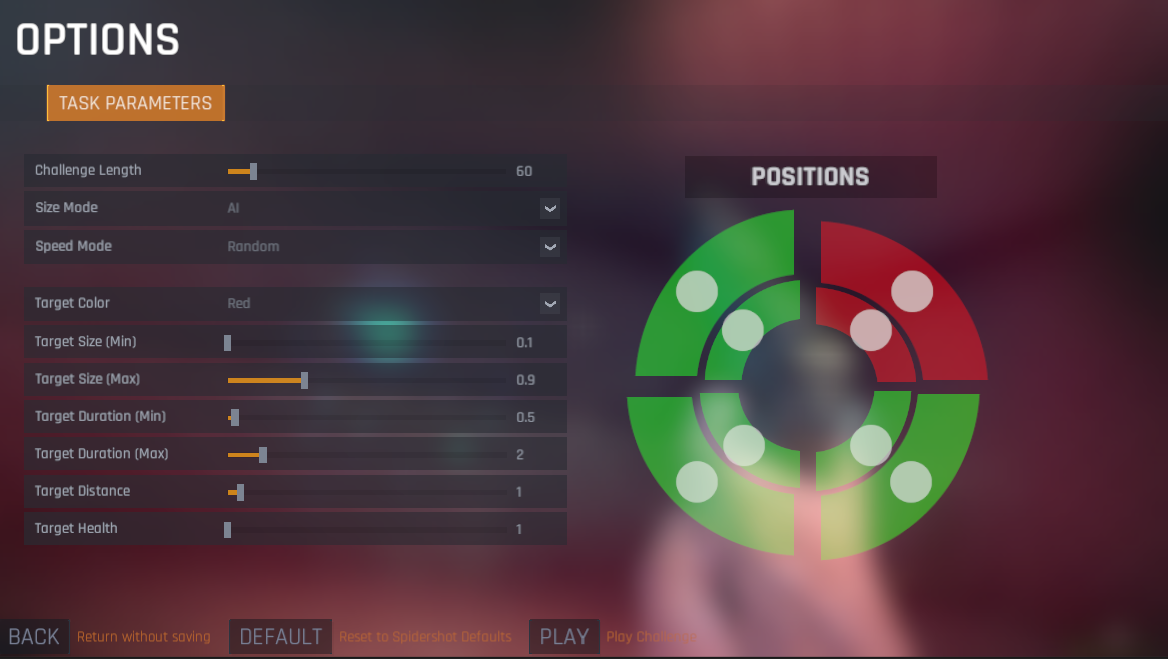
- You can control nearly every aspect of the task, including how long it lasts, min/max ranges for target size and duration, target color, target health, and your distance from the target.
You can also control where targets can spawn by turning on/off spatial position bins on the right
And finally, you can control the behavior of the target parameters across time, by choosing between 3 different modes for speed or size: Fixed, AI, or Random.
Fixed will allow you to set 1 size or speed value and all targets will follow those parameters. Or it allows you to say fix the target size and only practice speed, and only in one particular quadrant of the screen.
Random is exactly as it sounds.
And selecting AI will turn on the AI system for size, speed, or both. And the AI system will follow the min/max values you set it to below.
This is a test of things to come, as all tasks will be customizable soon, and feedback is greatly appreciated before we implement the feature across all tasks!
Bug Fixes
- Fixed bug when restarting a task that caused the time left to be equal to the amount of time left in the previous task before hitting restart
- Fixed bug that would allow Detection times of 0 to be uploaded to the leaderboard
- Fixed bug that would sometimes prevent rebinding of Detection Task button
- Fixed bug that would show "Ultimate" mode erroneously when playing an adaptive version of some tasks
- You can control nearly every aspect of the task, including how long it lasts, min/max ranges for target size and duration, target color, target health, and your distance from the target.
You can also control where targets can spawn by turning on/off spatial position bins on the right
And finally, you can control the behavior of the target parameters across time, by choosing between 3 different modes for speed or size: Fixed, AI, or Random.
Fixed will allow you to set 1 size or speed value and all targets will follow those parameters. Or it allows you to say fix the target size and only practice speed, and only in one particular quadrant of the screen.
Random is exactly as it sounds.
And selecting AI will turn on the AI system for size, speed, or both. And the AI system will follow the min/max values you set it to below.
This is a test of things to come, as all tasks will be customizable soon, and feedback is greatly appreciated before we implement the feature across all tasks!