Version 5.8 changelog:
- You can now draw multiple distance lines using right clicks or using the 'Distance tool' keybinding. Previously you could draw only one line at a time. To remove a distance line, right click on the distance text. And to remove all lines, right click anywhere on the menu bar.
- You can now pan and zoom while the game is paused, and the game now starts paused until you click anywhere on the screen.
- Added keybindings for less commonly used functions that were previously hidden behind longpresses on the digits on the menu bar. See the Controls screen (F7) to change the keybindings.
- LLZ ('cleared for localizer only'). This can be used temporarily to avoid capture of the glide slope (for separation purposes), when ILS mode is enabled.
- Resume Normal speed. This allows you to instruct a plane to resume to normal speed in case you had given the plane a speed instruction earlier. Normal speed behavior is similar to previous versions: departures automatically increase their speed. Arrivals reduce their speed to 250 knots when descending below FL100; and to 220 knots at 15 miles from the airport; and to 200 knots when intercepting the localizer. Note that Normal Speed is automatically resumed when intercepting the localizer, even when instructed a speed change earlier.
- Turn Direction (toggle between a left or a right turn). Note: these 3 features can also be enabled by longpressing digits on the option bar:
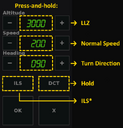
- Pause game. Tip: set it to the Alt key if you like the game to pause automatically when Alt-Tabbing. Esc key will always keep working as an alternative way to pause the game.
- Improvements to the Help menu. The interface is also translated to Dutch: the language can be toggled in the About menu in case the OS language is set to NL.
- Improvement to pilot readbacks: unnecessary 'double readbacks' are now avoided in case multiple instructions are given in quick succession to the same aircraft.
- Arrivals now reduce their speed when flying within 15 miles from their destination. Previously all planes reduced within 15 miles from the center of the radar, which was a bit inconsistent. This change mainly affects arrivals to secondary airports that are far away from center of the radar, for example Newark.
- Added 1 minute extra time to the Toronto traffic scenario.
- Fixed the Lock View function in the Display menu, so it correctly keeps the current radar view fixed when resizing or reloading the game.
- For custom airports:
- Added the option to draw text to the [background].
- The area label location is now centered at the middle of the label text.
- Increased the airspace radius limit.