Hi!
If game is not working for you, or you have some glitches help us to find and fix them! You can download debug version of a game, here is instruction how to do it:
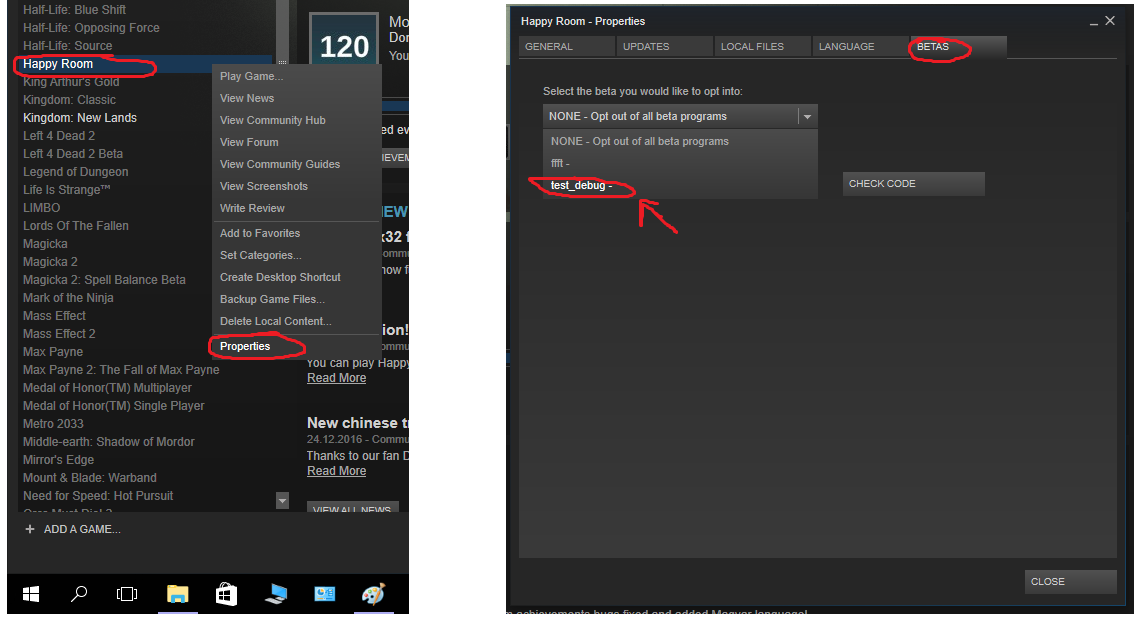
After Steam updated your game version to debug one just repeat what you was doing in release game version. Game will generate log file that is located at: \steamapps\common\Happy Room\Happy Room_Data\output_log.txt. Just send us that file to [email protected] so we can check what goes wrong and fix it so you may play game without any problems!
We will mention everyone who will help to fix bugs in special thanks in game : )
Thanks for you patient, we will do our best to fix all bugs!