
Overview
Eye detection plays a central role in the gameplay of Before Closure. With players’ real-life opening and closing of eyes driving the progression of the game, the system must respond intentionally to players’ actions. Incorrect detections could easily frustrate and negatively impact player experience and immersion, and we wanted to avoid that as much as possible due to how vulnerable Before Closure’s story and the mere nature of closing your eyes are.
I’m Julia Wang—an Interaction Engineer on Before Closure. As an Interaction Engineer, most of my responsibilities revolve around designing, iterating, and building systems around the eye detection system. Today, I’ll be your guide as I break down some of the underlying technology behind Before Closure’s eye detection system and discuss some of the decisions and challenges we faced when building a reliable eye-driven interaction system for an immersive narrative game. Hopefully, you find this interesting, regardless of whether you have a technical background or not!
Eye Detection System
The eye detection system in Before Closure can be broken down into three main parts:
Processing Landmark Data
Applying Thresholds
Determining Eye State
Part 1. Processing Landmark Data
The foundation of the system is built on MediaPipe, an open-source framework developed by Google that provides real-time facial landmark detection. While there are several open-source solutions with facial and eye tracking capabilities, MediaPipe offered the best balance of accuracy, real-time performance, and ease of integration into Unity for our use case. Since none of us are computer vision experts, we wanted a solution that abstracted the low-level eye tracking algorithms, allowing us to focus on building the systems necessary to process the eye landmark data and reliably identify when players’ eyes open and close. This immediately ruled out numerous research-oriented libraries and models, such as OpenCV, which—though powerful and flexible—requires significant custom implementation and tuning for facial landmarking. On the contrary, MediaPipe provides a pre-built face landmarker solution that is well-documented and widely adopted across research and industry due to its reliable solutions and stable, high-resolution landmarks. Furthermore, the MediaPipe Unity Plugin authored by homuler on GitHub enabled seamless integration into Unity. Our Tools Engineer, Kevin Hu, developed a Unity Perfetto tool that allowed us to trace, visualize, and debug the processed face landmark data.
So, how exactly does an eye detection system work behind the scenes? In a nutshell, when a face is detected in the webcam feed, MediaPipe identifies a predefined set of reference points—known as facial landmarks—around key facial features (see Figure 1) that are retrieved, processed, and discarded on every frame. In Before Closure, we reference the landmarks around the eyes and nose to determine whether a player’s eyes are open or closed. The distance between the landmarks on the upper and lower eyelids is used to calculate the eyelid opening distance for each eye. But, depending on players’ orientation and distance from the camera, these values can change rapidly. Therefore, we chose to normalize this distance with the nose height. Unlike the eyelids, which move constantly, the nose has proven to be a relatively stable and central feature of the face. The nose is actually widely used in anthropometry as reference points for comparing faces across populations or time, making it a reasonable—though far from perfect, as discussed later—metric to normalize the eyelid distance with.
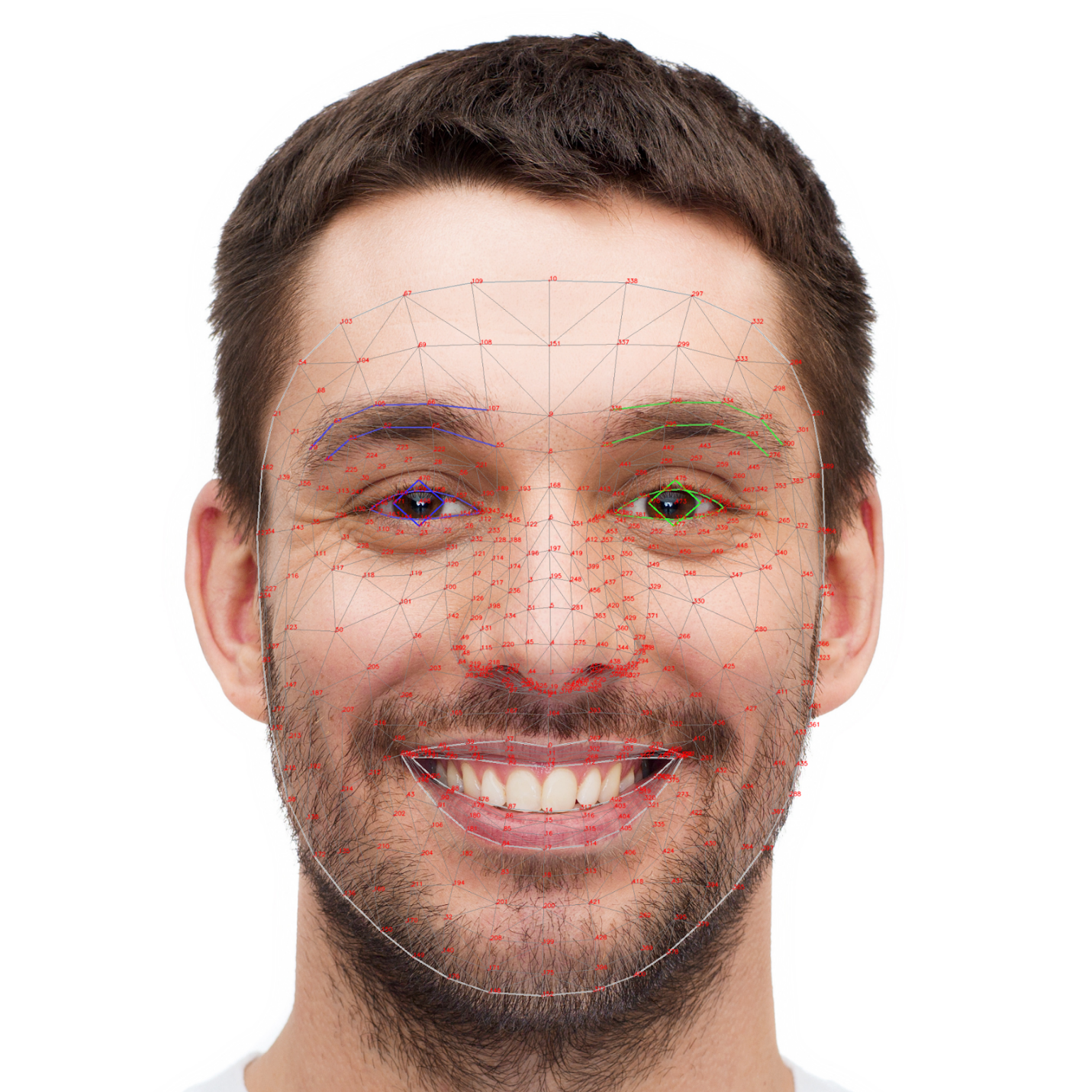 Figure 1. Mapping of the facial landmarks outputted by MediaPipe solutions. (Source: MediaPipe.)
Now, we have a normalized distance value that quantifies how open the players’ eyes are. Is that enough to accurately determine if players’ eyes are open or closed? Nope! If you’ve ever worked with raw, real-time data, you’d know that raw data is oftentimes subjected to a lot of noise. Rapid head movements or changes in lighting, for example, could cause the normalized distance values to fluctuate up-and-down enough that the system mistakenly interprets closed eyes as open or vice versa. Not to mention, glasses. Reflections, glares, occlusion, magnification—glasses introduce numerous variables that may degrade landmark visibility and consistency, leading to unstable distance values. To address these inconsistencies, Kalman filters are applied to the raw eyelid distances and nose height. While it doesn’t reduce all noise, Kalman filters predict the future state at each time step, effectively smoothing out statistical noise, as shown below in Figure 2, before the values are normalized and compared with calibrated thresholds.
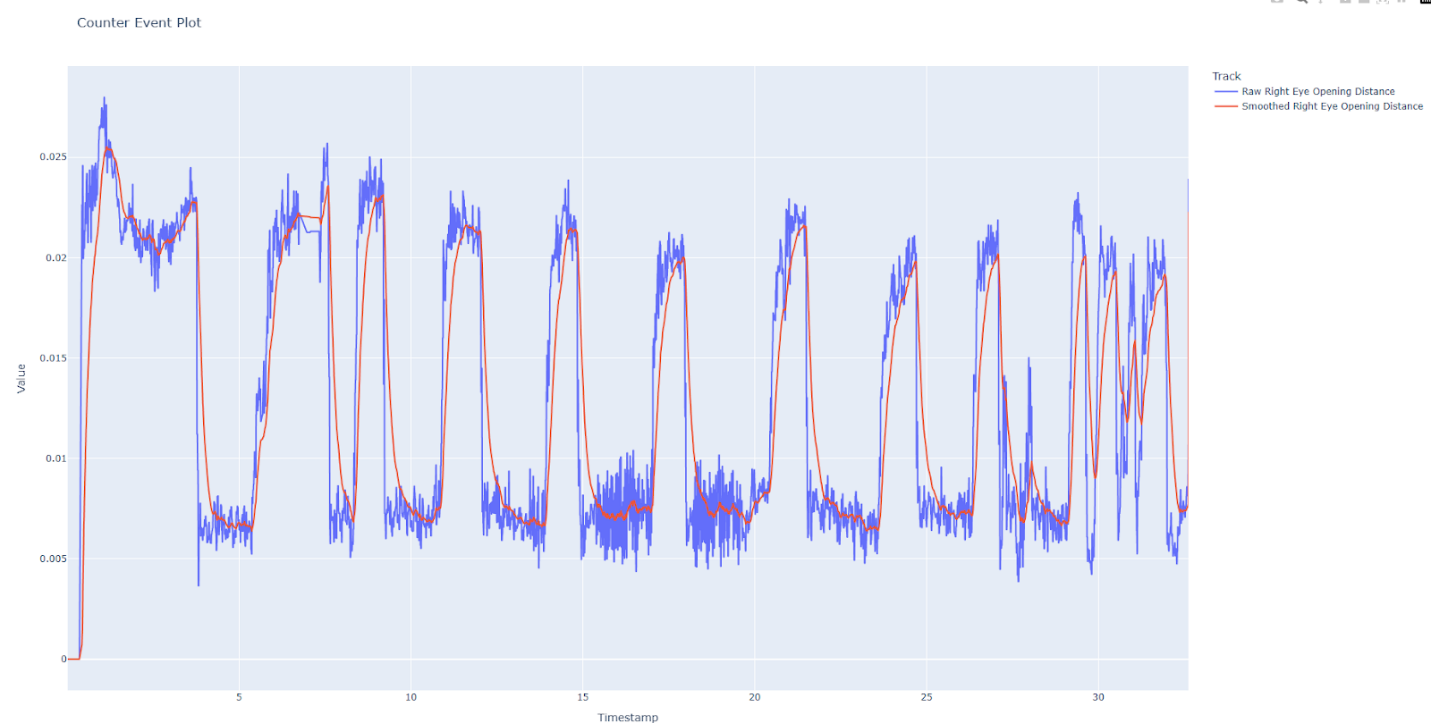
Figure 2. Plot of the right eye distance values before (in purple) and after (in red) applying the Kalman filter. Plot generated by Kevin Hu.
Part 2. Applying Thresholds
The eye detection system relies on two types of thresholds to determine whether a player’s eyes are opening or closing: distance thresholds and a time threshold for debouncing. The normalized eyelid distance values are compared to two calibrated distance thresholds—one for when players’ eyes are opening and another for closing! If an eye is currently open, the system checks if its distance value remains below the closing threshold for a specified duration (as defined by the time threshold). If so, the system knows that the eye is now closed. Though larger time thresholds could lead to more noticeable delays when updating eye states, they also filtered out blinking and inconsistencies in the data. That was a trade-off we were willing to take to ensure that only intentional eye closures and openings trigger a state change and subsequently affect the gameplay.
Part 3. Determining Eye State
Based on an eye’s current state and normalized distance values, the system determines if the eye’s state is Lost, Open, or Closed. An eye is Lost if MediaPipe is unable to detect a face or identify it in the webcam feed. Figure 3 below showcases the three eye states and transition conditions, including the opening (Closed → Open) and closing (Open → Close) conditions as outlined previously in Part 2.
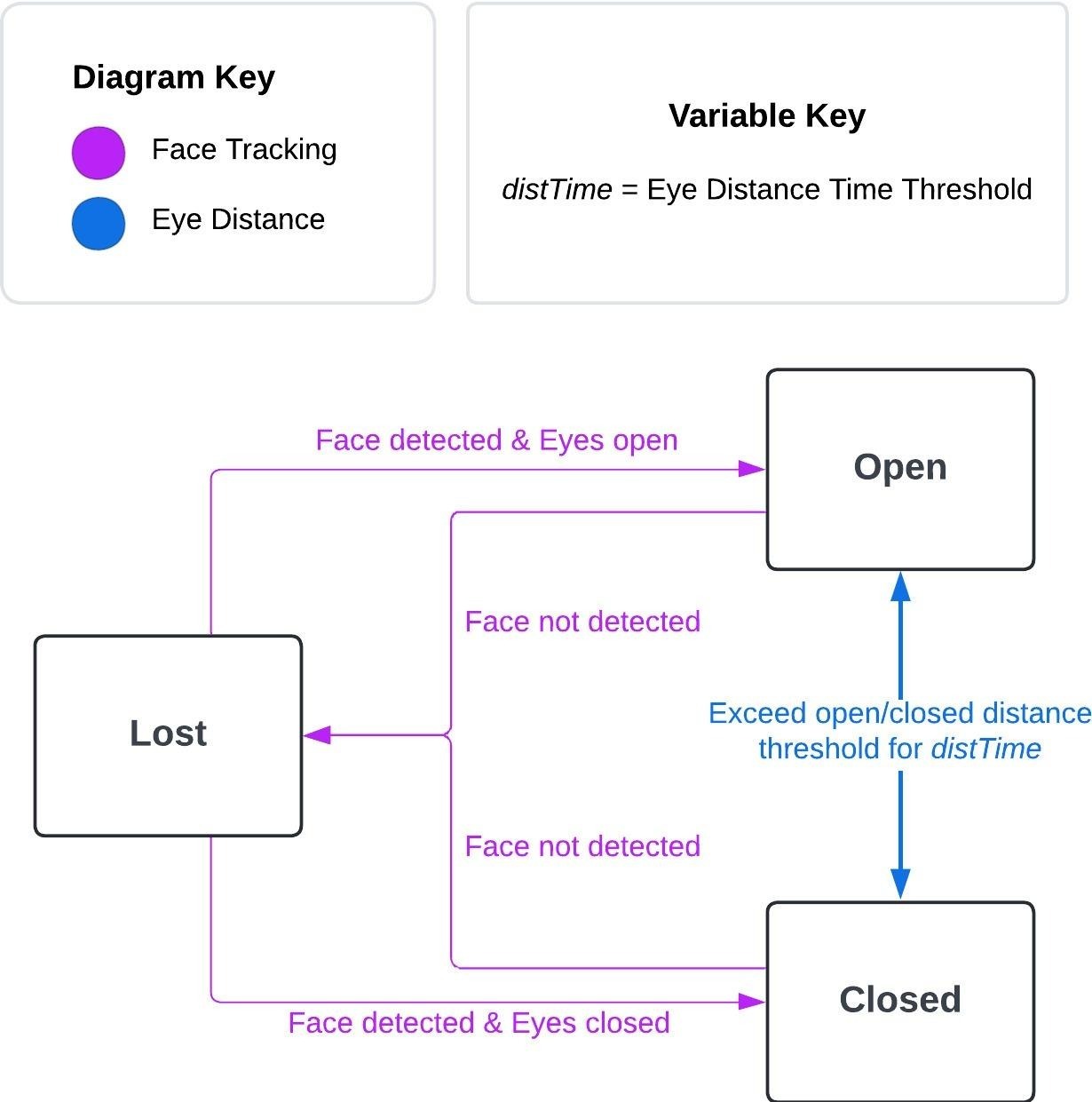
Figure 3. Eye state diagram created by Julia Wang.
Since eye states are handled independently for each eye, we created the gameplay eye state to process the individual eye states and determine a global eye state that defines whether a player’s eyes are open or closed. Unlike the individual eye states, there are only two gameplay eye states—Open and Closed. Transitions between the states trigger in-game events, such as visual feedback (see Figure 4), to signify the state change.
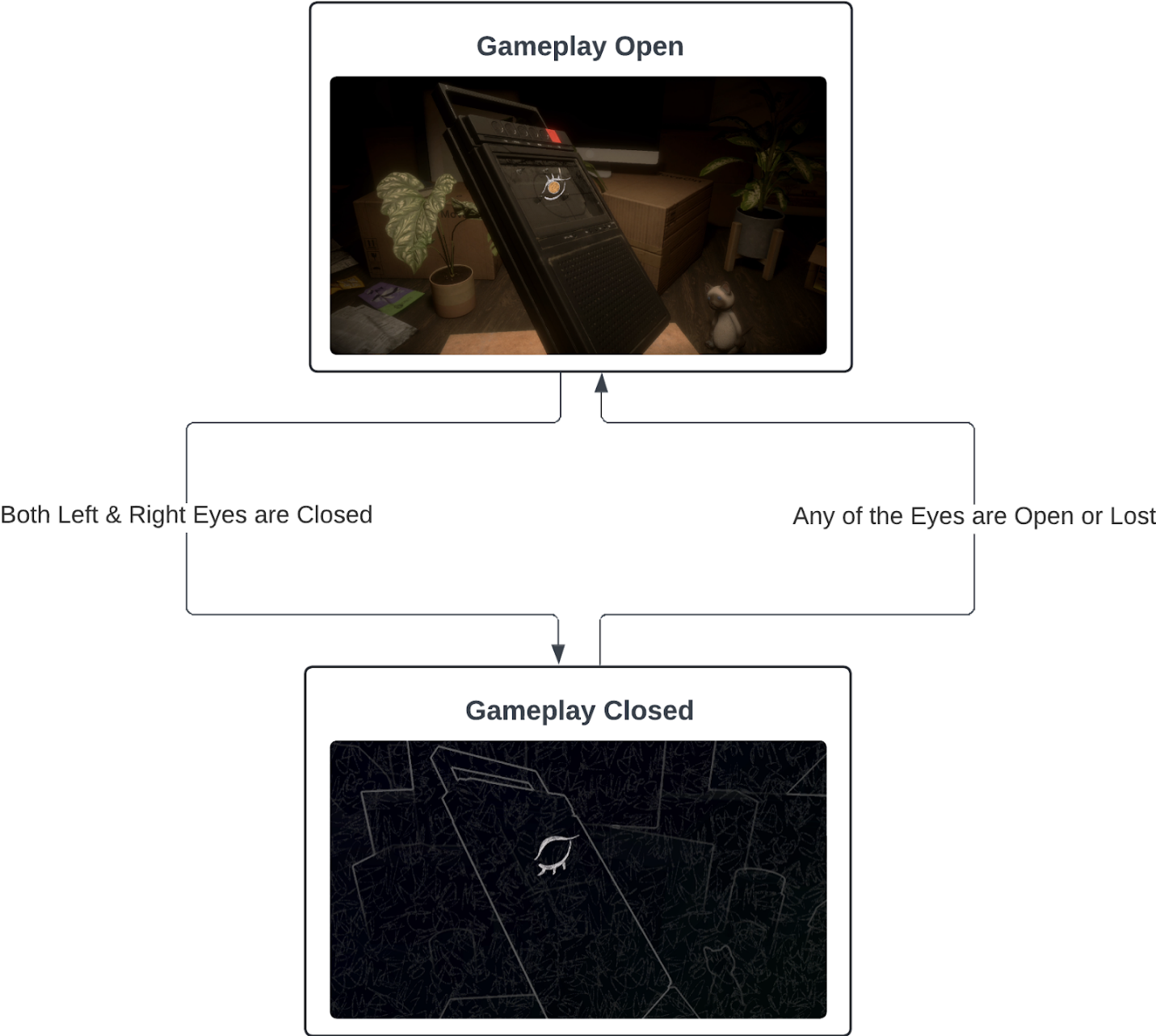 Figure 4. Gameplay eye state diagram created by Haocheng Liu.
Future Improvements & Iterations
Though normalizing eyelid distance by nose height has proven to be fairly reliable in detecting eyes opening and closing during playtests, it is not the most effective approach and still has its issues. As the human eyes and nose lie on different planes of the face, the rate at which the eyes and nose heights change is not a direct one-to-one. The Eye Aspect Ratio (EAR) is an alternative scalar metric that compares the ratio between the height and width of key eye landmarks to measure eye openness. Though we have yet to implement and compare the EAR with distance values normalized by nose height, modified EAR variants have proven to be reliable for detecting blinks and even drowsiness in drivers by analyzing blink patterns (Dewi et al, 2022). It’s definitely worth trying out!
(We’ve got some incredible concept art to show you, but since we’re hitting the length limit for this post, we’ll be revealing the full gallery in our next Dev Log! Stay tuned!)