
Enhancements
Item Name Changes
Item naming has been adjusted and follows a new convention.
Common Items maintain the format Common .
Uncommon Items use the format Superior .
Rare items use the format Magic
Above rare, a new naming system is used with randomly generated names from a pool of possible words. Each item type has its own pool of names combined with a common shared pool. The item card (tooltip) layout has been updated to support the new naming system.
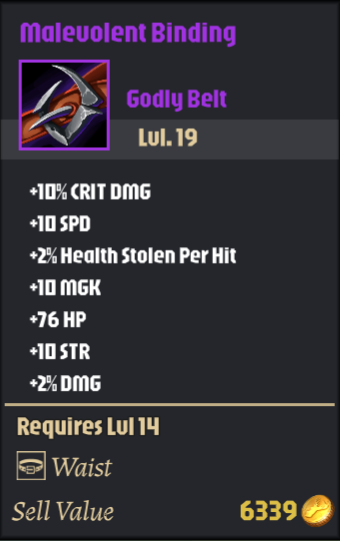
Mythical Items have fixed unique names and a unique and have a unique style of item card. (TG-190, TG-164, TG-196, TG-197)
NOTE: Old items will not have their names changed, but as you get new items they will have the new structure.
Store Window Redesign
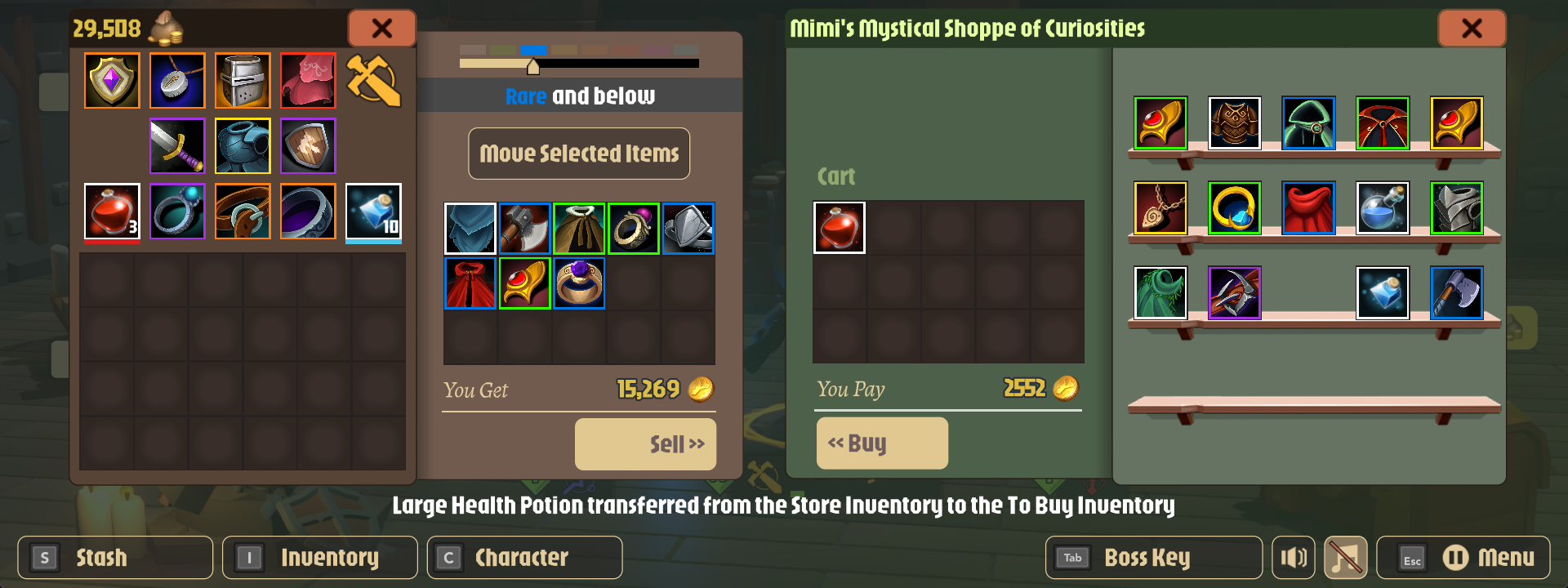
The Store screen has been updated to allow players to use their inventory while in the store and to better manage multiple sales of items or purchase at once. Players will not have access to the stash while in the store, but they will be able to fully interact with their personal inventory.
The Store was reworked to also use a buy and sell inventory alongside the player and store inventory. To buy something you can either drag and drop with the left mouse button, or right click to move the item to the buy window, then hit the buy button. Right clicking items in the buy inventory will send them back to the store. The same works for the player inventory and the sell inventory. The bulk sell feature now just moves items to the sell window. The store has visually been themed in green to make it distinct from other UI elements.(TG-180, TG-198)
Reforge Window Redesign
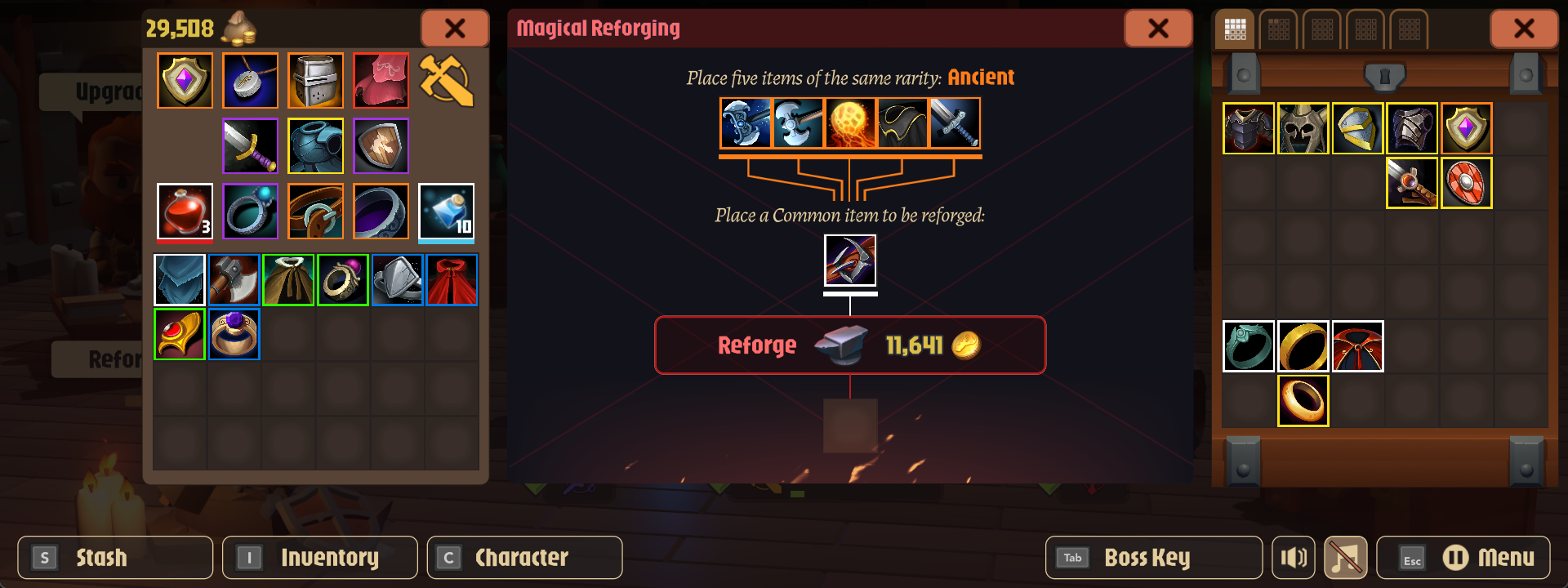
The reforge panel has been visually updated to clarify how the process works without relying on text instructions that may be unclear. The newly created item now is generated in a slot on the panel and can be manually moved to your inventory, or it will be automatically moved to your inventory when the window is closed. The reforge window has been themed in red to make it visually distinct from other UI elements. (TG-199, TG-228, TG-231)
Transmogrification Window Redesign
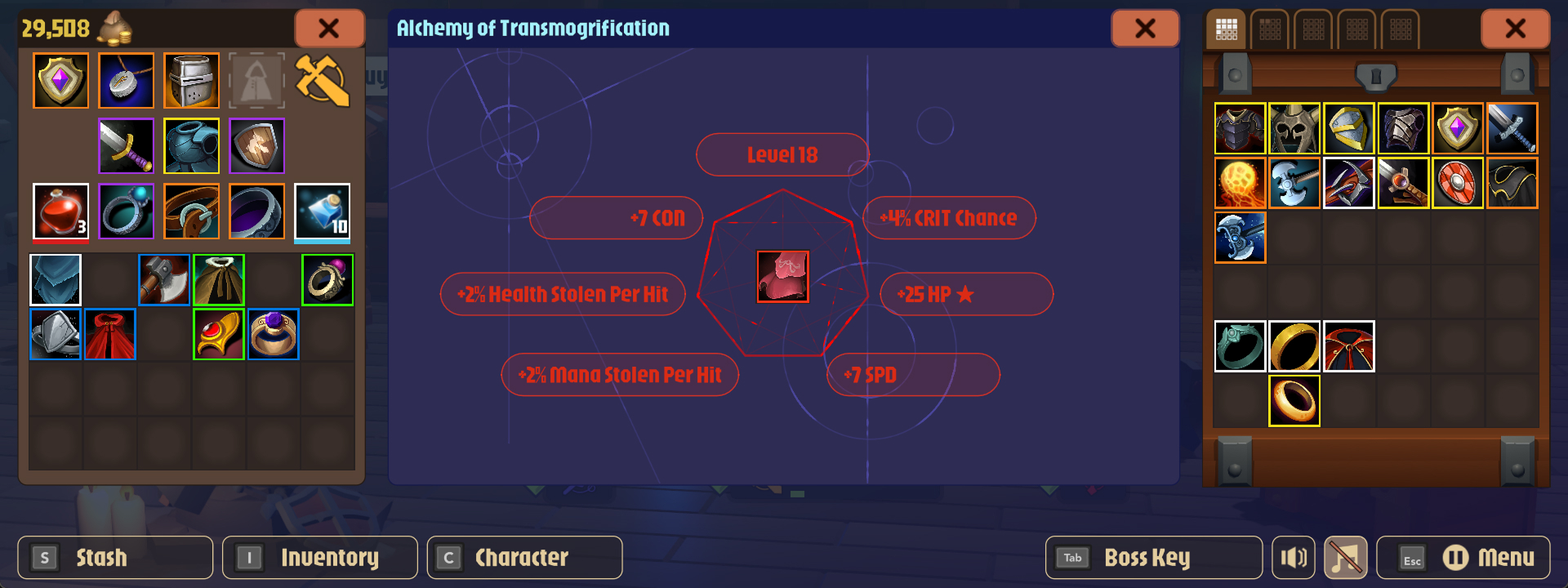
The Transmogrification Window has had a significant redesign. You'll now have access to your regular inventory and you can drag and drop any of your items into the Transmogrification Slot on the window. Depending on the item selected. When an Item is placed in the slot, each of the items will be displayed on screen surrounding it, while the name of the item will be displayed along with the level. The level and bonuses are all buttons, clicking on them will take you to a subsequent screen where you can either upgrade the level of the item (from clicking on the level) or you will be shown the option to Reroll or Replace the bonus on an item. None of the mechanics behind transmogrification have changed. (TG-202, TG-226, TG-227, TG-230)
Stash Redesign
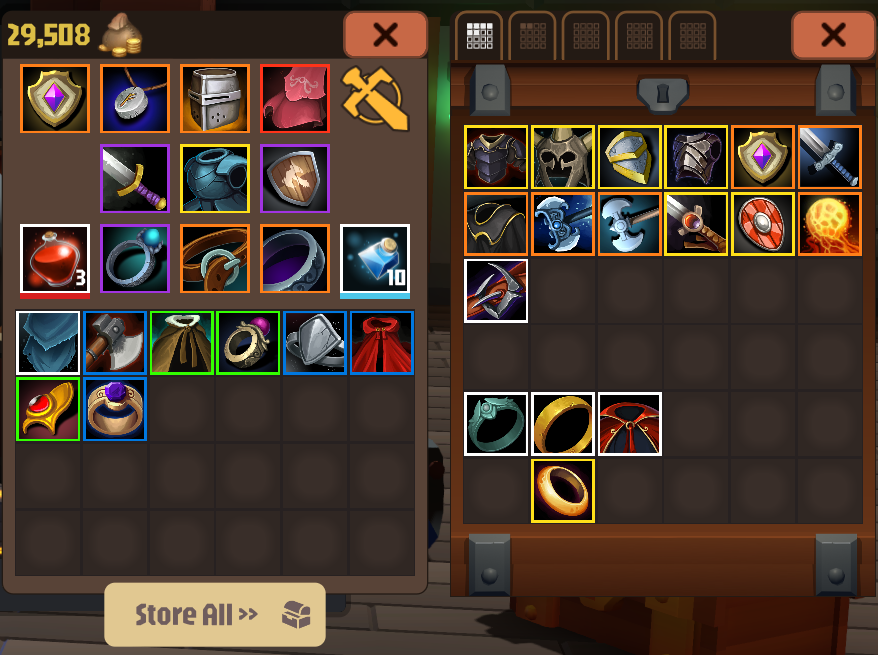
The stash has had a visual upgrade and you can use the right mouse button to quickly move items between your active stash page and player inventory, but otherwise functionality remains the same. (TG-217, TG-229)
Right Clicking
For vendor windows and inventory windows while in the tavern, the Right Click action has been adjusted so that it will automatically move items around between open windows. If your stash and inventory are open, right click to transfer between them. If your vendor window is open, you can right click to send an item into the appropriate vendor slot (sale window, Transmogrification Item, or Reforging component or base).
This does not work in the dungeon because right click is used to consume potions. (TG-180, TG-227, TG-228, TG-229)
Item Bonus Limit Relaxation
Each bonus has a maximum bonus per item and total, or per item per level plus total per level. Some of these limits were deemed too small and have been adjusted.
Bonus | Old Total Maximum Allowed | New Total Maximum Allowed |
|---|---|---|
STR | 2/Lvl | 3/Lvl |
ARC | 2/Lvl | 3/Lvl |
FIN | 2/Lvl | 3/Lvl |
CON | 2/Lvl | 3/Lvl |
SPD | 2/Lvl | 3/Lvl |
MGK | 2/Lvl | 3/Lvl |
DEF | 2/Lvl | 3/Lvl |
STR | 2/Lvl | 3/Lvl |
HP | 4/Lvl | 12/Lvl |
MP | 4/Lvl | 12/Lvl |
Extra DMG | 5/Lvl | 12/Lvl |
Health Stolen Per Hit | 10 | 16 |
Mana Stolen Per Hit | 10 | 16 |
The amount you could receive per item has not changed with the exception of HP and MP which has gone from 2/Lvl to 4/Lvl.
Note: The change to the maximum HP per item will not be reflected on existing item, to receive that new amount you will need to reroll your bonus at the Transmogrifier. (TG-215)
Item Level Restrictions
Items now require the character be no more than 5 levels lower than the item level to equip it. The level requirement id display on the bottom of the item card. Any existing items equipped which don't meet the level requirement will remain equipped, but if removed will not be equippable again until the character meets the level requirements.(TG-219)
Level Reset
A button has been added to the Settings -> Game menu. Pressing that button will prompt a confirmation and then you will reset your character back to level 1 with starting gear. The only thing kept will be your character's Journal history. (TG-218)
Monster Health Adjustments
To balance out some of the changes made to strengthen player characters, monsters have been slightly boosted in both health and damage. In particular Bosses and Uber Bosses have had their difficulty increased. (TG-216)
Quality of Life
Updated the design of the credits screen with smooth scrolling, layout and special thanks (TG-82)
Updated the way value is displayed on item so it corresponds with the value you'll receive from the store. (TG-180)
When you reforge an item, it will now use the same icon as the source forging base (TG-186)
The names of the 4th and 6th tier of rarity have swapped (colours remain in their original position) so the order is now Common, Uncommon, Rare, Epic, Ancient, Legendary, Godly, and Mythical (TG-187)
If you attempt to equip an offhand item while a two-handed item is already equipped or a two-handed item while an offhanded item is already equipped, the action will attempt to successfully complete by moving the blocking item to your inventory. If there is no room in your inventory to do so, the action will fail but the offending slot will give a visual indication that it is blocking the action (TG-212)
The Block % displayed in the character sheet has been changed to only show your base block chance + block % items when your shield is equipped. Previously it would show the modified block chance based on a comparison of speed values between the character and active monster. This was causing confusion as the number was changing. This will be further improved in future updates. (TG-224)
Bug Fixes
Corrected an issue that would occasionally allow Health and Mana globes to become desynchronized with their current values (TG-7)
Additional edge case fixes to manage the visibility of the end level movement selection UI (TG-182)
Players can no longer use potions while in the tavern (TG-185)
Fixed an issue where players were able to Reforge Godly items to create a mythical item, which was never intended to be allowed (TG-186)
Fixed an issue that would cut off the bottom of item cards when they had very long names and a large number of bonuses (TG-189)
Fixed an issue where the Reforge window wasn't closing with the inventory (TG-192)
Fixed an issue where players could open panels such as inventory when in the menu (TG-193)
Fixed an issue where the XP bar was visible on load before the menu showed up (TG-201)
Fixed an issue that allowed duplicate bonuses to be applied while replacing bonuses from the Transmogrifier (TG-213)
Fixed an issue where FPS limits were not being set correctly (TG-221)
Fixed an issue that allowed players to equip items in the incorrect slot using right click (TG-225)
Hotfixes
Hotfix 1
Fixed an issue where the total cash value wasn't correctly displaying in the sell window when selling stacks and could crash under some circumstances (TG-242)
Fixed an issue that was causing the upgrade level transmogrification action to overcharge (TG-244)
Fixed an issue where monsters were not providing the correct gold rewards (TG-245)
Hotfix 2
Fixed an issue that would cause players health and mana to not reset when they returned to the tavern (TG-249)
Fixed an issue that would allow reforged items to be created at unuseable levels (TG-255)
Fixed an issue that could cause an item from your inventory to be deleted when interacting with the store (TG-259)