
The community has spoken loud and clear, and the time for Blueprints is here! Even though I knew this day would always come, I'd like to talk about some of the specific challenges posed by Blueprints in MoteMancer, and for hexagons in general, because I'm a nerd and it's fun.
It's just 60 degree rotations right?
In simplest terms, yes, but in practice that's not the starting point that most footprints use. It is important to note that there is a difference between what is mathematically true and what feels correct as game UX. MoteMancer basically has 4 rotation paradigms for the 6 possible directions a building could be in order to make the UX smooth:
- Two rotations - 0° & 60°: we rotate 60 degrees and then rotate back. This is for small buildings like Grindstones.
- Two rotations - 0° & 180°: we rotate 180 degrees and then rotate back. This is for larger structures like Titanic Chests and large production structures like a Greenhouse.
- Three rotations - 0°, 120°, & 240°: any structure that is symmetric about 180 degrees actually needs 3 rotations to work properly. This applies to things like Wide Chests and Reefcrafters.
- All 6 rotations: This applies to Mana Leaves and Streamways.
Crucially, while MoteMancer could have used all 6 rotations for every building, it creates a large amount of overhead (6 variants of a building instead of 2), but also means the simple act of rotating would quickly become cumbersome because you would often have to reposition your mouse 2 or 3 times as often because a Structure's rotation point is rarely actually in the exact center, for a myriad of reasons.
Why does that matter?
Once you get to blueprinting and being able to grab multiple structures at a time, now you effectively need to 'teach' each structure what a 60 degree rotation means, even if they don't have one. This is best demonstrated by the image below where a Titanic Chest only has a 0 or 180 degree version. Rotating it 60 degrees intuitively means the pivot should be on the yellow hex, but that pivot orientation doesn't actually exist, the pink dots are the true 'center' coordinate used to place the Structure. So the game has to fake it - telling the Titanic Chest to use its 180° version, but nudging it a hex over so it looks like a 60° rotation.
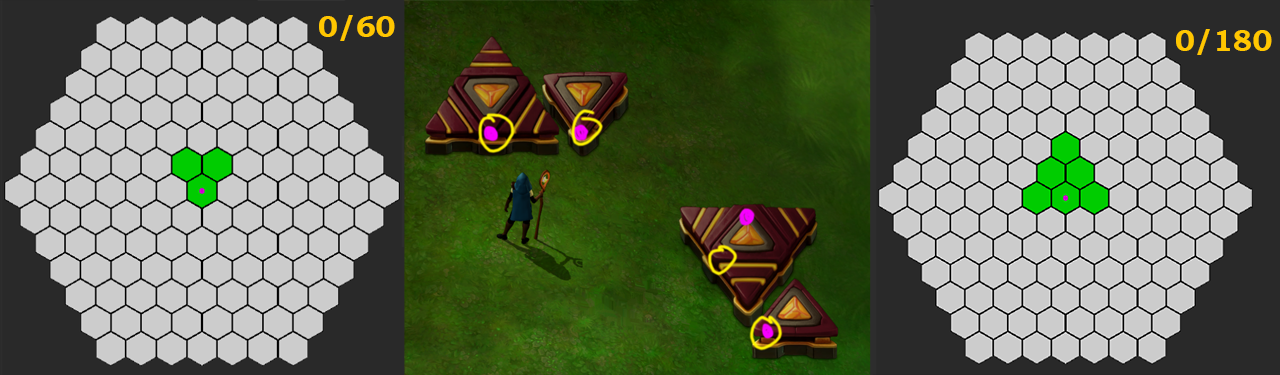
So in effect you need to make a set of rules for each rotation paradigm, with the added challenge of making sure odd and even rows offset correctly based on the source and destination coordinate. All of the problems are solvable, but come with many mathematical edges that need to be precise.
And that's just the rotation logic side
Beyond the simple math, making sure there are sufficient previews visuals and supporting shaders adds an extra layer of complexity, because not all of MoteMancers structures are handled the same way. Every tile visual like Mana Roots and Streamways have their own suites of tilemaps, and those exist on every plane, so the simple act of doubling those up for the sake of previews is a scary prospect in a game that is performance-sensitive.
Ultimately I ended up leveraging a similar tech to the Streamway/Shifting Slab join tech - where I am placing an invisible tile reference on their respective maps to fake the neighbor rules. In this case, I made a completely bespoke set of tiles for preview purposes that can coexist on the same map, which solves One of the problems... but not the other. Since Blueprints and placed Structures are mutually exclusive, I can rely on them to never overlap, but for previewing a placement that is not the case. The preview cursor set itself needs yet another layer of custom logic and shaders, which needs its own set of rules.
Sprinkles and the cherry on top
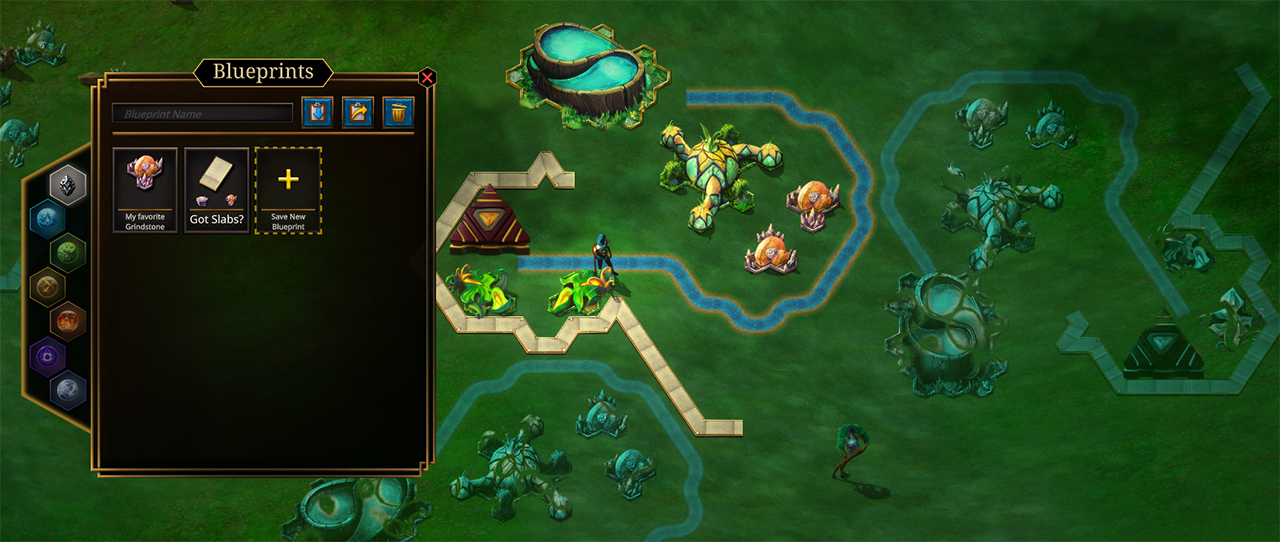
After all of that mathemagical wrangling, I’m happy to say Blueprints are in a pretty good spot and will be available with the next update! A fun addition added specifically for MoteMancer is a structure will automatically rotate and snap into position if your cursor matches the blueprint. Not really required in a game where everything is a square, but for a hex grid with unique shapes and 6 rotations, it's a simple quality of life add that feels good.
The UI has 7 folders designated by elemental icons which can be used literally or in your own mental map way (and can be modded to support more for people that want it). Each folder can hold an unlimited number of blueprints.
I waffled a lot on whether I would let players share strings with each other, because I feel like a lot of the joy in MoteMancer comes from solving your own spatial problems, and I didn't want people to "net-deck" their factories. That said, I realized my initial hesitation was too rigid and that perfecting blueprints, sharing them, and iterating as a group is its own type of fun. MoteMancer is also thankfully very resilient to being over-solved with blueprints because there are so many different approaches to problems and paths to take to get there. Which is a very long way of saying - blueprints are copyable into strings as you'd expect :)

One last bit about the future of Blueprints - they will be iterated upon with player feedback of course, but one thing I'd like to do is leverage the Research Plane hook that MM uses for walking around the tech tree, and create a sort of Mind Palace for placing blueprints down and tweaking them. This will also lead to tech for sandbox modes in the future, but I will likely focus on making the game more complete before getting into that. Good to already have ideas on where to go from here though, and definitely do share feedback as always.
The Entropy Update will hit experimental in the next day or two for smoke testing, and Live to everyone shortly after. Thanks for all of your support! As always, back to the lab 🌿
~CyanAvatar