
Hello everyone, this is Producer Morino.
With the release of Version 1.1.7, which we distributed earlier, we have implemented the overhaul of the “contact detection” system that we have previously announced. In this Producer Letter, I would like to explain the intention behind the change and its details.
◆ Issues with the “Contact Detection” System Prior to 1.1.6
As explained in detail in Producer Letter #15, the previous “contact detection” system suffered from our insufficient understanding of Godot’s specifications and a lack of proper consideration regarding how the system should be used.
For large collision shapes, very small collision shapes, rotated collision shapes, or collision shapes that move through animation, the previous system was not flexible enough to match Godot’s capabilities.
As a result, unintended detections and failures to detect contact occurred, and we sincerely apologize for the inconvenience this caused.
The new system has been redesigned to prevent these issues from occurring.
◆ Overview of the New “Contact Detection” System in 1.1.7 and Later
The new contact detection system adopts a more standard method used in Godot game development.
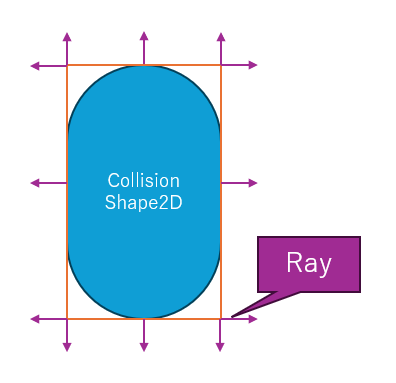
A rectangular detection-generation area is automatically generated based on the object’s wall detection size, and rays (normals) are continuously fired from each of the four sides.
By using RayCast, collisions within a specified distance are detected.
If these rays collide with any collision shape within the designated distance, the system considers it as “contact.”
◆ About the “Detection-Generation” Area
This detection-generation area is automatically created to cover all collision shapes. Even if the collision shape is a capsule or polygon, it will be represented as a rectangle.
From the four sides of this rectangle, rays are emitted based on the “RayCast Settings” described next.
◆ RayCast Settings
RayCast settings allow you to configure the number of rays, their distance, offset, detection method, coordinate space, and more.
Although the number of settings has increased, this allows the system to function correctly in all types of cases. Below is a simple explanation of each item.
• Number of Rays
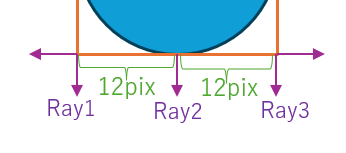
Specifies the number of rays fired from each side.
For example, if an object with a width of 24 pixels is set to emit 3 rays, one ray will be fired every 12 pixels.
The default is 3 rays, but very small objects may require only 2 rays, while extremely large objects with widths of several hundred pixels may need more rays for accurate detection.
• Ray Distance
This defines the detection distance—how many pixels away contact should still be considered “touching.”
The default is 3 pixels, but extremely small objects may use a shorter distance, while larger objects may require a longer one.
Fast-moving platforms (e.g., ones moving up and down rapidly) may also require longer distances.
Note: even if an object is scaled to 50% or 200%, the ray distance remains constant.
• Offset
As mentioned earlier, the detection-generation area is always rectangular regardless of the collision shape.
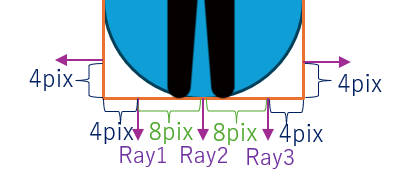
This setting allows you to offset the ray’s generation position inward to produce a more accurate detection.
For example, if a 24-pixel object with 3 rays is set with an offset of 4 pixels, the rays will be positioned like in the following diagram.
Note: The default offset is 0.01.
Setting this to 0 or smaller may cause penetration and false detection due to Godot’s specifications, so please be careful.
• Detection Method (DetectMethod)
In the following situation, should it be considered “touching”?
Or should it be considered “not touching”?
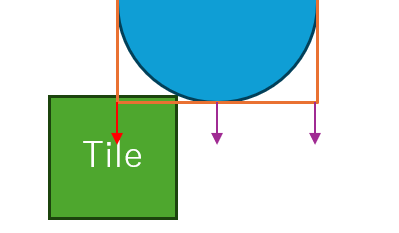
The answer depends on the use case. For example, a normal tile may be considered touching, but for “a platform that moves only when the player is properly standing on it,” it might be preferable to consider it not touching.
The detection method allows you to choose:
All — only when all rays are touching
Any — when any single ray is touching
• Coordinate Space
This is a more advanced setting.
Consider the following situation: an upside-down object makes contact with a tile.
Should this be considered “top” contact?
Or “bottom” contact?
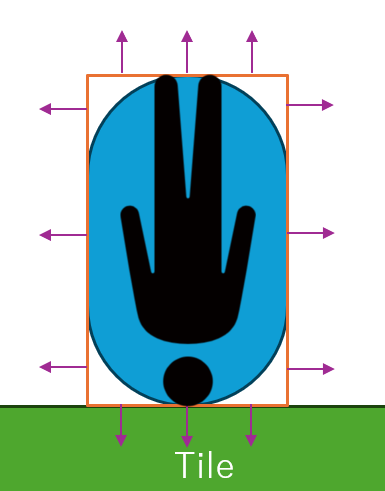
If all you need is a landing check, “bottom” might be correct.
If you want something like “the player gets stunned when landing head-first,” then “top” may be the correct answer.
Because the correct interpretation changes depending on the use case, we provide several coordinate-space options.
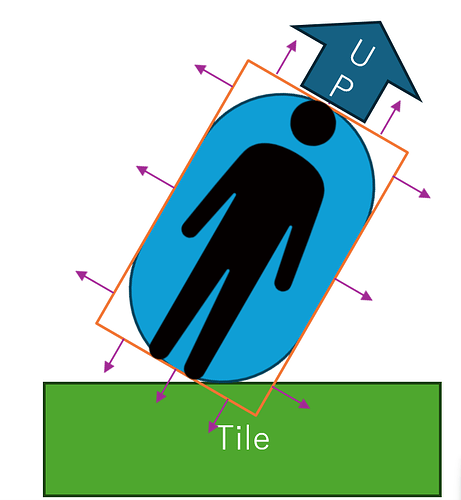
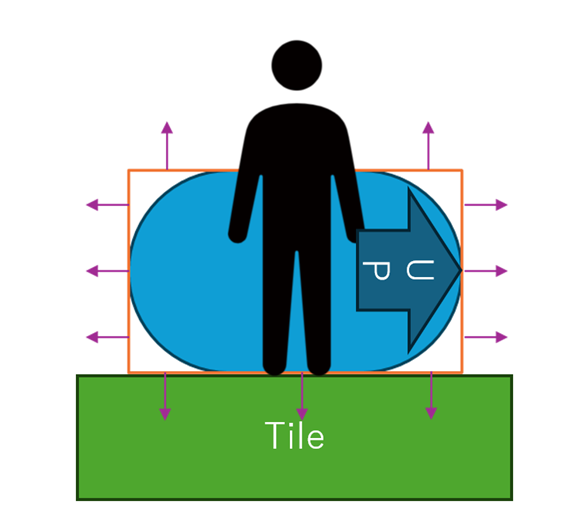
Since this can be a bit complicated, we will explain it using the following two diagrams:
① A case where the entire object is rotated 45 degrees to the right.
② A case where only the collision shape is tilted 90 degrees to the right.
Based on these two situations, the three available coordinate-space modes work as follows:
1. Global (Evaluate in Global Coordinates)
Only the scene’s global direction is considered
The rotation of the object or collision shape is completely ignored
Therefore, in both ① and ②, the system considers the “bottom” side to be touching
2. Local is Game Object (Evaluate in the Object’s Local Coordinates)
Considers only the rotation of the game object
Ignores the rotation of the collision shape
In ①, both the “right” and “bottom” sides are considered touching
In ②, the “bottom” side is considered touching
3. Local is Collision (Evaluate in the Collision Shape’s Local Coordinates)
Considers only the rotation of the collision shape
Ignores the rotation of the overall game object
In ①, the “right” and “bottom” sides are considered touching
In ②, the “right” side is considered touching
Although coordinate space can be a complex concept, mastering it allows highly accurate detection in many scenarios.
◆ Closing Remarks
With this update, all contact-related bugs reported through RPG Maker Guild, Discord, and other channels should now be resolved.
Thank you very much for your patience.
The new contact detection system is compatible with projects created in 1.1.6 or earlier, so no reconfiguration should be necessary.
In case of any issues, Version 1.1.6 is still available in the beta branch.
If you encounter any other problems, please feel free to report them through RPG Maker Guild or Discord.
Thank you for your continued support.