Welcome to the Wartop Now & Forever Update
You might be wondering what it is that means. We know as the the new kids on the block a lot of people aren't sure about our platform. They might worry that if we shut down sometime in the future they'll lose access to the games and content they've collected. We wanted to address that in a couple of ways.
First up, we have no intention of shutting down. Wartop is something we believe in, and we'll work on it as long as we're able to. It might take awhile to reach the heights of other platforms, but for us, that's fine. All good things had to start somewhere.
Secondly, this update adds a couple of features. So long as you have logged into Wartop once after adding any content, your content will be cached. If our servers are ever offline, the game will default to using the cached version of your content rather than retrieving a recent list. We use Epic Online Services for the backend, but let's imagine Fortnite falls on hard times, and Tim Sweeney finds himself panhandling on the corner. We've just implemented a Direct IP join option. You'll see this now after you choose a game system. So long as the internet uses IP addresses you should be fine to play Wartop. You could also play it on a LAN if that happened, but honestly if you're in the same LAN as someone just play the real game.
Finally, the apocalypse has come. Epic is gone, Amazon's servers have died and even Steam itself collapses, no problem. While the game currently creates your online presence using your Steam account in the event that Steam is no longer available, it will provide you with an alternate way to identify yourself.
While this is already a cool update, we've added a few more things in this update as well.
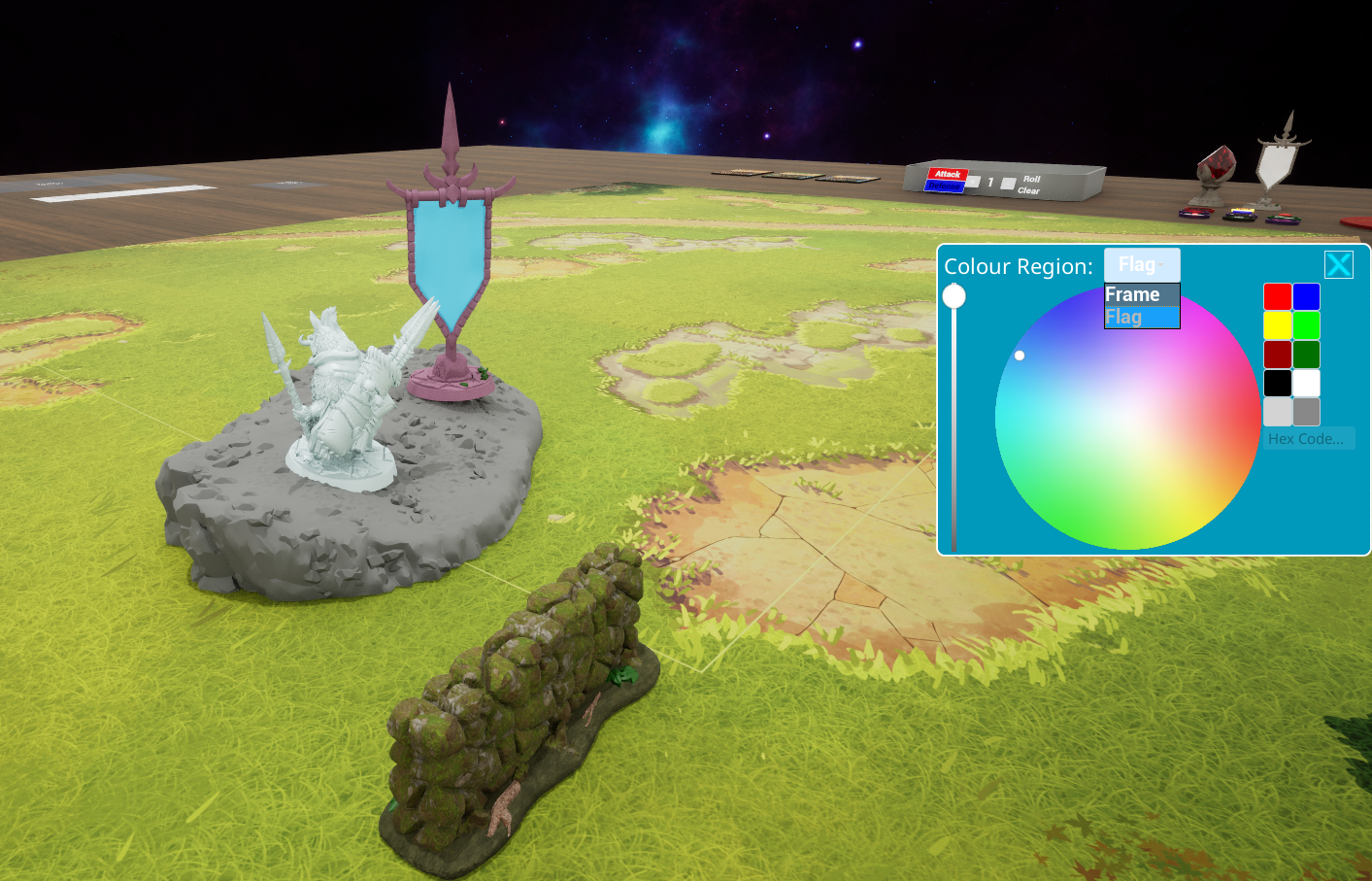
- A new colour wheel. This is more compact, and it's also been made more dynamic so that we can use it on more things that just units. We've also added the ability to paste in a hex colour code so you can bring in your favourite colour.
- The beginnings of terrain that can be customized. If you jump into the Bloodfields starter and find the Flag objective item, and hold tab while right clicking it, it'll bring up the colour wheel and you can customize the colours of the flag for your battle.
- We've also been experimenting with colouring and texturing terrain in Bloodfields, check out the short fence and a couple fo the large rocks we've gone through and put a few experimental materials on it, let us know what you think.
- A little more control when dropping tokens and units. If you drop a unit on a slanted surface, it may bounce around a bit. Just part of the physics. What you can now do, is hold shift and this will help constrain it so that when it hits the ground it will remain much more stable.
- We've added a button you can use to straighten tokens after picking them up. We don't automatically change the facing of tokens when picking them up because some games have tokens you have to flip to one side or the other. If you'd like to reset the rotation of a token while holding it, just hit the left alt key. This will force it to reset to the default orientation if it gets twisted around.
To help illustrate all of this we've managed to cram a bunch of these things directly into a single screen shot.