Dear customers,
We noticed users are experiencing difficulty in accessing the game with their controllers.
While we are working immediately to resolve the issue, in the meanwhile we have found that disabling Steam Input would help to elevate the issue.
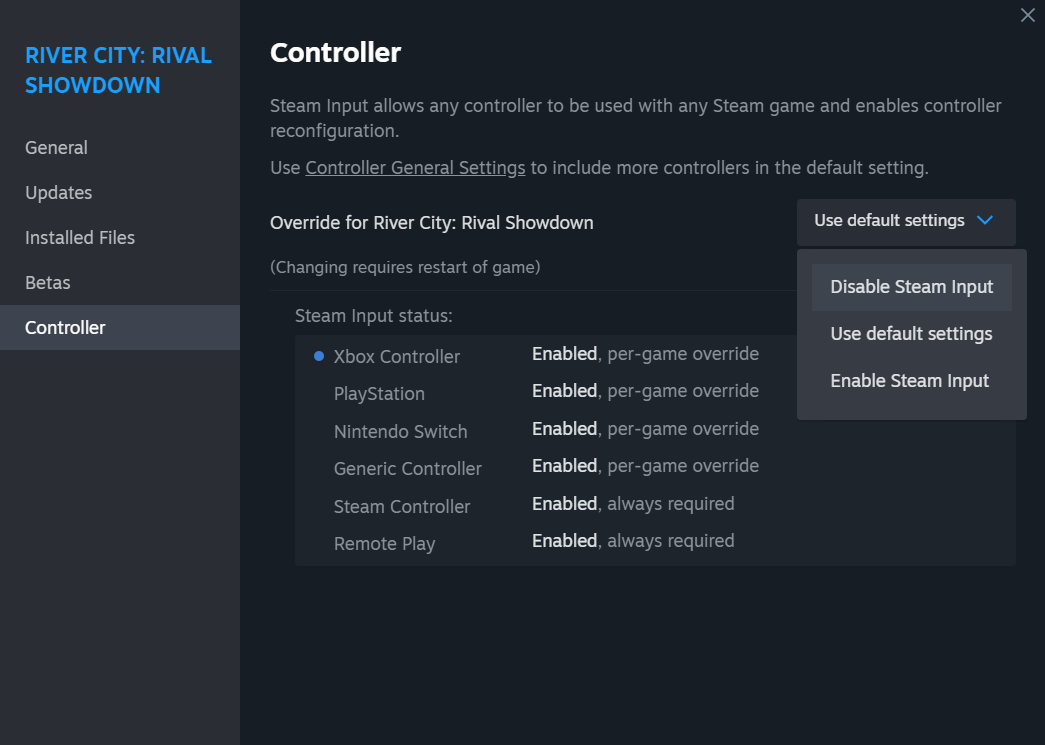
Please proceed with the following steps to disable Steam input, and reboot the game:
1) Go to your Steam Library, and right-click on the game.
2) Select "Properties".
3) Proceed to "Controller", then at the right menu, select "Disable Steam Input" from the drag-down menu.
If customers are still facing difficulties and/or issues with the game, kindly report them at the Bug Reporting sub-forum, and we will raise the matter to the development team.
https://steamcommunity.com/app/2090370/discussions/1/
Thank you very much for your kind cooperation.