Map Saturation changes and controls:
Last major update I added a more modern Terrain Shader. The new Terrain shader renders more realistically (it’s PBR now) and has more features, but it does render colors differently from the old terrain shader. This meant that on some biomes the colors and contrast were more muted and desaturated. After a bit of investigation I found that to get the same overall look as previous versions I’d need to increase the saturation of the camera post processing in DMM.
So the result is, overall Saturation has been boosted a small amount to allow me to achieve more fully saturated colors in textures. After making this adjustment I went through all the textures and Biomes in DMM that looked a bit too saturated with the new settings and adjusted them so they match previous versions when rendered.
You may need to tweak your adjusted light colors and override colors you’ve added yourself on your maps if they now look a little too saturated. In practice I found the difference was not that noticeable unless dealing with already quite saturated colors. So you probably shouldn’t need to adjust much if anything. If you find any asset that now looks too saturated compared to its previous version give me a shout on Discord and I’ll take a look.
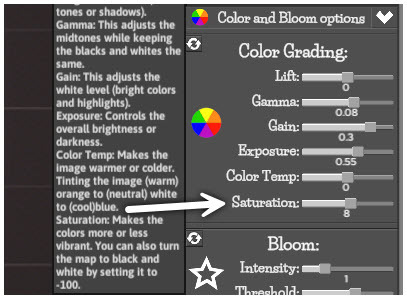
Added UI/Feature: A new Color Saturation slider has been added to the “Render panel > Color Grading”. This value is saved per map like all the Color grading values are, the default is set at 8.
Assets Tweaked: I went through and turned off the linework/outline effect for many assets that are meant to be low to the ground and look messy with an outline. For example, assets like the Decals and Hay as these looked weird when placed above a terrain that wasn’t 100% flat as outlines would appear where parts of the decals were too high off the ground.
Tweaked Line rendering quality/width: I went and fiddled with the depth line width and render settings to try and get a slightly cleaner look. I believe this is better. I’ll add a slider to control this in the next patch.
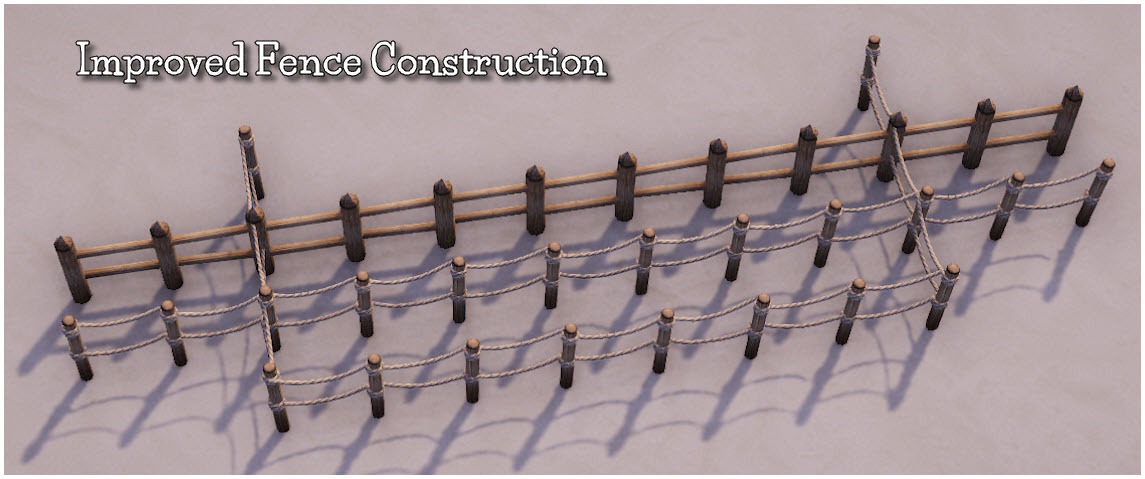
Assets Adjusted for Wall Tool Fences: Fences in the wall tool are now built with only one pole per span. They now look a lot more naturel.
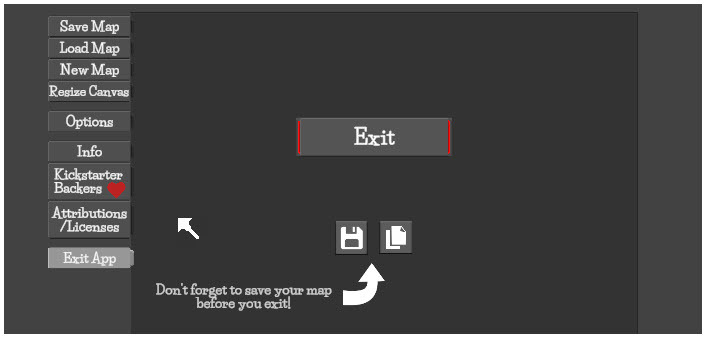
Added UI/Feature: Added an Exit App option for the file menu with a save map and save iterated map buttons.
Bug Fix: When using the search feature in the Theme Library, if the first button was selected in the Theme Library before search and then the search replaced that button with a new one, the old button values were kept with some buggy theme list behaviour. Fixed
Bug Fix: Overrides would not save on certain maps. Fixed.
On maps with a large amount of themes added to the map theme lists, Overrides were not being saved reliably. If you have a map that has this problem and Overrides still don’t save correctly on it in this version. Select the theme button you want to fix and apply another theme to it then reapply the old one. The Override should now save correctly.
Bug Fix: Duplicating theme buttons in a group when the group button was not visible caused the duplicated button to not be visible in the group until the group was closed and opened again. Fixed
Note: Duplicated buttons will be created at the bottom if the group they are created in. These duplicated buttons are no longer automatically selected.